Mobilize your credit collection team to manually amend the order the collection worklist is produced in SAP Collections and Dispute Management. Doing so allows the team to be more agile and provides the flexibility to amend the various rules based on the current business issues it faces.
Key Concept
SAP Collections and Dispute Management is the central submodule and the main tool that is used by the credit collection team that manages the relationships with customers who have credit terms. The collection worklist is the core tool within SAP Collections and Dispute Management. SAP Collections and Dispute Management takes data from the standard accounts receivable (AR) module to use in the collection worklist. A collection worklist provides the credit collection clerk a simple screen with all the relevant information needed to contact the customer, and has all the relevant functionality to record the outcome of the call (e.g., notes, promise-to-pay, or dispute).
The collection worklist provides the credit collection specialist with a concise tool to collect and chase outstanding customer debt. The worklist shows the amount of outstanding debt, the amount in dispute, contact information, credit limit information, promise-to-pay information, aging of the customer’s debt, and information relating to customer contacts. The collection worklist is a prioritized list of customers based on a collection strategy. The collection strategy is made up of a number of collection rules. Each rule can have a different score depending on your requirements. The total of the value of the scores of the collection rules that apply to the customer provide each customer a collection score. The worklist is then sorted by the customer’s collection score providing the credit collection specialist a prioritized worklist of customers to contact.
Within SAP Collections and Dispute Management, there is a further organizational structure. This allows different collection strategies to be applied to groups of customers. Organizations should score customers in a different way, which is easy to achieve if you define the correct organizational structure. A typical company may have different tiers of customers, such as national customers and local customers. The criteria for contacting these customers may be different, resulting in you being able to adopt different collection strategies (Figure 1).
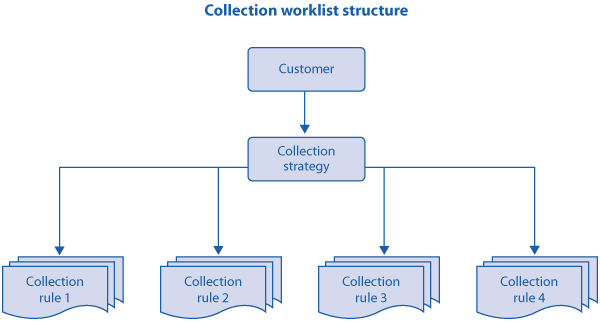
Figure 1
Allow Your Credit Collection Team to Alter Your Collection Worklist
I’ll focus on the way that business users can change the collection strategy. Within a normal implementation, you define the structure of the collection organization and work out which collection rules should be included in the collection strategy. Scores can and should be added to the collection rules within the collection strategies. However, over the course of time the business users can make changes in the productive system to the collection strategies rather than rely on a consultant to make the required configuration changes. This is particularly beneficial when organizations only release new functionality and changes into a productive environment monthly or quarterly. By allowing the business users to directly update the values of the collection rule, the changes are applied straight away and the benefit is realized in a more efficient way.
Collection Rules
Collection rules are defined in configuration. SAP has delivered a wide range of rules to score your customers. Within a collection rule, you can provide different scoring values depending on the customer. If a customer was to have a rule that looked at the duration since it had been contacted, you could assign different values depending on the duration.
Follow menu path Financial Supply Chain Management > Collections Management > Basic Settings for Collections Management > Collections Strategies > Collection Rules > Define Collection Rules (Figure 2).
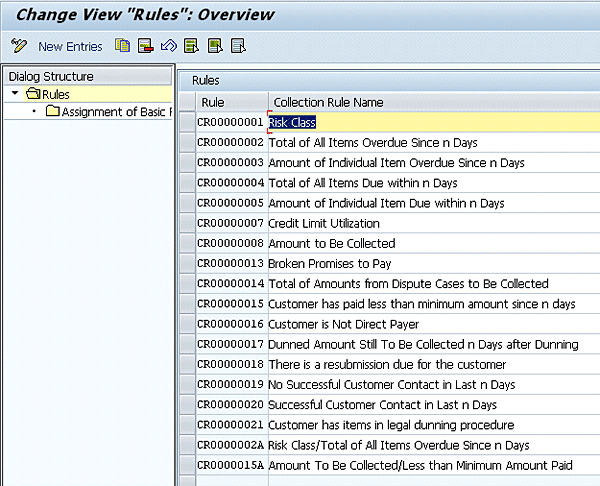
Figure 2
Standard list of SAP-delivered collection rules
This configuration links to the SAP-delivered collection rules. Note that these rules are the standard values that are available in enhancement package 4.
Behind a collection rule is a basic rule. Once again, basic rules consist of a list of SAP-delivered rules. There is a BAdI linked to each basic rule, so they can be altered to meet your requirements. However, within the rules there is the ability for them to be modified if there is a specific business scenario. Follow IMG menu path Financial Supply Chain Management > Collections Management > Basic Settings for Collections Management > Collection Strategies > Basic Rules > Define Basic Rules (Figure 3).
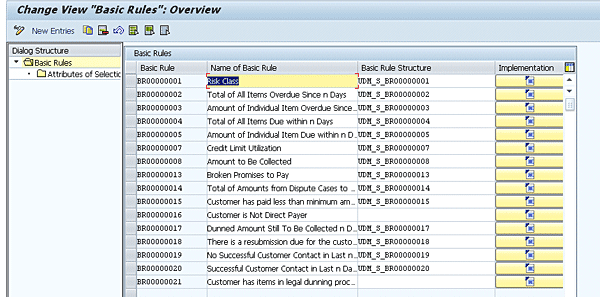
Figure 3
Configuration screen for basic rules
The basic rule has a structure to enable the rule to be enhanced based on specific customer requirements. This is a task that is generally performed by a technical consultant, so I won’t go into more detail about this.
Business Process Example
As mentioned previously, collection rules are linked to collection strategies. A customer strategy can have one or more collection rule to create a final customer score. A collection rule can have many entries within a collection strategy.
Let’s look at collection rule 19 — days since successful customer contact. This looks at the last time you contacted the customer. If you have recently successfully contacted the customer for payment, you should not need to contact them again. However, if you have not contacted them for, say, 45 days, you prioritize this customer as more important. Within the collection strategy you may want to assign a different score based on the outcome of the rule, such as:
- For customers who had not been contacted for 10 days, you could score them 10 points
- For customers who had not been contacted for more than 30 days, the score could be 20 points
- For customers who had not been contacted for more than 60 days, the score could be 30 points
Create the Collection Strategy
Once you have agreed on the various collection rules to be included in the collection strategy you need to create the collection strategy. Follow IMG menu path Financial Supply Chain Management > Collections Management > Basic Settings for Collections Management > Collection Strategies > Process Strategies (Figure 4).
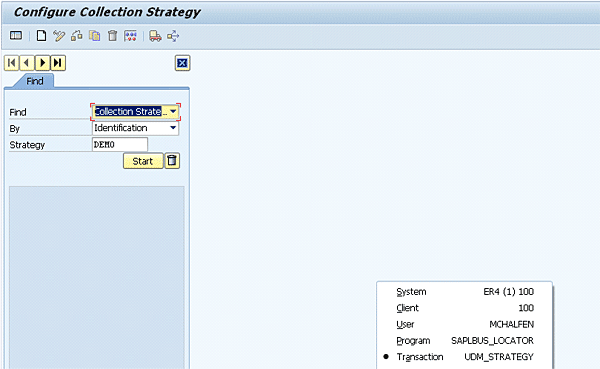
Figure 4
Configure the collection strategy
You need to define a name and link it into your collection organizational unit. Note that you can have more than one collection strategy to ensure that different types of customers are prioritized in different ways.
Figure 5 shows a collection strategy that I have defined in a demo system, reached via the Start button. As you can see, there are a number of lines, with many collection rules within the collection strategy, and multiple lines of the same collection rule. A standard collection strategy may have various lines for a single rule. This allows you to provide different scoring based on the outcome of the collection rule. Normally, a collection strategy has many collection rules, and therefore many lines.
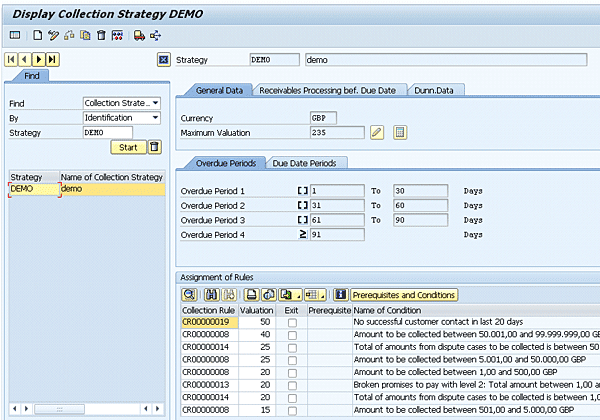
Figure 5
A collection strategy via transaction UDM_STRATEGY
To edit a collection rule line within a collection worklist, you simply need to highlight the line and click the Prerequisites and Conditions button to get to Figure 6.
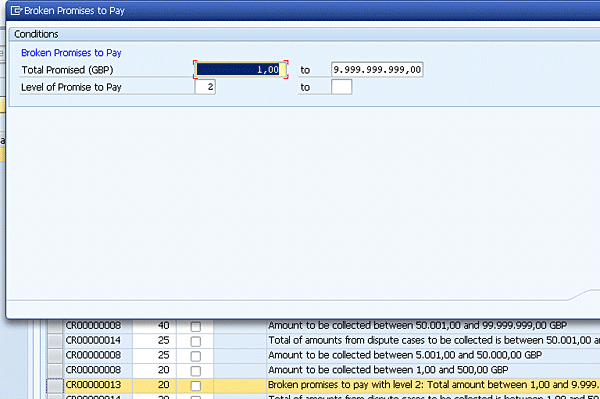
Figure 6
Enter a prerequisite for a single collection rule line
In this example, the prerequisite is that if a promise-to-pay has been broken twice within the value range of the total promised based on the condition record. Further, you can see in the highlighted line in Figure 6 that this line has a score of 20 in the collection strategy. Breaking a promise implies that the customer is less likely to pay, and as such the score should be higher. The value is also important — breaking a promise to pay $75,000 is obviously much more important than breaking a promise to pay $100.
Simulation
One of the main benefits in the way SAP designed SAP Collections and Dispute Management is the ability to check your collection strategy against actual customer data. Once your SAP Collections and Dispute Management configuration is in your productive environment, you can check your current collection strategy against your actual productive data. Checking your collection strategy against your productive data is the best way to check your collection strategy. This allows you to run a spot check against a few customers. Customers that they feel are a higher risk should end up with a higher score than customers that are deemed to be good payers and therefore a lower risk.
However, once the collection strategy is in the productive environment, the business users who have the required system access can make changes to the collection strategy and then test the impact that this would have on its customers. Within the collection strategy to simulate the values, click the simulation icon  to bring up the pop-up screen shown in Figure 7. This allows you to simulate the collection strategy against a single customer based on their open items at a given date.
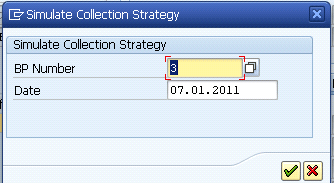
Figure 7
Simulate customer pop-up box
After entering a customer, the simulation score pop-up screen appears (Figure 8). This provides a score per line within the collection strategy, which details how the final customer collection strategy score is calculated. Here you can analyze the score to see if it meets your requirements.

Figure 8
Result of the simulation of the collection strategy for a single customer based on the key date
The outcome of the simulation is that you can link to the collection worklist view that the customer would have in the related collection worklist by clicking the green check mark icon (Figure 9).

Figure 9
Simulated worklist item
Menu Path View
Coming back to the main topic of this article, it is recommended that business users simulate and amend the collection strategy via the menu path and do not rely on the configuration team to make the changes. You can access the configuration screen to create and amend a collection worklist via transaction code UDM_STRAEGY or via menu path SAP menu > Accounting > Financial Supply Chain Management > Collections Management > Current settings > UDM_STRATEGY – Strategies.
Note that it is suggested that while there is a clear benefit to provide business users access to change the collection strategy, the role should not be provided to all users, and instead perhaps just for super users. Change should only be made to enhance the process and improve the accuracy of the rating of your customers. When a change to the collection strategy is made, for the change to be made to the collection worklist, the AR extract job needs to be run as well as the job to create the new collection worklist.
Mark Chalfen
Mark Chalfen is the finance capability lead at Bluefin Solutions, a niche SAP consultancy in the UK, and an SAP mentor. Mark has more than 12 years’ experience in SAP FI/CO in a number of industries. Mark’s core skills include Financial Supply Chain Management (SAP FSCM) and the new GL. He is currently advising a wide variety of clients on maximizing their SAP landscape either in the current R/3 version or upgrading to SAP ERP.
You may contact the author at mark.chalfen@bluefinsolutions.com.
If you have comments about this article or publication, or would like to submit an article idea, please contact the editor.


 Premium