Take full advantage of lockbox functionality with these advanced tips. Learn about two user exits that can increase lockbox efficiency.
Key Concept
Lockbox is a service provided by US banks that facilitates the collection and processing of customer payments. Instead of sending their payments to you, your customers send payments to a central bank location (usually a post office box). The bank credits your account, consolidates the remittance data from multiple customers into a flat file per BAI or BAI2 format, and sends the file to you via file transfer. You then use the data to clear customer open items and record the collection of the cash. SAP provides a standard functionality to import and process the data file for automatic matching and clearing of customer open items.
After I wrote an article about lockbox basics and intermediate techniques in May 2003, I received numerous inquiries from readers regarding ways to address more complex business scenarios. As a response, I conceived this article to share some of the advanced techniques, many of which are largely undocumented by SAP, with more readers. I’m focusing only on lockbox using the BAI and BAI2 format instead of IDocs.
I’ll briefly cover the overall processing logic of the main lockbox program and then dive into specific techniques you can employ to optimize lockbox performance.
Lockbox Processing Logic
To facilitate lockbox processing, SAP delivers the standard lockbox functionality. In this article, I will refer to the functionality as SAP lockbox. In R/3 you find the lockbox functionality under Treasury/Cash Management. In mySAP ERP Central Component (ECC) it is available under Financial Accounting/Banks.
After proper configuration, the lockbox process is comprised of two steps. In step 1, via transaction FLB2, the system automatically imports the data file and performs matching and clearing of customer invoices according to the imported data. In step 2, via transaction FLB1, accounts receivable personnel carry out post-processing to manually post and clear any errors from step 1.
In step 1, the main lockbox program RFEBLB00 performs a series of tasks — import the data, update the bank buffer, create the payment advice, and then carry out “area-specific” processing. The area-specific processing refers to updating cash accounts in the General Ledger (G/L) on one hand and matching and clearing customer outstanding invoice in the Accounts Receivable (AR) subledger on the other. The key to improving the performance of R/3 lockbox is to raise the rate of automatic match and clearing performed by the program RFEBLB00 to minimize the amount of post-processing required. Understanding the processing logic of the main lockbox program is essential to the success of automated lockbox. For details on its processing logic and steps, see the download "Main Lockbox Program" at the bottom of this article.
Leverage Standard Functionality
I’ll use various interactions between ABC Co., which has R/3 installed, its lockbox bank, and its customers Buyer Co. and Differ Co. for illustration. ABC Co. sells regularly to Buyer Co. and Differ Co., and therefore has outstanding receivables from both.
Enhanced Invoice Number Check
In my first example, Buyer Co. submits a payment to ABC Co. to settle an outstanding invoice. However, let’s say that because of a typographical error, invoice number 123456 became 123457. At ABC Co., invoice numbers are sequential — the invoice number 123456 was issued to Buyer Co., while the invoice number 123457 was issued to Differ Co., a different customer. The SAP lockbox thus matches the payment from Buyer Co. against invoice 123457 by Differ Co. in ABC Co.’s AR ledger. Because the lockbox posts successfully, ABC Co. is temporarily unaware of this error. Consequently AR reporting by the customer is distorted as the credit goes to Differ Co. while Buyer Co. pays for it.
The SAP lockbox comes with a feature to prevent this from happening, a selection option on the program screen called Enhanced invoice no. check. It is an option you can select to run the lockbox program. To use this feature, you need to identify a common payer for a group of related customers that belong together and are paid by this payer. You then assign this common payer’s customer account to each related customer as an alternative payer (KNA1- KNRZA) in the general data of customer master.
You need to go through this exercise for all customer masters in your system because this option, once activated, would preclude payment across customer accounts if they are not linked by alternative payer. Once customer masters are organized, the system automatically generates worklists that include all customer accounts that are linked together by one alternative payer. Simply choose the check box Enhanced invoice no. check on the selection screen of the main lockbox program for the feature to take effect.
For example, you link Buyer Co. and its subsidiaries with an alternative payer customer account. Since Buyer Co. and Differ Co. are two unrelated customer accounts, they are not linked together by the alternative payer. During processing, the SAP lockbox checks the customer account on the imported invoice 123457 (which is for Differ Co.) against the customer account identified by the MICR number imported with the lockbox data record (which is for Buyer Co.). The system sees these two customer accounts don’t belong to the same alternative payer worklist. As a result, it posts the payment on the Buyer Co. customer account, and the check receives a post-on-account status, pending further post-processing. Differ Co. is not credited for payment from Buyer Co. and the system correctly reflects AR balances by customers.
New Invoice Search Rule
Starting with R/3 Release 4.6C, a new search rule became available. In addition to search by document number, reference document number, and combination of these two (document number first, if not found: reference document number and vice-versa), you have the option to implement search rule 5: document number first, then reference and amount. This is handy if you have data scenarios such as invoice lists or installment payments where one invoice document includes multiple customer open line items. To apply payment to the exact line item, with search rule 5 the lockbox can find the specific item by matching the amount. Refer to SAP note 720271 for details.
There’s an undocumented limitation that a single invoice document should have no more than 10 customer line items; otherwise, this search does not render the desired result. This is because standard SAP program SAPMF05B has a hard-coded 10 as the maximum number of items. Per SAP note 170174, if you have more than 10 AR line items per document, you need to modify the code to a desired number (e.g., 12 for a maximum of 12 line items).
Take Full Advantage of User Exits
SAP delivers two user exits for the lockbox functionality, both processed during the execution of the main lockbox program. Clever use of the user exits can improve lockbox performance. You can use transaction SMOD to view the SAP extension FEBLB001 and its two user exits components. Note that if you activate the extension, you must maintain the export parameters for both user exits even if you haven’t changed the import data. You’ll see what this means in the “Split function” section of this article.
User Exit 002: EXIT_RFEBLB20_002
During an invoice search, the system calls EXIT_RFEBLB20_002 once for each invoice. Here you can influence the invoice search with your own logic. It uses import and export parameters such as customer number, search rule, document number, and even company code. You can swap and change any of these field values to fit multiple scenarios. Here are a few examples of its use.
Eliminate non-unique search. You can eliminate non-unique searches or irrelevant documents. For the same sales transaction, some customers pay by referring to the delivery document number from ABC Co. instead of by its invoice number. At ABC Co., the delivery document number is updated as the reference document number for an AR invoice accounting document. However, R/3 also updates the delivery number as the reference document number of the accounting document of goods issue subsequent to the delivery. Thus when the lockbox searches by the delivery number, it finds two accounting documents — the billing document and the goods issue document. You can code logic in user exit 002 to only select the billing document — when BKPF-AWTYP = VBRK.
Cross-company code application. One lockbox belongs to one company code, normally the one whose bank account is linked to the lockbox, which is called the lockbox company code. However, sometimes a corporation may have several company codes in the US. Instead of getting each company code its own lockbox, all company codes share the same lockbox for collection purposes for various reasons — for example, to use a shared service center, reduce lockbox operating costs, or maintain consistency in collection processes.
You need to make sure, however, that when a customer submits payments for the invoices posted in multiple company codes, the SAP lockbox has a way to track down these invoices and subsequently clear them in the invoicing company code.
User exit 002 can help apply payments across company code, with one prerequisite: Invoice numbers can be uniquely identified across company codes. One way to achieve this is to assign each company code a unique, dissimilar number range for customer invoices. In the “Improve Upstream Processes” section, I will offer a tip on how to meet the prerequisite easily.
When payments come through the lockbox, the system updates the cash account only in the lockbox company code. For AR processing, you need to implement custom logic in user exit 002: Search for the unique invoice in table BSID (customer open items) and identify its invoicing company code. Once the system finds the code, it swaps the default lockbox company code with the invoicing company code in the export parameter. This triggers the lockbox to generate a cross-company code clearing posting between the lockbox company code and the invoicing company code, and at the same time clear the invoice in the invoicing company code. Figure 1 shows a sample of AR cross- company code lockbox posting. Figure 2 shows a sample of nearly “plug and play” code implemented for user exit 002.
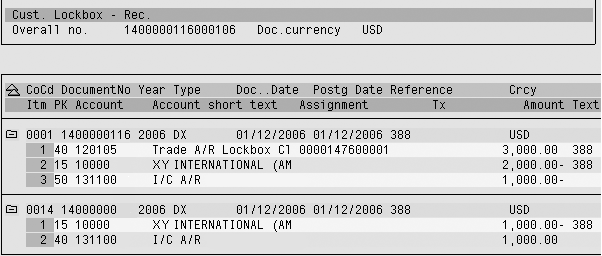
Figure 1
Cross-company code lockbox posting between lockbox company code 0001 and invoicing company code 0014

Figure 2
Sample code for user exit 002 for cross-company code lockbox application
User Exit 001: EXIT_RFEBLB20_001
During payment advice creation, EXIT_RFEBLB20_001 is called once for each payment advice. Here you can influence the quantity and characteristics of payment advices with your own logic. User exit 001 uses import and export parameters from payment advice header (AVIK) and item table (AVIP/AVIR).
Flag negative amount. As part of the normal routine of conducting business and invoicing the customers, a company may issue credit memos to the customers — for example, for returns or pricing errors. When customers remit the payment, they take advantage of the credit memos by deducting the corresponding amount from the total check amount and referring these deductions to the credit memos issued to them. However, by design, BAI and BAI2 formats are unsigned, which means that the lockbox data does not accommodate negative signs to indicate the deduction. I covered this briefly in the May 2003 article, but it’s worth expanding on. I’ll again use ABC Co. and its customer Buyer Co. for illustration.
Whenever Buyer Co. takes a deduction and correctly refers to the corresponding credit memo number that ABC Co. issued to it, the lockbox finds the credit memo, understands it’s a credit, and automatically sets the corresponding amount as negative at the time of payment advice creation. By adding up the positive invoice amounts with negative credit memo amounts, the total dollar of the payment advice reconciles with the amount of the corresponding check. Lockbox processing proceeds smoothly. However, when R/3 doesn’t recognize the credit nature of the credit memo for whatever reason, the payment advice total becomes out of balance with the check total.
For example, this time ABC Co. hasn’t yet issued a legitimate credit memo to Buyer Co. for $1,000 in sales that Buyer Co. disputes. This doesn’t stop Buyer Co. from going ahead to take a deduction amount of $1,000. In the lockbox remittance, lacking a valid credit memo number from ABC Co., Buyer Co. refers the deduction amount to its own internal accounts payable number, which naturally doesn’t exist in ABC Co’s AR system. Let’s say with the same check, Buyer Co. paid some invoices ABC Co. issued to it with a total amount of $10,000, so the net amount of the check after taking the deduction is $9,000.
At ABC Co., the lockbox fails to find the credit memo number associated with the $1,000 deduction in its AR system. As a result, the lockbox cannot tell that the amount should be negative; instead, it assumes it to be positive due to the unsigned nature of the BAI/BAI2 format. The lockbox thus adds up the total invoice items of $10,000 with the positive amount of $1,000 and perceives the total payment advice amount to be $11,000.
The advice amount doesn’t agree with the amount of the check of $10,000, and causes an AR posting error (F5 263) The difference is too large for clearing. The AR clearing function can’t proceed and the whole check is posted on account, despite the fact that all the rest of the invoices match successfully. An AR user needs to perform a post- processing function to sort out the mess. If the check were to contain hundreds of invoices and credit memos that are otherwise properly matched, it would be a great loss of efficiency.
SAP recommends that the only way around this is to abandon the flat file (BAI/BAI2) approach and implement IDocs for lockbox because the IDoc structure accommodates signs. I’ll show you a unique approach so that you don’t have to switch to IDocs for this purpose. You can still achieve the status of partially applied (and clear as many invoices as possible) as opposed to the status of post-on- account by combining a workaround with a slight modification of a standard SAP program. Here is how ABC Co. did it.
ABC Co. took four steps to accomplish the negative flagging. First, it negotiated a custom lockbox BAI2 format with its lockbox bank. Upon compiling lockbox data, the bank places a negative sign “–” in front of the first non-zero digit in the amount field if the amount is a deduction from a credit memo. Second, ABC Co. introduced a pre-processing program to convert the negative sign to a dummy reason code CCM and place it in the corresponding FLB24 record during the reformat to standard SAP from the custom BAI2 format provided by the bank. Third, it coded logic in user exit 001 to convert the payment amount to be negative if the line comes with the dummy CCM reason code and subsequently remove the dummy reason code. Figure 3 shows a sample of plug-and-play code for user exit 001 for this purpose. Lastly, a similar code change was implemented in program RFEBLB20 to flag the negative amount again for payment advice creation (as user exit 001 doesn’t have influence over this subroutine).
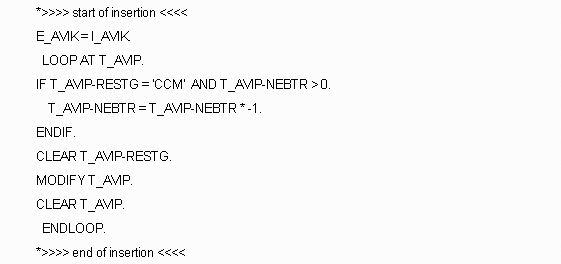
Figure 3
Code for user exit 001 for flagging the negative amount
In RFEBLB20, the system searches for the AR document and validates if the document is an invoice or credit memo. If it is a credit memo, it makes the corresponding payment amount negative.
Here you need to modify the program to add additional logic to help the system apply a negative sign whenever the line is flagged with the dummy reason code CCM. The negative amount then carries into subsequent payment advice creation. With a little help, the system now always understands the negative amount for credit memo deduction and is able to reconcile the advice amount with the check amount. Figure 4 shows the three-line code modification needed for RFEBLB20.

Figure 4
Code modification in RFEBLB20 to flag the negative amount for payment advice creation
Split function. Standard BAI2 format accommodates up to 99 invoice items per check; R/3, on the other hand, has a maximum limit of 999 line items per accounting document. A customer’s remittance, however, may include more than 999 invoices per check. When a check with more than 999 invoices is submitted to the lockbox, the entire check is posted on account instead of being applied or partially applied, despite many matching invoices. This is because the would-be posting exceeds the limit of 999 line items per document.
SAP has provided two solutions for this problem. The goal is to automatically split a large check with more than 999 invoices into several sub-checks at a predefined split position, say, at every 500 invoices. One option is a custom modification to the standard program, and the system continues splitting until the next sub-check ends up with a negative balance. This, however, may result in an AR posting problem during post-processing if the remaining balance is negative. Refer to SAP note 538300 for the implementation of this option. The latest solution includes SAP-modified code and the adoption of user exit 001. User exit 001 is only used to define a split position (e.g., 500). Figure 5 shows a sample of code for user exit 001 for defining a split position and for user exit 002 due to the activation of extension FEBLB001.
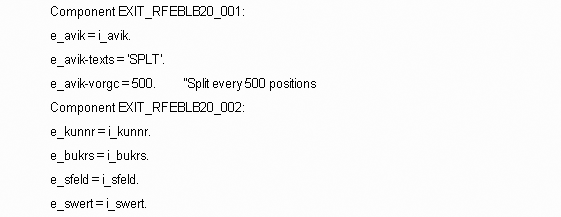
Figure 5
Code for split function in user exits 001 and 002
To avoid the AR post-processing problem, the split only proceeds if each individual sub-check has a positive balance. Refer to SAP notes 681901 and 897119 for implementation of this solution. As a standard SAP solution, this option not only doesn’t involve custom code modification, but also comes with a cool feature — it updates the application log, which enables you to track its progress and problems via transaction code SLG1. Figure 6 illustrates an application log of a successful split in which one check is split into eight sub- checks, each with its own partial payment advice. (The application log is a tool for collecting messages, exceptions, and errors in a log and displaying them.) Type in the object FIBL and sub-object LOCKBOX to track the split function.
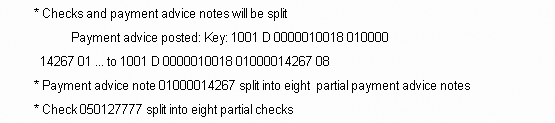
Figure 6
Application log of a lockbox split: one check into eight sub-checks
The successful implementation of split function has a prerequisite: The payment advice line item should have a consistent sort order by document number. In other words, all invoices, credit memos, cancellations of invoices, and credit memos should use the same number range. If your system doesn’t meet this prerequisite, you need to conceive your own custom logic in user exit 001 to reshuffle payment advice line items to make sure that each partial payment advice after the split has a positive balance.
Here the goal is to reorganize the sequence of positive and negative items and embed the negative among the positive amounts within each sub-check at the split position (e.g., 500) so that each sub-check has a positive balance. The logic is very customer-specific. You need to consider your business processes and customer behavior and if necessary, employ a mathematic model based on your findings.
Improve Upstream Processes
Never dismiss the importance of working with the upstream processes for a smooth lockbox operation. Upstream processes refer to the sales order, delivery, and billing processes leading to the generation of AR invoices.
If you have a choice, make the AR invoice (accounting document) number the same as the Sales and Distribution (SD) billing document number. This way, the AR invoice number inherits some great features of the SD billing document number. For example, SD document numbers are not fiscal-year dependent (document numbers won’t repeat by fiscal year), and they are unique even across company codes. This not only helps meet the prerequisite for cross-company-code lockbox application, but also frees up the reference document number field for other purposes, such as a delivery that may play a role in the payment matching process. Otherwise it would accommodate the billing document number. Refer to SAP note 8583 (“Transferring SD bill.doc. no. as external doc. no.”) for guidance.
Another general good practice is to have all SD billing types adopt the same number range. This includes invoice, credit memo, cancellation of invoices, and credit memos. It makes implementation of the split function much easier.
Download: Main Lockbox Program
Qian Sharon Tang
Qian (Sharon) Tang is a system program manager who is responsible for the support and development of various areas of SAP systems. Prior to this, she was a senior FI/CO application consultant at SAP China. She has been working with SAP since 1995, with emphasis on FI/CO modules such as FI-GL/AR/AP/SPL, CO-CCA, CO-PC, CO-PA, CO-ML, EC-PCA, and cross-module integration between FI/CO and logistics. She also has experience with MM, SD, SM, and PP.
You may contact the author at qian_s_tang@yahoo.com.
If you have comments about this article or publication, or would like to submit an article idea, please contact the editor.



 Premium