Learn how to complete acceptance testing for an SAP payroll system using an optimized approach that guarantees a thorough review before project acceptance. Learn to better define tasks, remove duplications, facilitate investigations of errors, and document the testing performed with a higher degree of efficiency.
Key Concept
One of the popular techniques applied for payroll validation testing is to run a parallel test. A parallel test involves the running of payroll in a new system for a period that has already been processed in the old system, with the intent of comparing the results of the two runs. This provides a level of opportunity to automate this validation process. If the results are available as electronic files, you can perform an electronic comparison of the two results. Using an appropriate tool to do this comparison makes this exercise even faster.
Managing the testing of a new SAP payroll system is a very important task, as it has a direct impact on the production of accurate paychecks for employees. It is so important that the success of a payroll implementation project depends on it. If paychecks are inaccurate, the project is always considered a failure. Therefore, executing this task successfully is usually the primary preoccupation of an SAP payroll implementation manager. The validation tasks during the last few months before rollout of a payroll are often the reason for a delay in a payroll project. No one wants to go live without an assurance that the new system can calculate employee pay accurately.
Payroll validation is difficult because of the numbers involved. Imagine an employee base of 10,000 people. Each person has an average of five lines of earnings: basic pay, overtime, shift allowance, vacation pay, and standby pay. Each person also has eight lines of deductions: federal tax, state tax, local tax, 401(k) deduction, union contribution, health plan deduction, life insurance, and accidental death and disability insurance.
That makes for 13 different numbers per employee that need validation. These in turn add to carryover totals, therefore requiring 13 accumulators to be verified. That makes almost a quarter of a million numbers that require ratification. At an average speed of six minutes per number, this task would take roughly 3,000 person days (eight hours a day). That is around 80 people working full time for two months (Table 1).
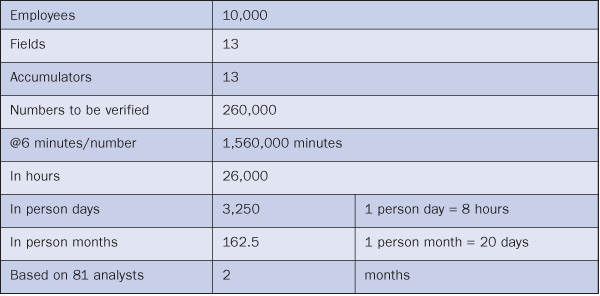
Table 1
Estimate for a validation of a 10,000 employee payroll
SAP provides the Wage Type Reporter, which describes the payroll run in a level of detail that covers an employee at the lowest component of pay (earning, deduction, or tax). You can launch the Wage Type Reporter using transaction PC00_M99_CWTR. Figure 1 shows the selection screen that this transaction brings up.

Figure 1
Wage Type Reporter selection screen
You can run the transaction for a single employee by entering a Personnel Number or run it for the entire population by leaving the Personnel Number field blank. Begin by entering the Payroll area in the first block (Selection) and the Period dates under the second block (Payroll Interval). Then, specify that you need the report at an employee level. By default, the report is set at a higher grouping level, such as company code or personnel area. Click the Object selection button. This brings up the screen shown in Figure 2.
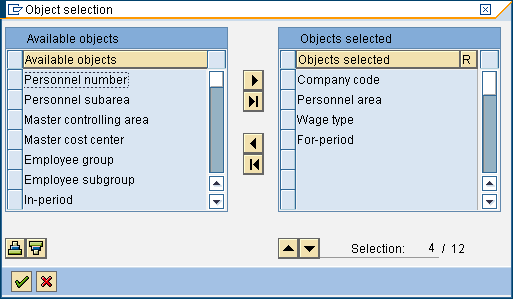
Figure 2
Object selection screen
Select Personnel number from the Available objects list. Then, click the arrow to move Personnel number to the Objects selected list. Click the OK (green checkmark) icon. You can now run the report by clicking the execute icon. You can save the report in a spreadsheet format using standard SAP reporting features.
You now have the personnel number and amount columns at a wage type level. With a similarly formatted output from your legacy system, you can compare the results from the two systems using standard spreadsheet techniques. After a series of merges and lookups in Microsoft Excel, the fields displayed would be similar (but not identical) to what you see in Figure 3.

Figure 3
Spreadsheet showing two systems’ wage amounts and the difference
Keep these three points in mind while you perform this comparison:
- You may need to maintain a cross reference of employee numbers if the new system has a different numbering system than the legacy system
- You may need to maintain a cross reference of wage types if the new system has different wage types than the old system
- Wage types need to have a convention so that basic pay characteristics can be easily determined (e.g., wage types 1000-1999 are earnings, 2000-2999 are deductions, and 3000-3999 are taxes)
Manipulating spreadsheets with these considerations in mind can be challenging. Using a third-party tool can make this easier and relatively error free. A few third-party tools are available in the marketplace to perform this comparison. They work in a similar fashion: first loading the data from two payroll runs into the tool, then comparing the results, and finally presenting the differences in a format that is easy to read and analyze. Figure 4 shows a typical workbench view in the Data Comparison Manager, which is one of the third-party tools you can use for the comparison.

Figure 4
Workbench view of a typical tool
In Figure 4, the Left Wage column is the SAP side. The Right Wage column is the legacy side. Employees appear in three status colors. Green indicates that the comparisons match perfectly and can be excluded from further analysis. Yellow indicates that data is missing in the comparisons, and red indicates that discrepancies exist and further analysis is required.
Subdividing Areas for Analysis
Statistics for comparison should be done at the project level, the data area level, the employee level, or the wage type level. This allows you to clearly see the differences at any level. Investigation becomes much more simplified because you can see which level has the most differences and drill into it in a top-down fashion.
As an example, say that a project represents a payroll run for the month of April 2009. Payroll Compare01, Payroll Compare02, and Payroll Compare03 are three areas within this project. Area Payroll Compare01 could be personnel area 01 representing California, Payroll Compare02 could be personnel area 02 representing Nevada, and Payroll Compare03 could be personnel area 03 representing Texas. It is useful to mark each comparison with an identity so that you can refer to it later. Think of each comparison as a project. The project is the highest level of reporting for this analysis (e.g., all hourly staff who work in the New York plant).
Differences and Discrepancies
With this basic wage type level comparison, there are a few ways to accelerate the comparison process. For example, you can display all earnings together or display all deductions together and filter out the taxes. In a spreadsheet, this would require sort, cut, and paste sequences, whereas using a third-party tool makes this a one-step process.
Logically, it makes sense to go through a process of elimination to discover the root cause of the discrepancy. See if the net payroll has a difference (if so, it shows in red in the third-party tool). If there is a difference, check the earnings first. If the earnings have no difference, check the deductions. If the deductions have no difference, then check the taxes. If there is no difference in the net, it is unlikely that the earnings, deductions, and taxes are incorrect.
Therefore, you can narrow down the search for the specific cause of a discrepancy in a methodical manner. Doing it this way also reveals patterns that might otherwise be difficult to see. For example, the only problem with the implementation might be the calculation of local taxes for employees based in New York. You wouldn’t know that until you open up all taxes together.
After the differences are displayed, you can sort the records in descending order of difference magnitude — this helps you concentrate on the big discrepancies first. You can also look out for patterns such as the same incorrect wage type for multiple people. Once you discover the discrepancy in one wage type, you can filter it out of your view and concentrate on others.
If the difference is in earnings, check the hours. The problem may be with time collection or evaluation and not payroll. If you suspect this is the case, you could focus more on time. If the difference is in deductions, isolate percentage-based deductions. If the earnings are wrong, then all the percentage-based deductions will be wrong. You can also group related differences using sort and filter functions (either in a spreadsheet or a third-party tool) on any of the available fields, such as amount, wage type, or location.
When you find the difference that you were looking for, you can document the difference in two ways that help with further comparisons. You can mark the lines you compared so that you can exclude them from your next pass, or you can document the analysis you did so that the project can return to analysis after the testing is over.
Preparation of the Comparison Framework
Several steps are required for a good comparison of payroll results. They are the conversion of master data, mapping of wage types, payroll execution, determination and configuration of tolerances, determination of testers (who conduct the tests), training of testers, and security setup.
Conversion of Master Data
Employee master data needs to be available to run payroll. The following is a typical list of infotypes that need to be ready for running payroll:
- 0001: Organization Assignment
- 0002: Personal Details
- 0003: Payroll Status
- 0006: Address
- 0007: Work Schedule
- 0008: Basic Pay
- 0009: Bank Details
- 0207: Residence Tax
- 0208: Work Tax
- 0209: Unemployment Tax
- 0210: W-4 Data
Mapping of Wage Types
Without mapping a legacy code to a wage type, comparisons are not possible. Sometimes a legacy code maps to multiple wage types. If this happens, you can only compare at the legacy code level. This is unavoidable because the wage type in this case has a more granular calculation detail required by the current design. When this happens, you have to make a comparison at the level of the legacy wage type by combining the wage types that map to it.
Payroll Execution
Before executing payroll in an SAP system, you need to:
- Enter one-time and recurring deductions using infotypes 0014 and 0015
- Convert earning and deduction balances from the previous period
- Enter and upload time and run a time evaluation
Note that basic functionality testing should have been completed by now. Parallel testing should only begin after all functionality tests are complete. If functionality tests are not complete, parallel tests would produce far too many errors and the reconciliation may become an impossible task.
Determination and Configuration of Tolerances
When determining cycles, you must also look at tolerances (the maximum amount of differences acceptable for the test). You need to set tolerances to achieve the correct level of accuracy for the tests. Is $1 a good figure for the difference? Or should it be $.01? A technique that is often applied is known as a ramp-down tolerance. You start with a large tolerance and then narrow it down over subsequent cycles. Some projects also use a variation in the tolerances of different wage components. While the gross payroll tends to be fairly accurate no matter which payroll system you use, the net is dependent on taxes. Taxes can differ by as much as a few dollars based on the method of calculation. (In certain situations, the IRS permits multiple methods of tax computation.) Therefore, it is common to come across tolerances that vary from $.01 to $.50 for earnings and fixed deduction wage types and $.50 to $2.50 for others.
In addition, you need to determine how many cycles of testing you can do in your project time frame. If you use a third-party tool, this tolerance can be set up front. A tool also allows for different tolerances for different wage types, which the SAP system does not allow.
Determination of Testers
This group is typically made up of people who are directly involved with running payroll. However, the number of testers required is dependent on the objectives of the test. Often the objectives are a little broader than simply validating payroll, such as the validation of user roles and supplementary training in the new payroll system. Table 2 shows a typical formula.

Table 2
Formula for calculating the number of testers needed to perform a parallel test
For effective testing, testers need to be trained in how to use the tool for comparison (even a spreadsheet requires training), how to record differences, how to run reports to see payroll results in an SAP system, how to run reports to see payroll results in a legacy system, and how to check master data.
How the training is delivered depends on several factors — primarily the number of testers that need to be trained. One saving grace is that this group of testers is typically the group involved in running the legacy payroll. Thus, they are very familiar with the legacy payroll process. A series of Web-enabled sessions works well for this group of people.
Security Setup
Payroll validation requires the examination of a number of details for the employee. While functional testing can be done through mock data, payroll validation requires real data so a clear idea is available about what the pay to this employee should have been. Therefore, the SAP security profile for all testers must permit the printing of standard reports that deal with pay results (e.g., Wage Type Reporter or payroll reconciliation report) as well as all master data, including pay rates and time.
The most effective use of the time devoted to this phase of testing is achieved by setting up security to mimic the exact authorization these testers would have when the SAP system goes live. This ensures that any security-related issues with running reports and viewing master data are resolved early. This phase also provides the opportunity to test organization-based security for companies that have discrete business units with restricted cross-unit information sharing. You should also execute the transactions for a comparison tool (if used), which needs to be attached to a role and assigned to the tester pool.
A tester is typically a person who runs payroll once the system has gone live. The access can be restricted to the group that the tester would normally see. The tester also needs to pull legacy reports. Generally, this is not an issue because the tester is responsible for the legacy payroll of these individuals and therefore has access to this data already. However, sometimes the legacy payroll is not in house or the results are only available through reports. In those situations, preparation is needed to make the legacy payroll results data viewable by the testers.
Finally, testing often requires printing large reports. Care should be taken to ensure that testers sit in the same room so that access to printed reports can be controlled and the reports shredded after the testing is over. Not printing the name and social security number on reports helps protect the privacy of this sensitive data, and this is easily achieved by not including these fields in the report variants.
Other Important Considerations
In addition to improving the testing process, improving efficiencies of parallel testing requires careful planning of parameters that influence these tests. The final section of this article describes three of these important, indirect factors that you can control to optimize testing without compromising on objectives.
Entry and Exit Criteria
The start of payroll testing has to be at a time when the new system has been properly tested for functionality and the parallel testing process and tools have been established. Here is a list of tasks you need to chronologically complete before beginning testing:
For the system:
- Conversion of master data
- Completion of all report, interface, conversion, enhancement, and forms (RICEF) testing
- Availability of reports for validation (standard variant creation)
- Loading of payroll year-to-date balances from previous payroll period
- Movement of transports for RICEF and configuration to test client
- Running of payroll
- Correction of errors
- Confirmation of payroll
For the testing tool:
- Configuration of comparison tool
- Movement of transports for tool configuration to the test client
- Extraction of legacy pay results
- Formatting and loading of legacy results in comparison tool
- Setup of security roles for tool use
- Creation of training material for the tool
Exit criteria generally involve the answer to the question, “When do you really stop testing?” In other words, these are pre-established rules you formulate to conclude your testing successfully. Payroll validation testing is slightly different from the other types of testing that typically happen in an SAP project. Successful completion does not require 100% of employees with 100% of all different wage types because that would take too long. The exit criteria are the comfort factor that the team agrees to at the beginning of the test. Determination of tolerances and cycles is a key element of these criteria.
Number of Cycles
Although the number of agreed-upon testing cycles in a payroll project varies widely, most projects tend to have three cycles. The first cycle is to familiarize the users with the process. The second cycle measures the current state of the configuration to get an idea of where the project really is. The third cycle is run after problems are fixed and as a final proof that all is well.
Some projects use subcycles to cover specific areas. These areas are both structural and functional in nature. For example, there could be subcycles that follow each payroll area and a subproject team that manages it. This is particularly beneficial when the pay rules are significantly different between payroll areas, such as in a large corporation with multiple business lines. Others find it useful to split their tests into gross and net payroll. This is advantageous if the gross is very complex, particularly if a new time entry system is implemented along with a payroll system. Having both gross and net payroll in the same cycle can be challenging in these cases. If the gross is different, the net has no chance of balancing.
Tolerances
Many project teams believe that all employees must be tested to meet the exit criteria for testing. This is not practical and causes a lot of stress for the project. The ideal tests focus on small representative samples that cover the entire gamut of employee variations in an organization. No more than 5% to 10% of the employees need to be tested using this strategy, with a cap of about 200. With this restriction, it is realistic to have exit criteria such as 80% accuracy in the first cycle, 90% in the second, and 99% in the third. Employees need to be selected carefully to cover all scenarios. Typical selections include:
- Exempt
- Non-exempt
- Unions with different pay rules
- Employees in locations that have different state and local taxes
- Employees with loans
- Employees on vacation and holiday pay
- Employees with different benefit subscriptions
- Mid-period transfers
- New hires
- Mid-period terminations
- Employees for different pay and personnel areas
- Employees that are administered by different payroll administrators
Deepankar Maitra
Deepankar Maitra has more than 25 years of consulting experience specializing in SAP-based solutions for human resources, supply chain, and reporting in multi-national companies around the world. He has successfully directed large implementation projects as solution architect, delivery manager, global lead, and country lead. His expertise lies in pragmatic harmonization of data and synthesis of processes using tools that improve process execution through quantum leaps in productivity.
You may contact the author at deepankar.maitra@accenture.com.
If you have comments about this article or publication, or would like to submit an article idea, please contact the editor.



 Premium