Using the example of a quality control process in a fertilizer factory, the author shows how to use business processes in recipes to map activities from different cost centers to one operation. The method also applies for mapping multiple costs center to a network activity if you are using the R/3 Project System module.
Have you ever wondered why some operations in a routing are more easily mapped to cost centers and activity types than others? In my experience, operations that are specifically concerned with assembling or processing materials, such as milling, drilling, and welding, rarely cause problems. The costing department creates activity types and calculates prices for the machine hours, the production department makes sure that the standard times in the routing are accurate, and both departments are happy.
However, if the routing contains non-manufacturing operations, such as procurement or quality control, these operations can cause problems. The reason is that each operation in the routing can be assigned to only one cost center, but non-manufacturing operations often span several cost centers. Take procurement, for example. It is not unusual for procurement to use activities from three cost centers: purchasing, accounts payable, and stores. The same goes for quality control. A complex testing process may involve several different cost centers, but only one is allowed in the operation.
One answer is to create more operations for each stage of testing, but this is usually rejected by production. It owns the routing/recipe and only wants to confirm operations happening on the shop floor. Costing takes the wider view and wants to calculate the true costs of procurement or quality control based on the activities used.
If you have ever found yourself at the center of one of these discussions, let me introduce you to the business process as a way of bundling activities. That way, production won’t notice that the operation is crossing several cost centers. Order confirmation proceeds as usual, but costing can use the process as a means of absorbing activity from several cost centers.
The business process appears on the same screen of the work center as the cost center and activity types, but chances are you either haven’t noticed it or haven’t appreciated what you can do with it. In fact, I’ve had several consultants insist that there is no business process in routing.
If you have called up the F1 help for the field, you have received a hint of its usefulness in bundling activities from several cost centers. More likely, you have seen that it has something to do with Activity-Based Costing (CO-ABC) and wondered how ABC relates to the routing.
In ABC terms, production typically involves unit-related activities (the ones in the routing), batch-related activities (the ones that apply to the order header), and product-related activities (the ones that apply to the product profitability segment). By using a business process in the routing, I am using a business process where I would usually use an activity type. The purpose is simply to bundle a number of different cost centers and activity types and map them to one operation in the routing.
It doesn’t only apply to routings and recipes—you can use exactly the same method to map multiple cost centers to a network activity if you are using the R/3 Project System module. So next time somebody mentions ABC, think small. The fact that a business process is hiding in the routing may be all you need to know to make R/3’s Production Planning (PP) and Controlling work for you.
You’ll find detailed documentation about the use of business processes under CO-ABC. This article focuses on one aspect of CO-ABC—the linking of a template with a business process to solve what appears, at first glance, to be a production problem.
Using the example of a quality control process in a fertilizer factory, I’ll show you how to use business processes in recipes to map activities from different cost centers to one operation.
Business Example
The organization in my example is a manufacturer of fertilizers. It describes its operations and the ingredients required to manufacture the fertilizer in a master recipe. The master recipe is like the routing in discrete manufacturing. It contains standard times for the duration of each operation. Each operation is performed at a resource. The resource is like the work center in discrete manufacturing. Whereas the work center might be a drilling machine or a grinding machine, the resource is more likely to be a reaction chamber or a silo, but in costing terms, it is the same as a work center.
In this organization, the manufacturing activities for the fertilizer are listed as operations in the master recipe, and standard times are entered for each operation. The quality control activity, however, is too broad for this definition. It uses activities from two cost centers—a laboratory that performs testing hours and a quality management cost center that makes usage decisions. As far as production is concerned, quality control is one operation requiring one confirmation. Figure 1 shows the master recipe, the resource, and the quality control process. The filling and mixing operations absorb activity directly from the cost centers, whereas the quality control operation is handled as a business process that bundles the testing and usage decision activities so that they can be mapped to the recipe.
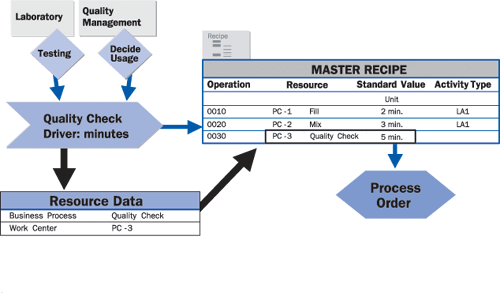
Figure 1
Business example showing the PP master data and the use of a business process to bundle the quality control activities
The costing department creates cost centers for the laboratory and quality management, and activity types for testing hours and usage decision minutes. Instead of mapping them directly to operations in the master recipe, as happens for the filling and mixing operations, it creates a business process for quality control in CO-ABC. Production enters this business process in the recipe.
To calculate the costs for the business process, the costing department defines a template, or activity catalog, that lists how many hours of testing and usage decision minutes are required for each business process. Figure 2 illustrates the flow of values from the cost centers to the order. The filling and production cost centers map their activities directly to the operations in the routing, whereas the laboratory and quality management cost centers map their activities to the routing in a two-stage assignment.
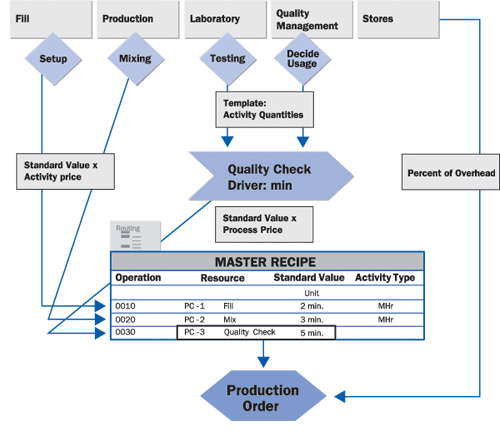
Figure 2
Activity flow from cost centers to orders
First, a template is used to bundle the activities required to perform the quality control and assign these costs to the control process. Then the business process assigns its time to the operation and these costs are assigned to the process order during confirmation. The activity types for each cost center are represented as diamonds. The stores’ cost center bypasses the routing altogether and maps its costs to the order using a percentage overhead.
Once you have set up these structures, you can use them for both planning and execution.
During planning, the number of quality checks is used to determine the amount of testing and usage decisions to be provided by the cost centers. During execution, the operations for each process order are confirmed, resulting in the quality check costs being assigned to the order in the same way as the manufacturing activities. At the end of the period, the costs for the testing activities and usage decisions are assigned to the quality control process using template allocation in ABC. I’ll now walk you through the process of setting up the structures you need in CO-ABC and PP. Then I’ll show you how the business process appears in the cost estimate and order execution.
Business Processes
Business processes are like activity types in the sense that they have an output (number of times performed or number of minutes/hours), a price (calculated by looking at the activities assigned to the process), and various allocation parameters. In the example in Figure 3, the output of the quality check is in minutes. Almost all the allocation parameters are the same as for your manufacturing activity types. You need Allocation category 1 (for direct activity allocation), an Allocation cost element (in this case, 624000) and Price indicator 1 (to calculate activity price based on quantity usage rather than capacity). To display a business process, choose Accounting> Controlling>Activity-Based Costing> Master Data>Business Process> Individual Processing>Display. Enter the business process and choose the Allocation tab.
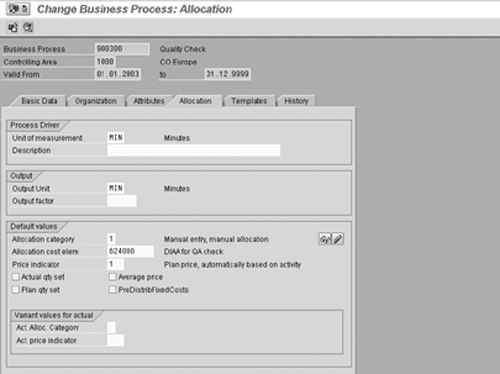
Figure 3
Business process allocation parameters, the same as those for an activity type
To link the quality check process with the two cost centers and their activity types, you use a template. You can create the template using transaction code CPT1 and environment SBP (business processes) in Customizing, and then enter it in the business process. You can also choose the Templates tab (Figure 4) and then select the Create Template button from within the business process.
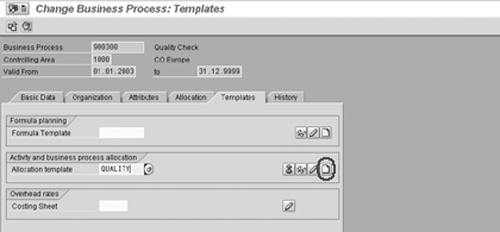
Figure 4
Creating a template from the business process
Defining a Template
Think of the template as an activity catalog for the costs flowing on to the business process. In Table 1, I’ll show you how to enter the testing hours from the laboratory in the template. The template distinguishes fixed and variable quantities and planned and actual quantities.
Figure 5 shows the template that links the cost centers 4700 and 4400 (laboratory and quality assistance) with the business process Quality Control. By putting the Quality Control process between the cost centers and the operation, you can map any number of cost centers and activity types to the one operation, keeping the production structure lean, but allowing Costing to include all pertinent activities.
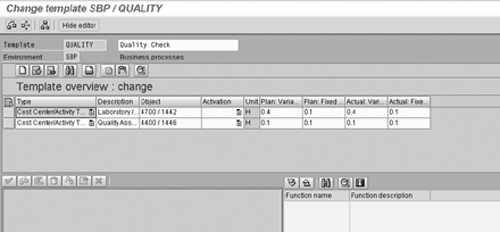
Figure 5
Template for quality check
Once you have defined the template, you need to calculate the price for the quality check, so that a value for the quality check can be applied to the minutes confirmed when PP confirms completion of the operation. To calculate the planned costs for the quality check, choose Accounting> Controlling>Activity-Based Costing> Planning>Allocations>Price Calculation and select all business processes. Alternatively, you can enter the process price manually by choosing Accounting>Controlling>Activity-Based Costing>Planning>Process Quantities/Prices>Change.
| Field |
Enter |
| Type |
Cost Center/Activity Type |
| Description |
Testing |
| Object |
Cost Center: 4700 (Laboratory), Activity Type: 1442 (Testing Hours) |
| Activation |
Leave this blank |
| Plan Variable |
0.4 hours |
| Plan Fixed |
0.1 hours |
| Actual Variable |
0.4 hours |
| Actual Fixed |
0.1 hours |
|
Linking the Business Process to the Recipe (Routing)
Now that you have set a price for your business process, you can link it to the resource (or work center) and the recipe (or routing). Before you tackle the recipe, you need to switch off the normal link to CO in the resource and enter the business process instead. Choose Logistics>Production – Process>Master Data>Resources> Resource>Change, enter the resource and choose Goto>Costing. (See Figure 6.)
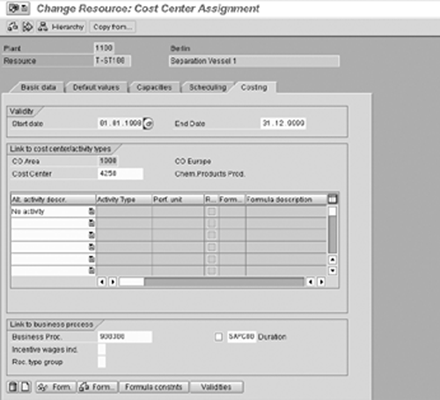
Figure 6
Business process in the resource/work center
Instead of entering activity types in the costing screen, choose No activity where you would normally enter the activity type. Enter instead the name of your business process and the formula for the quantity calculation. This formula calculates how many minutes of quality control are required for each unit of fertilizer. Note that the screen is called Cost Center Assignment and R/3 still wants you to enter a cost center on this screen. However, when you perform costing, the business process overrides this entry and the cost centers and activity types in the template are used for Product Costing purposes.
Now you need to change the data for the operation performed at this resource. To change the recipe, choose Logistics>Production – Process>Master Data>Master Recipes>Recipe and Material List>Change, enter the recipe group and choose Goto>Operations. Then select an operation and choose Details>General Data (Figure 7). Now fill in the Business Process field (in my example, 900300). You may be surprised to find the well-hidden business process here. Choose the Standard values tab to enter the standard values to be used with the formula you entered in the resource. Remember to remove the activity type if one has been defaulted into this screen—otherwise your cost estimate will contain an empty line, as the activity type has been deactivated in the resource.
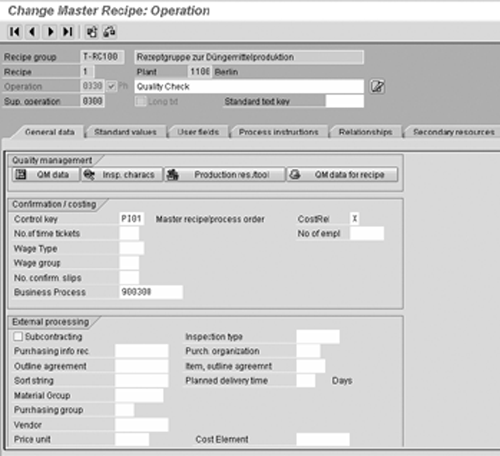
Figure 7
Business process in the routing/recipe
The Business Process in the Cost Estimate
If you create a standard cost estimate for 1,000 liters of fertilizer, the itemization in Figure 8 shows that the quality check process takes 30 minutes. In my example, the quality check occurs in operation 0330 and is item 12 in the itemization. You can distinguish business processes from activity types—processes are category P and activity types are category E in the itemization.
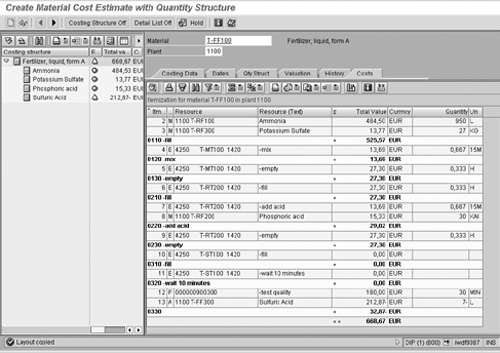
Figure 8
Business process in the cost estimate
The Business Process in the Production Order
If you now confirm completion of the order, the operation with the business process is handled in the normal fashion, but instead of costs being charged to the order by activity types, the number of quality controls appears in the confirmation (Figure 9). Here again you see 30 minutes from the quality check process. You can change this if the quality check takes longer than planned.
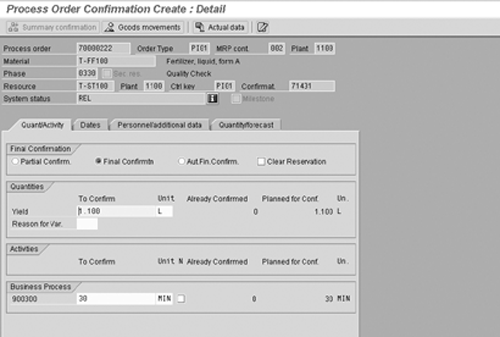
Figure 9
Order confirmation
As the order is confirmed, costs are charged to the order using the price you planned for the business process. At the end of the period, you can use the template mechanism to assign the costs for the multiple activities to the business process. To do this, use menu path Accounting>Controlling> Activity-Based Costing>Period-End Closing>Single Functions>Template Allocation. In Figure 10, you can see that the template you entered in the business process has been used to calculate the number of activities required to perform the quality checks for the period. In other words, I have used the template I defined in Figure 5 to assign the activity costs to the quality control process based on the minutes of quality control provided to production during the accounting period.

Figure 10
Template allocation — bringing the costs for the activities onto the quality control process and tying back to the template in Figure 5
The business process represents a way to bundle activities from more than one cost center for the routing. You won’t always need it—many organizations have only manufacturing activities in their routings—but it can be a useful route out of an integration impasse.
Janet Salmon
Janet Salmon joined SAP in 1992. After six months of training on R/2, she began work as a translator, becoming a technical writer for the Product Costing area in 1993. As English speakers with a grasp of German costing methodologies were rare in the early 1990s, she began to hold classes and became a product manager for the Product Costing area in 1996, helping numerous international organizations set up Product Costing. More recently, she has worked on CO content for SAP NetWeaver Business Warehouse, Financial Analytics, and role-based portals. She is currently chief product owner for management accounting. She lives in Speyer, Germany, with her husband and two children.
You may contact the author at janet.dorothy.salmon@sap.com.
If you have comments about this article or publication, or would like to submit an article idea, please contact the editor.



 Premium