Read an overview of the reporting capabilities of the data captured within the Employee Interaction Center. Understand the standard SAP NetWeaver Business Warehouse queries that SAP delivers with the Employee Interaction Center (EIC) product, as well as some of the common custom reports that customers typically develop as part of their EIC implementations.
Key Concept
The Employee Interaction Center (EIC) is a centralized call center application that is part of SAP’s shared services offering. It delivers employee information to your call center agents and empowers them to capture the details of the interaction with the employee. Once this data is captured, companies require reporting tools to evaluate and analyze the performance of their SAP ERP HCM call center organization for reporting on key metrics. This analysis helps companies to identify key areas or categories of calls being handled by their organization as well as streamline their agents to better address the employees' needs.
The SAP Employee Interaction Center (EIC) solution is built on the Interaction Center WebClient platform (IC-WebClient). SAP delivers two deployment options for running IC WebClient: SAP ERP 6.0 and SAP Customer Relationship Management (SAP CRM) 7.0. SAP recommends using the SAP ERP 6.0 solution (enhancement package 2 or higher) for customers that plan to use SAP HR processes as part of the shared services delivery.
Various reporting techniques are available for users who have implemented EIC to analyze the performance of the HR call center organization. The analysis of this data allows companies to measure the quality of the call center data, and to determine the performance against the service levels as defined by each organization. This analysis is used to improve the quality of call centers for better service delivery and customer satisfaction.
The article gives an overview of the standard SAP NetWeaver Business Warehouse (SAP NetWeaver BW) queries that SAP delivers with the EIC product, and some of the common custom reports that customers typically develop as part of their EIC implementations.
Benefits of Reporting on EIC Data
The EIC application allows an SAP HR service center to capture the details of the interaction with employees. The information is stored against the interaction record within SAP Case Management. The stored information includes the affected employee, the person (internal employee or an external contact) who is contacting the EIC agent, the category and sub-categories of the interaction, the priority and status, as well as the interaction notes. In addition, the resolution of the interaction can also be captured.
This captured data is used to:
- Analyze the activity volume to project future business demands and staffing requirements
- Identify trends in the type of data being captured to identify key areas to be targeted for improvement and develop mitigation strategies
- Measure the performance of the call center based on Service Level Agreement (SLA) information
- Measure the quality of the services being provided using the customer feedback surveys
EIC Data within SAP Case Management
The EIC application uses the SAP ERP version of the Case Management component for storing the EIC activity data. Case Management enables you to consolidate, manage, and process information pertaining to employee interactions in a central collection point: a case or activity.
Within a case, you are able to group diverse information, such as case notes, attachments, business objects (incoming and outgoing emails), and other transactional attributes. This information can reside in different physical systems. Case Management also allows for linking cases together and for status management.
Given the complex nature of the Case Management component, it becomes a challenge to report on the EIC data using conventional reporting techniques. Developers have to use the SAP-delivered case management Application Programming Interface (API) functions to access the case management data for EIC.
EIC Data Reporting Options
The SAP strategy for companies that use the EIC application is to use SAP NetWeaver BW tools to report on the EIC data. For this purpose, SAP provides standard extractors that pull the EIC data from the case management component into SAP NetWeaver BW InfoCubes. In addition, SAP provides pre-delivered queries that companies can adapt for querying and reporting on the EIC data.
One of the drawbacks of SAP NetWeaver BW is that some SAP companies do not use it for their reporting needs. Another drawback is that data has to be extracted periodically based on a workable frequency which sometimes leads to the SAP NetWeaver BW reports not being up to date. In addition, certain free-form data such as EIC notes and EIC attachment information is not sent to SAP NetWeaver BW.
The only report that SAP provides as part of the EIC application that is real-time is the EIC activity search link that exists within the EIC application. This report is very rudimentary and does not allow customizations or downloading to a file. Given these challenges, many companies therefore choose to develop custom real-time reports within the SAP ERP system. These reports are typically coded under the ABAP framework and use the API functions available within case management to read the EIC data. These API functions are encapsulated under the business object SCASE.
Some of the typical functions available are:
- OPEN_CASE – This method is used to initialize and preselect the case data for a given EIC activity
- CLOSE_CASE – This method is used to close the buffer after processing a given EIC activity
- NOTES_GET – This method reads the notes associated with an EIC activity
- ATTRIBUTE_ALL_GET – Read all the attributes of an EIC Activity
- GET_LINKED_OBJECTS – Read the linked objects of an EIC activity
Overview of SAP NetWeaver BW Extractors and SAP NetWeaver BW Queries for EIC
SAP delivers four standard extractors for extracting the EIC data for SAP NetWeaver BW. These extractors are:
- 0PA_EIC_IO — Master data for EIC attribute (not shown in Figure 1)
- 0PA_EIC_1 — Transactional EIC activity data
- 0PA_EIC_HAP2 — Master data for EIC surveys
- 0PA_EIC_HAP3 — Transactional EIC survey data
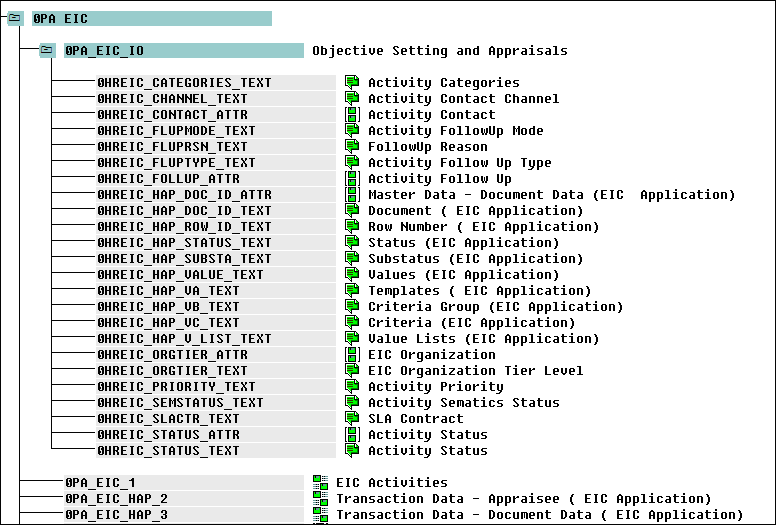
Figure 1
List of standard SAP NetWeaver BW extractors for EIC
In addition to the extractors, SAP delivers 16 SAP NetWeaver BW queries that allow users to report on EIC data. These queries include:
- Channel Distribution Overview: Identifies trends, analyzes activity volume and data distribution by different communication channels (e.g., phone, email)
- Activity Volume Overview: Overview of activity volume during a specified time frame (activities may be open, or pending)
- Activity Completion Overview: Overview of completed activities during a specified time frame (quarterly, monthly)
- Activity Target Group Overview: Identifies and evaluates activity trends for a specific target group, such as cost center or company code (quarterly, monthly)
- Activity Performance Overview: Overview of activity performance and related trends during a specified time frame (e.g., processing time, number of SLA violations)
- Activity Completion for SLA Targets: Overview and comparison of completed activities versus predefined SLA targets, to determine achievement of key performance indicators
- Activity Completion Time Overview: Overview of the average processing time for completed activities by different attributes, such as channel or category (quarterly)
- Tier Escalation Overview: Provides an overview of the number of activities that have been escalated to a higher support level for processing
- Closing Rate of Tiers: Identifies and evaluates specific trends for different tier levels of support (e.g., Tier 1, Tier 2), including number of activities completed
- External Processing Overview: Identifies external processing trends, such as the number of activities forwarded to external contacts (outside of the EIC) for processing and resolution
- SLA Violation Overview: Calculates the number of activities that have violated an SLA target (e.g., due date passed and activity still open or unresolved)
- SLA Compliance Overview: Provides an overview of SLA data to ensure compliance with target goals and performance criteria
- Activity Status Overview: Provides an overview on activity status for a specified time period (e.g., how many activities are open, closed, or pending)
- Customer Satisfaction Overview: Provides an overview of customer satisfaction data
- Customer Satisfaction Results: Evaluates service quality based on customer feedback, using specific quality standards and criteria, such as timeliness and professionalism (quarterly, monthly)
- Customer Satisfaction by Category: Provides an overview of customer satisfaction data filtered by category, such as overall satisfaction rating for service requests categorized into different service areas or groups (e.g., benefits, payroll, compensation)
Custom Reports Commonly Developed by Users
Given the lack of standard delivered real-time reports for EIC, and the fact that some companies do not use SAP NetWeaver BW, many users choose to develop their own custom EIC reports. The following is a list of some commonly used reports:
EIC Agent Activities Report — This report is for the agents and upper management of the shared services organization to report on current and past EIC cases using a range of selection criteria. The report is real-time and uses SAP Case Management to read the EIC activity data. It uses SAP List Viewer (ALV) functionality that allows users to perform dynamic sorting, sub-totaling, filtering, and storing output variants (Figure 2).

Figure 2
Output of the EIC Agent Activities Report
Supervisor SLA Report — This report is used by EIC supervisors to monitor and track the performance of the agents within their organization with regard to the SLA in place. The report is real-time and uses SAP Case Management to read the EIC activity data. It uses ALV that allows users to perform dynamic sorting, sub-totaling, filtering, and storing output variants.
The report output is color-coded to highlight the EIC cases that are in violation of SLA or the EIC cases that have generated SLA reminders. For the ones that have generated reminders, the report line is color-coded in yellow, and the ones that are in violation are color-coded in red. The supervisor can also choose to sub-total the number of cases that were completed within SLA agreements, the ones that are approaching violation, and the total number in violation for their organization. In addition, the user can use sub-totals to show the EIC case count by status. For example, the supervisor can quickly see the total number of EIC activities sub-totaled by the category and sub-category (Figure 3). Using the ALV graphing capabilities, the supervisor can also view the percentage of EIC activities for each category in a pie chart view (Figure 4).
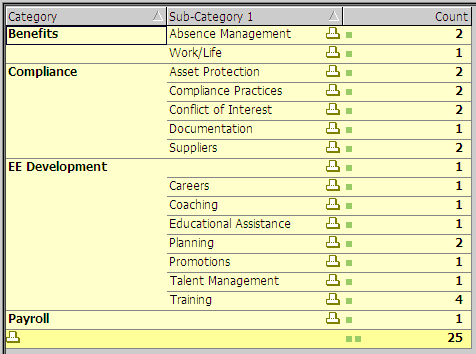
Figure 3
Output of supervisor report listing the activity counts by category and sub-category
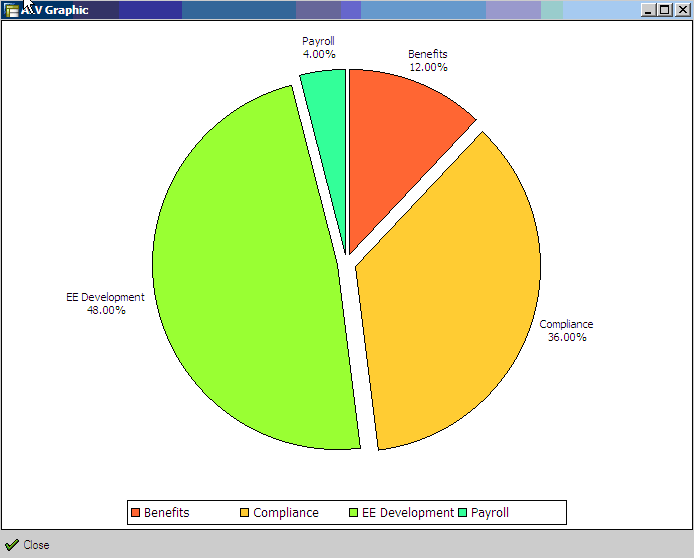
Figure 4
Output of the Supervisor Report indicating the volume of activities by category
Shared-Services Manager Dashboard — This is a dashboard report that is used by the upper management of an EIC-based shared-services organization to identify and report on the current workload of all the agent groups (or sub-organizations) within the shared-services center.
This report gives a high-level overview of the current and recent activities within the EIC system with various key metrics displayed by tiers of support. You run the report on a user-defined time line (monthly, weekly, quarterly, and annual). Some of the metrics that the report produces are as follows:
- Number of Open, In Progress, and Pending Activities by Agent Group
- Number of contacts (email and telephone) received within the SSC by Agent Group
- Number of activities closed by the shared services team by Agent Group
- Number of follow-up activities created, open, or closed by Agent Group
- Number of SLA Reminders and Violations for the reporting period by Agent Group
- Activity count by Category and Agent Group
Jarret Pazahanick
Jarret Pazahanick is an SAP Mentor, Human Capital Management (HCM) Certified Consultant, and Managing Partner of EIC Experts who has specialized in SAP HCM since 1998. He is a subject matter expert in US Payroll, Employee Interaction Center (EIC), and Enterprise Compensation Management (ECM). Over the past 14 years, Jarret has completed 20 high profile, full life cycle SAP HCM implementations for global Fortune 1000 companies. He is SAP HCM certified and ASAP certified; author for HR Expert, CloudAve, and ASUG News; and a moderator, blogger, and gold-level contributor on the SAP Community Network.
If you have comments about this article or publication, or would like to submit an article idea, please contact the editor.
Chandan Gopalani
Chandan Gopalani is a senior SAP HCM technical consultant with over 18 years of experience working on SAP projects across various industries and clients since 1995. He is co-founder of EIC Experts and specializes in Organization Management, Employee Interaction Center (EIC), US Payroll, Enterprise Compensation Management, ESS/MSS, Personnel Administration, Benefits, CATS, Finance, and Sales & Distribution. He is ABAP certified and ASAP certified, as well the author of several HR Expert article. He is currently working as an ECM consultant for a Fortune 50 client.
You may contact the author at cgopalani@eicexperts.com.
If you have comments about this article or publication, or would like to submit an article idea, please contact the editor.