DataStore object data usually updates when the user or system generates or changes source system documents. The data flows into SAP BW via a full load or delta queue extract. Unfortunately, the real world sometimes intrudes on this ideal scenario and requires you to edit data in BW directly. Discover the pros and cons of three methods of editing data in BW.
Key Concept
A maintenance dialog is a function group and set of screens that the system can generate automatically after you create a table. You then use these screens to maintain (view, modify, insert, or delete) rows in the associated table. You generate a maintenance dialog from transaction SE11 using the Utilities(H)>Table Maintenance Generator menu navigation. After generating a maintenance dialog, you use transaction SM30 to actually display the dialog so you can use it to maintain the table.
Imagine an example scenario in which the system passes a sales order from an R/3 system to BW, and then purges it in R/3. Much later you discover that the system should have credited it to a department, profit center, or person other than what the configuration rules defined. The configuration rules may be wrong due to the business changing — such as the assignment of the account to which the sales order belongs to department X when the account really transferred to department Y — but no one updated R/3 to reflect that. Eventually, department Y may discover this and require proper credit.
In another scenario, sales representative A makes a sale but sales representative B owns the account. Sales rep A notifies his manager so the manager can override the account assignments in R/3 to give sales rep A proper credit. Only later does sales rep A discover that the override never took place so he never got credit for the sale. But now the source data no longer exists in R/3. The two scenarios have a common pattern — the user cannot update the data in the source because the data is either purged, static, frozen, or off limits to updates. This forces the problem upon the BW team. How can you update data directly in BW when the business demands it and there is no other recourse?
The Sarbanes-Oxley Act imposed accounting standards and auditing requirements that further complicate these scenarios. Changing company data after its creation causes concern among management and auditors. Therefore, you only should grant the ability to change data in a production system after thoughtful consideration, on a temporary basis, and when there is no other alternative. In addition, you need to track the change for audit purposes.
We’ll discuss three methods for manually correcting or changing data in a BW DataStore object (formerly operational data store [ODS] object) when you cannot change it and regenerate from the source system — changing the data in the Persistent Staging Area (PSA) and reloading it into the DataStore object; using Open Hub to export and import records; and using an ABAP routing with parameter input. Since these methods are by their nature not routing practices, we created an audit process around the change, even if it is simply filling out a form noting the action and submitting it to management for record keeping. These methods apply to BW 3.5 and the BI component in SAP NetWeaver 2004s. For a brief discussion of the positive and negative aspects of each method, see the “Pros and Cons” sidebar.
We’ll show how to change values in a DataStore object that a delta mechanism populates on a regular basis. We’ll use a DataStore object called Z_ODS as an example and need to change the 0SALESORG (Sales Organization) field. For this discussion, we’ll assume that we need to make changes for sales order 3000016180.
Note
You can download a fourth method of editing DataStore object data, directly editing a DataStore active table through a data browser, by clicking this link. The fourth method presents some security risks and only applies to select situations.
In methods 1 and 3, you can implement auditing of the changes with some ABAP expertise. Refer to the “Pros and Cons” sidebar for relevant notes. You would create a maintenance dialog and implement code to write to a change log. The system performs this auditing outside of the batch cycle, so it would not affect extraction, transformation, and loading (ETL) performance. Many BW developers would not have the ABAP experience necessary to implement a maintenance dialog. Because properly tracking changes to your data is vital, you should obtain the ABAP resources necessary to audit when changing company data. We’ve mentioned details about maintenance dialogs in the Key Concept.
Method 1: Change the Data in the PSA, Then Reload It
In this method, we’ll check to make sure we have the proper settings, delete the request ID so we can edit data in the PSA, and then reload it into the DataStore object. This method is particularly useful for sites that prevent backdating or changing of data in R/3 even for data that is only a few weeks old. In this case, it is likely that you can still access the data in the BW system’s PSA.
The system generates request IDs during the ETL process to keep a chronological history of all updates and loads that the system has performed. During the extraction process from a source system, the system moves the data selected for each request from the source system and bundles it into packages within the request before loading it into BW.
For this method to work, you need to have chosen the appropriate settings in the InfoPackage Processing tab, namely the PSA and then into Data Targets (Package by Package) or PSA and Data Targets in Parallel (Package by Package) options that designate loading into both the PSA and data target (Figure 1).
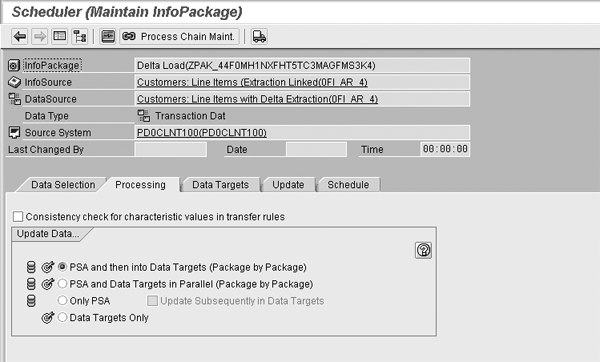
Figure 1
InfoPackage processing options
Manually changing data in the PSA requires you to delete the request IDs associated with them by using the Manage Data Targets screen, which we’ll discuss in this section. The system assigns unique request IDs to each data load during the loading process. Deleting the request ID is a means of undoing or rolling back the changes from the DataStore object and results in the physical deletion of the data associated with the request ID from the DataStore object. Of course, in this method, the data still resides in the PSA, which we’re going to edit and reload.
First, you need to find a request ID associated with data that you need to edit in the PSA. It is not a straightforward process, but we’ll break it down into three steps, and determine the request ID very quickly by retrieving the request number for the data extract from the underlying database table that represents the PSA, and cross-referencing that to a request ID.
You must determine the underlying RDBMS table name for the PSA associated with the transfer structure. There are various ways to arrive at the name, but the quickest and simplest way is to use Data Browser, transaction SE11, and search the short text descriptions for the DataSource associated with the DataStore object. BW creates a PSA and assigns a database table name starting with /BIC/Bn… for each transfer structure. Using transaction SE11 with that naming convention as a search mask, you can then use the binoculars icon  to search for the DataStore object, whose name is part of the short text in the dialog box. In Figure 2, you can see that the DataStore object is named /BIC/B0000701001.
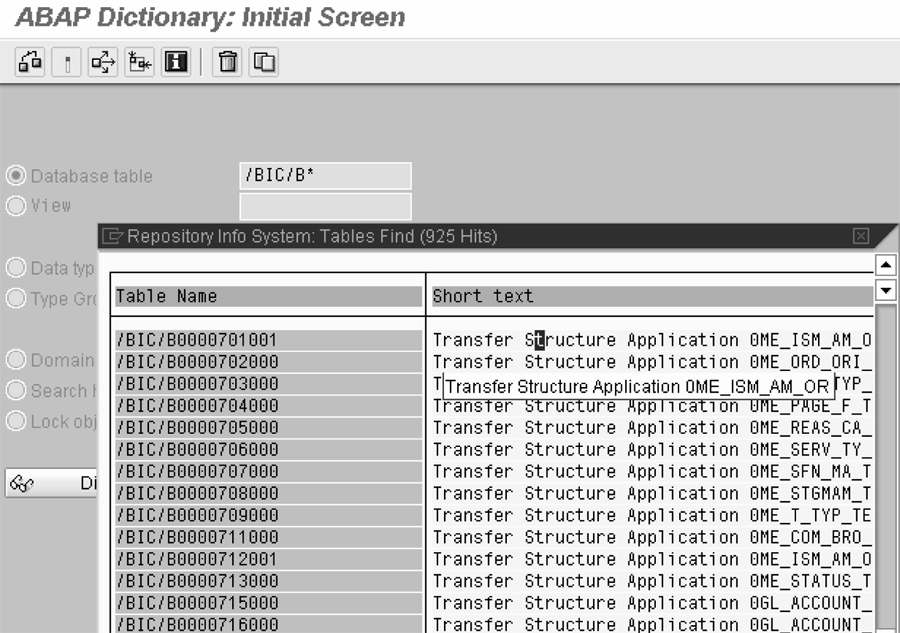
Figure 2
Search for PSA table associated with DataStore object.
Next, you need to view the PSA database table identified in the previous step by using transaction SE11 and finding the transactional data using their natural keys — any semantic description that would identify the data, such as employee name, employee ID, order number, or document number. In this example, you’re looking for order number 3000016180, which is under the AVM_NR column. Once you find it, you can retrieve the request number under the REQUEST column in the same row (Figure 3). Copy the request number onto the clipboard because you’ll need it as you move on to the next step.
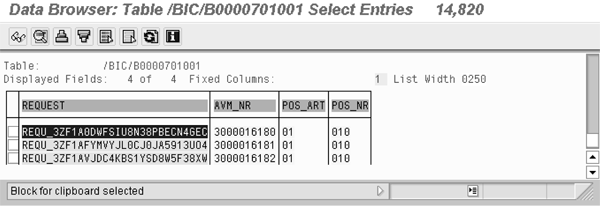
Figure 3
Find the request number for an order
Finally, you need to associate the request number to a request ID. You need to use table RSICCONT, which provides a cross-reference between request numbers and request IDs. Using transaction SE11 again, you can view RSICCONT by specifying it on the initial selection screen and then its contents by clicking on the list icon  as shown in Figure 4.
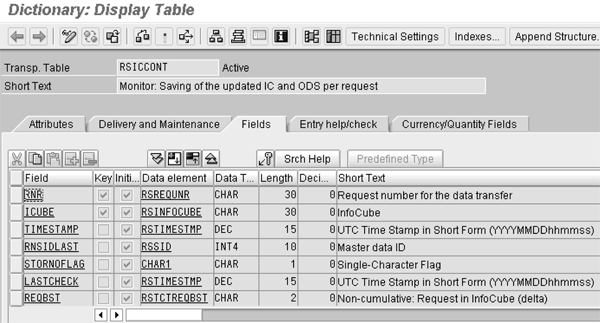
Figure 4
View table contents by clicking on the list icon
You need to query the table for rows containing the request number. For the selection criterion, paste the request number from the clipboard for field RNR (Figure 5).
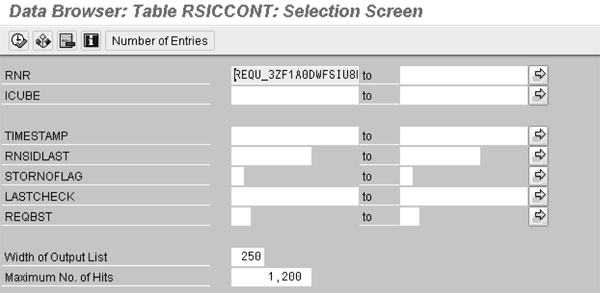
Figure 5
Retrieve a particular row from table RSICCONT with the request number as the selection criterion
By viewing the row of data in Data Browser as shown in Figure 6, you have now cross-referenced the request ID with the request number and determined that you need to delete request ID 3972 from the target. Request ID 3972 is the key to the rows in the PSA that contain the data that you want to edit. It also is the first package that you need to delete and re-apply after editing the data in the PSA (Figure 6).
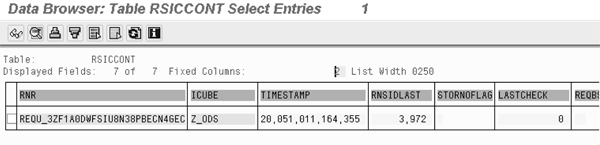
Figure 6
Cross-reference the request number to the request ID
Now you know the request ID that contains the data you want to change. Deleting that request allows you to edit the data in the PSA manually. Prior to deleting the request ID, you can only view the data in read-only mode. Since you’re changing historical data, it is unlikely that the request ID associated with the PSA data that you need to edit manually is the most current. This means that you need to delete all requests subsequent to, and including, the request in question. BW deletes the requests subsequent to the request in question, in this example request 3972, automatically after prompting you, as Figure 7 shows. Upon confirming the dialog box, the system deletes request 3972 and all subsequent requests (through 3978) from the data target.
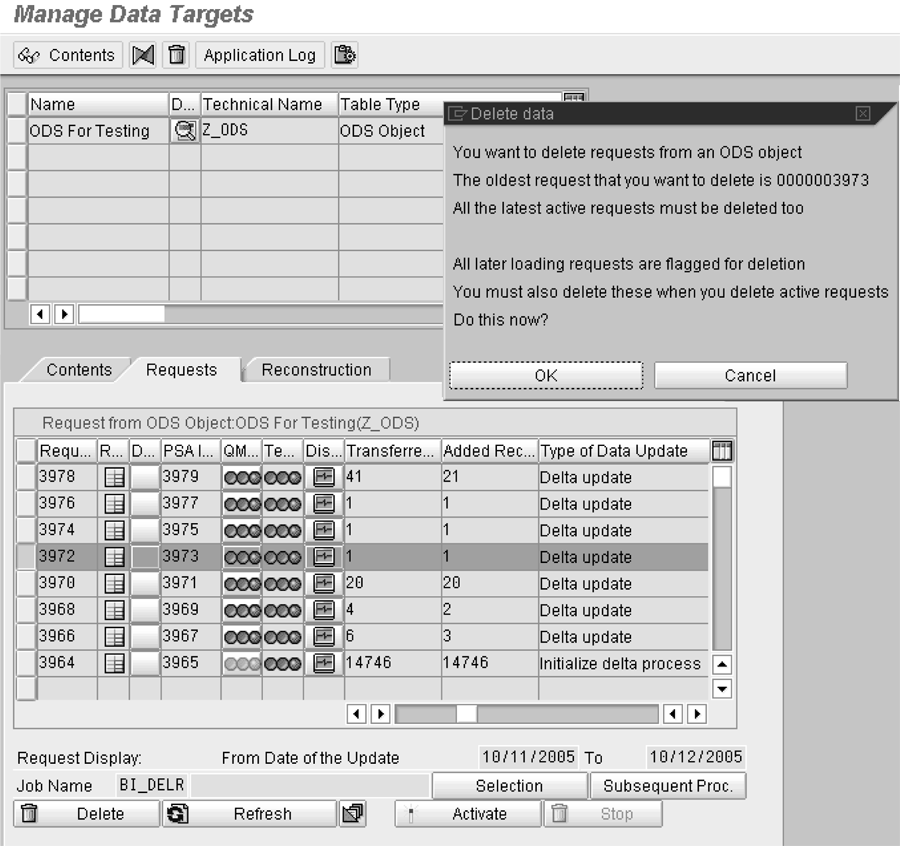
Figure 7
Delete applied requests from the DataStore object.
Through Administrator Workbench (transaction RSA1), or using transaction RSA15, you can edit PSA data. As Figure 8 shows, now four requests in the PSA are inactive in the target — they are marked with the  icon. The requests in the monitor that change from
  to
to  depict requests that require manual processing.
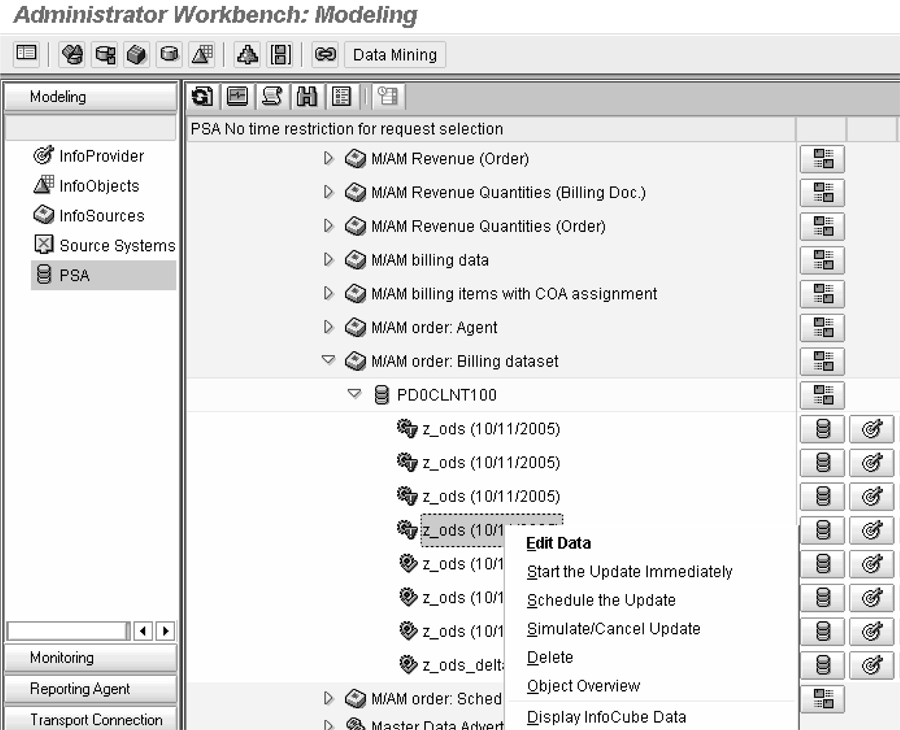
Figure 8
Select a request that you need to edit from the PSA.
Select the request containing the data you want to edit which you can identify by its request number, and from the context menu right-click and select Edit Data as shown in Figure 8. You need to be careful when editing packets generated by a delta queue — some data records, for instance those with a delta update mode of X, are reversals and changes of prior records. If you’re not sure about which record to change, either refer to delta queuing documentation or choose another of the three methods we discuss.
You need to be aware that the PSA contains all the fields of the DataSource, which may be a superset of the fields the target contains. You may need to search the fields of the record to find the relevant data. As Figure 9 reflects, we manually changed the sales organization from 1000 to 1999, and saved the record.
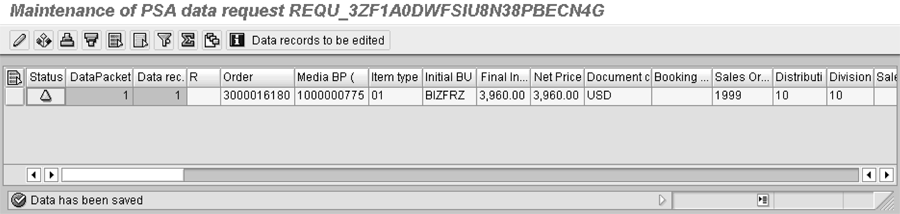
Figure 9
Result of editing data.
Next you need to begin the process of reapplying this and subsequent PSA requests back to the DataStore object, which you do from the Reconstruction tab of the Manage Data Targets screen (Figure 10). You can load request IDs individually or select all affected request IDs that you want to reconstruct. If you select them individually, you start with the earliest, the one associated with the PSA change, and work your way through to the latest.
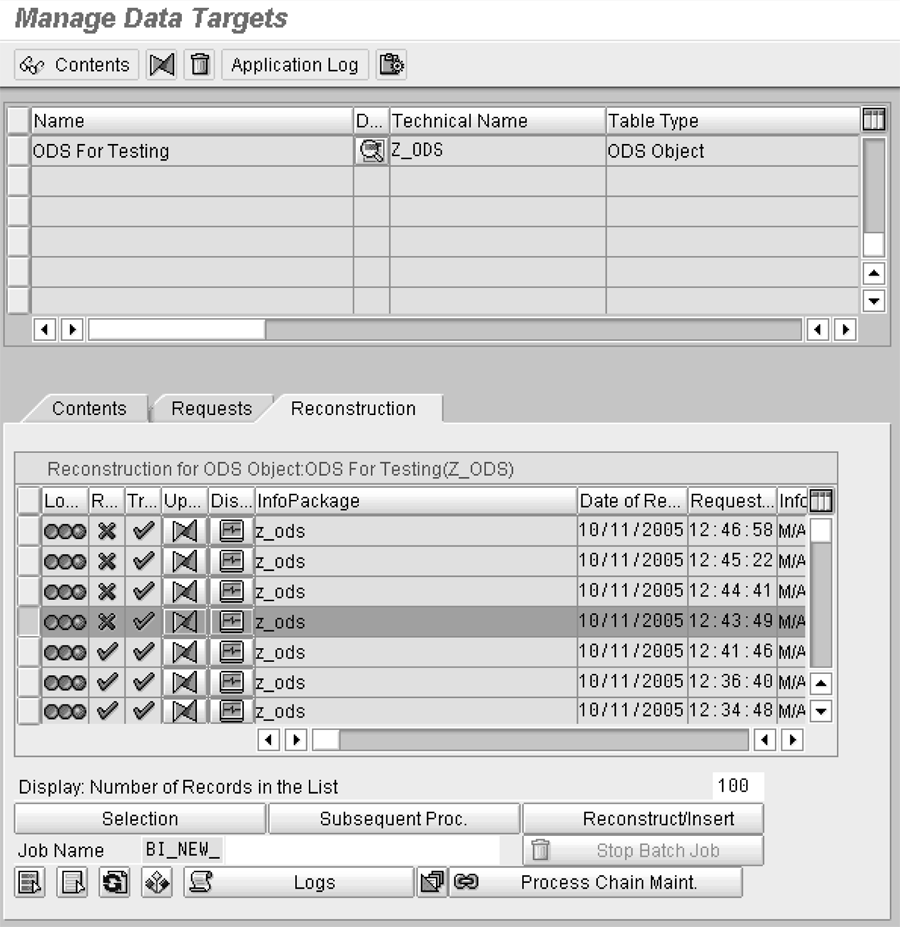
Figure 10
Reapply requests to the DataStore object.
Viewing the contents of the DataStore object through the Manage Data Targets screen, you can see that, after the manual changes and reapplying the requests, the value in 0SALESORG becomes 1999 for order 3000016180 (Figure 11).
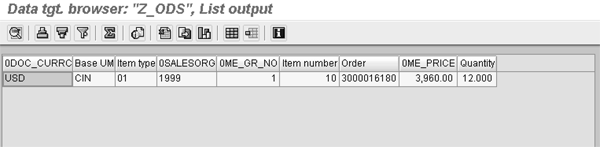
Figure 11
View results of edited data in the DataStore object
In the example presented here, we assumed that the DataStore object is not a source of delta loads to an InfoCube in a data mart scenario. However, using this method should not necessarily disrupt the delta queue, especially if you synchronize the deltas from R/3 to the DataStore object, and from the DataStore object to the InfoCube. If the DataStore object was sending deltas to a data mart, you would first delete the request(s) from the data mart, then uncheck the Data Mart Status (appears as D… in Figure 7). Then, you would delete the packages, edit the PSA, and perform the reconstruction that we described in this method. Finally, you would resume your regular schedule of delta loads from R/3 to the data mart without reading the package at the data-mart level — doing so would duplicate the affected records in the data mart.
Method 2: Export/Import of Individual Records through Open Hub
This method is particularly useful for sites that need to change data that is fairly old, making it likely that the system purged the BW PSA.
Open Hub allows you to extract some or all data from a data source (InfoCube, DataStore object, or master data) to a flat file or database table. Once you have extracted the data from the data source to a flat file or database table, you can edit the data and reload it back into the DataStore object via a standard flat file InfoPackage.
In BW 3.5, you access Open Hub in the Tools menu in Administrator Workbench. In the BI component of SAP NetWeaver 2004s, you access it under the Modeling area of the Workbench. The tabs on the screen let you define the data source and destination, select InfoObject fields to export, and provide selection criteria. You can also perform transformations using a Business Add-In (BAdI) on the last tab. Note that the system does not display metadata InfoObjects, such as request IDs, for export; it only shows those InfoObjects that exist in the data provider.
As Figure 12 shows under the Selection tab, specify and export the record that you are going to edit to a local drive in a .csv file. After exporting the selected data, edit the resulting .csv file with Notepad or another similar text editor per Figure 13 and change 0SALESORG from 1999 to 2999.
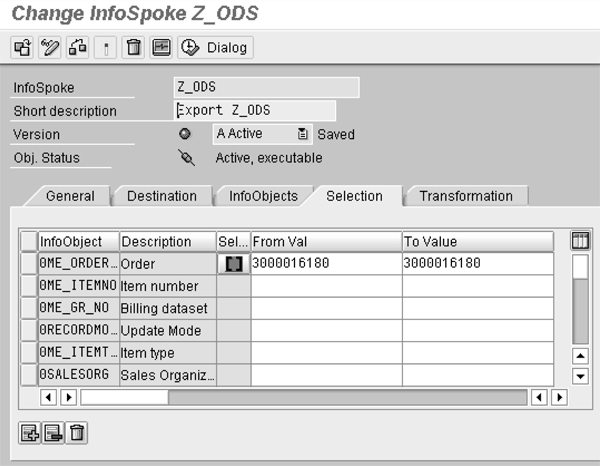
Figure 12
Supply selection parameters for the data to extract to flat file

Figure 13
Manually editing the data in a text editor
Then, using an InfoPackage and a flat file, you can import the record back into the DataStore object. You may have problems with unit of measure (UOM) conversion exits, which are not required on export/imported data since they’re already in a human-readable American Standard Code for Information Interchange (ASCII) format. To avoid these problems, you can turn them off on the data source by removing the conversion exit specification from the DataSource/Trans. (Transfer) Structure tab, as Figure 14 shows. By not specifying the conversion exit, the system won’t invoke it. After reloading the flat file, you can view the changes using Manage Data Targets (Figure 15).
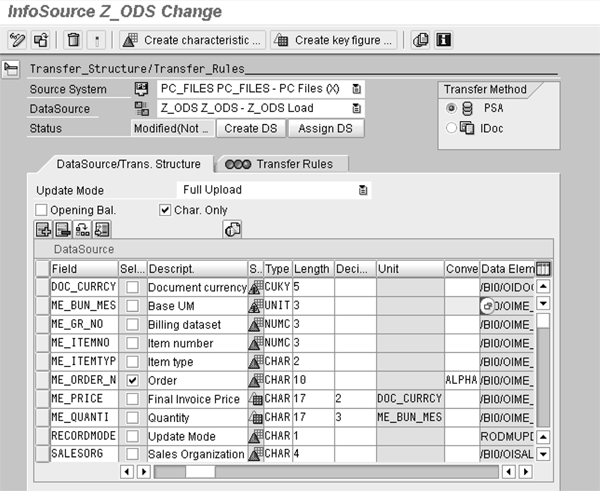
Figure 14
Remove a conversion exit specification to prevent it from executing

Figure 15
View the resulting changes in the DataStore object
Method 3: Use an ABAP Routine with Parameter Input
This method is particularly effective for sites that have a very good ABAP support team that can tweak the program code if it needs to update a field.
You can write an ABAP routine that presents an input screen to the user that allows you to supply the sales order number and new SALESORG value. The ABAP routine then makes the necessary updates to the database for that order number.
In this example, you only use the order number as an input parameter, but you can include finer granularity, such as the item number, billing dataset number, and so on, in the input screen from transaction SE38. You can also implement auditing functionality with this method. You can capture relevant data about changes to a table, such as user, date, and before and after values, with an audit table. After you click on the execute icon, the system performs the database update and produces a diagnostic message (Figure 16).

Figure 16
Diagnostic message from ABAP program
After executing the ABAP program, you can see the changes reflected in Data Browser (Figure 17).

Figure 17
View the resulting changes in the DataStore object
Figure 18 displays part of the ABAP code that you need for making the changes to the DataStore object database table. Note that we have included procedural logic to capture the change to an audit table. The audited data captured includes the values that Figure 16 displays, plus the table and field name. You can download the full code by clicking this link.
<span style=”background-color: #ffe4b5”>
REPORT zz_update_ods. TABLES: zods_audit.
DATA: wa_audit LIKE zods_audit. DATA: itab_ods TYPE STANDARD TABLE OF /bic/az_ods00,
wa_ods LIKE LINE OF itab_ods. PARAMETERS: p_ordr LIKE /bic/az_ods00-/bic/z_order_n OBLIGATORY,
p_new_s LIKE /bic/az_ods00-/bic/zsalesorg OBLIGATORY.
|
| Figure 18 |
ABAP program to change the DataStore object |
Pros and Cons
Method 1: This process offers several advantages and disadvantages. On the plus side, SAP supports all of the activities we documented above and makes them standard. It is possible to change all fields and all records in the PSA, and also possible to delete records from the PSA. This does not necessarily disrupt delta repeats in a data mart scenario, and you can implement auditing with a maintenance dialog.
The method’s negative aspects include that you can only change history to the extent that it exists in the PSA. If the system purges the PSA, you need to use another method to change the DataStore object. You can change all the fields and all the records in the PSA and can delete records from the PSA, which we listed as an advantage above, but clearly this poses problems as well: Someone could delete vital company data through design, ignorance, or neglect, which could result in the loss of company data and lead to incorrect decisions, invalid financial statements, and so on. There is also no built-in audit trail to reflect the changes.
Method 2: As with method 1, SAP supports these activities and provides them as standard, and it is possible to change all fields and records, or delete records, in the PSA. This method also does not depend on the PSA being intact.
Several of the cons echo those of method 1 as well. It is possible to change all the fields and records, and to delete records, in the PSA. This can be dangerous, and there is no built-in audit trail to reflect the changes or the ability to implement auditing via a maintenance dialog. Other negative aspects of this method include the difficulty in identifying the correct field in the text file, which increases the probability of error while editing the data in a text editor. Also, if the DataStore object you edit generates deltas to a downstream data provider, such as an InfoCube data mart, then you need to reload that downstream target using a full reload. Additionally, directly editing the active DataStore object table via Open Hub disrupts the delta mechanism.
Method 3: The positive sides of this method include that it does not depend on PSA data being intact. Also, the framework of the ABAP program restricts what you can do, and the user can only change certain fields. The scope of the change is limited to the order number parameter that the user enters. In addition, you can create an audit table and record changes made to the DataStore object, thereby satisfying company and regulatory requirements about data access.
As with method 2, if the DataStore object you edit generates deltas to a downstream data provider, you need to reload the downstream target using a full reload. In addition, directly editing the active DataStore object table using ABAP disrupts the delta mechanism. No built-in audit trail exists to reflect the changes.
Brian Hether
Brian Hether is the manager of data warehousing at The Washington Post. He has 17 years of data warehousing experience, most recently with SAP NetWeaver BW, helping take the system live in 2007. He holds a bachelor’s degree in mathematics, a master’s degree in information systems, and a professional development certification in business administration from Georgetown University.
You may contact the author at hetherbk@yahoo.com.
If you have comments about this article or publication, or would like to submit an article idea, please contact the editor.

Jerry Coleman
Jerry Coleman is a senior analytics developer at The Washington Post. He has 17 years of IT experience on Oracle, PeopleSoft, and SAP systems. He has been a BW developer for two years. He is a certified ABAP developer and a certified Oracle DBA.
You may contact the author at jerryacoleman@yahoo.com.
If you have comments about this article or publication, or would like to submit an article idea, please contact the editor.



 Premium