Understand how the Service Parts Planning Supply Network Collaboration (SNC) Product Detail user interface (UI) enables information sharing, improves decision making, promotes collaboration, and creates extended supply chain visibility in the aftermarket industry. Learn how to implement the SNC Product Detail UI for your organization and restrict the data that can be seen by your supply chain partners.
Key Concept
In the aftermarket (or spare parts) industry, product volumes are high and demand can vary from rapid to irregular and sporadic. This makes downstream processes, such as forecasting, stocking products, and procurement from suppliers within lead times, more complex and challenging. The Product Detail user interface (UI) for Service Parts Planning in SAP Supply Network Collaboration provides real-time data visibility to both internal supply chain analysts as well as external supplier partners. This Web-based tool can be configured to restrict some of your suppliers from viewing certain information, such as your current stock.
The aftermarket or spare parts industry yields high margins and can boost the corporate bottom line. On the flip side, it can also bring challenges. Service parts inventory in an industry such as automotive covers the gamut from slow movers to fast movers with demand ranging from sporadic to seasonal, and in high volumes. Often there is a lack of supply chain visibility, and the supply chain partners can/may make decisions in isolation. This information asymmetry may cause a negative domino effect in the aftermarket industry that typically has millions of stock keeping units.
Information sharing in real time between supply chain partners can help alleviate these concerns. Supply Network Collaboration (SNC) is a collaborative Web tool for enhanced supply chain visibility, supplier interactions, and communication. SNC for Service Parts Planning (SPP) provides a part analysis tool, the Product Detail user interface (UI), for the aftermarket industry. This facilitates real-time collaboration between analysts in your organization and supplier partners by providing visibility into information, such as demand, forecast and planning results, in one place.
Using an illustrative case study of aftermarket parts for an automotive company, the authors first explain specific information about the Product Detail UI and how you can tailor it to your organization’s requirements. Your supply chain analysts and supplier partners can enhance productivity and collaborate by viewing information in one place. Other complementary tools, such as Shortage Monitor, are also available in SPP SNC for enhanced collaboration. We also show how you can restrict your supplier partners from viewing some of the critical information, such as your stock level.
Then we show SPP SNC deployment options and its architecture using the example of an SNC implementation, along with some lessons learned based on SPP SNC implementations.
Collaboration Through SNC Product Detail UI
Organizations intending to collaborate with their suppliers often face multiple challenges:
- The need for a scalable solution to share information with the supplier partner ecosystem.
- Availability of real-time information for supply chain analysts and supplier partners.
- Suppliers may be on incompatible technology platforms. To avoid developing different approaches for individual suppliers, the information has to be accessed over a common platform, enabling analysts and supplier partners access using Web browsers.
- The need to reduce change management and training efforts for both internal analysts and supplier partners.
- The need to limit the data fields and columns displayed to just the ones that are important for the daily activities of users.
If SAP SPP is your platform of choice, implementing SPP SNC for Web-based collaboration can help address the challenges highlighted above. The visibility of demand, forecasts, purchasing documents, schedule delivery lines, and Advanced Shipping Notification (ASN) information enables suppliers and internal analysts to collaborate better because they are viewing the same information.
SPP SNC provides separate transactions for internal analysts and planners and suppliers to access the Web portal. Internal analysts can access SNC using transaction /SAPAPO/SPP_CUSTOMER, while the suppliers can access it using /SAPAPO/SPP_SUPPLIER or by following menu path Advanced Planning and Optimization > Service Parts Planning (SPP) > Reporting / Monitoring > Web UIs for Service Parts Planning > SPP - Supplier View or SPP - Planner View (Internal).
Setting up business partners and Internet users is a prerequisite for accessing SNC. The business partners and Internet users are set up using transaction BP. An organization could have separate roles for analysts responsible for demand planning, forecasting, and distribution requirements planning. This separation of duties is modeled through planners as system configuration or role assignment in SPP. The analysts responsible for specific areas such as Demand Planning as assigned to a respective planner. The planners are set up using transaction code SPRO configuration, while the assignment of the analyst to the specific planner is done using transaction /SAPAPO/USRPLN.
Supplier analysts and internal analysts access SNC by executing the above transaction, following the menu path provided earlier in this section or using the direct link on a Web browser. They can view various drop-down menus, such as Shortage Analysis, Release Process, Purchase Orders, and Supplier Confirmations. While each of these provides specific information, the Product Detail screen provides detailed, real-time information on the parts, facilitating collaboration. The Product Detail is under the Shortage Analysis Menu. This is accessed by clicking Shortage Analysis and selecting Product Detail from the drop-down menu. The following sections describe how the functionalities and information in Product Detail can be used for collaboration and enhanced business benefits.
Product Characteristics and Overview
To effectively identify the overall health of the part, the internal analyst can consult the information in the Overview (Figure 1) and Product tabs (Figure 2). In the Selection Area, enter the product or product and location and optionally the location to view the details for the product.
For example, the analyst can identify the supplier of a part that is short and check the lead time it takes to procure the part. The analyst can also collaborate with suppliers to expedite a shipment from surface to air if the default transportation time is based on surface and the part is needed promptly.
Similarly, as the product approaches the production end date, the analyst can expect a reduced part requirement and analyze it against the purchase orders and schedule line quantities that are generated by planning. The supplier gets this real-time information and can plan to reduce its production and assembly line capacity. It can also check the quantity that has already been shipped and is in transit, and confirm the expected delivery date to the analyst. Similarly, it can enhance part packaging and reduce waste by using the part dimensions, such as length, volume, or weight. If the part is identified as hazardous or pilferable, the supplier and analyst can take precautions, such as requisite packaging to facilitate safety.
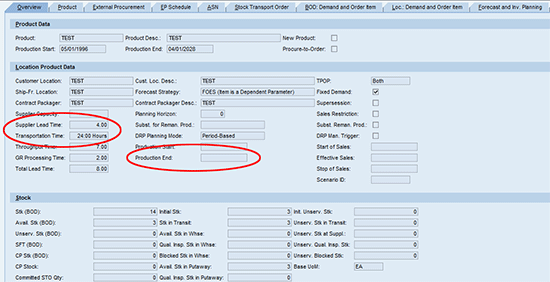
Figure 1
Overview tab
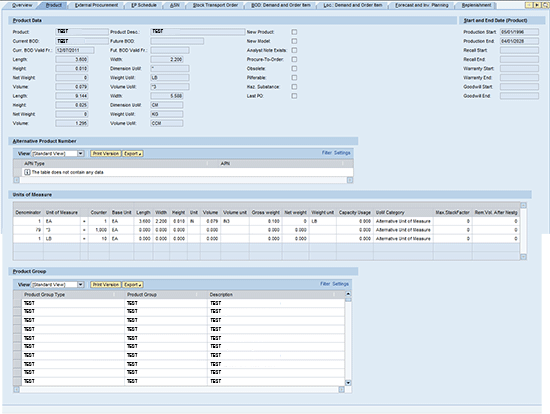
Figure 2
Product tab
Demand Collaboration
A common concern of suppliers is the lack of visibility into historical customer demand and forecasts. The lack of visibility means they often see unexpected fluctuations in the customer schedule lines due to events, such as promotions, and find it difficult to adjust their production and assembly line on short notice. At the same time, the internal analysts use the demand data to identify trends. Demand collaboration is achieved by sharing the demand data real time through Product Detail.
Sharing of historical demand data can be done for specific locations in the network or bill of distribution (BOD), at which the customer has demand for the product (Figure 3) or for demand at specific locations (Figure 4). To view historical demand at a particular location, you enter the product and location in the search criteria. As soon as demand UIs are updated in the SPP GUIs (i.e., received in the source SPP system), the same detail is updated in SNC in real time.

Figure 3
BOD Demand tab
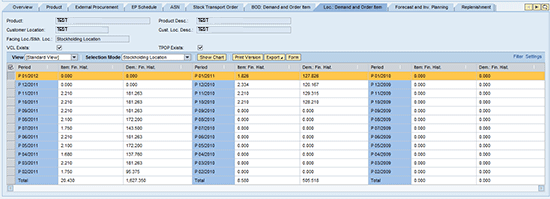
Figure 4
Location demand tab
Forecast Collaboration
The analysts in your division can collaborate with other divisions within your organization by sharing forecast data (such as forecast demand, forecast order items, or safety stock by periods). For example, the parts and manufacturing divisions may be separate in your organization. We have seen organizations at which forecast demand is high and order items are low for manufacturing divisions, while parts divisions have fluctuating demand and order items. Parts that are critical and in short supply in one division can be obtained from another if there is an excess in the other. Similarly, from an overall organization profitability standpoint, safety stock can be routed between divisions if a customer for your organization requires it promptly from the parts division while the same part is in transit from the supplier for the manufacturing division.
Analysts can also collaborate with the suppliers on the expected demand in the future for locations that need replenishment by sharing the forecast data. Since this is real-time information, suppliers can also anticipate future requirements and spikes by viewing historical demand.
As shown in Figure 5, you can collaborate with the supply chain partner for outliers and exceptions. For instance, one of the periods for Item: Final History or Demand: Final History might be beyond your acceptable threshold. The supplier can also view the forecast across periods at the item and demand level and collaborate with the analysts on forecast and replenishment
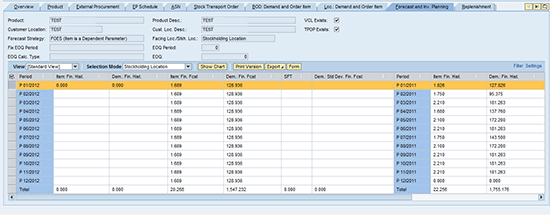
Figure 5
Forecast and Inventory Planning tab
Schedule Collaboration
Organizations normally have contracts and agreements with suppliers for obtaining certain quantities of parts in a specified time frame. The suppliers base their production on schedules and purchase orders they receive against the contracts and agreements. Often when analysts in the organization change the schedule or purchase order (e.g., expecting early delivery or increasing the order quantity in a particular order), the changes are seen without delay by the supplier. If the change is within the normal lead time, an exception alert is also raised to notify the supplier.
If the time window is too short to fulfill the purchase order change, the supplier sends the analyst the projected shipping date and quantity by creating a confirmation from the Supplier Confirmation UI. The analyst views this information (quantity and confirmation ship date) in the EP (External Procurement) Schedule tab and can communicate to the customer.
When the product is actually shipped by the supplier, an Advance Shipping Notice (ASN) can be sent. This ASN provides real-time visibility to the analyst. Figure 6 shows the external procurement purchasing relationships that exist for the product with the suppliers. Figure 7 shows the open schedule and purchase order with the supplier, along with details for collaboration, such shipping and delivery dates, destination locations, the quantity that has been shipped, quantity in transit, and means of transport for the product.
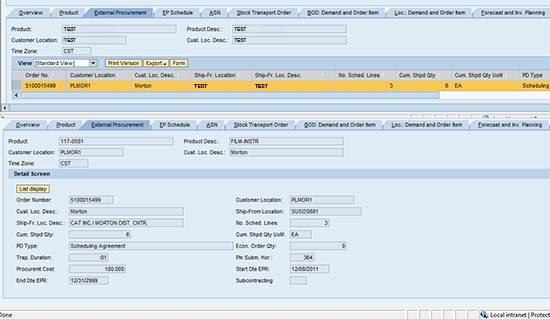
Figure 6
External Procurement tab
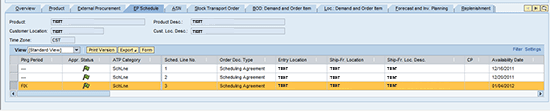
Figure 7
EP Schedule tab
Miscellaneous Data Collaboration
You can also facilitate decision making and collaboration by sharing other data, such as fixed demands (Figure 8) and stock. When you see a customer order that cannot be fulfilled due to a stockout, you can use other SPP SNC processes, including the Shortage Monitor, to expedite and also increase the schedule quantities when the inventory falls below defined days of supply. The supplier is also informed via alerts on exceptions (e.g., when schedules are changed within the lead time or schedules go past due and are not fulfilled as described previously).
The sales team may forecast that more customers require specific parts to be replaced in a certain month or that there is a recall for a specific product. To efficiently serve the increased need in a specific period, you can create a fixed demand that in turn increases the schedules and quantity to be procured from the supplier. You can also share the current stock data if your organization decides to do so.

Figure 8
Fixed Demand tab
Control Data Visibility in Product Detail UI by Partners
Your organization may be comfortable with sharing only certain information with the suppliers, such as forecast and schedules. You might be wary of sharing the current internal stock for the product if it is being procured from multiple suppliers or you don’t do a Vendor Managed Inventory. To overcome these concerns, you can enable specific suppliers to view information in Product Detail and collaborate with you. You can also limit the screens or tabs the suppliers can view if you plan to collaborate and share the information in Product Detail with them. This can be done by following menu path Advanced Planning and Optimization > Service Parts Planning (SPP) > Reporting/Monitoring > Hide Tab Pages for Product Detail (Planner) and Hide Tab Pages for Product Detail (Partner) or by using transactions /SAPAPO/SPP_PDPL and /SAPAPO/SPP_PDBP.
If the supplier is maintained in the above transaction, then access to specific screens in Product Detail is available for that supplier. To remove visibility to specific screens in Product Detail, you mark the check box. As shown in Figure 10, for example, supplier BP TEST1 has access to Product Detail screens. So do the supplier BPs other than TEST5. TEST5, although maintained in the table via the transaction given above, has access to Product Detail, but since specific checkboxes are marked, cannot view data in Product Detail screens and could just see Product Detail screens without data.
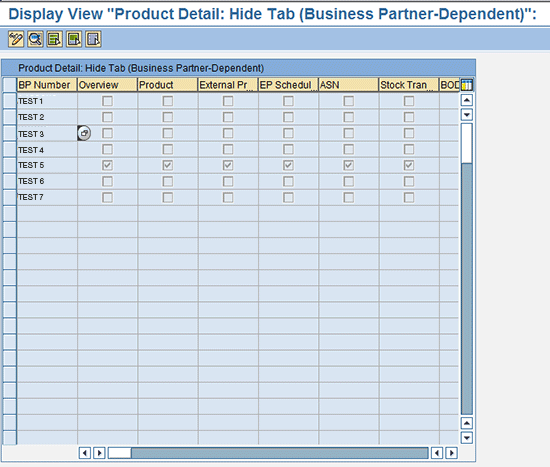
Figure 9
Tab for hiding business partners
SPP SNC Deployment Options and Architecture
In a typical user landscape, SAP implementations involving SNC integrate with legacy systems for data sources unless an SAP system is completely replacing existing systems. You can implement SNC in a couple of ways depending on the landscape, scope, and related criteria. Each approach has its advantages
Deployment Options
- Integrated with SCM landscape as a part of SAP APO and SPP: This approach uses the SAP SCM suite for planning functionality on the same server that is now connected with supply chain partners through SNC. Since the components are on one server, the hardware capacity requirements could be higher depending on the transaction data volumes, but the data integrity is better since it resides within SAP. In this option, SNC is part of overall SAP SCM (APO, SPP, EWM) landscape and sits on top of SCM Basis and SAP NetWeaver components.
- Implemented as a standalone SNC solution: In this “lite” approach, SCM planning functionalities and SNC may be on different servers and SNC is installed as a standalone server. These are hosted on different servers and data is streamed through SAP NetWeaver or XML messages without overlap with the existing APO implementation and with integration to other planning systems.
Architecture and Functionality Integration
Companies consider and implement SNC for various benefits, such as having a single platform integrated within the SAP SCM suite for collaboration internally across divisions of the organization or externally with supply chain partners. A single standard system enables easy viewing and navigation across the intranet and Internet. An associated benefit is that users can carry some of the search criteria from one screen to another while navigating within SNC, thus saving time. Figure 10 shows Deployment Option 1 described above with integrated SAP systems such as ERP and CRM.
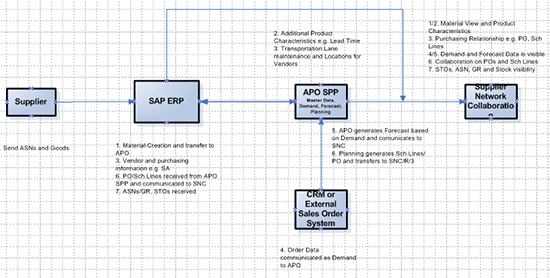
Figure 10
SNC architecture and functionality Integration
Example in Figure 10 shows that:
- SAP ERP Central Component (ECC) is used as the central hub for material creation that is exchanged via the Core Interface (CIF) with APO/SPP in the approach in which SNC is integrated with SCM.
- Additional product characteristics are added in APO such as lead times.
- The supplier or vendor information is also transferred from ECC to APO/SPP as locations, and the transportation lanes and purchasing relationship are maintained in APO.
- Since the planning functionality is housed in SAP, APO SPP Planning functionalities get the demand data from SAP CRM or external systems. This demand is visible in SPP GUIs and also viewed in SNC Product Details as described previously.
- Forecast is generated based on the demand and shared with supply chain partners via SNC.
- Similarly, since the planning engine is housed in SCM, the generated purchase orders and schedule lines are transferred to ECC and communicated to SNC via XI communication.
- Stock transport orders are generated in ECC and communicated to SNC along with ASNs and goods receipt, and the stock is updated. ASNs and GRs can be created and updated directly in SNC by suppliers, or, if you are using EDI, it is communicated via ECC.
Based on the above process, internal analysts and supply chain partners can view specific information in SNC in real time and collaborate more effectively and efficiently.
Data Sources and Infrastructure
As seen in Figure 10, the data for SNC primarily comes from the SAP ERP and SAP APO/SPP systems. In an integrated environment (such as deployment option 1 above), the data source is the integrated SAP landscape with SAP ERP as the hub and detailed data flowing from SAP ERP to APO/SPP and displayed in SNC. For instance, ASN and purchase order data flows from SAP ERP to SNC. If SPP is the planning engine (i.e., for forecast, demand and planning functionalities), then the data can flow effectively from SPP to SNC as shown in Figure 10.
If your organization is using leading combination of packages and SPP SNC is considered only for collaboration (such as deployment option 2 as “lite” SNC), the collaboration data could be integrated to SNC from the existing systems. SNC provides hooks via XML message formats to integrate the data.
The infrastructure needed to implement and sustain SNC depends on multiple factors, including:
- Deployment strategy.
- Customers: May include internal usage across divisions or much of the supply chain ecosystem (including suppliers and internal analysts).
- Data requirements: The industry and size of the company determines data volumes. Higher data requirements normally have higher infrastructure requirements when combined with other infrastructure drivers illustrated here.
- Leading performance indicators (KPIs): The use of the systems for other activities, such as planning or data transfers, affects the performance and speed of real-time data availability.
In areas such as the automotive industry, the data requirements and need for quick decision making is high. We have seen application server requirements ranging from just a couple to over a dozen with speeds in multiple Gbps between the application servers. The overall hardware and performance requirements and expectations are a critical factor for SNC implementations (and are thus mentioned in the Lessons Learned section below).
Lessons Learned
Similar to other technology implementations, SNC implementations have their own challenges. Project Managers and Analysts on SNC implementations can consider the following to mitigate the implementation challenges.
- SNC is a tool for collaboration. Develop a business case and get the stakeholder and supply chain partner buy-in for collaboration.
- Decide the deployment option for SNC, keeping the long-term view in mind (i.e., consider the current and future business environment and SAP system components during design, including expansion across geographies, the supplier base, and data shared across SAP components for collaboration).
- Collaboration is as good as the underlying data. Pay close attention to data integrity across SAP and non-SAP system components. It is important to keep the systems in sync. A dedicated data strategy and integration team is a good idea if multiple SCM components are implemented along with SNC.
- Determine the SNC effectiveness criteria (such as improving availability by a certain percentage).
- Perform a detailed analysis of hardware capacity requirements with a sizing exercise.
- Work with the business and IT and infrastructure teams from the beginning to define the KPIs for SNC performance. Determine the supplier access to SNC (e.g., log in through single sign-on), reverse proxy, or using a VPN) and manage expectations.
- A supplier enablement strategy is equally important. It may be effective to implement and collaborate with 20 percent of the suppliers with whom the company has 80 percent of its business. Define the SNC rollout strategy, first internally within the organization and then in a phased manner to the suppliers by product groups or geographies. Do not underestimate the training and change management processes.
Deloitte, its affiliates, and related entities shall not be responsible for any loss sustained by any person or organization that relies on this publication. As used in this document, “Deloitte” means Deloitte Consulting LLP, a subsidiary of Deloitte LLP. Please see www.deloitte.com/us/about for a detailed description of the legal structure of Deloitte LLP and its subsidiaries.
Sanjiv Shahrawat
Sanjiv Shahrawat, director, Deloitte Consulting LLP, is a thought leader with proficiency in the aftermarket industry. He has led SAP Service Parts Management (SPP, SNC, EWM, CRM) implementations for automotive clients. He has also led aftermarket assessments, aftermarket parts M&A, and operational improvement programs at automotive OEMs globally.
You may contact the author at sshahrawat@deloitte.com.
If you have comments about this article or publication, or would like to submit an article idea, please contact the editor.

Sundar Chandrasekaran
Sundar Chandrasekaran, a manager at Deloitte Consulting LLP, is a process consultant in the aftermarket industry and has led global SAP supply chain SPP and SNC implementations. He has also managed supply chain integration, improvement, and sales & operations planning assessments. He holds an MBA from the Indian Institute of Management, Lucknow, and a bachelor’s degree in computer science engineering from REC India.
You may contact the author at suchandrasekaran@deloitte.com.
If you have comments about this article or publication, or would like to submit an article idea, please contact the editor.



 Premium