When organizations implement SAP HANA, they need to devise a strategy to protect the data that the system manages in memory. Depending on your SAP HANA use case, failure to protect this data can lead to significant monetary or productivity losses. One way to protect the in-memory data is through the implementation of SAP HANA System Replication. SAP HANA System Replication is a solution provided by SAP that works with all certified SAP HANA appliance models. It also works with Tailored Datacenter Integration (TDI) configurations if you build your own system using TDI rules.
Key Concept
SAP HANA System Replication works with all SAP HANA hardware appliances, regardless of the hardware vendor or hardware configuration. It can also provide solutions for high availability (HA) and disaster recovery (DR). You can manage SAP HANA System Replication using the operating system command line or SAP HANA studio.
SAP HANA is capable of managing data for applications that facilitate both Online Transaction Processing (OLTP) and Online Analytic Processing (OLAP). Most organizations use OLTP-oriented systems to help them manage, automate, and organize business processes. These digital workflows often streamline revenue-producing operations. Because these systems typically help organizations directly generate revenue, it is often critical that they maintain high availability (HA). In the event of a disaster that makes the OLTP system’s services no longer maintainable, a disaster recovery (DR) plan should also be available.
OLAP systems can also be important to the daily, monthly, and annual processes within an organization. These systems often indirectly help to bolster revenue by giving organizations actionable insight into budgets, plans, sales activities, and operations. Regardless of how SAP HANA is used by an organization, most organizations will find a need to provide both HA and DR solutions.
One such solution is SAP HANA System Replication. It is capable of providing both HA and DR. It provides HA by replicating data from an active server to a standby server. Out of the box, administrators can manually swap operations from the active server to the standby server. This can help protect the SAP HANA system from a potential hardware failure. It can also help organizations perform maintenance without excessive downtime. Depending on the type of replication that is chosen, no data is lost when operations are switched from the active server to the standby server. Because the data is copied to another independent system, even one hosted in a separate data center, it can also be considered a DR solution.
SAP HANA System Replication should not be the only DR solution implemented at an organization. SAP HANA backups are also a critical component of the DR process and they should always accompany the SAP HANA System Replication process. However, the goal of this article is not to discuss the backup processes in detail. As you read through this article, you will see how SAP HANA System Replication achieves HA and DR. I also discuss how to configure it and how administrators manage the takeover and takeback processes.
One could simply describe how SAP HANA System Replication works by stating that data in a primary system is mirrored to another independent system. Figure 1 shows how data and logs are mirrored or replicated from an active source to a target secondary system.
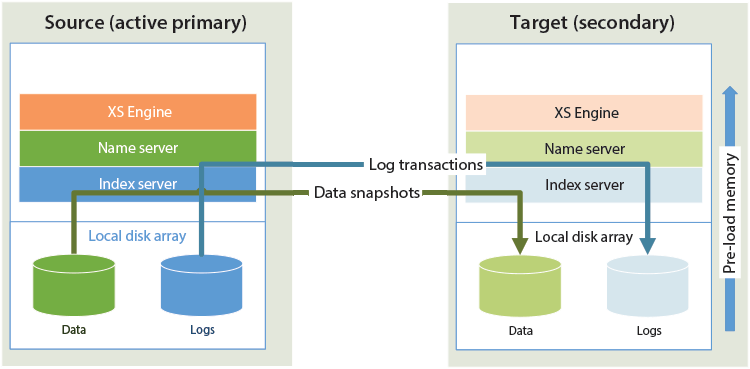
Figure 1
SAP HANA System Replication from an active source to a target system
While that is an accurate description of the process, there is more to System Replication than this simple explanation. With SAP HANA System Replication, there are two major questions that have to be addressed. First, what is the network latency and bandwidth between the two systems? Two, what is the tolerance for data loss by the organization? For example, when one system takes over operations from another system and subsequently those operations are taken back, can data be lost in the back-and-forth process? The two questions are not mutually exclusive. As you will discover, there is a correlation between network performance and the potential for data loss.
In order to prevent data loss, a committed transaction at the source system must also be committed in the target system. In addition, the target system has to communicate back to the source that the transaction was received and committed. At its extreme, the source system blocks subsequent transactions until a transaction is fully validated and committed in the target. If this back-and-forth process is slowed by the network, the source system seemingly suffers performance issues. It’s not actually a true performance problem in the source. It just looks like one to the users. If the target system has any issues, the source system stops processing data.
To avoid these issues, either the network performance has to be exceptional or the way that data is validated during replication has to be changed. Fortunately, SAP HANA offers several replication settings to help organizations change the replication behavior and optimize the movement of information based on their tolerance for data loss. However, these optimizations come at a cost. As the replication behavior is changed, potential data loss becomes more likely. For example, if the target system commits several transactions and the network loses connection before they are transferred to the target system, those transactions likely will be lost if the takeover process is initiated moments later.
If you assume that an exceptional network is one with high bandwidth, low latency, and high redundancy, you must also assume that its cost increases significantly as the physical distance between the source and target SAP HANA systems increases. For example, if the source system is in one data center and the target system is in another data center 500 miles away, providing an exceptional network connection between the sites is very expensive. However, if the two SAP HANA systems are in the same data center, sharing a redundant 40 Gigabits (Gbs) per second network connection, the network would be exceptional. You could also assume that the cost would be significantly less to implement and maintain due to the short distance.
As mentioned before, an organization can also choose to change the way that SAP HANA System Replication works to reduce the need for costly exceptional networks. SAP HANA supports three different forms of synchronous, and one form of asynchronous, replication. System Replication also supports compression. With compression, the source system compresses the data and logs it before transmitting it to the target. The target decompresses the data and logs it before committing the transactions.
Compression does add additional processing time and should only be used when the network connection between systems has limited bandwidth. For example, let’s assume it takes one minute for a system to transfer, validate, and commit 100 megabytes (MBs) of uncompressed transactions over a slow wide area network (WAN). If you then enable compression and reduce the 100 MBs to 15 MBs, you should be able to transfer the data in about 10 seconds.
However, you also have to add the additional time it takes to compress, un-compress, acknowledge, and commit the data. Let’s assume that that takes a total of 20 seconds. If my assumptions are correct, enabling compression would reduce the total trip time in this example by about 50 percent. However, on a fast network the data transfer time would not be impacted significantly by compression. The time it takes to transfer 100 MBs compared to 15 MBs is negligible on a 10 Gbs local area network (LAN). Most likely the total trip time would be increased because of the additional 15 to 20 seconds required to compress and decompress the data. In most cases, compression should only be used when replicating over a low bandwidth and high-latency WAN.
For those organizations that want the best of both worlds, SAP HANA System Replication supports a multi-tiered or cascading replication configuration. In a multi-tiered or cascading configuration, a source system can replicate synchronously with a target system on the same high-speed LAN. That secondary system can then replicate asynchronously with another target over a slower WAN connection. Figure 2 depicts how two servers on the same high-speed LAN can be configured with synchronous replication. A third server is also configured as an additional target using asynchronous replication. The typology is considered cascading because the primary server replicates with the secondary server, and the secondary server then replicates with the third server.
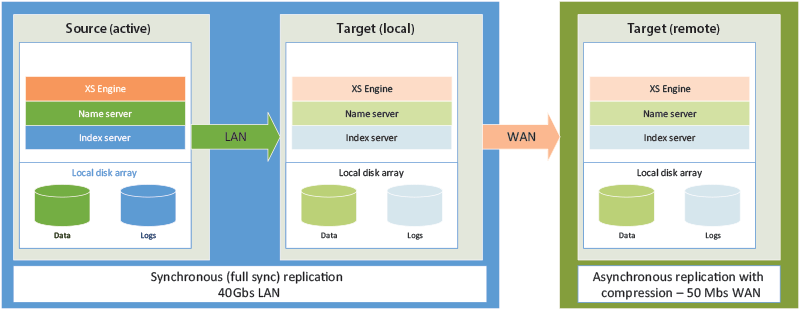
Figure 2
Multi-tiered or cascading replication
With the multi-tiered configuration in Figure 2, the primary source node and the secondary target node could quickly switch operations with zero data loss. This can be achieved with synchronous replication. Because data loss is not a concern, this setup can help eliminate downtime in situations in which maintenance needs to be performed on the hardware or software. In the event of a disaster, the secondary target node at the remote site could also take over operations. An expensive WAN would not be required because of the use of asynchronous replication and compression. As indicated before, there is the potential for data loss at the remote site when using asynchronous replication. It is up to the organization to balance the cost benefits in these cases. If costs are not a concern, the WAN connection could be increased to speeds of 1 Gbs or higher. Synchronous replication could then be used between all server nodes and the potential for data loss would be eliminated.
How SAP HANA System Replication Works
Now that I have discussed the general principles of SAP HANA System Replication, let’s take a moment to discuss the mechanics. Hopefully this discussion helps to fortify your understanding of the process before I begin talking more about the different options that are available when replicating data. When enabled, each service in the target system establishes communication with its counterpart in the source system. An initial data-storage snapshot is replicated from the source system to the target. Once the initial snapshot is replicated, the transaction logs are continually replicated to the target system. Every so often another storage snapshot is replicated. This helps to reduce the startup time when the target system initiates a takeover.
In addition to the occasional storage snapshot being replicated, the target system also preloads data into memory to mirror the state of the source system. The goal of the occasional data-storage snapshot replication and in-memory mirroring is to reduce the takeover time or the amount of time it takes for the target to take over operations from the target.
When a takeover process is initiated, the target system needs to perform a few tasks. Tables provisioned as row stores might need to be loaded into memory and their indexes might need to be rebuilt if data was actively replicating to that table during takeover. Otherwise, the row table would likely already be in memory. Any logs received after the last data snapshot was replicated need to be replayed. Again, the occasional storage snapshot is replicated to reduce the log replay time during takeover.
Most columnar store tables will be loaded into memory in the target system if the preload option was configured during replication. However, if the in-memory state of a column table was not fully replicated to the target, some information might need to be replayed from the logs and loaded from disk to memory. Overall, SAP HANA System Replication takes multiple steps to mitigate the amount of takeover time.
As mentioned before, SAP HANA System Replication offers three synchronous replication options (full-sync synchronous, synchronous, and in-memory synchronous) and one asynchronous replication option. These options are designed to give organizations flexibility when deciding how best to architect their replication solution. For example, when an organization requires that all transactions exist in the target, synchronous replication with the full-sync option enabled is required.
As you will discover, each is designed to help reduce the potential for communication delays between the source and target host. Asynchronous replication is ideal for replicating data over a slower WAN connection.
Synchronous replication with the full-sync option enabled guarantees that data has been replicated, acknowledged, and committed in both systems. With this option the source system does not consider a transaction committed until it has been acknowledged and committed on the target system. While this seems ideal, it also means that transaction processing in the source stops if the target system goes offline or is slow at processing the transactions.
With this in mind, synchronous replication with the full-sync option ultimately requires an exceptionally fast network connection that is equally reliable. This does not necessarily mean that it is only supported between servers on a LAN. Organizations can choose to implement a high-bandwidth, low-latency connection between independent data centers. For example, if two data centers are within 100 kilometers of each other and the WAN bandwidth is 1 Gbs or higher, synchronous (full-sync) replication is a viable solution for providing both HA and DR.
The second type of synchronous replication, simply called synchronous replication, ensures that data has been replicated to both memory and disk on the target system. It is an acknowledgment that the data was persisted in both areas. However, there is no guarantee that all records committed in the source system are also committed at the target system. For example, if the transaction takes longer than 30 seconds to be acknowledged by the target, the source resumes processing new transactions. This timeout is configurable but it does show that data can be lost depending on the timing of the takeover process and the events that lead to the need for a takeover. Effectively, data could exist on the source that was never replicated to the target. Not only would the data be missing from the target, but it could also be lost when the source performs a takeback of operations.
The third type of replication is called synchronous in-memory replication. It ensures that the target system has acknowledged receipt of the data. It does not ensure that that data was persisted to disk on the target. This replication option might be helpful if the target system is experiencing disk performance issues that could lead to slow acknowledgments and subsequently replication latency. Like synchronous replication, there is no guarantee that all records committed in the source system are also committed at the target system. Data on the source system can be lost during takeback events.
Asynchronous replication, the final option, is likely to have the least impact on the source system, but there are no guarantees that a transaction is received or committed in the target system. It does not wait for an acknowledgment from the target system. It is an option that might only be wise to use if there is a secondary restore method also available. Data loss in this situation can be significant depending on the events that lead to the need for a takeover. It is most often used in situations in which the replication of the data is expected to be slow. For example, if the source system is located 800 miles from the target system and 10 Mbs of bandwidth are available, asynchronous replication will likely be required. If synchronous replication were enabled in this situation, the source system would appear to run slowly as it waited for acknowledgments from the target system.
Prerequisites Before Starting SAP HANA System Replication
Before I discuss the steps for enabling SAP System Replication, let’s go over a few prerequisites. These conditions have to be met before the replication process can begin.
1. The primary source system has to be installed and running.
2. The target system has to be installed and running with the same or newer versions of SAP HANA. However, I recommend that they run the same version during normal operations. The target systems should only operate at a newer version for a short time and this state should only exist long enough to complete the upgrade process.
3. The target system has to have the same SAP system identifier (<SID>) as the source.
4. The source and target must be configured using the same instance numbers or the services must be configured to use the same TCP/IP port. Firewalls between the two systems must allow communication between services using these ports.
5. In a clustered environment, the number of active server nodes in the source cluster must match the number of server nodes in the target cluster. An equal number of standby nodes is not required in the target.
6. Configurations in the source .INI files must be identical in the target system. The only exception would be .INI settings that are host specific. This means that you cannot simply copy the files from source to target. Settings must be carefully compared and applied to each system.
7. The primary source system must have completed a backup before replication can start.
How To Enable System Replication
There are two ways to enable System Replication. Administrators can choose to start the process using the operating system command line interface (CLI) or they can use SAP HANA studio to manage the process. SAP HANA studio is a graphical user interface (GUI) that aids administrators and developers as they work with the SAP HANA system.
To set up System Replication on a primary and secondary system using the CLI utility hdbnsutil, follow the directions below. Before you begin, make sure that the hostnames are different between the primary and secondary systems. Verify that hostname resolution works in both directions by using the ping utility from the Linux command line.
1. Make sure that the primary system is fully started. Open SAP HANA studio and connect to the system if you are unsure.
2. If you have not already completed a full data backup, back up the primary system before proceeding.
3. Make sure the SYSTEM .INI files are in sync with one another between the primary and secondary server. Using Table 1, you can locate the .INI files on your SAP HANA system. I recommend that you use SAP HANA studio to adjust the settings. If the .INI files are not formatted correctly, your SAP HANA system might not start properly.
Type of configuration file
|
Example file location
|
| SYSTEM .INI |
/<sapmnt>/shared/<SID>/global/hdb/custom/config/*.INI |
| HOST .INI |
/<sapmnt>/shared/<SID>/HDB<InstanceXX>/<host>/*.INI |
Table 1
Example location of the SAP HANA .INI configuration files
4. If you want to enable compression, open SAP HANA studio and connect to the source and target systems. Double-click each system on the left side to launch the administration console for each system. Click the Configuration tab to access the .INI configuration window. Expand global.INI then system_replication. Set the parameters enable_data_compression and enable_log_compression to true. Figure 3 is an example.
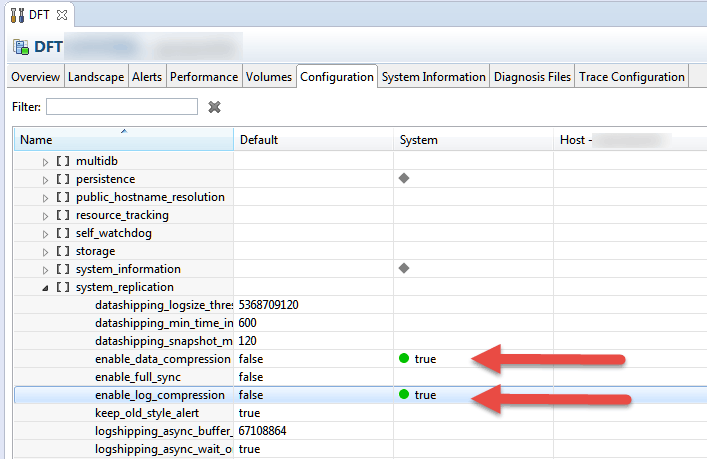
Figure 3
Configure System Replication compression using SAP HANA studio
5. To enable System Replication on the primary system, log on to the server using a terminal emulator. From the command line, execute the commands listed in Table 2.
| Purpose/task |
Example commands |
| Log in as <sid>adm to primary server |
|
| Change directory to hdbnsutil directory |
cd /usr/sap/<SID>/HDB<INSTANCE#>/exe |
| Enable System Replication |
./hdbnsutil -sr_enable --name=PrimarySystem |
| Confirm replication was enabled |
./hdbnsutil -sr_state |
Table 2
Example list of commands to execute when enabling replication on the source system
For a complete list of the available command line options, visit the following URL: https://help.sap.com/saphelp_hanaplatform/helpdata/en/2d/d26de6360046309e1579accbd9e527/content.htm?frameset=/en/54/01f498b2c84fb5b3bcdcbda948d991/frameset.htm¤t_toc=/en/00/0ca1e3486640ef8b884cdf1a050fbb/plain.htm&node_id=439.
6. To register the secondary system with the primary system, log on to the secondary system using a terminal emulator. Follow the commands in Table 3. It is important to remember that the secondary system instance is not usable once replication starts. It is completely locked down by the replication process.
| Purpose |
Example commands |
| Log in as <sid>adm to secondary server |
|
| Secondary server must be stopped to register it |
cd /usr/sap/<SID>/HDB<INSTANCE#>/
./HDB stop
|
| Enable System Replication on the secondary system |
cd /usr/sap/<SID>/HDB<INSTANCE#>/exe/
./hdbnsutil -sr_register --name=SecondarySystem --remoteHost=saphana.domain.com --remoteInstance=00 --mode=async
|
| Confirm replication was enabled |
cd /usr/sap/<SID>/HDB<INSTANCE#>/exe/
./hdbnsutil -sr_state
|
| Start the secondary system |
/usr/sap/hostctrl/exe/sapcontrol -nr 14 -function Start |
Table 3
Example list of commands to execute when enabling replication on the target system
https://help.sap.com/saphelp_hanaplatform/helpdata/en/54/01f498b2c84fb5b3bcdcbda948d991/content.htm?frameset=/en/72/15cee793f547db832413e02c5744d0/frameset.htm¤t_toc=/en/00/0ca1e3486640ef8b884cdf1a050fbb/plain.htm&node_id=440.
To set up System Replication on primary and secondary systems using SAP HANA studio, follow the directions below. Before you begin, make sure that the hostnames are different between the primary and secondary systems. Verify that hostname resolution works in both directions by using the ping utility from the Linux command line.
1. Start the primary system.
2. Review steps 1 through 4 from the section above.
3. Using SAP HANA studio, right-click your primary source system located on the left side. Choose Configuration and Monitoring > Configure System Replication… . See Figure 4 for an example.
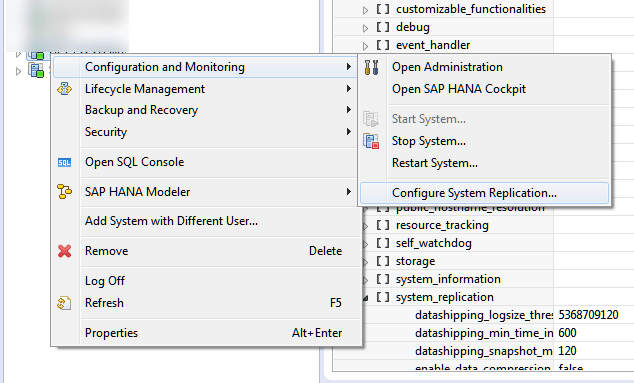
Figure 4
Access the Configure System Replication... option with SAP HANA studio
4. In the screen that opens (Figure 5), make sure the Enable system replication radio-button option is selected. Click the Next button.
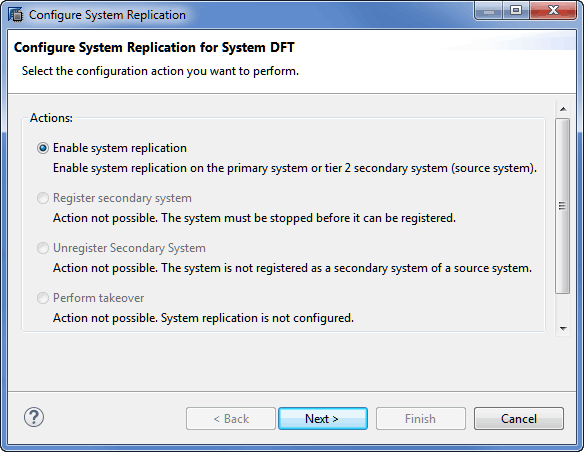
Figure 5
Enable System Replication using SAP HANA studio
5. Input the Primary System Logical Name (Figure 6), and then click the Next button.
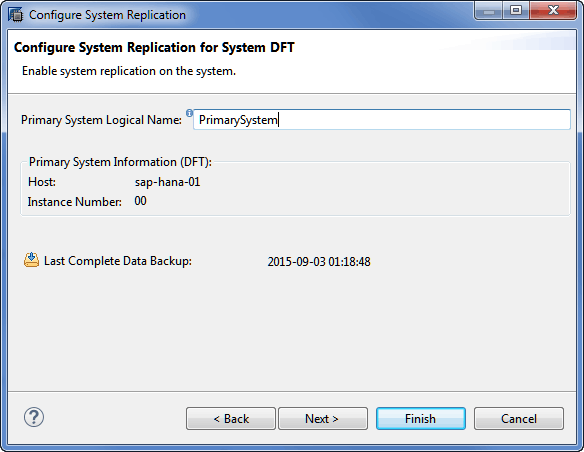
Figure 6
Configure the primary system's logical name
6. Before configuring the secondary target system, make sure SAP HANA services have been shut down. Using SAP HANA studio, right-click your target system (located on the left side). Choose Configuration and Monitoring > Stop System, as shown in Figure 4.
7. Now you need to configure your secondary system for replication. Using SAP HANA studio, right-click your target system located on the left side. Choose Configuration and Monitoring > Configure System Replication. See Figure 4 for an example. The window shown in Figure 7 appears.
8. Register the secondary system by choosing the Register secondary system radio button. Click the Next button to proceed. Figure 8 contains an example screenprint, which pops up after you complete step 7.
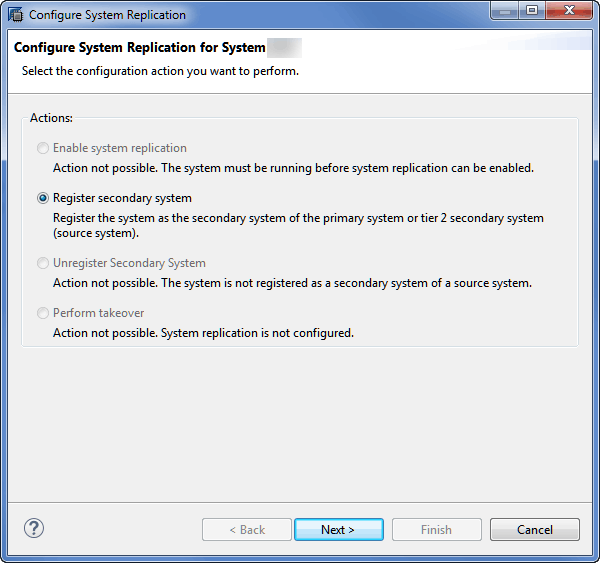
Figure 7
Register the secondary target system
9. As depicted in Figure 8, enter the Secondary System Logical Name, choose the Replication Mode, and enter the host name and instance of the primary source SAP HANA system.

Figure 8
Configure the secondary target system
10. Click the Finish button. If the Start the secondary system after registration option is checked, the target system starts and replication begins.
11. It is important to remember that the secondary system instance is not usable once replication starts. It is completely locked down by the replication process.
12. To verify that replication is active, access the primary system using SAP HANA studio. Launch the Administrator console by double-clicking your system on the left side of SAP HANA studio. Click the Landscape tab and then click the System Replication subtab. The source HOST, target SECONDARY_HOST, REPLICATION_MODE and REPLICATION_STATUS are all visible as shown in Figure 9.
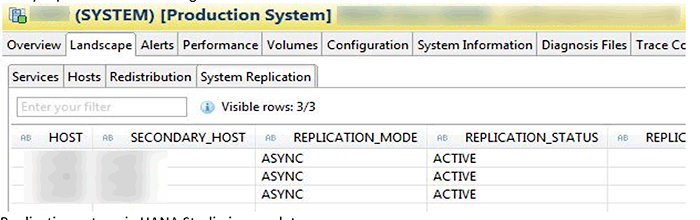
Figure 9
View the status of replication using SAP HANA studio
Assuming that replication is now active, let’s review the process for initiating a takeover. A takeover is a process in which the secondary system stops receiving replicated transactions and starts operating as the primary system. This is a process that would useful during primary site maintenance, primary site disasters, or business continuity testing.
The secondary system does not have to communicate with the primary system in order for it to initiate a takeover. Therefore, you should always stop the original primary system before initiating a takeover with the secondary system. If you do not have access to the primary system because it has lost services, do not be concerned. However, make sure that all dependent systems are no longer using the original primary system. Any transactions recorded to the original primary system will be lost when it eventually takes back operations from the secondary system.
There are two ways to perform a takeover. You can use the command line or SAP HANA studio. The following instructions outline the process for performing a takeover.
1. To perform a takeover using SAP HANA studio, right-click the secondary system located on the left side of SAP HANA studio. Click Configuration and Monitoring and then Configure System Replication… . Review Figure 4 for an example of this workflow.
2. Choose the Perform takeover radio-button option and click the Finish button. Figure 10 is an example of the window that is available and the option that should be selected.
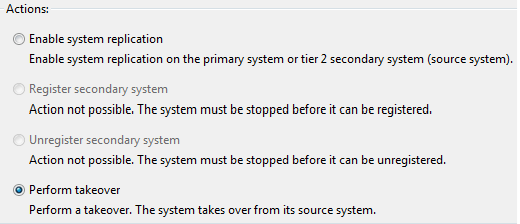
Figure 10
Perform a takeover
3. As an alternative, you can perform a takeover from the command line. To perform this action from the command line, access the secondary system using a terminal emulator. Execute the commands listed in Table 4.
| Purpose |
Example commands |
| Log in as <sid>adm to the secondary server |
|
| Go to the following directory |
/usr/sap/<SID>/HDB<INSTANCE#>/exe |
| Initiate a takeover |
./hdbnsutil -sr_takeover |
| Confirm that the takeover completed |
/usr/sap/<SID>/HDB<INSTANCE#>/exe/hdbnsutil -sr_state |
Table 4
Example list of commands to initiate a takeover
4. When the original primary system is back online, you need to disable replication and register it as a secondary system.
5. To disable SAP HANA System Replication on the former primary system (assuming that the disaster didn’t bring the primary system down before), follow this process. Using SAP HANA studio, right-click the former primary system, choose Configuration and Monitoring, and then Configure System Replication … . A new window appears as shown in Figure 11.
6. In Figure 11, select the Disable system replication radio-button option and click the Next button.
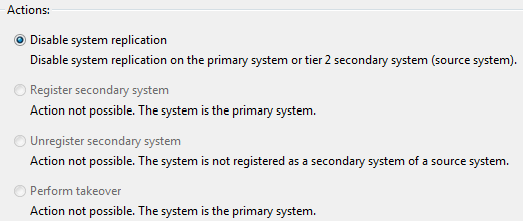
Figure 11
Disable replication on the former primary system
7. After clicking Next, an additional window appears allowing you to ignore the secondary system during the disabling process. Set the Ignore secondary system check box and click the Finish button (Figure 12).
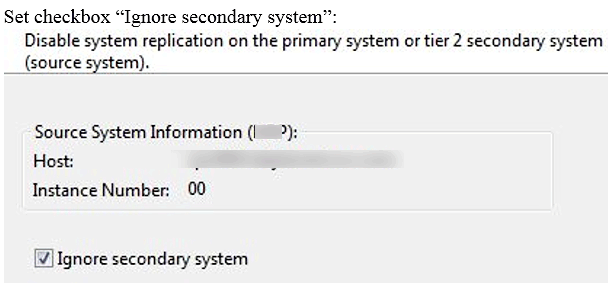
Figure 12
Choose the Ignore secondary system option
8. As an alternative, you can use the command line on the former primary system. Execute the following commands found in Table 5.
| Purpose |
Example commands |
| Login as <sid>adm to the secondary server |
|
Go to the following directory
|
/usr/sap/<SID>/HDB<INSTANCE#>/exe |
| Initiate a takeover |
./hdbnsutil -sr_disable |
| Confirm that the command completed |
/usr/sap/<SID>/HDB<INSTANCE#>/exe/hdbnsutil -sr_state |
Table 5
Example command line options to disable replication on the primary system
9. You can now configure the original primary system as a secondary system using the instructions outlined earlier in this article. For example, you can stop the original primary and then register it as a secondary using SAP HANA studio.
At some point you might also need to perform a takeback. In a takeback the original primary system starts operating as the primary system again. Assuming that you have performed a takeover on the secondary system and that the original primary is now serving as the secondary target system, you can effectively reverse their roles by following the process outlined above. However, the roles are now reversed. The original secondary system is now the primary system and the original primary is now the secondary system. You assume that the source is now the target and the target is now the source. Below is a quick outline of the process. For this example let’s assume that HOST_A is the original primary and that HOST_B is the original target.
1. HOST_B is now serving as the primary system and HOST_A is serving as the secondary system. Replication has been running from HOST_B to HOST_A for the past two days.
2. Stop the SAP HANA services on HOST_B.
3. Assuming that HOST_A is still in operation, access HOST_A and perform a takeover using SAP HANA studio or the command line.
4. HOST_A is now the primary system.
5. Access HOST_B and disable replication.
6. Assuming that HOST_B is still stopped, register HOST_B as the secondary system.
7. Start the SAP HANA services on HOST_B.
8. Replication should now be active between HOST_A and HOST_B.
In summary, SAP HANA System Replication is a solution that can be used to provide both HA and DR for an organization. It should not be the only means of providing DR because the SAP HANA backup process is critical to any DR plan. However, it is a hardware-independent solution that can provide HA and DR. Administrators must initiate the takeover and takeback processes using either SAP HANA studio or using the hdbnsutil from the command line. Out of the box, the process must be managed manually. However, there are solutions from third parties that can be used to automate the process. SAP HANA System Replication supports both synchronous and asynchronous replication options. These replication options can be selected based on either network bandwidth availability or tolerance for data loss.
Jonathan Haun
Jonathan Haun, director of data and analytics at Protiviti, has more than 15 years of information technology experience and has served as a manager, developer, and administrator covering a diverse set of technologies. Over the past 10 years, he has served as a full-time SAP BusinessObjects, SAP HANA, and SAP Data Services consulting manager for Decision First Technologies. He has gained valuable experience with SAP HANA based on numerous projects and his management of the Decision First Technologies SAP HANA lab in Atlanta, GA. He holds multiple SAP HANA certifications and is a lead contributing author to the book Implementing SAP HANA. He also writes the All Things BOBJ BI blog at https://bobj.sapbiblog.com. You can follow Jonathan on Twitter @jdh2n.
You may contact the author at jonathan.haun@protiviti.com.
If you have comments about this article or publication, or would like to submit an article idea, please contact the editor.