Explore and learn the technical details of two methods for exposing SAP BW artifacts as SAP HANA views: the pull and push methods. See the pros and cons of each in order to select the best approach. Learn about how to mix SAP BW data with non-SAP BW data for enriched analytics.
Key Concept
The SAP BW on SAP HANA mixed scenario presents options to cross-use data between SAP BW on SAP HANA and SAP HANA. The use of SAP BW data on SAP HANA has two options: pull and push. Depending on the enterprise data warehouse usage, either method can be used.
Companies working to improve the efficiency and management of their enterprise data warehouse are looking for the ability to connect with different reporting tools, augment existing information, and manage data expansion. In this article, I explore how SAP BW technology is adapting and transforming itself to integrate SAP HANA, providing such a flexible, holistic enterprise data warehouse (EDW).
One of the ways SAP BW has adapted to newer technology is its capability to expose SAP BW artifacts to the SAP HANA modeling environment. I explore two critical functionalities that expose SAP BW objects to SAP HANA:
- Importing SAP BW objects into native SAP HANA as SAP HANA views using SAP HANA studio (e.g., the pull method).
- Enabling SAP BW objects via externally enabled views and exposing these objects as SAP HANA views (e.g., the push method).
Both of these options serve a similar purpose. SAP BW objects are exposed into native SAP HANA as views and enabled for reporting or further development. However, it is crucial to understand when to use each because the behavior and security of the exposed views can differ.
As I explain how SAP BW and SAP HANA work together with exposing BW artifacts in SAP HANA, I will also outline the pros and cons of two methods.
Integration of SAP BW and SAP HANA
The SAP BW on HANA environment provides the ability to mix a structured framework (e.g., SAP BW on HANA) with an agile framework (e.g., SAP HANA modelers) in a single platform.
Although the SAP BW application provides a comprehensive development framework, it limits the ability to access information via the BEx framework. In addition, the SAP BW application (when used in combination with the BEx framework), lacks the agility required for rapid development and data integration.
As a result, there is a need for an environment that can co-exist with SAP BW while providing a flexible reporting and development framework (Figure 1). An SAP BW on HANA scenario provides a framework that uses the structured development application (such as SAP BW) and also provides SAP HANA studio for free-form agile development capabilities.
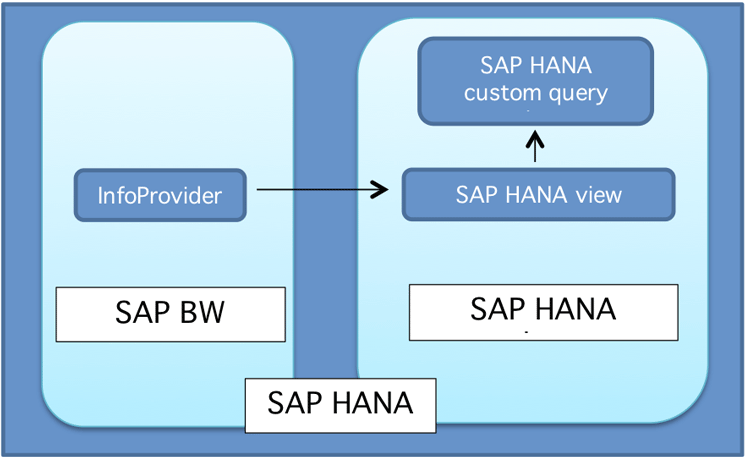
Figure 1
SAP HANA platform for EDW with SAP BW and SAP HANA applications
SAP BW has been the core EDW framework for many companies that have focused much of their analytics resources on SAP BW. The SAP HANA platform provides many ways to integrate both the SAP HANA platform (as a free-form development framework, e.g., native SAP HANA development) and SAP BW on HANA. In this article I discuss how best to expose the BW artifacts in SAP HANA as SAP HANA views.
Pull and Push Methods
The pull and push methods that I am comparing in this article need SAP BW on SAP HANA 7.3 Support Package (SP) 8 and SAP BW on SAP HANA 7.5 SP5 as the minimum software requirements. These scenario do not work if you have two separate SAP HANA instances—one for SAP BW on HANA and the other for SAP HANA, such as side-car SAP HANA.
Figure 1 illustrates the overall architecture of SAP BW on HANA and SAP HANA integration. The data is stored and managed by the SAP BW application, while the users can access data either through BEx Queries or SAP HANA views. Figure 1 also illustrates the need for a single SAP HANA platform on which the SAP BW on HANA and SAP HANA (schema) are located. Similar to other databases, SAP HANA uses the schema concept to group the catalog objects by schema. Access to schemas is restricted through the SQL privileges in SAP HANA. A distinct benefit of having SAP BW on HANA artifacts exposed as SAP HANA views is the ability to access SAP BW data without physically moving it out of SAP BW. By doing so, you avoid data redundancies.
Note that it is important to decide on an EDW strategy prior to starting development. SAP HANA is the platform of choice for EDW, and the SAP BW and enterprise SAP HANA approaches are applications that can co-exist while providing a comprehensive solution. However, it is also paramount that EDW architects first determine if the EDW is SAP HANA-application centric or SAP BW-application centric. This is to ensure that you have the right development and support resources in place. It’s also important to determine your security and BI tool strategy at the outset.
Before deciding to use either the pull or push methods, you should be aware of certain limitations of both (Table 1).
| Scenario |
Pull method
|
Push method
|
| Update SAP BW objects |
Requires re-importing of the SAP HANA model |
The SAP HANA view is updated when SAP BW objects are activated
|
| Migrate objects (transport) |
Requires SAP HANA delivery unit and part of the SAP HANA transport path |
Transported along with SAP BW objects |
| Support SAP BW artifacts |
InfoCubes, standard DataStore Objects (DSOs), InfoObject, and query as an InfoProvider |
InfoCubes, standard and advanced DSOs, InfoObject, query as an InfoProvider, Composite Provider, and BEx Queries |
| Generate security authorizations |
Optional; analytic privileges can be generated based on associated analysis authorization |
Automatic generation |
| Change SAP HANA views |
Are allowed; calculated attributes and calculated key figures and restricted key figures are retained—if the SAP HANA view is updated by a re-import. |
Are not allowed; changes are overwritten. |
Table 1
The pros and cons of the pull and push methods
Exposing SAP BW Artifacts Using SAP HANA: The Pull Method
The ability to import SAP BW objects into native SAP HANA was launched with SAP BW 7.3 and SAP HANA SP5. This feature was initially introduced to fill the gap caused by migrating SAP BW on to an SAP HANA platform, and the discontinued use of Business Warehouse Accelerators (BWA), which resulted in SAP BW’s inability to connect to BusinessObjects Explorer (Figure 2).
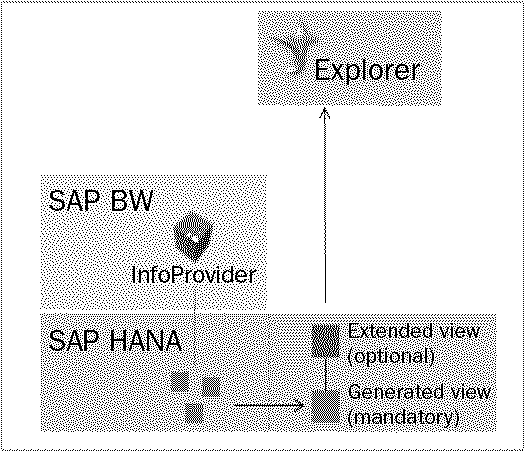
Figure 2
Exposing SAP BW artifacts as SAP HANA views for BusinessObjects Explorer consumption
Companies that had SAP BW, BWA, and Explorer reports could not connect to Explorer once they migrated to SAP BW on HANA without first importing the SAP BW objects into SAP HANA as SAP HANA views. Importing SAP BW objects into SAP HANA as views also enabled non-SAP reporting tools to access SAP BW data. In the past, exposing SAP BW objects as views wasn’t possible unless SAP BW data was first exported to an external data-staging environment.
The pull method is applicable to the SID ID-enabled SAP BW InfoProvider. InfoProviders such as write-optimized DSOs won’t be able to be imported into SAP HANA as views. This technical requirement limits BEx Queries as well as the BEx Queries do not store data. However, as an alternate solution, BEx Queries can be generated and imported as snapshots to work around this limitation.
The benefit of the imported views is that the views can be further enhanced within native SAP HANA or incorporated with existing SAP HANA views. In this way, they can be treated as any other SAP HANA-developed view without severing the association with the base SAP BW InfoProvider. Any enhancements can also be kept when views are re-imported from SAP BW in the event the InfoProvider changes.
The pull method is recommended for companies that want to further develop SAP HANA models and use existing SAP BW artifacts, without throwing away the SAP BW models that were built prior to the introduction of SAP HANA. Therefore, companies that are moving towards native SAP HANA, but still want to reuse existing SAP BW for enterprise-based reporting, choose to import SAP BW InfoProvider-based views and then further enhance them for reporting.
The pull method has the option of importing associated analysis authorization objects and roles into enterprise SAP HANA as run-time analytical privileges and roles. The imported analytical privileges and roles can be further modified or combined with existing SAP HANA security objects. However, any subsequent changes on SAP BW are not reflected in the imported objects until a re-import takes place. It is critical that the architects who are making the decision about whether to use the pull method (or push method, discussed later) also consider the pull method’s limitations in refreshing analytical privileges. For more details, refer to Table 1.
Imported objects can be migrated independent of their corresponding SAP BW objects; however, the dependencies need to be maintained. For example, SAP BW objects need to be migrated prior to migrating the dependent SAP HANA views and the associated models. Any changes in SAP BW require the re-importing of the objects, including the changes to analysis authorization objects. It is imperative to synchronize the objects when changes or enhancements are made in SAP BW, and the planned changes and enhancements should take into consideration the impact to SAP HANA models and security as well.
Figure 2 depicts the scenario in which the SAP BW provider (e.g., cube) is exposed to SAP HANA as a generated view for BusinessObjects Explorer consumption. The similar view can be consumed by other reporting tools or further enhanced with custom views.
Steps for Importing Objects to SAP HANA
To import objects from SAP BW to SAP HANA you need to have access to the SAP BW system, and have REPO.IMPORT system privileges in SAP HANA, as well as standard maintenance and modeler access in SAP HANA. To start the import process in SAP HANA studio, go to Quick Link > Import and open the import wizard (Figure 3).
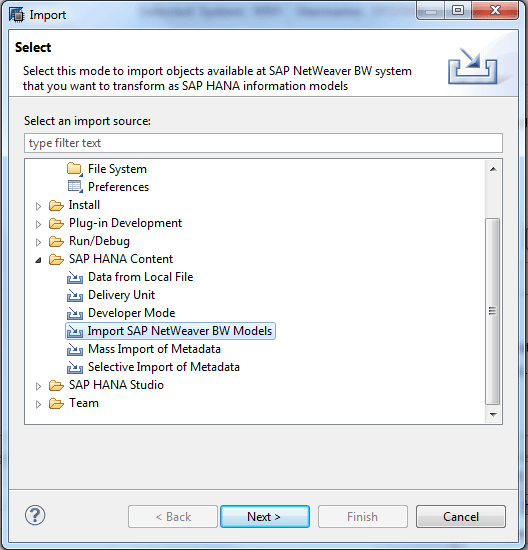
Figure 3
Import the SAP NetWeaver BW models
Double-click the SAP HANA content folder, then select the Import SAP NetWeaver BW Models option. Click the Next button. This opens the screen in Figure 4 where you enter the required log-on credentials for SAP BW to establish a connection. Click the Test Connection button and you should see the Connection successful pop-up window. Note that when doing this the SAP BW application and SAP HANA need to be on the same SAP HANA instance.
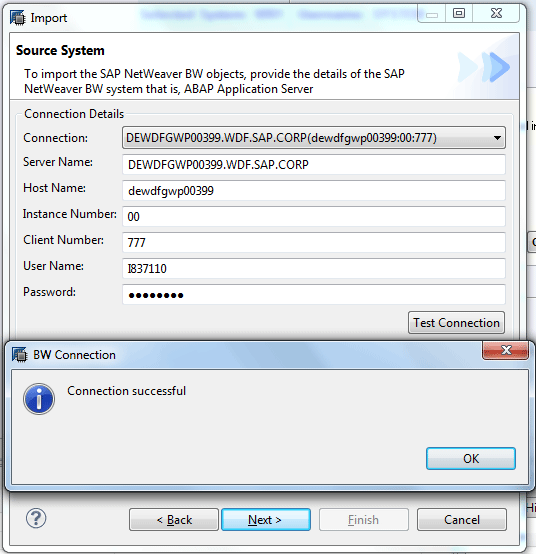
Figure 4
Establish an SAP BW connection for the SAP BW import
Click the OK button in the pop-up window in Figure 4, then select the target SAP HANA system for generating SAP HANA views. This opens the screen shown in Figure 5 where you select the target system for import. Then click the Next button.
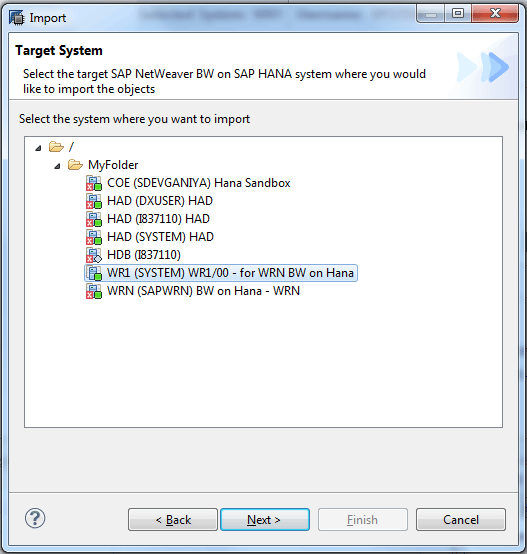
Figure 5
Select the target SAP HANA system
In Figure 6, select the InfoCube you want to import from the list of available SAP BW InfoProviders and tick the Generate InfoProvider-based analytic privileges check box.

Figure 6
Select the required SAP BW objects to be imported
Click the Finish button and wait for the import process to finish. When it’s done, the Job Log status (Figure 7) indicates the job has been completed successfully (ignore the Completed with warnings Status message).
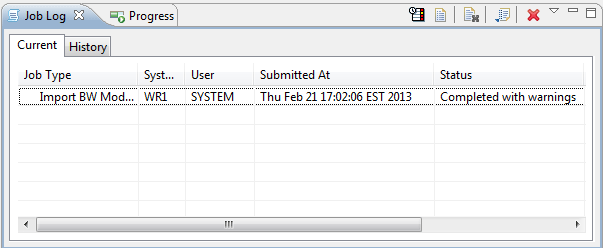
Figure 7
Check the job status in the Job Log
Now that the import is complete, navigate to the content folder (Figure 8) and drill down into the package that was set as the Target package, sap.bw, in Figure 6. The analytical privileges and corresponding calculation views are created within the same package (e.g., sap.bw). Figure 8 depicts the objects after import. To view Figure 8 in SAP HANA studio, go to the Modeler Perspective and then select the Content folder and navigate to package sap.bw.
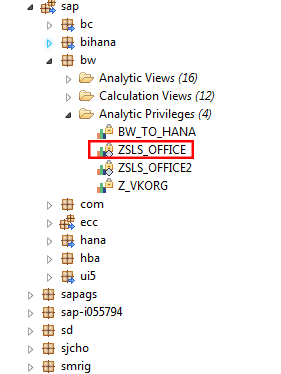
Figure 8
Display the sap.bw package with the imported objects
The analysis authorizations objects, along with SAP BW InfoProviders, are imported into SAP HANA as analytical privileges. However, for certain scenarios the importing of security objects does not work; for a list of scenarios that do not import objects, refer to Table 2. This table lists the scenarios in which the analysis authorization objects can be imported into SAP HANA as part of the pull method. If there is a scenario in which the analytical privileges cannot be generated, security administrators can create corresponding privileges manually in SAP HANA.
Analysis authorization restriction in SAP BW
|
Analytical privilege
|
Single-values restriction
|
Imported successfully as single-value restriction
|
Range restriction
|
Imported successfully as range restriction
|
Contains patterns (e.g., Sam*)
|
Imported successfully as range restriction
|
Authorization variable
|
Not able to import
|
Hierarchy node
|
Not able to import
|
Hierarchy node variable
|
Not able to import
|
Special restrictions (e.g., # or :)
|
Not able to import
|
Table 2
Analysis authorization scenarios that can be imported into SAP HANA as analytical privileges as part of the pull method
The pull method is best suited for use in an existing, complex SAP BW environment where you want to reduce development efforts in SAP BW, but want to keep the existing data and the SAP BW artifacts. The pull method serves as a perfect segue to transition from the SAP BW into the SAP HANA environment. Nevertheless, the SAP BW environment needs to be on SAP HANA.
Exposing SAP BW Artifacts in SAP HANA: The Push Method
In this section I discuss push reporting, its advantages and disadvantages, and the steps to enable it. As companies’ technical landscapes transform with SAP HANA and other innovative technologies, there is an increased need to simplify the systems, landscapes, and integration. As part of the application transformation and simplification with SAP BW 7.4 SP5 on, the SAP BW on HANA and SAP HANA integration has become tighter. The new integration functionality enables SAP BW objects to be visible as SAP HANA views with a push of a button instead of requiring manual import.
The push method was introduced with SAP BW 7.4 SP5, and was further enhanced (with the release of SP8) with the capability for exposing BEx Queries. In SAP HANA, BEx Queries can be exposed two ways: query snapshots and query as an InfoProvider. The query snapshot is available from SAP BW 7.3 on. However, the query view is a static view and the index needs to be updated in order to be able to retrieve the latest data.
In this scenario, the query re-indexing has to be scheduled after the InfoProvider loads, which is similar to BWA Indexing. With SAP BW 7.4 SP8, the query can be enabled as an InfoProvider and there is no need for indexing, thus enabling data access as soon as the load is completed. Moreover, exposing the InfoProvider-based BEx Queries generates the associated user and security privileges in SAP HANA.
Following are the steps needed to push SAP BW artifacts into SAP HANA as views.
The Push method starts with enabling an SAP BW InfoProvider for an External SAP HANA view. Figure 9 shows the edit mode of cube ZCUBE01. There is an additional parameter in the settings called External SAP HANA view for reporting. Once it is turned on (by selecting the check box next to it) and the InfoCube is reactivated, the corresponding SAP HANA view is generated in SAP HANA. To navigate to Figure 9, use SAP BW transaction code RSA1 and find the InfoCube with a search option or navigate to the list of InfoProviders, which will be shown on the right of the screen.
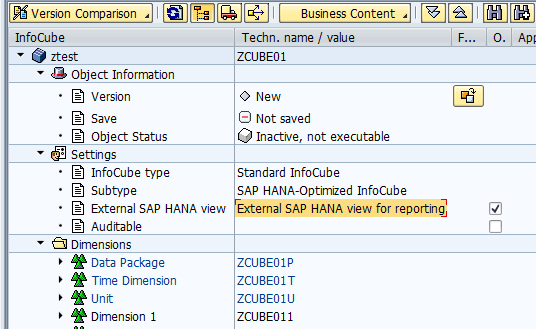
Figure 9
InfoCube ZUBE01 in edit mode with the setting External SAP HANA view for reporting turned on
The External SAP HANA view for reporting can be enabled for a standard InfoCube, standard DSOs, CompositeProviders, BEx Queries, and master data objects. To activate a DSO’s External HANA view, the DSO has to be a standard DSO with SID enabled.
In Figure 9 you saw the SAP BW InfoCube settings. In Figure 10 you can compare the corresponding SAP HANA view that was generated based on the InfoCube. To view the details of the SAP HANA view in Figure 10, go to SAP HANA studio and navigate into Package System local > BW > BW2HANA to see the corresponding SAP HANA Analytical view for BW InfoCube ZCUBE01.
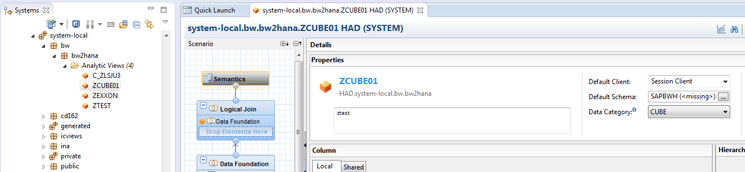
Figure 10
The corresponding generated analytical view ZCUBE01, based on SAP BW InfoProvider ZCUBE01
The generated views are stored under the standard package named BW2HANA. However, you can customize this with the use of program RS2SAPHANA_VIEW_SETTINGS in SAP BW. The best practice is to run this program once during the system configuration and avoid any further subsequent changes.
Once the generated views are in SAP HANA, they can be integrated with natively created views in SAP HANA studio and be used as any other SAP HANA view would. However, unlike the pull method these pushed views won’t be enabled for modification in SAP HANA studio.
Similar to the pull method, the associated Analysis Authorization Objects are transferred into SAP HANA as analytical privileges and roles. In addition to generating privileges, you may also transfer the assigned user natively to SAP HANA.
In the push method, the analysis authorization objects require additional technical characteristics (Figure 11). Figure 11 lists the required technical characteristics for the analysis authorization objects. To get to Figure 11, use transaction code RSECADMIN and then select the analysis authorization ZTEST03843.
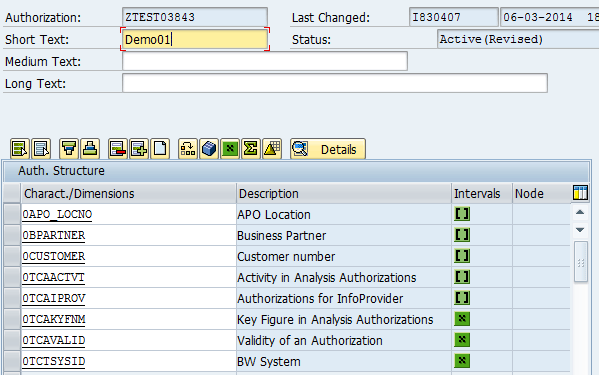
Figure 11
View the analysis authorization with the required technical objects
Unlike the pull method, in the push method the analytical privilege uses dynamic capabilities that make it more flexible and allow changes to be made dynamically. The dynamic capability is derived from the stored procedures that are triggered during run time to fill in the analytical privileges. The generated role (the InfoCube name) includes the object privileges as well as the stored procedure, and is executed at run time.
In this example, the stored procedure reads table RS2SAP HANA_AUTH_STR and dynamically fills in the analytical privileges for the user. The dynamic privileges reduce the number of objects created in SAP HANA, thereby reducing the maintenance and object-generation requirements. Figure 12 shows the values in RS2HANA_AUTH_STR for InfoProvider ZUBE01. The values 0BPARTNER = AP*, 0CUSTOMER 1 to 9, are same as the SAP BW analytical authorization values. The Table RS2HANA_AUTH_STR can be found under the BW schema in SAP HANA studio or you can use the SQL editor on SAP HANA studio and follow my sample SQL script.

Figure 12
Select the table RS2HANA_AUTH_STR view
An added benefit of the push method is that the changes and user assignments for the analysis authorization objects can be created dynamically and synced with a program. Then the program can be scheduled to run using a process chain. Because of this feature, end-user administration can be managed through SAP BW and any user-administration tools that support SAP BW user administration.
Haran Vinayagalingam
Haran Vinayagalingam is a Practice Lead with SAP’s HANA Services Center of Excellence team. He is a certified HANA architect with experience implementing SAP HANA and SAP BW on HANA for large-scale enterprises. Along with numerous SAP HANA implementation experiences, he is the North American solution-delivery owner for SAP HANA Live.
You may contact the author at haran.vinayagalingam@sap.com.
If you have comments about this article or publication, or would like to submit an article idea, please contact the editor.