D. Russell Sloan explains the value of establishing and adhering to standards when you are delivering a solution.
Key Concept
Solution Documentation is much more than a collection of Microsoft Word documents and some flow charts. It is a representation of everything that goes into designing, building, testing, delivering, and supporting a solution.
Implementations generate a lot of information about the final solution to be delivered. This information includes solution design, mapping of transactions and configuration, and documentation on functional and technical development, testing, job roles, and even training materials. Keeping all this organized and usable for your support organization requires the use of naming and procedural standards during the project.
The topic of standards undoubtedly conjures up notions of bureaucracy and overhead that make system implementers cringe. However, if you proceed into your project with solution support in mind, the value of consistent and logical application of standards becomes more self-evident.
Imagine you are the one picking up the phone and on the other end is a frustrated business user at wits end just trying to get a job done. Where do you turn to find the information you need to support them? Are you simply an “expert” at every business process and system used by your enterprise so that you can answer any question off the top of your head? Likely not.
Imagine you’re that frustrated person. Where do you turn to understand not only how the system works, but why it was built that way in the first place?
The answer to these and other important solution sustenance questions is Solution Manager. By building and maintaining solution documentation following good standards, both the business users and the support teams have a single point of truth to answer the “How to” and “What Happens If” questions that come up on a daily basis.
Solution Documentation
Before I dive in any further, let’s take a minute to define the key component parts of Solution Documentation:
1. The Business Process Hierarchy (BPH) – The BPH is the catalogue or table of contents for your solution. It is used throughout all phases of your SAP implementation from project preparation through ongoing support. Getting this right is the first step in establishing a common language across your business units as well as helping to bridge the gap between business and IT. For more details about how to build a good BPH, see my SAP Experts article, “Building a Better Business Process Hierarchy (BPH).”
2. Documents – It is important to establish what documents you’ll deliver at the beginning of your project. Answering questions such as, “Are we going to track requirements individually, or within process designs?” have significant implications on downstream activities. While detailing the content of each of the different document types is beyond the scope of this article, Table 1 describes some common document types and some key considerations for each.
|
Type
|
Title
|
Purpose
|
Considerations
|
Volume
|
|
SDD
|
Scenario Design Document
|
Describes the business scenario and the value it provides. High-level description of “What the business does.” Describes the association of business processes that link together to provide business value. These documents should illustrate the end-to-end business functions needed to deliver value such as inquiry to quote and order to cash, with variations such as customer self-service or contract sales.
|
Use these documents as a high-level commun-ication vehicle to help show how business value crosses many process areas and organizations in your enterprise. Keep them high level and visual. Clearly articulate the business value that is derived from the scenario.
|
Low. One per scenario.
|
|
PDD
|
Process Design Document
|
Describes the business process within a scenario. Examples include sales order processing, contract management, and invoice processing.
The name of the document should indicate the goal of the process. These documents cover multiple business activities, but need to be bound to a single business milestone within a scenario.
|
Use great care to manage the scope of these documents consistently. It is very easy to cross process boundaries when developing these. It is also easy to go into too much detail about how the process is performed.
|
Medium. One per business. process.
|
|
MDD
|
Master Data Definitions
|
Also known as an Enterprise Data Definition. This document describes what data must be captured for a specific master data.
|
This document should contain two fundamental parts. The first describes the key data that makes up the master data record. For example “A customer must have a name, business hours, and contact information.” This part is the enterprise definition and is not SAP specific. The second should contain information needed to configure the master data in the SAP system. Details include required fields, drop-down values, field groups, and views used.
|
Low. One per master data.
|
|
ODD
|
Organizational Design Document
|
Describes the SAP organizational elements to be used.
|
This is a document that describes all the organizational elements to be used in the solution and how they relate to one another. This is sometimes called the organizational hierarchy document.
|
Low. One per project.
|
|
BPP
|
Business Process Procedure
|
Describes in detail how to perform a particular business activity. For example, how to create a specific type of sales order would be the scope of a single BPP (i.e., create standard sales order, or release credit hold for standard sales order).
|
Bind these to a single business activity such as a single SAP transaction. Keep in mind the BPP should only represent a single person’s activity. If you find you’re documenting activities across job roles, then you’ve crossed the BPP boundary and should start a new BPP.
|
High.
One per business activity.
|
|
BRD
|
Business Requirement Document
|
Used for capturing the business requirements for the solution.
|
Often these requirements are not captured separately, but are listed within the process design document for the requirements specific to that process.
|
Can be a single document or a separate document per business requirement.
|
|
NFR
|
Non-functional requirements
|
Used to capture solution requirements that are not directly tied to business requirements.
|
These include high availability requirements, disaster recovery, and authorization standards/Single Sign-On.
|
Virtually all projects have some non-functional requirements.
|
|
GAP
|
Requirement not met by the existing solution
|
Used to document business and non-functional requirements that cannot be met in the current solution or through standard configuration.
|
The GAP document can be an integral part of your change control process. It should capture the requirement that is not being met and offer recommendations for mediation. Common outcomes are: change the business process, purchase additional bolt-on software, develop custom code, or combinations of the above.
|
Varies by project.
|
|
FDS
|
Functional Design Specification
|
Captures the detailed requirements to close a GAP when using custom code as the resolution.
|
This document should include business requirements, dependencies, business rules, data mapping, and minimum acceptance criteria for test plan development.
|
Varies by project.
|
|
TDS
|
Technical Design Specification
|
Detailed technical document describing how program code and other custom development objects are to be written to meet the requirements described in the functional specification.
|
Keep in mind that this document is very important to the “next developer.” After implementation, break fix or business as usual changes occur. This document needs to enable any future developer to understand how the program was developed.
|
Varies by project. One per functional specification at minimum. Some functional specifications can cover multiple systems (i.e., interfaces).
|
|
TUT
|
Technical Unit Test
|
This document describes how the programmer will test the custom development. It should illustrate how all program logic and exceptions will be tested. It answers the question as to whether or not the program runs as required and can handle exceptions gracefully.
|
This is a developer’s document used by technical peers to aid in performing quality assurance activities.
|
Varies by project. One per technical specification.
|
|
FUT
|
Functional Unit Test
|
Tests if the custom development meets the business needs and delivers the functionality required to close the GAP.
|
Written and performed by the functional teams. Supported by the technical team during development of the test document and during execution.
|
Varies by project. Minimum One per functional specification.
|
|
COE
|
Configuration Element
|
Documents the details of configuration performed as part of building the solution.
|
These documents tend to be lengthy and get out of date very easily as solutions are maintained. Only maintain these documents if absolutely necessary as the combination of the configuration mapping on the BPH and system transports contain the record of the detailed configuration activities.
|
High. One per configuration node accessed during solution build.
|
|
COR
|
Configuration Rationale
|
Documents why a particular configuration was accessed during solution build.
|
These should contain any business information needed to perform configuration and why particular configuration nodes were used. They should not contain screenshots of configuration tables, menu paths to navigate the IMG, or dumps of configuration data. Only include menu paths or other configuration instructions when the configuration is obscure and requires special navigation to get to a particular underlying configuration. (i.e., pricing procedures on condition types).
|
Medium. One per business process. Some exceptions may apply when a particular process step requires unique configuration.
|
|
JRD
|
Job Role Definition
|
Describe scope and key activities for jobs within the organization.
|
Capture all business activities performed by a particular job role. Include both system and non-system activities, both within and outside of SAP. These documents are very important for developing role based training, supporting separation of duties audits and other compliance activities.
|
High. One per job in the to-be solution.
|
|
EUR
|
End-User Roles
|
Collection of SAP transactions and other information used to develop authorization profiles.
|
A summary of SAP transactions table can be added to the JRD in lieu of creating these as separate documents. Consider the authors and consumers of these documents on your project to determine if this information should be included in your JRDs.
|
Detailed instructions for the first-line support team.
|
|
HDS
|
Help Desk Scripts
|
Detailed instructions for the first-line support team.
|
Used to do initial triage and troubleshooting for end-user support. These can contain decision trees, anticipated user errors, frequently asked questions, and so on. These should be developed as part of the solution development and delivery.
|
Medium. One per business process.
Optionally, one per business process procedure if the business activity is complex.
|
|
TRN
|
User Training
|
Materials used for classroom training or to be made available in context sensitive help.
|
These materials are in addition to and in support of the BPPs. They are to drive classroom training or provide online reference in context-sensitive help.
|
These materials are in addition to and in support of the BPPs. They are to drive classroom training or provide online reference in context-sensitive help.
|
Table 1
Common document types
3. Transaction Code Mapping – All the SAP transactions in your solution should be mapped to the BPH.
4. Configuration Mapping – Implementation Guide (IMG) nodes for configuring the SAP solution should be mapped to the BPH.
5. Custom Development – Developed objects should be mapped to the BPH for the processes they support.
Document-Naming Conventions and Storage
Document-naming conventions add value in that they help to more consistently describe the document when you see just the document title. For example, PDD_OTC_Standard Contract Management tells you information about the type of document (PDD) and the Team (OTC – Order to Cash) and the process being described. This makes for easier sorting on reports and Excel extracts as well.
The development of naming conventions for your project can often become a project in and of itself. Please guard against this. Everyone has opinions on how documents could be named, but you owe it to yourself to define early on how documents should be named for your project.
I recommend that you meet with the project team leads during project preparation to define the naming standards for all project preparation and blueprint documents. Then, when you are well into detailed design, hold another session to define the names for the documents created during realization and beyond.
The reason I recommend this two-stage approach is that projects are dynamic and it is often difficult to predict exactly what documents you’ll deliver during realization. You’ll have the experience of the Blueprint to know what did and didn’t work well.
Here are some things to consider:
- Include the document type at the beginning of the name. Even though the document type is one of the key attributes of documents stored in Solution Manager, you may have reason to access documents outside of Solution Manager on network shared folders or other locations that do not support additional attributes.
- Include an owning team designation in the name. I recommend you assign a three-letter designation to each of your teams to be able to quickly identify which team “owns” a particular process so that finding the right point of contact is easy even when processes are shared across different scenarios in different teams. For example, both order-to-cash and requisition-to-receipt use outbound delivery processing in their scenarios. However, only one team should “own” the outbound delivery process. This provides a single point of contact for all aspects of the process, regardless of who uses it.
- Keep the name of the document short and include the concept of the solution transaction. For example, “Standard Sales Order Management” is concise and to the point, whereas “Sales for Products to International Customers from Domestic Warehouses for Hazardous Goods” is a mouthful, to say the least. You can cover the details in the document.
- Avoid using numbering in your document names. At first it may make for easy reference in conversations, but when you re-use processes in other scenarios or scope changes, these can become confusing fast.
- Rely on key words and other attributes in Solution Manager to further group and classify documents. Keep the names simple. For more information on using document attributes, see my SAP Experts article “Use Solution Manager Attributes to Help Manage Project Work.”
Document Storage in Solution Manager
Project-Level Documents
Some documentation is only for project use and is not intended to be handed over to the production support team. Some of these documents may include onboarding guides, project logistics, or meeting cadence. If you wish to store these in Solution Manager, you can store them at the Project Header on the General Documentation tab for template projects and the Project Documentation tab for implementation projects. Documentation stored here does not migrate to a solution, nor is it included in the “Compare and Adjust” feature in Solution Manager. Figure 1 shows this for template projects and Figure 2 shows it for implementation projects.
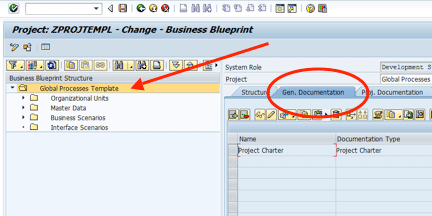
Figure 1
Project documents at the project header for a template project
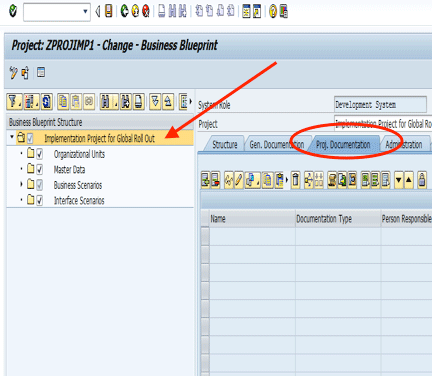
Figure 2
Storing project-level documents on the project header for implementation projects
Storing Solution-Related Documents
Table 2 shows where to store the documents described above. Figure 3 highlights the sections of the BPH referenced in Table 2.
|
Type
|
Title
|
Node on BPH
|
Tab
|
|
SDD
|
Scenario Design Document
|
Scenario.
|
General or project documentation.
|
|
PDD
|
Process Design Document
|
Business Process.
|
General or project documentation.
|
|
MDD
|
Master Data Definitions
|
On individual master data nodes at the Project Header. Note: The BPH has organizational unit and master data nodes for each business scenario. I recommend only using these if the information is very sensitive or highly specialized and needs access control.
|
General or project documentation.
|
|
ODD
|
Organizational Design Document
|
On the organizational units node at the project header. This document covers all organizational hierarchy units for the solution. A scenario-specific organizational hierarchy may be required by your project (although rare), and would be stored at the organizational units level within the business scenario.
|
General or project documentation.
|
|
BPP
|
Business Process Procedure
|
Stored at the business process level.
|
General or project documentation.
|
|
BRD
|
Business Requirements Document
|
Stored at the business process level if creating multiple documents (one per process, or one per requirement). If single document, store on the Business Scenarios node of the BPH, not individual business scenario nodes.
|
General or project documentation.
|
|
NFR
|
Non-functional requirements
|
Store at the Business Scenarios node as these requirements cross scenarios.
|
General or project documentation.
|
|
GAP
|
Requirement not met by the existing solution
|
At the process node where the GAP is identified.
|
General or project documentation.
|
|
FDS
|
Functional Design Specification
|
At the process node affected/supported by the custom development. (May be more than one process node.)
|
General or project documentation.
|
|
TDS
|
Technical Design Specification
|
At the process node affected/supported by the custom development. (May be more than one process node.)
|
Development tab (access via SOLAR02 or turn on for Blueprint using SOLAR_PROJECT_ADMIN).
|
|
TUT
|
Technical Unit Test
|
At the process node affected/supported by the custom development. (May be more than one process node.)
|
Development tab (access via SOLAR02 or turn on for Blueprint using SOLAR_PROJECT_ADMIN).
|
|
FUT
|
Functional Unit Test
|
At the process node affected/supported by the custom development. (May be more than one process node.)
|
General or project documentation.
|
|
COE – Business Process Configuration
|
Configuration Element
|
At the process node affected/supported by the custom development. (May be more than one process node.)
|
Configuration tab (access via SOLAR02 or turn on for Blueprint using SOLAR_PROJECT_ADMIN).
|
|
COR – Business Process Configuration
|
Configuration Rationale
|
At the process node affected/supported by the custom development. (May be more than one process node.)
|
Configuration Tab (access via SOLAR02 or turn on for Blueprint using SOLAR_PROJECT_ADMIN).
|
|
COE – Org Units
|
Configuration Element
|
At their respective organizational unit in the project header section
1 COE for each organizational unit.
|
Configuration tab (access via SOLAR02 or turn on for Blueprint using SOLAR_PROJECT_ADMIN).
|
|
COR – Master Data
|
Configuration Rationale
|
At their respective master data in the project header section.
1 COR for each master data element.
|
Configuration tab (access via SOLAR02 or turn on for Blueprint using SOLAR_PROJECT_ADMIN).
|
|
JRD
|
Job Role Definition
|
At the process node affected/supported by the custom development. (May be more than one process node.)
|
Training materials (access via SOLAR02 or turn on for Blueprint using SOLAR_PROJECT_ADMIN).
|
|
EUR
|
End User Roles
|
At the process node affected/supported by the custom development. (May be more than one process node.)
|
Development tab training materials (access via SOLAR02 or turn on for Blueprint using SOLAR_PROJECT_ADMIN).
|
|
HDS
|
Help Desk Scripts
|
At the process node affected/supported by the custom development. (May be more than one process node.)
|
Training materials (access via SOLAR02 or turn on for Blueprint using SOLAR_PROJECT_ADMIN).
|
|
TRN
|
User Training
|
Process level.
|
Training materials (access via SOLAR02 or turn on for Blueprint using SOLAR_PROJECT_ADMIN).
|
Table 2
Document storage locations
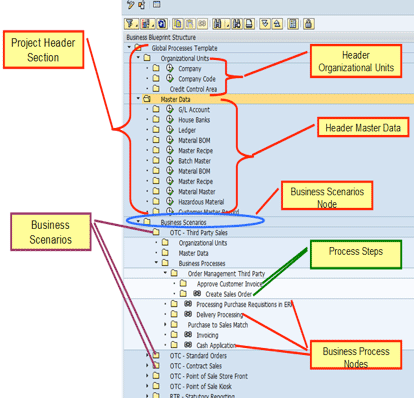
Figure 3
Locations on the BPH
Transaction Mapping
Transaction mapping, configuration mapping, and custom development go much more quickly than documentation as there is much less to control and standardize. Transaction mapping occurs at the process step level as a general rule. While mapping at the process level may seem painstaking when the same transaction code is used for every step, such as PA01 for HR functions or MIGO for warehouse functions, mapping at the step level helps you with future change impact analysis, preparing training, and many other process-level project activities. The transactions are mapped to the Transactions tab (Figure 4).
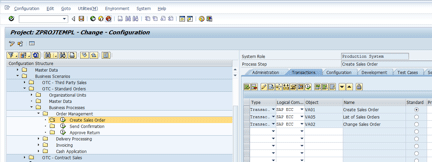
Figure 4
Transaction code mapping
Note
When you map transactions to the BPH nodes, the execute icon
![]()
appears in the BPH structure. Clicking this icon in the structure executes the SAP transaction in the managed (or satellite) system. If you have more than one transaction mapped to the process step node, the one marked with the radio button in the Standard column is the one executed.
Configuration Mapping
Like transaction mapping, taking the time early on to be detailed pays many benefits going forward. Since it is a bit more difficult to identify configuration for individual process steps, I recommend that you map the configuration on the Configuration tab at the process node level rather than at the step.
On the Configuration tab, you can navigate to the managed (or satellite) system’s IMG and select the IMG objects that are relevant to the business process. I encourage you to map to the lowest node, rather than mapping to higher order IMG nodes, even if you will be configuring all the lower order nodes. This helps in doing change impact analysis, reduces time in navigating to the proper place in the IMG in repeated visits to the IMG during configuration, and reduces the risk that others might navigate to the wrong location when doing future configuration. Figure 5 shows selecting the IMG nodes from the managed system.
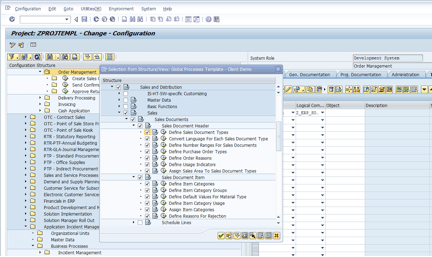
Figure 5
Select all relevant IMG nodes for the business process
Custom Development
Unlike configuration, custom development objects do not exist during solution design. Therefore, they must be mapped to BPH after they have begun development. (I recommend mapping as soon as the object is created in the managed system rather than waiting until they are complete. Good habits yield good results.)
Custom development objects are mapped on the Development tab for the process they affect or support. Figure 6 shows how mapping of Development Objects occurs.
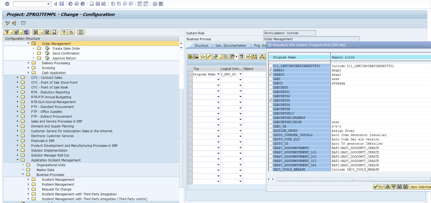
Figure 6
Mapping development items to business processes
As you might have surmised, I’ve only scratched the surface of the importance of establishing good standards for your projects. Some other things to keep in mind:
- Assign someone to monitor that project standards are being followed. It’s quite common for project teams to become busy and cut corners to meet time lines. If this begins to happen on your project, hire some low-cost help to clean up content and run preliminary audits. The audits you initiate yourself can save you millions of dollars in fines generated by audits after the fact. Be sure you don’t fall into the trap of having a “Congress and no cops.” Don’t define your standards without putting enforcement in place.
- Not all transactions are transactions. Some SAP products are launched via URLs, services, and so on. The Transaction tab has support for a wide variety of ways to invoke SAP functions. Just because the business activity is not invoked by a transaction code is not a reason to leave it out of your solution documentation.
- The custom development space has a wide variety of objects and invocation methods. Be diligent and map every one you possibly can. For those you can’t map to the BPH, store a document on the Development tab that describes them. You’ll thank me later.
- Documentation content can be a very troublesome pain point on projects. Since you’re using the Solution Manager BPH and mapping all these different objects to it, you can lean toward minimal documentation. Keep your documentation templates simple. Don’t document what can be generated via a report if you’ve mapped the content to the BPH properly.
There are many more lessons learned I could share, but these are some of the biggies. As always, set all this up in a test project and walk through how you’ll actually use these techniques before rolling it out to your team.
D. Russell Sloan
D. Russell Sloan is a specialist in project and program governance for IBM. He focuses on the use of SAP Solution Manager for global rollout projects for IBM’s largest customers, having worked with SAP software since 1996. Russell has degrees in accounting and information systems and has been a team and project leader for SAP projects for more than 14 years. He has been developing and deploying software systems for over 30 years.
You may contact the author at solmanruss@gmail.com.
If you have comments about this article or publication, or would like to submit an article idea, please contact the editor.