SAP Lumira and SAP Lumira Cloud are SAP’s latest offerings for data discovery use cases. These products allow you to uncover hidden data anomalies in your SAP ERP, SAP NetWeaver BW, and SAP HANA systems. Learn about the data connectivity options that you can use to leverage SAP Lumira with your SAP systems and how to use SAP Lumira and SAP Lumira Cloud to create content based on data from your SAP systems.
SAP Lumira and SAP Lumira Cloud are SAP’s latest offerings for data discovery. Organizations can leverage these data visualization products to uncover hidden data anomalies, starting at the granular level, in SAP ERP, SAP NetWeaver BW, and SAP HANA systems. I discuss the data connectivity options for SAP Lumira towards your SAP systems and then explain how to use SAP Lumira and SAP Lumira Cloud to create content based on data from these source systems.
Data Connectivity – SAP Lumira and SAP ERP
SAP Lumira is able to leverage a relational Universe (UNX) to connect to your SAP ERP system and leverage classic InfoSets, ABAP functions, and ABAP queries as the data source. In addition, SAP Lumira is also able to connect directly to the classic InfoSets in your SAP ERP system. Figure 1 illustrates these connections.
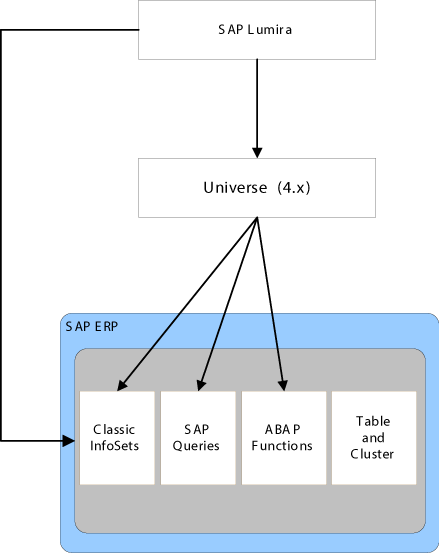
Figure 1
SAP Lumira and SAP ERP
Users must understand the advantages and limitations of each connection type. The direct connectivity option is limited to the classic InfoSets and does not provide you with any ability to change the metadata as part of the data connectivity from the underlying InfoSet. On the other hand, it provides you with direct data connectivity without the need to implement an SAP BusinessObjects BI server and without the need to create a UNX.
Table 1 outlines the advantages and limitations you face when choosing direct connectivity or a relational UNX.
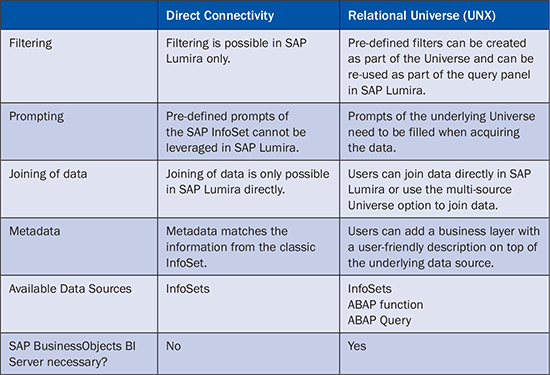
Table 1
SAP Lumira – Data connectivity to SAP ERP
Data Connectivity – SAP Lumira and SAP NetWeaver BW
The latest version of SAP Lumira is able to connect to SAP NetWeaver BW (Figure 2).
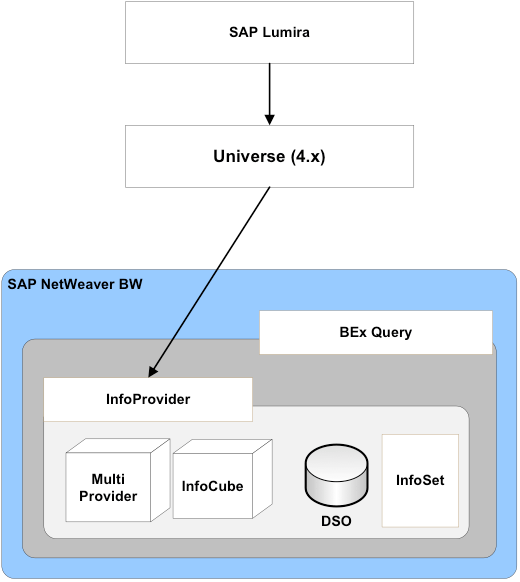
Figure 2
SAP Lumira and SAP NetWeaver BW
As Figure 2 shows, SAP Lumira can connect to the InfoProvider level in your SAP NetWeaver BW system via an authored relational UNX.
However, there are several limitations to consider. At this point in time, SAP Lumira does not have a direct connectivity option to retrieve the data from a BEx query element. Users will not be able to access data from unit or currency conversions, calculated key figures, and many other elements.
Table 2 shows the most common elements of a BEx query. Those elements that are available when connecting directly to the BEx query – for example using SAP BusinessObjects Analysis, edition for Microsoft Office – are not all available under the relational UNX connection.
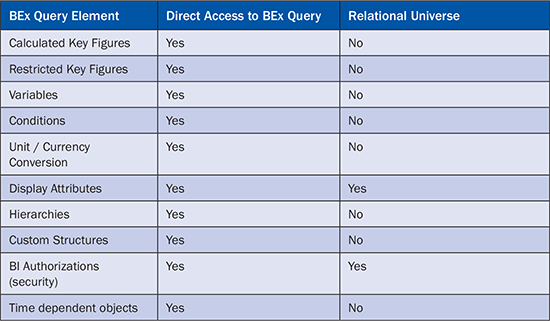
Table 2
SAP Lumira – Data Connectivity to SAP NetWeaver BW
Data Connectivity – SAP Lumira and SAP NetWeaver BW on SAP HANA
Users can leverage the integration of SAP Lumira and SAP NetWeaver BW on SAP HANA, where SAP HANA is the database for your SAP NetWeaver BW system (Figure 3).
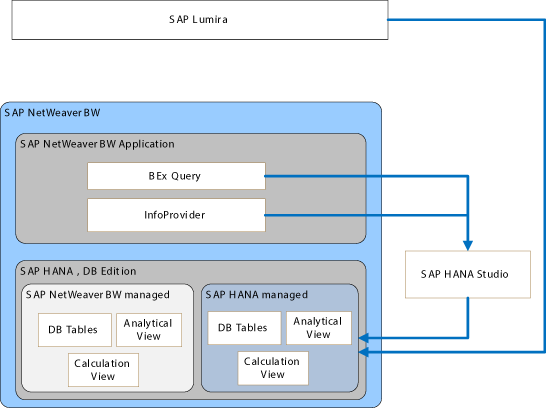
Figure 3
SAP Lumira and SAP NetWeaver BW on SAP HANA
Users can leverage BI tools such as SAP Lumira to review analytics from a reporting model generated in SAP HANA and based on the metadata from SAP NetWeaver BW. There are several considerations for users to keep in mind, depending on the modeling the user chooses.
With the integration of SAP NetWeaver BW on SAP HANA, the user has two options to generate either a model based on an SAP NetWeaver BW InfoProvider or a model based on a BEx query. The connection automatically generates an SAP HANA model based on the information from those SAP NetWeaver BW assets.
In case you are using SAP NetWeaver BW on SAP HANA, it is important to remember that the underlying SAP HANA system has two sets of tables. Your SAP HANA system does have tables and views that are managed by SAP NetWeaver BW, such as the tables for an InfoProvider created in SAP NetWeaver BW, and tables and views that are managed directly in SAP HANA using SAP HANA Studio.
In case the users generates a model based on a SAP NetWeaver BW InfoProvider, the resulting model in SAP HANA points directly to the tables in the SAP NetWeaver BW-managed part of the SAP HANA system. Because the model points directly to these tables, the user does not have to worry about any additional steps when new data is being loaded into the InfoProvider.
When the user chooses to create the model based on a BEx query, the first step of the process is to generate a BEx query snapshot, which means that SAP NetWeaver BW executes the BEx query and creates a table in SAP HANA based on the results of the BEx query. In this case the process has to be repeated after new data has been loaded into the InfoProvider.
The following set of tables compares the option to leverage the relational UNX on top of your SAP NetWeaver BW InfoProvider with the option to use SAP NetWeaver BW on SAP HANA in combination with SAP Lumira.
Table 3 compares the connectivity of InfoProvider features when the user chooses the relational UNX or the generated SAP HANA model when using SAP NetWeaver BW on SAP HANA. Notice that an SAP HANA optimized InfoCube or DSO can be leveraged directly, but all other InfoProvider features can only be leveraged using a BEx query and generating a BEx query snapshot. The relational UNX is capable of connecting to all those InfoProviders directly but is not able to leverage the BEx query as a source.
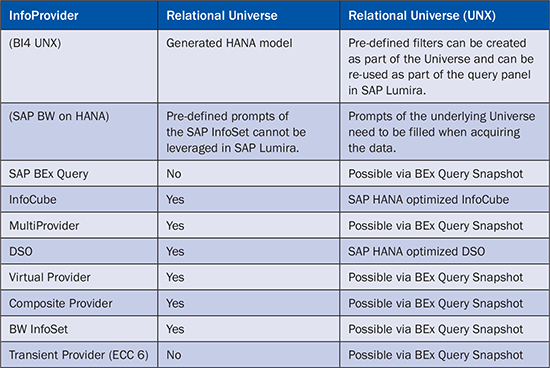
Table 3
Supported InfoProvider
Table 4 demonstrates that most of the basic elements are supported in both options but that elements from the BEx query are not supported in the relational UNX route. These elements are only supported with SAP NetWeaver BW on SAP HANA by generating a BEx query snapshot.
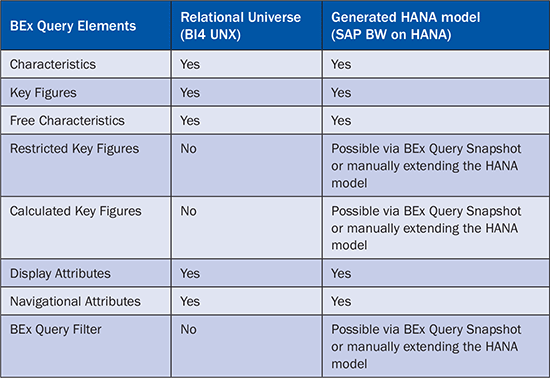
Table 4
Supported metadata (Part 1)
Table 5 shows that both approaches are unable to leverage BEx queries with two structures. The relational UNX option is not able to leverage BEx queries at all, so you are not able to leverage custom structures in the UNX. The generated model based on a BEx query does not support BEx queries with two structures, so you can only use BEx queries with a single structure.
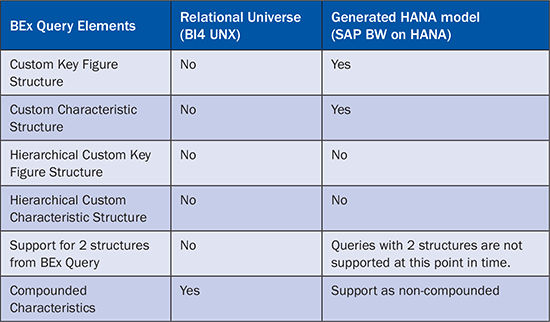
Table 5
Supported metadata (Part 2)
Table 6 shows another set of important metadata from SAP NetWeaver BW. Elements such as a condition from a BEx query are not supported with the relational UNX. These elements do require manual enhancement of the generated SAP HANA model or use of a BI client that is capable of defining a condition in the BI tool itself, such as SAP BusinessObjects Analysis, edition for Microsoft Office.
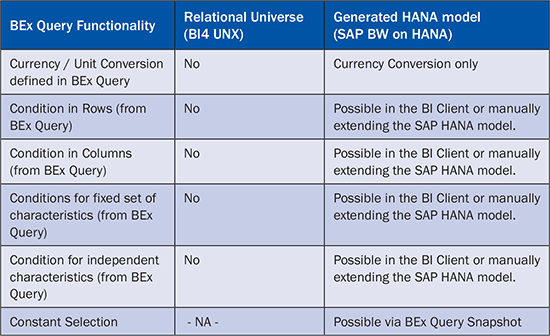
Table 6
Supported metadata (Part 3)
Note
Neither the relational UNX nor the generated model in SAP HANA based on the metadata from SAP NetWeaver BW support the already existing hierarchies (Figure 7). Both data connectivity options give you the basic information of the underlying SAP NetWeaver BW InfoProvider, but if you require the complete set of metadata available in the BI client, such as hierarchies, custom structures, variables, or local calculations, then the best option is to leverage the BEx query as an entry point to SAP NetWeaver BW.

Table 7
Supported metadata (Part 4)
Note
In addition to the different level of support for the metadata from your SAP NetWeaver BW system, note that the connectivity option using the relational UNX does require you to have an SAP BusinessObjects BI server installation as part of your overall landscape. The option to use SAP Lumira in combination with the SAP HANA model based on SAP NetWeaver BW on SAP HANA does not have a mandatory requirement for the SAP BusinessObjects BI server.
Data Connectivity to Distribute Content to Mobile and Browsers – SAP Lumira Cloud
Earlier in this article, I explained how SAP Lumira as a desktop-installed product can connect to SAP ERP, SAP NetWeaver BW, and SAP NetWeaver BW on SAP HANA. You also learned that usage can require the deployment of a SAP BusinessObjects BI server landscape in some instances. This leaves the question of how you can share your content with colleagues or use it on a mobile device. The answer to this question is SAP Lumira Cloud (https://cloud.saplumira.com).
As shown in Figure 4 you have the ability to share your data discovery and your datasets from the SAP Lumira desktop environment to the SAP Lumira Cloud environment. Using SAP Lumira on your desktop you can acquire the data – for example, SAP ERP or SAP NetWeaver BW – and analyze the information and then publish your findings to SAP Lumira Cloud. SAP Lumira allows you to publish either the dataset or so called stories—stories are a collection of visualizations—to SAP Lumira Cloud. Once you published the dataset or stories to SAP Lumira Cloud, you can use either your existing story and share it, or create a new data visualization using SAP Lumira Cloud and share it with your colleagues.

Figure 4
SAP Lumira and SAP Lumira Cloud
SAP Lumira Cloud allows you to share the content in two options: You can either share content with your colleagues using a browser or your colleagues can use the SAP Mobile BI application by configuring the application connection to point to the SAP Lumira Cloud system.
At this point in time, SAP Lumira Cloud does not have a direct connectivity to your on-premise or cloud-based SAP systems. Therefore your only available option is to upload the datasets using SAP Lumira, or upload the datasets manually to SAP Lumira Cloud and to then create the required data visualizations.
Overall Recommendation
As you learned in this article, there are different approaches for using your corporate data from your SAP systems in combination with SAP Lumira. In case you already use a SAP BusinessObjects BI system, you should consider the UNX-based approach for your SAP ERP and SAP NetWeaver BW systems in combination with SAP Lumira.
If you do not have an existing SAP BusinessObjects BI landscape and are not considering deploying one, than you can leverage the direct connectivity towards SAP ERP.
You can use SAP NetWeaver BW on SAP HANA and generate an SAP HANA model that you can use with SAP Lumira directly.
Even if you do already have an existing SAP BusinessObjects BI system, for a mobile consumption of your SAP Lumira content you have to leverage SAP Lumira Cloud. You can point the SAP Mobile BI application directly to your SAP Lumira Cloud account.
Product Roadmap Disclaimer
The descriptions in this article of future functionality are the author’s interpretation of the publicly available product integration roadmap. These items are subject to change at any time without any notice, and the author is not providing any warranty on these statements.

Ingo Hilgefort
Ingo Hilgefort started his career in 1999 with Seagate Software/Crystal Decisions as a trainer and consultant. He moved to Walldorf for Crystal Decisions at the end of 2000, and worked with the SAP NetWeaver BW development team integrating Crystal Reports with SAP NetWeaver BW. He then relocated to Vancouver in 2004, and worked as a product manager/program manager (in engineering) on the integration of BusinessObjects products with SAP products. Ingo's focus is now on the integration of the SAP BusinessObjects BI suite with SAP landscapes, such as SAP BW and SAP BW on SAP HANA, focusing on end-to-end integration scenarios. In addition to his experience as a product manager and in his engineering roles, Ingo has been involved in architecting and delivering deployments of SAP BusinessObjects software in combination with SAP software for a number of global customers, and has been recognized by the SAP Community as an SAP Mentor for SAP BusinessObjects- and SAP integration-related topics. Currently, Ingo is the Vice President of Product Management and Product Strategy at Visual BI Solutions, working on extensions to SAP’s product offering such as SAP BusinessObjects Design Studio and SAP Lumira. You may follow him on Twitter at @ihilgefort.
You may contact the author at Ingo@visualbi.com.
If you have comments about this article or publication, or would like to submit an article idea, please contact the editor.