In product cost controlling-based standard costing, various options exist to add additional costs to a product cost estimate, such as the use of an overhead costing sheet, an additive cost estimate, or statistical pricing conditions. Understand the solution to add actual costs manually to a material that is subjected to actual costing in the material ledger. Learn the business reasons for manual cost addition to a material and how to use transaction MR22 to influence actual cost computation of a material.
Key Concept
Manual cost addition with transaction MR22 is unlimited and allows an automatic change of the cost in all material ledger currencies. It also has flexibility that allows users to enter cost details for multiple materials.
In a typical manufacturing company when a costing run is performed, the finished goods cost is rolled up using bill of material (BOM), routing and activity prices, and procurement purchasing conditions. However, there may be many other costs or expenses that are not booked directly. Although they are associated with the material, they are booked as periodic expenses in general ledger accounts. Such cost elements may not be picked up in a cost estimate directly and may need to be included in an indirect manner. Approaches include the use of an overhead costing sheet, an additive cost estimate to add extra cost items, and accrual purchasing conditions. Selection of any of these options varies based on the business scenario and type of standard costing design in the SAP system.
In actual costing in the material ledger, the SAP system records the actual cost associated with a material based on valuated inventory goods movement transactions, invoice postings, associated price and exchange rate differences, production variance settlement postings, and so on. Based on these actual costs booked to the material, the system computes the periodic unit price (or actual cost) following the price determination process. You cannot follow any of the approaches that are typically used in product costing for manual cost addition in the material ledger.
I’ll explain a solution that helps you add additional actual costs manually to a material so that the actual cost computed by price determination is accurate. Since most people know about standard costing and approaches such as additive costing and overhead sheets, in this article I focus on the option used in the material ledger actual costing scenario.
In the first section of this article, I’ll explain the various business scenarios that necessitate manual cost addition to a material.
Manual Cost Addition
Let’s take an example of an externally procured raw material to illustrate the business scenario. Typically in a manufacturing company, the organization incurs a lot of material overhead costs in support departments (e.g., procurement, inbound logistics management). Apart from this, there are additional landed costs incurred as a part of the procurement process such as freight, taxes, surcharges, and custom duties. Typically, these costs are not a part of the purchase cost of a material that is paid to the vendor and such cost bookings are never booked at a material level. These actual expenses are booked in the general ledger through an AP invoice sent by a service provider (e.g., freight carrier) or as manual journal entries. Some companies would like to consider these costs as a part of inventory valuation and reflect them as a separate cost component in the cost structure.
In actual costing, since the actual overhead and landed costs are not booked at the material level, they are not included as a part of the actual cost calculation. Businesses must adopt an offline or manual process of allocating the actual overhead and landed costs from the general ledger account to the material level following some distribution basis such as percentage based on purchase value or consumption amounts. Once the debit or credit cost amount to be booked at the material level is determined, you can use standard transaction MR22 to book the cost at the material level. The debit or credit cost added through transaction MR22 is considered as a price variance and then is included as a part of the actual cost calculation at period end.
You can extend similar logic to other business scenarios or material types in a manufacturing company. For example, imagine the addition of material overhead costs to subcontracting materials (i.e., finished or semi-finished goods that are outsourced and procured from an external subcontractor). In this business scenario, the company provides some components or partly finished materials to the subcontractor. The subcontractor adds value by performing certain operations and sends the finished goods back to the organization. The standard process is to create a subcontracting purchase order and pay the subcontractor for the value-add done to the material. This actual cost is booked to the material. However, the administrative overhead of the procurement or logistics department is part of indirect costs. Indirect costs are not booked at a material level. Another business scenario is related to the addition of sales and administration overhead costs to finished goods valuation. In all these scenarios, you can use transaction MR22 to add debit and credit actual costs to the material and reflect these indirect costs as actual costs to a material.
In the next section, I’ll show you how you can use transaction MR22 to post the manual cost for a material subjected to actual costing in the material ledger.
Prerequisites to Post Manual Cost Using Transaction MR22
To post a manual debit or credit cost using transaction MR22, you need to set the following account determination settings in transaction OBYC. Follow menu path Materials Management > Valuation and Account Assignment > Account Determination > Account Determination Without Wizard > Configure Automatic Postings (Figure 1). You need to do account determination for the following transaction keys to enable accounting postings for transaction MR22:
- UMB – Gain/loss from revaluation: In Figure 1, I maintained the gain/loss revaluation account as account 519400 for valuation class 3000. The configuration setting in this transaction depends on the chart of accounts. For example, a valuation class is a parameter set as a part of the material type account grouping.
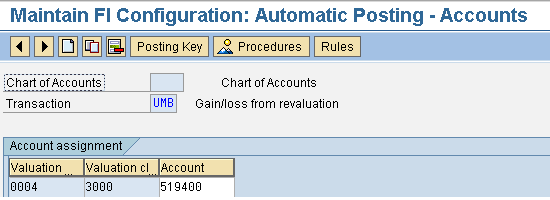
Figure 1
Account determination for UMB transaction key
- PRD – Cost (price) differences: In Figure 2, I maintained the price difference account as account 502610 for valuation class 3000.
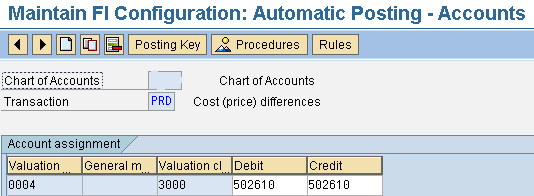
Figure 2
Account determination for PRD transaction key
Representation of Transaction MR22 Posting in Material Price Analysis
Now let’s look at how to post the transaction and how it is represented in material price analysis.
In transaction MR22, enter the posting date, plant, and company code associated with the posting in the header (Figure 3). Once you enter these header details, you can then enter the manual cost (debit and credit amount) for one or more materials in the plant in the Amount column. There is no need to enter Quantity. In this example, the amount of 100 CRC (Costa Rican colon) is entered in company code (local) currency in the CRC Co.Code tab. When you press Enter, the SAP system updates the current standard price value in the Price column along with the Price unit as information.
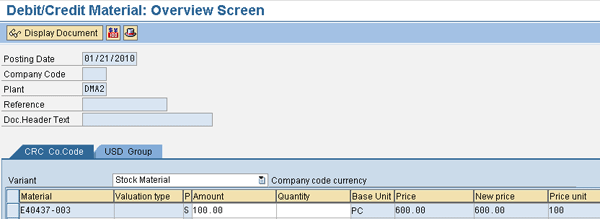
Figure 3
Debit costs entered in company code currency
To update the corresponding value in other currency tabs, navigate to the USD Group tab, select the materials, and then click the currency conversion icon as shown in Figure 4. In this example, the other parallel currency is the group currency (USD), so navigate to the group currency tab, select the material entered, and click the currency conversion icon.
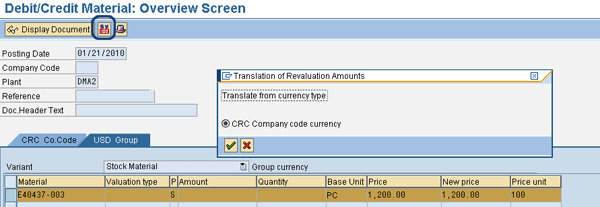
Figure 4
Automatic currency conversion in transaction MR22
Once you press Enter in the pop-up window, the system automatically does currency conversion based on the exchange rate value maintained between two currencies for the M exchange rate type. Figure 5 shows the automatically calculated group currency amount value. Once this is done, click the save icon and you see a message that says Price change document <number> posted.
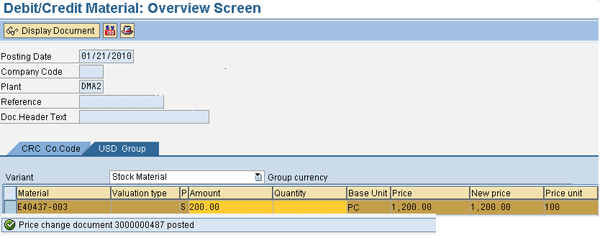
Figure 5
Post manual costs in transaction MR22
Note
Users can enter the input amounts either in the local currency or any of the parallel currencies set up in the material ledger. There is no specific constraint that only local currency amount should be entered in this transaction. Depending on the input currency, you need to enter amounts in the correct tab. The SAP system automatically does currency conversion in the other tabs. It is also important to do currency conversion in all parallel currency tabs (or have the right currency amount value in all tabs) before posting the transaction. If this is not done, inconsistencies in posted values for the material across different currencies can lead to incorrect actual cost calculations.
In transaction CKM3 (material price analysis), the debit or credit amount posted through transaction MR22 is represented in process category Other Receipts/Consumption. The SAP system recognizes the amount posted as price differences in price determination view as shown in Figure 6. Also, the amount values are stored in respective parallel currencies and subsequently are considered as a part of the actual cost calculation. Figure 6 shows the representation of a transaction in material price analysis of a material in company code currency.
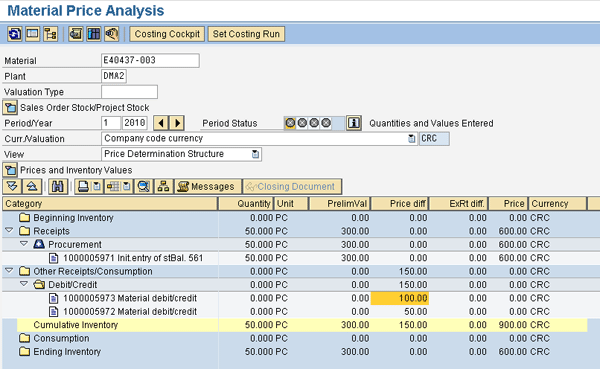
Figure 6
Representation of transaction MR22 in transaction CKM3
Accounting Integration of Transaction MR22 Posting
The debit or credit amount posted through transaction MR22 creates a material ledger document in the SAP system, which further integrates to create accounting documents (i.e., FI, profit center accounting [PCA], and CO documents as applicable).
The FI entry created for this transaction posting uses the account determination settings that I explained in the prerequisites section. For the debit posting, the FI entry that is automatically created is shown in Figure 7. You get to the screen in Figure 7 by clicking the appropriate entry in Figure 6.
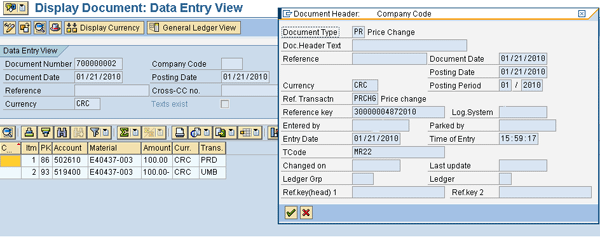
Figure 7
Price change accounting entry for transaction MR22 posting
The SAP system automatically converts the company code currency postings to another parallel currency (e.g., group currency) based on parallel currency settings in configuration. Depending on account settings and profit center integration, the system may also generate CO and PCA documents.
Consideration of Transaction MR22 Postings in Actual Cost Calculation
Now I’ll show how the price differences posted through manual cost addition are picked up during the single-level price determination process, and how they influence the actual cost calculation of the material.
Initially, the material has a standard price of six CRC per PC, resulting in a preliminary valuation of 50 units as 300 CRC. During the month, I posted a cost of 150 CRC as Other receipts/consumption using transaction MR22. After single-level price determination, a variance of 150 CRC is included in the actual cost calculation resulting in a new periodic unit price of nine CRC per PC (900 CRC for 100 PCs).
Figure 8 shows the new periodic unit price value computed after performing single-level price determination for the material.
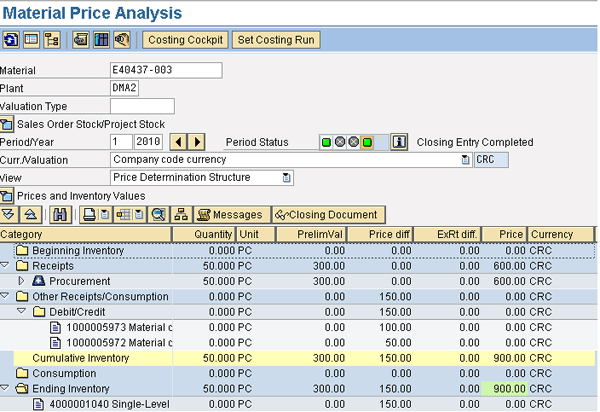
Figure 8
Periodic unit price after single-level price determination
After doing a post-closing step in the material ledger close process, the SAP system revaluates the period-end inventory quantity based on the new periodic unit price and posts necessary accounting entries for the revaluation amount.
You need to follow a similar procedure at the end of every month. Business users have to enter the actual cost amount to the material considering ending on-hand inventory levels, total receipts, and consumption of material during the month.
When you post the actual cost or price differences to a material, the SAP system splits the debit or credit amount added through transaction MR22 to other cost components automatically based on the existing cost component structure for the material. In this example, the cost of any externally procured raw material is equal to the purchase price, and so it has only the material component in the cost split. However, the manual cost that you are adding to the material is overhead cost (or other landed costs), and you may want to see these costs assigned under a different cost component in the overall cost structure. To achieve this and to modify the standard derived cost component split assignment, you can adopt one of these two options:
- Modify cost component split in the material ledger using SAP Business Add-In (BAdI): Define custom logic in the standard SAP BAdI GET_DEFCCS. GET_DEFCCS is a customization option provided by SAP in the material ledger to modify the actual cost component split. This BAdI is generally not active in the standard system and to activate it, you must create an active implementation. In GET_DEFCCS, you can provide necessary custom logic to assign the cost component. For more details on how to implement the BAdI and to understand risks and precautions in using the BAdI, refer to SAP Note 996304.
- Use transaction CKMCCC (manual change of cost component splits) to manually modify the actual cost split at a material level: This is a standard SAP transaction and users can manually change the assignment of the cost component for the actual cost posted to the material using this transaction. Since the focus of this article is mainly on transaction MR22 use, I have not gone into detail on how to use transaction CKMCCC. You can get more details on how to use this transaction in SAP Help.
Muralidharan Sethuraman
Muralidharan Sethuraman is director enterprise ERP IT finance at Johnson Controls. He has more than 16 years of industry experience leading and managing multiple SAP implementation and business transformation programs across geographies. Muralidharan is currently leading the SAP S/4HANA program at Johnson Controls. He specializes in SAP Financials and has done design lead, solution architect roles in global SAP implementation programs. Muralidharan is a subject matter expert in the areas of product cost analysis and management, inventory and working capital management, management reporting and profitability analysis, financial analytics and reporting, and business planning. He has published multiple articles in Financials Expert in these areas.
If you have comments about this article or publication, or would like to submit an article idea, please contact the editor.



 Premium