Find out how planned assembly scrap in material master views affects cost estimates in Product Cost Planning. Planning and posting assembly scrap removes the value of scrap from the total variance. Only the difference between planned and actual scrap posts as a scrap variance. This improves variance analysis by reducing the variance by the value of scrap that is predictable based on past production statistics.
Key Concept
Assembly scrap is the percentage of assembly quantity that does not meet required production quality standards. For example, planned assembly scrap of 25% means that to deliver 100 pieces of an assembly, you plan to produce 125.
When you enter assembly scrap percentages in the material master, the assembly standard cost estimates
increase the standard cost by the planned percentage in Product Cost Planning. The system posts actual assembly scrap
during activity confirmations in Cost Object Controlling. You then analyze scrap variance — the difference between
planned and actual scrap — following variance calculation or in detailed analysis reports in Cost Object
Controlling.
Planning and posting assembly scrap results in more accurate variance analysis because you reduce total
variance by the value of scrap. If assembly scrap is not planned, all scrap costs post as a variance. Although you can
include variance at a higher level in profitability reporting, planned assembly scrap is included at the material level.
This results in more accurate analysis of profitability at the product level.
Planned assembly scrap also improves the Material Requirements Planning (MRP) process by ensuring you
start with an increased quantity to achieve the required product yield. Assembly scrap is an output scrap because it
affects the planned output quantity of items in the production process.
How assembly scrap affects cost estimates and the benefits of planning and posting assembly scrap to
variance analysis generally are not well understood. I present the overall flow of costs from cost estimates to activity
confirmations and variance reporting in a summary format not found in standard documentation. I’ll explain the
effect of assembly scrap on quantities. Then I’ll discuss how you can plan assembly scrap in MRP master data.
I’ll describe how to determine planned and actual assembly scrap costs. Finally, I’ll show you how you can
calculate and analyze the variance.
Business Example
Let’s follow an example scenario that demonstrates how you can improve variance analysis by planning
assembly scrap. A standard cost estimate without planned assembly scrap calculates a total value of $50,000 to produce a
quantity of 1,000. Quality inspection routinely rejects 100 of the assemblies, which subsequently are scrapped during
activity confirmations. This means the cost to produce 1,000 assemblies is actually $55,000, which includes $5,000
unfavorable variance incurred due to the cost of 100 scrapped assemblies.
If you enter 10% assembly scrap in the material master of the assembly, the cost estimate total value
increases to $55,000, which includes the cost of the 100 scrapped assemblies.
If you then produce 1,000 assemblies and scrap 100, the total actual cost is $55,000. This equals the
planned cost of $55,000 calculated in the cost estimate, so no scrap variance occurs. This simplifies the task of
analyzing other variances, because the planned cost of scrap is removed from the variance total.
Effect of Assembly Scrap on Quantities
Scrap quantities are important because they cause scrap values. I’ll use a simple example of how
assembly scrap applied at the assembly level affects lower-level component and activity quantities. You plan to produce
100 finished printed circuit boards (PCBs). If you enter planned assembly scrap for the finished PCBs, the system
increases all component and activity quantities by 10%, as highlighted in the Quantity costed column in
Table 1.
| Finished PCBs |
100 pieces |
100 pieces |
0 pieces |
| Blank PCBs |
100 pieces |
100 pieces |
10 pieces |
| BIOS |
100 pieces |
100 pieces |
10 pieces |
| Operation 1 |
100 hours |
100 hours |
10 hours |
| Processor |
100 pieces |
100 pieces |
10 pieces |
| Operation 1 |
100 hours |
100 hours |
10 hours |
|
| Table 1 |
Effect of assembly scrap on component and activity quantities |
By increasing the quantity of components and activities, assembly scrap increases the planned cost of
producing the finished PCBs. MRP proposes a production quantity of 110 assemblies, with the expectation that 100 become
inventory and 10 become scrap. Now let’s investigate how to plan assembly scrap.
Assembly Scrap Master Data
You can plan assembly scrap in two different master data fields. The most commonly used field is located
in the MRP 1 view of the material master, which you access by using transaction code MM02 or following
menu path Logistics>Materials Management>Material Master>Material>Change>Immediately.
Click on the MRP 1 tab to display the screen shown in Figure 1.
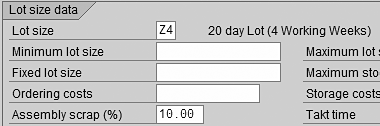
Figure 1
Assembly scrap field in MRP 1 view
Complete the Assembly scrap (%) field with a flat rate percentage determined by
your production statistics of scrap rates. You should update this field prior to the next costing run if the statistics
change during the current year.
Another master data field that affects assembly scrap is located in the Basic Data tab of
a bill of materials (BOM) item. You can view or change BOM item details by using transaction code CS02 or
by following menu path Logistics>Production>Master Data>Bills of Material>Bill of Material>Material
BOM>Change. Double-click on a BOM item to display BOM item details, as shown in Figure
2.
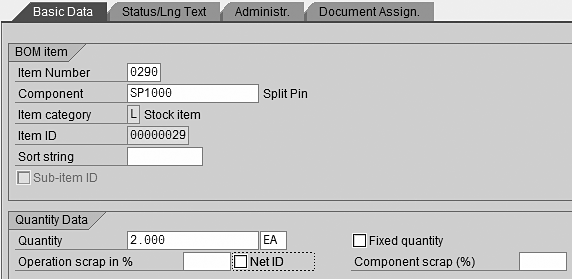
Figure 2
Inspect Net ID indicator of BOM component
You can select the Net ID indicator to ignore assembly scrap for this component. This is
useful if you need to enter a scrap percentage for a particular component that is different from the assembly scrap
percentage of the assembly. In this case, select the Net ID indicator and enter the percentage scrap for
the component in either the Operation scrap in % or Component scrap (%)
fields. If you make an entry in the Component scrap (%) field without selecting the
Net ID indicator, the system calculates assembly scrap first, and then it calculates component
scrap.
Planned Assembly Scrap Costs
Planned assembly scrap costs are included in the standard cost estimate. Let’s compare two cost
estimates, one without assembly scrap and one with assembly scrap, to highlight the difference. To display the screen
shown in Figure 3, use transaction code CK13N or follow menu path
Accounting>Controlling>Product Cost Controlling>Product Cost Planning>Material Costing>Cost
Estimate with Quantity Structure.

Figure 3
Cost estimate without assembly scrap
The Total value of the STANDARD FG cost estimate without assembly scrap
is 46,254.68. The figures in the Scrap and Scrap quantity columns
indicate that no planned output scrap exists. Now let’s display a cost estimate for material STANDARD
FG with 10% assembly scrap planned, as shown in Figure 4.

Figure 4
Cost estimate with assembly scrap
The Total value of the STANDARD FG cost estimate with assembly scrap is
50,880.14, which is 10% higher than the cost estimate without assembly scrap. The quantity of all
components increased by 10%, as shown by comparing the Quantity columns in both cost estimates. The
system displays the increase in component quantities in the Scrap quantity column and the corresponding
increase in value in the Scrap column. Although Figure 4 shows only material cost estimates, the quantity
and value of all other cost estimate items, such as activities, also increase by 10%.
Now that you’ve seen how assembly scrap affects standard cost estimates, let’s look at how
actual costs occur.
Actual Assembly Scrap Costs
Actual costs usually occur during manufacturing order confirmation. This is when activities are confirmed
and goods movements occur during backflushing and auto goods receipt. Backflushing is a term used to describe the
automatic issue of materials from inventory to a manufacturing order during activity confirmation. Auto goods receipt
describes the automatic goods receipt of assemblies or finished goods from a manufacturing order into inventory during
activity confirmation. Let’s follow an example of posting actual assembly scrap during activity confirmation at the
order header level by using transaction code CO15 or following menu path
Logistics>Production>Production Control>Confirmation>Enter>For Order (Figure
5).
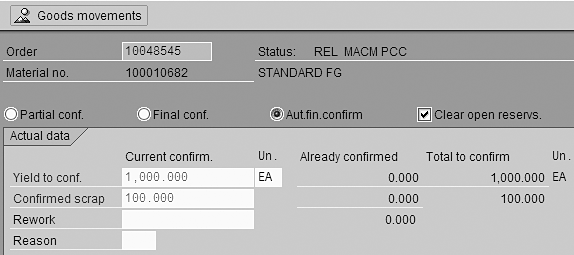
Figure 5
Activity confirmation screen with confirmed scrap field
A quantity of 100.000, due to 10% planned assembly scrap, defaults in the
Confirmed scrap field in the Current confirm. column in this example. If you change the
default Confirmed scrap quantity manually, a scrap variance results. The system displays the expected
scrap quantity of 100.000 in the Total to confirm column of the Confirmed
scrap row. After the system confirms the scrap, you calculate the variance, as I explain in the next
section.
Variance Calculation
You calculate the variance by using transactions KKS6 (individual) and
KKS5 (collective) or by following menu path Accounting>Controlling>Product Cost
Controlling>Cost Object Controlling>Product Cost by Period>Period-End Closing>Single Functions: Product Cost
Collector>Variances. You carry out variance analysis for production and process orders with transaction codes
KKS2 (individual) and KKS1 (collective).
Following variance calculation, you can analyze scrap variances either in the variance calculation output
screen or in detailed product cost collector reports. In the following section, I’ll demonstrate the effect of
planning and posting scrap on variances by comparing detailed product cost collector reports.
Assembly Scrap Target/Actual Analysis
Before performing analysis during a period, you should first run a variance calculation to determine the
target costs. You can display and analyze target versus actual costs in detailed product cost collector reports by using
transaction code PKBC_PKO or following menu path Accounting>Controlling>Product Cost
Controlling>Product Cost by Period>Information System>Reports for Product Cost by Period>Detailed
Reports. A similar report is available for production and process orders with transaction
PKBC_ORD.
Let’s compare two detailed reports to demonstrate how assembly scrap affects variance. The first
detailed report contains an unfavorable scrap variance because assembly scrap is not planned, although actual scrap is
posted (Figure 6).
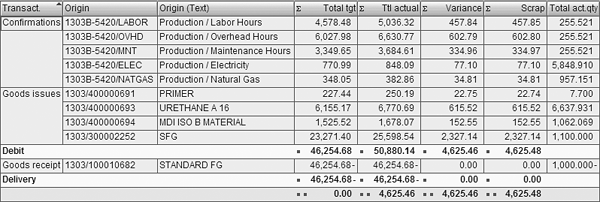
Figure 6
Assembly scrap posted and not planned
Assembly scrap is not planned, so actual assembly scrap posts as an unfavorable scrap variance with a value
of 4,625.48, as shown in the Scrap column. The system issues activity and component
quantities from inventory to make 1,100.000 standard FG, as shown in the Total act.qty column of
the SFG row. This corresponds to the value of 50,880.14 in the Debit row and Ttl
actual (total actual costs) column.
A quantity of 1,000.000 STANDARD FG is delivered to inventory, as shown in the
Total act.qty column. This corresponds to the credit value of 46,254.68 in the
Delivery row and Ttl actual column. The total actual debits of
50,880.14 are greater than the total actual credits of 46,254.68, so an unfavorable
variance of 4,625.46 results, as shown in the summary (last) row of the Total actual
column.
Now that you’ve seen how posting assembly scrap without planning for it results in an unfavorable
variance, let’s examine the effect of planning and posting assembly scrap, as shown in Figure
7.
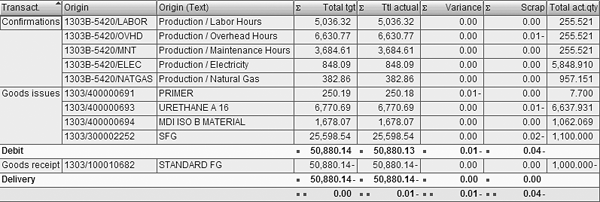
Figure 7
Assembly scrap planned and posted
Assembly scrap is planned and actual scrap posted, so only rounding differences of 0.04-
remain in the Scrap variance column. The system issues from inventory the activity and component
quantities needed to make 1,100.000 standard FG, as shown in the Total act.qty column of the
SFG row. This corresponds to the value of 50,880.13 in the Debit row
and Ttl actual (total actual costs) column.
A quantity of 1,000.000 STANDARD FG is delivered to inventory, as shown in the
Total act.qty column. This corresponds to the credit value of 50,880.14- in the
Delivery row and Ttl actual column. The credit value is based on the standard cost
estimate, which contains the costs for making 1,100 assemblies because assembly scrap is planned. The total actual debits
of 50,880.13 are nearly equal to total actual credits of 50,880.14, so variance is
nearly eliminated, as shown by the 0.01- in the summary (last) row.
Ideally, total variance should only include unplanned production costs. If you don’t plan scrap, all
scrap costs post as a scrap variance, as demonstrated in Figure 6. When you plan assembly scrap based on production
statistics, scrap costs are separated from variance, and only the difference between planned and actual scrap costs posts
as a variance, as shown in Figure 7.
John Jordan
John Jordan is a freelance consultant specializing in product costing and assisting companies gain transparency of production costs resulting in increased efficiency and profitability. John has authored bestselling SAP PRESS books Product Cost Controlling with SAP and Production Variance Analysis in SAP Controlling.
You may contact the author at jjordan@erpcorp.com.
If you have comments about this article or publication, or would like to submit an article idea, please contact the editor.



 Premium