Learn how to use standard SAP operations based on employee master data to create decision trees in time evaluation processing.
Key Concept
The time evaluation schema processes time data from the SAP Cross-Application Time Sheet (CATS) to be used in payroll processing. Personnel calculation rules can be used to apply policies regarding time and leave based on specific employee master data such as job keys, departments, cost centers, payroll areas, and company codes.
Organizational rules related to time and pay can be complex and challenging to administer. Through personnel calculation rules called by the time evaluation schema your SAP system can apply the appropriate regulations and computations based on employee master data such as organizational data. Out-of-the-box operations are available in SAP to facilitate this.
I will show you some examples of decision trees based on employee personnel data, specifically, organizational data from infotype 0001 (organizational assignment). These decision trees can be used to selectively apply business rules and policies to specific groups of employees in time evaluation processing. The examples shown in this article were all created in SAP ERP Central Component (SAP ECC) 6.0.
Laying the Groundwork
Before you implement new personnel calculation rules or changes to your time evaluation schema, a good rule of thumb is always to make backup copies of any rules or schemas that you will be modifying.
For schemas, this can be accomplished via the schema editor (transaction PE01), shown in Figure 1. Simply enter the name of the schema you wish to back up in the Schema field and click the copy icon. The system prompts you for a four-character name for your copied schema. I will be using a copy of my time evaluation schema ZM04, which I have named AM04.

Figure 1
Copying a time evaluation schema
The process for backing up personnel calculation rules is similar. Using the rule editor (transaction PE02, shown in Figure 2), enter the name of the rule you wish to copy in the Rule field and click the copy icon. As with the schema copy, the system prompts you for a name for your target rule.
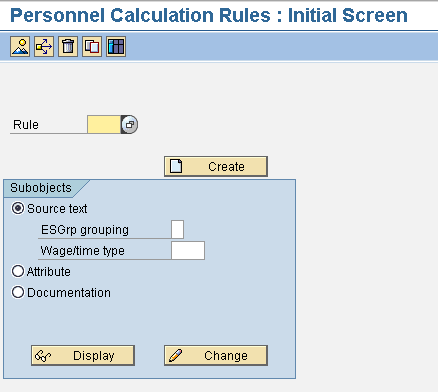
Figure 2
Copy a personnel calculation rule
Once I have copies of my time evaluation schema and any applicable personnel calculation rules, I modify the copies and test with those versions, rather than the originals. This is necessary in my environment because there is more than one support person working with time and payroll and I want to leave my colleagues with pristine working copies of our production environment for their own testing, even in our sandbox client. When I have completed modification and thorough testing of my copied versions, I can then recreate my changes in my main working schema and rules, coordinating my changes with my fellow support personnel as necessary.
Business Cases
An organization needs the flexibility to implement policies based on different criteria. In the examples to follow, I use various master data to control the threshold for comp time payout. I use the different variations of the OUTWP operation to control if and when comp time is paid out. Operation OUTWP is used to transfer data values from the work center to the variable key, and can be used to differentiate employees by the master data contained in various infotypes. This operation can use data from infotypes 0000 (actions), 0001 (organizational assignment), 0002 (personal data), 0007 (planned working time), 0008 (basic pay), and 0016 (contract elements). For this article, I am limiting the scope to just the data available from infotype 0001 (organizational assignment), but all the infotypes listed above contain useful data that distinguishes groups of employees from each other and can therefore be used to trigger rules in time evaluation processing.
I start by narrowing my processing to only full-time, hourly employees, since that is the only group in my organization that is eligible to receive comp time, and by extension, a comp time payout. I created a rule called ZE33 which checks both the employee’s group and subgroup in infotype 0001 (organizational assignment). In my environment, the employee group is used to store whether an employee is Hourly (value H) or Salaried (value S). The employee subgroup further categorizes the Hourly grouping into full-time (values 00 and 29), part-time (value 01), or temporary (value 15) employees. Using transaction PE01 to open the schema editor, you can see I used a simple IF condition in my time evaluation schema AM04 to call rule ZE33. In this IF routine, if the processing in rule ZE33 returns a condition of T for True, the rule for comp time payout, ZCMP, runs. If rule ZE33 returns a condition of F for False, the comp time payout rule ZCMP is skipped (Figure 3).

Figure 3
Call of personnel calculation rule ZE33 from time evaluation schema
Personnel calculation rule ZE33 returns a T (for True) or F (for False) condition based on the combination of employee group and subgroup read from infotype 0001 (Figure 4).

Figure 4
Personnel calculation rule ZE33
Allow me to explain what this rule is doing, line by line (Figure 5).

Figure 5
Step-by-step analysis of personnel calculation rule ZE33
Referring back to my time evaluation schema IF routine in Figure 3, it is the value returned by rule ZE33 that determines if the time evaluation schema goes on to execute rule ZCMP for comp time payout. The operation SCOND = T triggers personnel calculation rule ZCMP via function ACTIO back in the time evaluation schema. Function ACTIO can be used to call and process personnel calculations rules regardless of whether or not there are time pairs.
If on the other hand rule ZE33 returns SCOND = F, it means that the employee does not meet the criteria of being both full-time and hourly, and is therefore ineligible for comp time or a comp time payout. Processing in the time evaluation schema continues on without calling the comp time payout routine rule ZCMP.
Variations on Rule ZCMP
Personnel calculation rule ZCMP can be used to trigger a comp time payout at different quota balance thresholds, based on employee master data. In this first example, I use job key as my criteria. Let’s say my organization’s usual policy is to allow employees to accrue 100 hours of overtime as comp time before automatically paying the overage out. At some point, the organization decides that it does not want to allow a certain job class to carry that much comp time leave. I can use the job key parameter JOBNO of operation OUTWP to set the threshold accordingly, in this case to only 50 hours.

Figure 6
Job key subtype of OUTWP
In the above example, one job key, 20000063, is singled out to run a different comp time payout routine (ZCP3), namely one that sets the threshold at 50 hours accrued instead of the 100 hours that is standard and is processed in rule ZCP1. The GCY (Go to Cycle) operation executes a new personnel calculation rule and the Z in the rule type column terminates processing of the current rule, ZCMP. In the above rule, you could have just as easily included additional job keys that branch to different routines; the decision tree allows you that flexibility.
The employee’s home cost center can also be used to determine the threshold at which comp time is paid out. In the following example, the cost center subtype (COSTC) of operation OUTWP is used as the decision tree for determining which comp time payout routine is run.

Figure 7
Cost center subtype of OUTWP
In my organization, manpower constraints sometimes dictate how much leave a cost center can allow employees to book during a given work cycle. In the example above, the two cost centers 07004000 and 09004000 are opting to pay out accrued comp time at an earlier threshold, rather than allowing employees to carry a larger leave quota, because allowing the employees to take all that leave could negatively impact those areas’ day-to-day operations. Therefore the comp time payout limits have been set lower for those cost centers, via calls to rules ZCP4 and ZCP5.
Perhaps my organization wishes to set the threshold at a broader level, say by department (personnel area). It can use the PLANT parameter to do so, as shown in the following example.
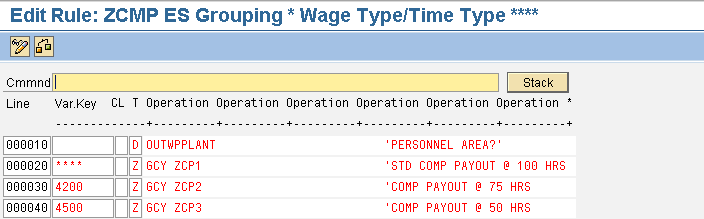
Figure 8
Personnel area subtype of OUTWP
In the version of ZCMP shown in Figure 8, the decision of which comp time payout routine is run is based on the personnel area of the employee being processed. In this example, I have singled out two departments, 4200 and 4500, to set their thresholds for comp time payout to something other than the 100 hour standard. Rule ZCP2 sets the bar at 75 hours accrued, and ZCP3 sets it at 50 hours. All employees whose personnel areas are something other than 4200 and 4500 will branch to the routine that sets the 100 hour threshold, personnel calculation rule ZCP1.
Another type of employee master data OUTWP can read is payroll area. Let’s say my organization wishes to set a higher threshold for the payout of comp time for my bi-weekly payroll as opposed to my monthly payroll. The logic behind this policy is that the organization cannot afford to let the employees who are paid on a monthly basis book too much leave as it would affect daily operations. The payroll area subtype (PAYSB) of operation OUTWP is illustrated in Figure 9.
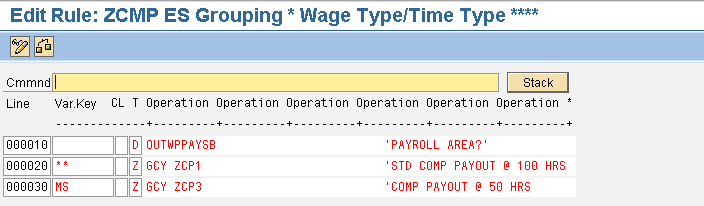
Figure 9
Payroll area subtype of OUTWP
In this variation of rule ZCMP, I am using the payroll area to which the employee is assigned to determine which comp time payout routine is executed for that employee. In this example, I am executing routine ZCP3, which is my 50-hour threshold for employees on my monthly payroll (MS). All other payroll areas would execute my standard comp time payout routine ZCP1.
Finally, many organizations use the Company Code field in infotype 0001 to distinguish between different subsidiaries of the organization. Organizational policies may vary from subsidiary to subsidiary, and the Company Code subtype of operation OUTWP can be used to write decision trees that implement different personnel calculation rules by Company Code (Figure 10).

The version of ZCMP illustrated above in Figure 10 uses the COMPY parameter of operation OUTWP to allow me to call different comp time processing rules based on the Company Code in the employee’s Organizational Assignment data. Let’s say my organization has through mergers and acquisitions added other business entities to the company over time, and has allowed these entities to keep many of the policies related to their employee time and leave rules. The OUTWPCOMPY operation has allowed me to automate the unique processing rules related to comp time payout within these entities. At the same time, I am exercising the organization’s 100-hour threshold for comp time payout over the rest of the company, again via rule ZCP1.
Variations on Operation OUTWP
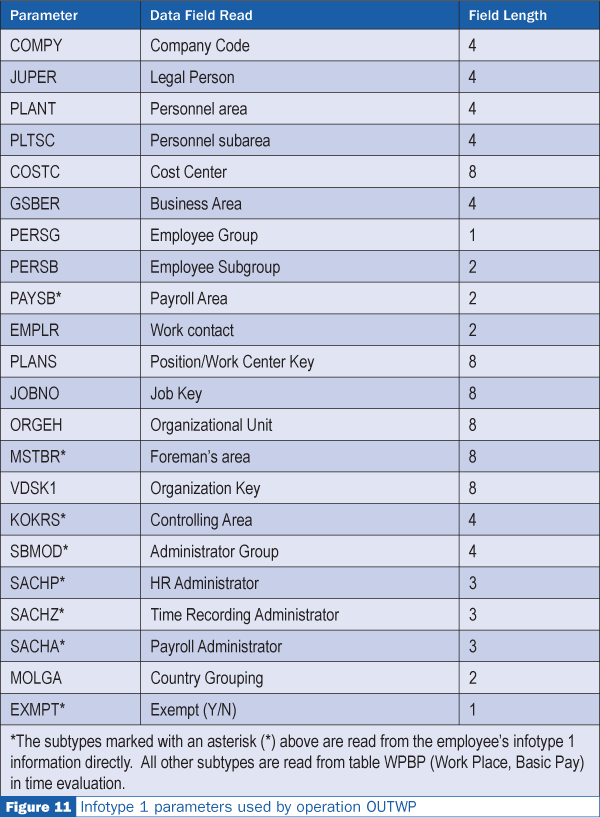
These are just some of the employee data captured in infotype 0001 that you can use to selectively implement organizational policies with regard to time and leave. Figure 11 provides a complete listing of all the subtypes of operation OUTWP related to infotype 0001. The parameter used with operation OUTWP varies, but the underlying logic is the same. Any of these parameters can be swapped for the examples used in this article with the same objective: controlling the automated processing of time and leave during time evaluation.
April Lerner
April Lerner is an ERM specialist on the payroll/time management team in the City of San Antonio’s IT services department. April has more than five years of SAP experience in CRM and R/3 HR Time Management and is an SAP Certified Solutions Consultant in the mySAP CRM Interaction Center (IC) and mySAP CRM Service. She has worked in diverse positions in the IT industry for over 15 years.
You may contact the author at alerner@sanantonio.gov.
If you have comments about this article or publication, or would like to submit an article idea, please contact the editor.