Because mitigations are normally detective controls, it’s very important that they are designed in a way to maximize their effectiveness. Learn the key concepts for designing, documenting, implementing, testing, and monitoring an effective mitigating control. In addition, examples show how you can use SAP BusinessObjects Access Control risk analysis and remediation to help document and monitor these mitigating controls.
Key Concept
| Mitigating controls are normally detective controls designed to ensure any exploitation of a segregation of duties (SoD) risk is caught in a timely manner and can be addressed before significant loss or financial misstatement occurs. |
In today’s economy, resources are limited and people are wearing multiple hats. Consequently, many organizations do not have the people available to facilitate proper segregation of duties (SoD) of system access. Although it’s always better to remove SoD risks (which is a preventive control), many companies today must rely on mitigating controls to remediate SoD risks (which is a detective control).
The key to designing an effective mitigating control is in understanding the risk that occurs if the SoD issue is exploited. Thus, you really have to think like a criminal when evaluating the risk to determine what could happen if someone executed both conflicting actions.
The SoD example I use in this article is a conflict between maintaining vendor master data and generating accounts payable payments (cut checks). It’s very important that all possibilities that could occur if the SoD risk were exploited are identified and documented to ensure that the mitigating controls address all use cases. In this case, the main risk is that someone could create a fictitious vendor and subsequently cut a check to that vendor, defrauding the company of money. A secondary risk is that the person could change the bank routing information on an existing vendor to redirect payments to his or her own account.
When you are designing the mitigating control, keep in mind that there can be two main types of mitigating controls:
- System mitigating controls — This mitigating control relies on system configuration to mitigate the access SoD risk. A system mitigation control is normally a preventive control that negates the access-level risk through additional configuration that would prevent users from exploiting the risk through their security access. This control is the preferred method for mitigating a risk because it’s always better to prevent a risk than to try to mitigate it after the fact. However, implementing system mitigating controls normally incurs a much greater cost than simply implementing a manual mitigating control. It is necessary to perform a cost-benefit analysis to determine whether the increased cost is worth the additional level of control.
- Manual mitigating control — This type of mitigation is a detective control that relies on someone performing a process (normally reviewing a report) to detect whether the access SoD risk was exploited.
For the purpose of this article, I discuss both a system mitigating control as well as a manual mitigating control. Keep in mind that these are just examples, and there could be other possible mitigating controls that would remediate the risk of having someone who can both maintain vendor master data and generate accounts payable payments. The two examples are as follows:
- System mitigating control — For this risk, the company has decided to implement a process whereby any new vendors or changes to vendor banking information must route through a configured system workflow and obtain approval from the vice president of purchasing, who does not have this SoD conflict in her access, before the change goes into effect
- Manual mitigating control — The company has implemented a process in which transaction XK04 (Vendor Account Changes) runs periodically to identify new vendors and changes to existing vendors to ensure these changes are valid
Documenting
For system mitigating controls, the documentation should be at a sufficiently technical level to explain exactly how the system mitigation would prevent anyone from exploiting the SoD risk. Because this is normally part of the standard configuration of a system, the documentation that was done as part of the design of the application should be sufficient to explain how the mitigating control configuration works.
In this case, the company should have a detailed document explaining how the vendor master create or change workflow was designed. This documentation is not something that was developed specifically for the mitigating control, but instead is part of the standard configuration documentation. For a system mitigating control, you normally include a reference to the detailed configuration guide. In the risk analysis and remediation (RAR) component of SAP BusinessObjects Access Control, go to Mitigation > Mitigating Controls > Create. See Figure 1 for an example of this documentation.
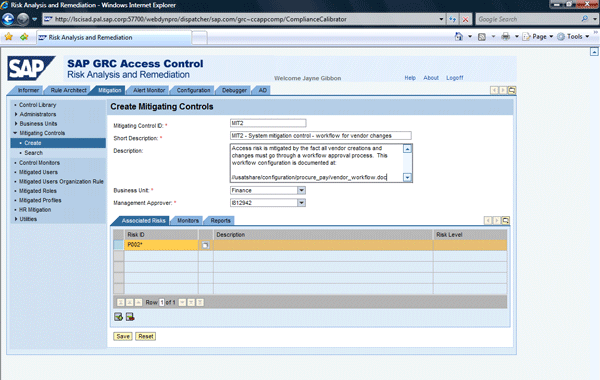
Figure 1
Documentation of a system mitigating control
The documentation of the manual mitigating control should mirror a good newspaper article that answers the following critical questions (see Figure 2 for an example of this documentation in RAR):
- Who — This documentation should be the specific named position or individual who is responsible for performing the mitigating control. Avoid phrases such as “accounts payable team member” or other generic positions. It should be very clear from the documentation who is responsible for performing the mitigating control, either with a specific name or a specific position title. The key is that these people cannot have the SoD risk themselves. Otherwise they would be checking themselves.
- What — This documentation provides the name of the program, report, or process that is the core of the mitigating control. You can maintain this documentation both in the Description of the mitigating control (Figure 2) and on the Reports tab of the mitigating control (Figure 3).
- Where — Some mitigations may be done by a central team. Other mitigations may have to be performed by several decentralized teams (such as by region or country).
- When — The specific recurrence pattern of the mitigating control needs to be clearly documented. You can do this on the Reports tab of the mitigating control (Figure 3).
- Why — This documentation notes the risk that could happen if the SoD risk were exploited. By documenting this clearly, you demonstrate that you understand why mitigation is needed and how this specific mitigation addresses the risk concerns. In RAR, you actually include this documentation not in the mitigation, but in the risk on the Control Objective tab. Go to Rule Architect > Risks > Create. On the Control Objective tab, specify exactly what could occur if the risk were exploited (Figure 4).
- How — Include transaction code names, variable, and even screenprints to show exactly how the mitigating control has to be performed. This documentation ensures that when a new person moves into a position that is responsible for performing the mitigating control, that person has the documentation available to perform the mitigation. In RAR version 5.3, it is not possible to load documents into a mitigating control. However, what you can do is include a path to where the detailed documentation is stored (Figure 2).

Figure 2
Documentation of manual mitigating control
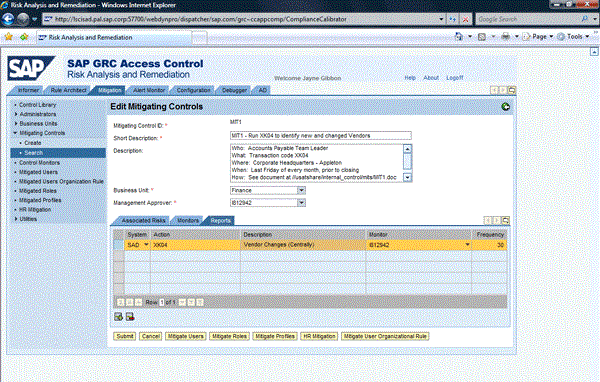
Figure 3
The Reports tab that documents the transaction and frequency of the mitigating control

Figure 4
Documentation of control objectives that describes how the risk could be exploited
Implementing and Testing
This step is critical for system mitigating controls. Auditors expect to see proof as part of configuration testing that the configuration prevents the risks as described in the mitigating control. In this example, auditors expect to see test results showing that the business tried to create or change a vendor without having the change route through the workflow. They also expect to see testing that the person who changes the vendor cannot change the workflow configuration and vice versa.
With a manual mitigating control, implementation and testing are not quite so rigorous. The expectation is that there is training documentation around performing the manual mitigating control that is the same document referenced in the documentation of the mitigating control.
Monitoring
For system mitigating controls, the key is to have proof that the configuration was not changed in a way that would negate the mitigating control. Auditors want proof that the system configuration was not changed in a way that negated the mitigating control. The company’s change control process around configuration and transport of configuration changes is the key monitoring process for system mitigating controls. The business should be able to demonstrate that no changes were done to the system configuration for vendor workflow that would have resulted in the mitigating control no longer being valid.
For manual mitigating controls, see my earlier article “Monitor Alerts in Risk Analysis and Remediation” for detailed instructions on how you can configure alerts to be sent if configured mitigating controls are not performed in a timely manner. This step is a key feature of RAR in that the business can show that the mitigating reports were executed in a timely manner. Note that there are some limitations to the alerts feature:
- Alerts can only be configured if there is a specific transaction as documented on the Reports tab of the mitigating control. If mitigation is more of a process than a single report or transaction, you cannot generate alerts.
- As explained in the article and in SAP Note 1088483, the monitor as configured on the Reports tab of the mitigating control must execute the transaction once so RAR can properly calculate the due date going forward. Thus, if a monitor never executes the program, no alerts are sent out. Therefore, a critical step is to ensure that all mitigating control monitors execute the program once after setting up the mitigating control alert job.
- As indicated in SAP Note 1504785, if you want to use mitigating control alerts, the Risk ID as defined in the Associated Risk tab of the mitigating control must be four digits plus *, or the seven-digit action-level rule ID. It does not work if you have the nine-digit permission-level risk ID in the Associated Risk tab.
Keep in mind that the alerts only provide proof that a certain report or transaction was done. It is the responsibility of the people performing the mitigating control to retain proof that they reviewed this data as necessary. This proof normally is either a signed hard copy of the report or an email with the summary of the review with the report attached as proof that they performed the mitigating control.
Jayne Gibbon
Jayne Gibbon, CPA, has been implementing SAP applications since 1996 and is currently a director in the Chief Customer Office at SAP. Jayne’s focus is making customers successful with their SAP HANA deployments. She has helped more than 100 customers drive business value with SAP HANA. Prior to joining SAP in 2007, Jayne worked for two multinational manufacturing companies based in Wisconsin. While an SAP customer, Jayne led the very first implementation of Virsa’s Compliance Calibrator, which is now part of SAP Access Control. Jayne’s experience includes internal audit; computer security; governance, risk, and compliance; SAP HANA; and SAP analytics.
You may contact the author at jayne.gibbon@sap.com.
If you have comments about this article or publication, or would like to submit an article idea, please contact the editor.




 Premium