Execute an SAP HR global implementation template with these guidelines. Prevent common implementation pitfalls by creating a balance between competing needs, such as reporting, security, and scalability.
Key Concept
Global templates define and explain the technical and functional data elements and processes necessary for supporting a global HR system. The template incorporates global and local requirements and outlines key strategies to avoid common implementation pitfalls. Global templates are tailored to meet specific business objectives such as a streamlined workforce and enhanced global reporting capabilities. Core global SAP HR teams design the global template during the preparation phase for implementations in multiple countries.
Before you begin to outline your global template, you need to consider how to plan for a global template, what to include, and common pitfalls to avoid. Understanding these best practices and common mistakes helps you define your global template more appropriately. For example, some users are under the impression that a set of simple naming conventions is sufficient. However, they’ll discover that simplicity is not enough to control a global implementation. On the other hand, some users go to extreme lengths to define many restrictions and ultimately trap themselves in a corner.
Based on my implementation experiences, I have learned that the best global template designs maintain a healthy balance among three key constraints: reporting, security, and scalability. Global templates are compatible with all SAP HR systems, including SAP R/3 and ERP Central Component (ECC). Refer to the sidebar “How to Successfully Monitor Your Change Control Process” for information on how to manage your change control processes.
Planning Considerations
Every company has unique reporting, security, and scalability requirements. SAP HR implementation teams need to evaluate their prerequisites and modify the template to meet their company’s specific needs. Figure 1 highlights the three main areas of a global template you need to balance.

Figure 1
Strike a balance among these three areas in your global template
For reporting purposes, define easy-to-use conventions for selecting country-specific data. SAP standard reports do not typically allow selection for a specific country code and clients do not normally define data elements for local implementations with country separation in mind. For example, defining your company codes as USxx allows a user anywhere in the world (with sufficient authorizations) to run a report selecting only company codes for the United States by entering US* in the report selection screens. The list of International Organization for Standardization codes (ISO codes) is a standard that everyone can reference globally. Table T500L (Figure 2) contains ISO codes in SAP. For a comprehensive list of all ISO codes, go to www.iso.org/iso/en/prods-services/iso3166ma/02iso-3166-code-lists/list-en1.html.
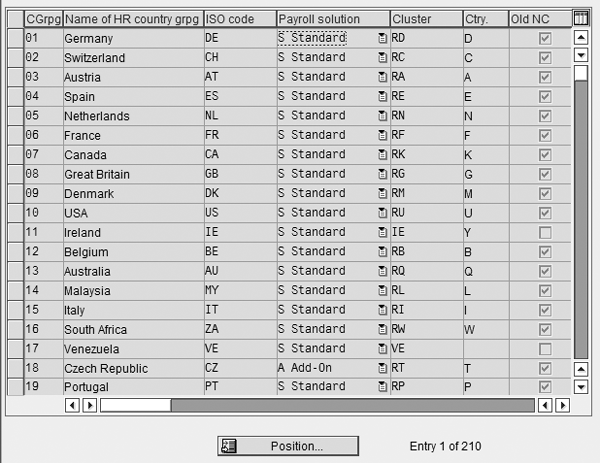
Figure 2
Table T500L: ISO codes and MOLGA by country in SAP
The first two characters of the enterprise structure, if defined as described above (US*), allow a second layer of more detailed authorizations control to be implemented by your global support team. For example, table T500P (personnel areas) (Figure 3), contains the country code in the list of fields but it is not part of the unique table key. Therefore it is not easily used during authorizations setup. It also helps create a template that enables easier implementation of Sarbanes-Oxley and SAS70 compliant controls. While the Basis team can restrict access to tables and entries without this naming convention, it is not easy to control specific changes within a table to a specific user in a specific country. This is especially true if MOLGA (country grouping, shown in Figure 2, in column CGrpg) is not a field in the table.

Figure 3
Table T500P (personnel areas) illustrates how text description instead of a PA key can filter drop-down results to a line of business so that the PA key usage is limited only to a sequential country namespace
Naming conventions must be scalable to support future requirements globally. A flexible, yet well-designed naming convention is essential for lower and stable maintenance than typical SAP HR instances that have been deployed globally. Conversely, over-defining naming conventions also presents a handful of problems. Over-defining naming conventions is described in more detail in the “Avoid Design Pitfalls” section of this article.
What to Include in Your Template
The global Personnel Administration/Organizational Management (PA/OM) template should contain at least the following three items:
- Enterprise structure definition and data element usage descriptions
- Strategy for country-specific namespaces
- Technical naming conventions for all data elements and developments
Enterprise Structure
Define the enterprise structure in great detail in the global template. It is a blueprint for the PA and OM modules. You should include what the data element symbolizes functionally (location, employee status), the naming convention, and any associated table links (country codes, for example). The enterprise structure should include at least the major infotype 0001 (organizational assignment) fields: company code (defined by Financial Accounting [FI], not HR), personnel area, personnel subarea, employee group, and employee subgroup.
For example, personnel area = xxyy where xx is some kind of country identifier (ISO code or SAP MOLGA [country code]) and yy is an incremental number. xx is the second layer because it is a country identifier, which is used to control user configuration by country. This is not typically possible with standard authorization groups, where the country code is not a key table entry.
This section of the global template also includes the global naming for organizational structures, jobs, and positions and the ongoing strategy for maintenance of the organizational structure, which is often highly centralized. When using position management in SAP’s OM module, a well-organized process and naming convention is needed for organizational structures globally. OM drives much of Employee Self-Service (ESS), Manager Self-Service (MSS), and workflow. Incorrect organizational structures can corrupt value-added processes and similar modules if it is poorly maintained. If your company uses position management in SAP HR, include these processes in your design template.
Country-Specific Namespaces
Allow room in your naming conventions for country-specific (or region-specific) groupings for data elements such as employee subgroup. First, align your design globally among your major regions’ HR owners. Doing this prevents fragmented and redundant groupings created during realization phases. This requirement applies to your enterprise structure data elements in infotype 0001. Although country code (MOLGA) is present in many tables, allowing you to define as many local elements as you want, the goal is to strike a balance specifically tailored to your needs. Achieve this balance by creating a common global structure that also satisfies local reporting requirements. For example, Equal Employment Opportunity (EEO) reporting in the US, driven by personnel area and subarea, is a global common structure that applies to many other country-specific legal needs as well. As a result, this helps manage the support costs, simplifies future upgrades and maintenance, and eases global training needs. On the other hand, some tables such as the one for employee group definition do not contain country group and you must define and maintain them globally only.
For example, employee subgroup = xy where x = country or region identifier and y = 0-1 and A-Z. Using this example, a US range might be A1-AZ (Americas) or U1-UZ (US), and a core global range is reserved in 9* or G*.
When you define the conventions to be used by all countries, remember that many small countries have very simple organizational structures.
Technical Naming Conventions
This component should provide a comprehensive list of technical developments in SAP HR and the required naming convention for objects such as:
- ABAP programs (reports and interfaces)
- ABAP function modules
- Payroll/time functions, operations, and rules
- Features
For example, ABAP programs Z_GL_HR_PY*, Z_US_HR_PY* where the GL and US represent global versus local ISO code, plus module (HR) and submodule (PY) for HR and Payroll.
Defining technical naming conventions within the global template is not required, but it should be defined somewhere by the technical team. For example, if the technical team already has a document for ABAP Quality Assurance created, then the naming convention can be covered in that document only. It is not necessary to repeat this information in the global template, as long as it is defined in writing and referenced in the global template.
Note
A technical layer solution refers to a custom solution within the transport management system of SAP. At that level, when a change transport is released the development analyzes and rejects or approves the contents based on naming conventions allowed for each configuration user and country space. A simpler version might be a report to check transport objects and naming, run intermittently by Transport Management personnel.
Avoid Design Pitfalls
Companies face a number of common challenges when creating a global template for SAP HR. This section focuses on the topics of conflict I see arise repeatedly across companies of many sizes and industry sectors.
Pre-Existing SAP HR Implementations
If you have had SAP HR in parts of your organization somewhere globally, do not assume the incumbent design is the best. SAP HR has evolved significantly over the past five years and therefore it is wise to create a global template from scratch with participation from all major countries. Using this approach is more beneficial and comprehensive in comparison to building onto an existing implementation that is outdated or only deals with a few countries. The SAP HR system has advanced to allow much more global capability than was possible in earlier releases.
Over-Defining Conventions
This is an especially common pitfall with companies that already have SAP HR implemented without a global design and want to re-define their enterprise structures based on a global template. Companies typically want to provide meaning to all characters of the naming conventions. As I mentioned before, it is a balancing act to provide a global framework while minimizing conflicts with local design needs. Committing too far in one direction or the other can cause many problems. Here is an example of a naming convention that is too specific:
Personnel area = xyzz where x = region or country code, y = line of business or other unit, and zz = two- digit company code. This naming convention creates too many guidelines for the data element, which are likely invalid in most countries.
Specific naming conventions result in tedious configuration and complicate the process of training new users. Over-defining naming conventions might render the legal reporting structure useless in many countries, due to the diverse ways in which countries define the purpose of Personnel Area within SAP HR.
Your best option is to err on the side of simplicity with something like US01. It is important to bear in mind that the more rules you impose on the naming, the more difficult it is to train people, to police changes, and to upgrade or make future changes to the enterprise structure. When you define the keys, they should only be regarded as technical names because they are easily incremental when new areas need to be added, rather than predefining naming convention ranges for future use.
It is important to consider that these restrictions may also create significant barriers for the very small countries in scope, which may have only a few employees in one or two departments. For this type of situation, you may create more work than is feasible for such a small HR operation. Without the participation of the multitudes of smaller countries, you may lose some valuable aspects of a global HRIS system.
Over-defining naming conventions frequently cause problems for local country design. It restricts the naming more than necessary and requires more complex ranges to be reserved. You can achieve the same objective using text description, which is easier to correct and update than the actual key when changes are required. When a key is changed (for example, US01 to US02), you must correct all employee records using that key manually. In contrast, when a text description changes, you only need to change the description — all instances of the key automatically display the new text properly with no additional effort. View the text descriptions in all drop-down menus to provide an easily filtered list for users to search by.
For example, in defining personnel area or subarea you can simply define added naming conventions in the text description illustrated in Figure 3.
Country Code (MOLGA)
MOLGA is a two-digit code that represents a country in SAP HR. For example, the United States has been assigned a MOLGA of 10, Canada 07, and India 25. In SAP, this relationship is defined in table T500L (Figure 2). This table also defines naming conventions by country or region.
Country code is one of the most important data elements for you to know and understand because SAP uses it to separate configuration on a country-by-country basis. MOLGA is used throughout security and in authorizations profiles to restrict access to country data for Sarbanes-Oxley and SAS70 audit controls.
Unfortunately, implementations of SAP HR without consideration for proper MOLGA configuration are not uncommon. Often these were completed before most companies considered the need for global HRIS systems or vendors and companies chose this route to save on project implementation costs. While you may be able to save on cost (perhaps 10 or 15 percent) in the short term, you severely limit yourself in the long term and for future implementations.
Proper MOLGA assignment is required for any country’s payroll to run in SAP. Even if you choose to outsource your payroll to an SAP HR-based provider, MOLGA will still be a problem. The provider will have difficulty integrating with your SAP system via Application Link Enabling (ALE) without custom work to address the MOLGA assignment problem. MOLGA is a key field in many configuration tables. If you don’t properly assign MOLGA, you will not have the desired flexibility of a normal SAP HR system to define local country table entries when you need them. You could not allow local changes to tables that do not contain MOLGA unless the table is applicable for a single country only. A complete table analysis can determine which tables contain the MOLGA key, to allow local changes, and which do not, and should be controlled globally (Figure 4).
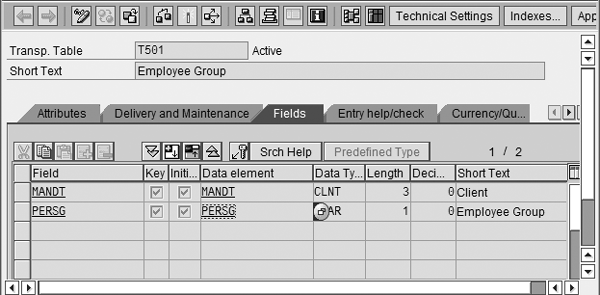
Figure 4
Use transaction code SE11 to view table T501 (employee groups). MOLGA is not present in this table and should only be changed by the core global SAP HR team.
Re-implementing after the fact is far more costly than the trivial savings realized from the omission of the correct country code assignment in configuration. If you are starting from scratch, be absolutely sure that the implementation agreement with your vendor includes the correct country-by-country MOLGA assignment and not assignment to one master MOLGA code. There are some exceptions to this rule if your organization is relatively small globally (less than several thousand employees worldwide). For a smaller organization with no intention of processing Payroll in SAP for many smaller countries (less than 100 employees) it may only be cost effective to assign these areas to the generic MOLGA 99 for PA and OM implementation. However, you should know that if you implement Payroll in SAP for any of these countries or regions in the future you have to adjust configuration and migrate employee data to the new values with the correct MOLGA assignment. When using MOLGA 99, some country-specific fields are not available in standard infotypes (e.g., insurance numbers for the US or the UK in infotype 0002).
Note
Some small countries do not have MOLGA in SAP at all — instead, they are grouped within a larger region that shares some common characteristics, such as reporting currency, or they can be assigned to the generic MOLGA 99.
Personnel Area and Personnel Subarea
The two fields personnel area and personnel subarea provide a unique pitfall, due to a conflict between SAP’s technical design and the way companies typically use them in different countries. It is crucial to note that many countries’ legal reporting is based on a combination of personnel area and personnel subarea and therefore the fields are very important in many local designs.
To illustrate this point, SAP intends for a single personnel area to be assigned to a single company code and a single country code. It must be a unique physical location such as plant A. However, in the US for example, it is common for plant A to house employees from multiple company codes or employee identification numbers (EINs). For example, personnel area US01 = plant A with subareas: 0001 = company code A, 0002 = company code B, 0003 = company code C would not work properly.
Although making personnel area equal to a unique location may work for other countries, you cannot assign US employees from multiple company codes to this specific plant location without also incorporating a split for EIN or company code (which, depending on your financial accounting software may or may not be equal). Here are two potential solutions to this situation:
- Make personnel area = company code (or EIN) then subarea = plant location. For example, personnel area US01 = company code/EIN A with subareas: 0001 = plant A, 0002 = plant B, and 0003= plant C.
- Make Personnel Area and Personnel Subarea redundant by including company code in the text description of each. For example, personnel area US01 = company code A with subareas 0001 = company code A - plant A, 0002 = company code A - plant B, and 0003 = company code A - plant C. Note the short text length restriction when defining subareas.
To define the enterprise structure personnel areas and subareas, local SAP HR expertise is critical. This is because these components drive the country-specific legal reporting needs more than any other data element within the enterprise structure. However, if you require global reporting capabilities on company location, then you must have a convention that satisfies legal reporting requirements for all countries in scope. To achieve that, a thorough country-by- country analysis is mandatory. Note the above example is not necessarily “plug and play” because I have only considered US requirements for a specific scenario in the example.
SAP Features
An SAP HR feature is a collection of rules used for programming default values. The default setting of a feature is most commonly an infotype screen. For example, infotype 0001 is the default screen of SAP feature ABKRS. SAP features, such as ABKRS, which drive a great deal of PA, some Payroll, Personnel Time Management, and Benefits, are not governed by country codes. When a change is made to a feature, the entire object is transported for all countries using the feature, creating a risk for everyone in the landscape. To avoid this (especially if your configuration team is decentralized) it is a good idea to use country-specific sub-features for core (or global) PA features. Create one main feature whose only decision is on country code (or MOLGA) and then attach a country-specific version of each feature to the main feature. Note that some features are already country-specific and it is not necessary to split them in this manner. For example, refer to feature ABKRS in Figure 5, which defaults payroll area in infotype 0001 during actions.
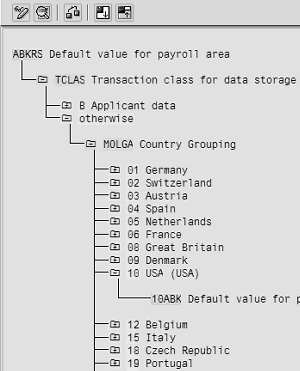
Figure 5
ABKRS, the default value for payroll area using infotype 0001
For US configuration, copy ABKRS into custom feature 10ABK or ABK10 (as long as MOLGA is somewhere in the naming convention). In the main feature ABKRS there would be only one decision on MOLGA for all countries and in each corresponding node (see 10 US) you configure a call to a local sub-feature, 10ABK in this example, which is shown in Figure 6.
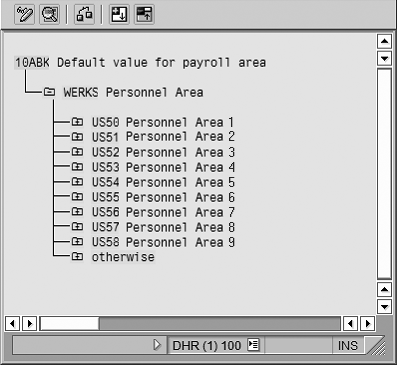
Figure 6
10ABK, default value for payroll area used specifically during US configuration
How to Successfully Monitor Your Change Control Process
The change control process describes the steps to follow when a previously signed-off design document requires a technical change to configuration. Tight and centralized change control is a critical success factor for global implementations. It instructs the team on creating change request documentation, defines the submission process, and identifies the approval and implementation steps required to complete the change.
I recommend incorporating a change control process section in your global template. This component explains which configuration tables or objects can exclusively be changed by the global implementation team. It is important for you and your SAP HR implementation team to lock down the global design before the change control process is implemented. To protect the global design from accidental changes, consider the following guidelines:
- The Basis or security team specifies the protected tables and objects in a list for the project team. Any configuration tables or objects without MOLGA (country code) in the list of key fields should not be changed by local resources unless closely monitored by a central global team.
- Define country-specific tables even though they have no MOLGA field. These typically do not need to be protected since they fulfill local country requirements. For example, US table names often begin with T5U* or UK tables with T5G*. In larger global implementations, I recommend that you restrict these table changes to those responsible for the corresponding country configuration.
- If you have a decentralized configuration team (for example, local resources in many countries doing configuration), it is critical to implement a technical transport layer solution to restrict these kinds of changes to specific global team users.
The template can also contain any module that a company believes is global in terms of technical requirements in SAP HR. More often than not only PA and OM modules are included in a global template. However, it is possible to include other modules such as Performance Management, Compensation, and Training and Event Management in your global template.
Charles Eubanks
Charles Eubanks is a senior project manager with more than 12 years of experience implementing SAP HR and Payroll systems globally.
You may contact the author at charles.eubanks@fuseanalytics.com.
If you have comments about this article or publication, or would like to submit an article idea, please contact the editor.

 Premium