Management
Discover a transaction in project system (PS) that enhances your reporting by ensuring consistent data despite changes that occur in the projects in your SAP system.
Key Concept
Project reporting in project system (PS) is a bit more complex than traditional SAP ERP reporting due to the higher complexity and greater differentiation that occurs in PS master data. A project can cover a greater set of scenarios, time frames, and business events than any other master data object in FI or managerial accounting (CO). Some of this is because a project is intended to be a temporary object that covers multiple phases. A typical project can cover phases including initial concept, planning, approval, project execution, and project closure.
Reporting is an area of constant concern among companies running SAP systems, regardless of tool or reporting need. The project system (PS) module provides more complex reports than traditional SAP ERP reports, and PS master data is more complex due to varying types: project definition, work breakdown structure (WBS) element, network activity, and network activity element. Projects track a wide range of cost types such as actual, plan, budget, commitment, and forecast values, as well as different types of objects such as dates, capacities, costs, revenues, and payments.
In addition to being a cost object on par with other managerial accounting (CO) objects, PS is far more integrated with the logistical modules. Various materials management (MM) and sales and distribution (SD) documents can be assigned to the project and PS is integrated with logistics processes such as materials requirement planning (MRP), assembly processing, variant configuration, and resource-related billing. If you add all these elements together and realize that an information need can occur at any point in the project life cycle, it becomes obvious how potentially complex project reporting can be.
Despite these complexities, reporting in PS can produce tremendous value. I’ll show you a transaction that delivers a program that allows you to rebuild the database with reliable data even in the cases of configuration changes or updates to projects. But first, let’s look into the PS information system in more detail.
PS Information System
SAP delivers a robust set of reporting tools to handle many different types of PS reporting requirements. PS has four different types of reports. It is best to classify these under two broad categories: cost reports and structure reports. Within the cost reports category, there are three reports:
- Hierarchy reports: The hierarchy reports show project costs, revenues, and payments for a project hierarchy. The values are summarized by value categories that are simple groupings of cost elements, commitment items, or statistical key figures (SKFs).
- Cost element reports: The cost element reports allow you to evaluate project values, quantities, or SKFs by cost element. Several of the CO plan/budget reports fall into this category.
- Line item reports: As with most other SAP ERP modules, you can use the line item reports to analyze individual postings based on different posting criteria. The line item reports are delivered for actual, plan, and budget postings. The advantage of using them is that they provide direct access to all source accounting documents.
Within the structure reports category there is essentially just one report type: the structure overview. There is a general overview as well as individual overviews for each object type in PS. The functionality among them is largely identical:
- Structure overview reports: The structure reports are used to evaluate the master data structure and logistical aspects of a project. They show all related objects to a given project (or range of projects) in their full hierarchical structure, allowing you to evaluate the project objects based on their relationships and key attributes. While the structure reports display basic summarized cost values, their primary purpose is master data related, which makes them different from the other three reports. These reports are based on the logical database PSJ, which provides access to the most important PS tables.
The cost element and line item reports read from the CCSS structure, which is an important CO reporting structure that provides access to the CO source tables such as COEP for CO line items. Most PS users rely heavily on the line item reports, particularly the PS actual line items report CJI3, because it provides the most granular and detailed information about individual project line items. Combined with the functionality of the SAP List Viewer (ALV), it is possible to easily aggregate data by project or transaction characteristics, such as document type or project type.
The hierarchy reports are different. They read from the RPSCO table that SAP refers to as the project information database or project information system (PS-IS). This stores all CO cost data related to the project.
Note
Quantities are not stored in table RPSCO. They are stored in table RPSQT, which acts as a sister-table to RPSCO.
Given how useful the line item reports are, it is common for SAP users to ask the obvious question: “Why didn’t SAP continue this approach for these other reports?” One of the biggest reasons why table RPSCO was created was for performance. Because RPSCO only stores PS data, and stores it in a summarized fashion, greater reporting performance is realized. In essence, RPSCO is a pure PS database and is the source for all PS value reporting. In addition to the hierarchy and structure reports, it is used for progress analysis and project planning.
Reconstructing the PS Information System
Since RPSCO is the source for PS value reporting in the hierarchy and structure reports, it is updated whenever someone posts to a project. To ensure that it is consistent and that the reports are accurate, SAP delivers a program that rebuilds the database. This is sometimes required if configuration changes to value categories have been made. As with most rebuild-type processes, this program is useful in ensuring that the reporting database is correct based on some anomaly that might corrupt it and therefore negatively affect project reporting.
To access the program, use transaction code CJEN. The selection screen is straightforward and easy to understand. You can execute the program for a single project or multiple projects and networks. The program also supports variants so it’s possible to save certain selection criteria and execute the program periodically. If you have a large number of project objects or have to rebuild project data over several years, you should create a series of variants so that the program won’t time out. I’d recommend that you create variants for different project types based on the project mask. I usually do this so that no more than 20,000 to 30,000 objects are executed at any time, but this is just a guide.
After entering in the appropriate project, you can choose several processing options (Figure 1). Most of them are self-explanatory but a few are worth calling out:
- The Delete option deletes the entries in the database for the selected project or network. It is very rare to have to use this option. One example is if there are reporting entries related to budget values. If the budget values are subsequently zeroed out and the budget status is reset, then the reporting entries are deleted by transaction CJEN. In particular, you have to be careful in considering if the entries that will be deleted can in fact be rebuilt. If the answer is no, then you should strongly consider not using this option.
- You can choose from two output lists: Object list and Detail list. The Object list option only outputs the list of project objects (e.g., WBS elements and network activities) that are included in the program’s execution. This might be useful in confirming that all objects for a given project, or range of projects, were in fact updated. The Detail list option is much more informative in that it outputs the list of objects as well as the RPSCO entries.
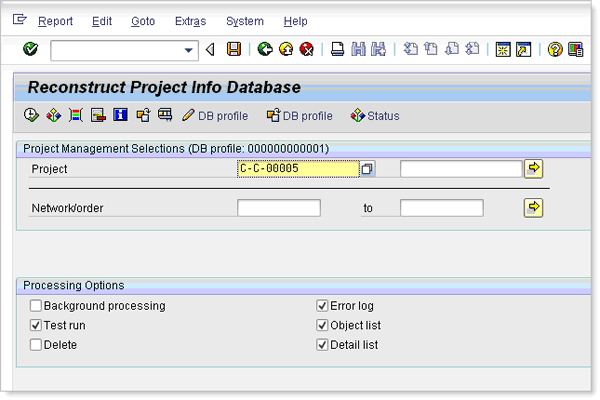
Figure 1
Processing options in a project
The first thing transaction CJEN does is delete the contents of RPSCO and RPSQT. It then rebuilds them by analyzing the existing configuration for value categories and from the source data in the following tables. These tables store the plan, budget, and actual values in summarized forms for projects and their associated objects such as orders and network activities. By doing so, the SAP system is able to provide a single summarized table to support PS value reporting.
- BPGE: totals record for overall plan/budget values
- BPJA: totals record for annual plan/budget values
- BPPE: totals record for period values
- COSS: CO cost totals for internal postings
- COSP: CO cost totals for external postings
- COSPP: CO cost totals for external postings for projects
- COSSP: CO cost totals for internal postings for projects
- COSB: CO total variances and results analyses
- COSR: CO totals for SKF
- FMSU: FI-FM totals records
- FMSP: FI-FM totals records for projects
Once the program is complete, a list of the RPSCO entries is displayed for the projects that were updated (Figure 2). Note that the entries track several prominent fields related to project reporting, such as the generic object number, budget/planning ledger, value types, value category, year, version, and budget type.
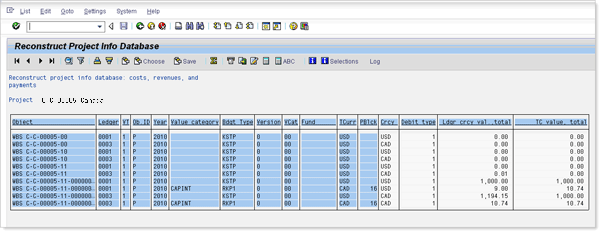
Figure 2
PS-IS reconstruction for a single project
If the program was executed in update mode (i.e., the Test Run indicator was inactive) then the entries displayed in Figure 2 are now reflected in the database and should also show up in any PS structure or hierarchy report.
Activating the Extended Log
The problem with the current report output is that it shows the most current and accurate reporting entries generated by transaction CJEN. Without viewing the entries directly in transaction SE16N or via RKACGRID, you can’t tell what entries proposed by transaction CJEN have been changed, deleted, or added to table RPSCO. To remedy this, SAP has released a hidden OK Code that changes the output log of the report, thus increasing the functionality of the report’s data. To use it, go to the initial selection screen of transaction CJEN and enter the selection criteria and processing options as you normally would. Then enter the word COMPARE in the command field (i.e., the transaction code box) and press Enter (Figure 3). No message or confirmation is issued, so you might not initially know what has happened. Press F8 to execute the program.
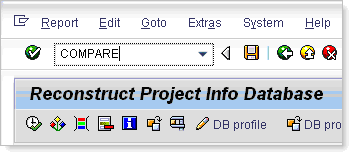
Figure 3
Enter COMPARE in the command field to activate the extended log
When the report output is displayed, you see that a column has been inserted at the end of the key of the table (Figure 4). The final column In (indicator) contains a series of icons that provide information about the entry. The icons used are:
- Green check mark: The entry proposed by transaction CJEN is the same as in RPSCO. There are no changes to the entry and it was already a correct and valid entry.
- Trash can: The entry has been deleted
- Pencil: The entry has been changed. This could be a change in the entries’ amounts or any of the characteristic values (e.g., the value category).
- White document: The entry has been created and did not previously exist in RPSCO
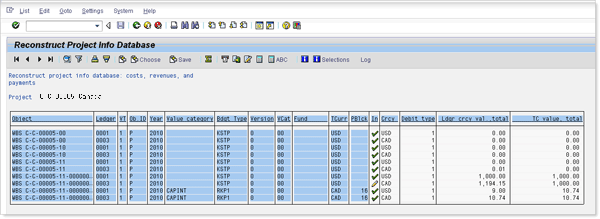
Figure 4
PS-IS reconstruction with the extended log active
The extended log remains active until you either enter COMPARE again (to deactivate it manually) or leave transaction CJEN. It does not have to be entered again if you back out to the selection screen and just want to re-execute the program.
The extended log is useful for highlighting the types of changes being made or confirming that the entries in the database were already correct.
Recommendation
Consider running this program during the month-end close process. Because the program supports variants, it is relatively easy to logically break up a customer’s project based on the project mask and schedule the execution of the program. Doing so helps ensure that the PS hierarchy and structure reports are accurate. It’s important to note that the PS availability control (AVAC) function is also based on the same RPSCO table. SAP provides a similar transaction to reconstruct AVAC, but it uses RPSCO as its source.
Nathan Genez
Nathan Genez is an SAP FI/CO- and SAP BW-certified consultant who has worked with SAP ERP since 1996, with an emphasis on the capital accounting modules: PS, IM, and FI-AA. A former platinum consultant with SAP America, Inc., he has worked with SAP BW since release 1.2B. He is currently a managing partner at Serio Consulting in Houston, Texas.
You may contact the author at nathan.genez@serioconsulting.com.
If you have comments about this article or publication, or would like to submit an article idea, please contact the editor.