Logistics Customizing Cockpit provides a simplified way to extract logistics data and transfer it to SAP Business Information Warehouse/SAP NetWeaver Business Intelligence. Learn about this tool and find out how you can use it with your logistics data.
Key Concept
Logistics Customizing Cockpit (LO Cockpit) is an alternative to the traditional Logistics Information System (LIS). It is a bridge between logistics applications and SAP NetWeaver Business Intelligence (SAP NetWeaver BI). LO Cockpit contains a set of extract structures that map to the existing LIS communication structures and enable extraction of logistics data to your SAP NetWeaver BI system via logistics DataSources. LO Cockpit was first introduced in R/3 Release 4.0B with a plug-in level of PI 2000.1. The corresponding release on the BW side is 2.0B or higher.
LBWEAbout LO Cockpit
A connected SAP NetWeaver BI system triggers the request for extracting logistics data via an InfoPackage.
In the source R/3 system, LO Cockpit is the interface between the Logistics Information System (LIS) communication
structures and the corresponding logistics DataSource. Among other processes, it helps technical members if the SAP
support team schedules the transfer of deltas from the update tables to the BW delta queue.
One of the innovations fostered by this approach is the new Central Delta Management (CDM) that SAP
designed to handle extraction of deltas efficiently. While you can still use LIS to extract logistics data into SAP
NetWeaver BI, beginning with BW Release 2.0B, R/3 Release 4.0B, and plug-in level PI 2000.1, LO Cockpit is the recommended
approach. See Table 1 to understand when you should use LIS or LO Cockpit. It is important to note that
LO Cockpit is not a silver bullet — you must perform a fair amount of customizing in both the source R/3 system and
the connected SAP NetWeaver BI system before you can use it productively.
| LIS |
Already using as conduit for data extraction to SAP NetWeaver BI and have real-time reporting
needs. You could switch to LO Cockpit to extract the data from R/3, but you would still need LIS for the operational
reporting end. |
| LO Cockpit |
On R/3 4.0B or higher and BW 2.0B or higher and either have not used LIS structures or use LIS
only as the conduit to SAP NetWeaver BI |
|
| Figure 1 |
Recommended scenarios for using LIS and LO Cockpit |
LO Cockpit Benefits
LIS is an aggregate of several components, including Purchasing Information System (PURCHIS), Sales
Information System (SIS), and Retail Information System (RIS). It facilitates both operational (online transaction
processing [OLTP]) as well as analytical (online analytical processing [OLAP]) reporting.
It’s advantageous to use SAP NetWeaver BI as your logistics data warehouse and run analytical
queries and tools on it. For those of you who are familiar with LIS and SAP NetWeaver BI, you may notice the similarities
in the data warehousing concepts in these two worlds. LO Cockpit, as part of the interface between your logistics
applications and SAP NetWeaver BI, provides several advantages over using the LIS structures and techniques to pull data
from your logistics application:
- It offers a streamlined delta mechanism that significantly reduces the volume of data that you load
- It provides the ability to pick and choose the type of logistics data on the basis of header, line item,
and schedule line for most applications. When you want to load deltas (all changes in the application since the previous
load), you can select (per DataSource) those that are relevant to you.
- The cockpit user interface (UI) provides a common, central interface to configure
extraction for all logistics applications
- It enables you to use various upload mechanisms including the V3 update that allows you
to schedule delta loads at a date and time of your choice
- You can enhance standard SAP business content (extract structures) easily by dropping
fields from the LIS communication structures to the relevant extract structures
- It renders unnecessary the onerous task of updating LIS tables
Now let me answer some common questions about LO Cockpit.
How do I access LO Cockpit? Access LO Cockpit via the IMG by using transaction
code SBIW, and then following menu path Settings for Application Specific DataSources
PI>Logistics>Managing Extract Structures>Logistics Extraction Structure Customizing Cockpit.
Alternatively, you can use transaction code LBWE. The system displays the screen shown in Figure
1.
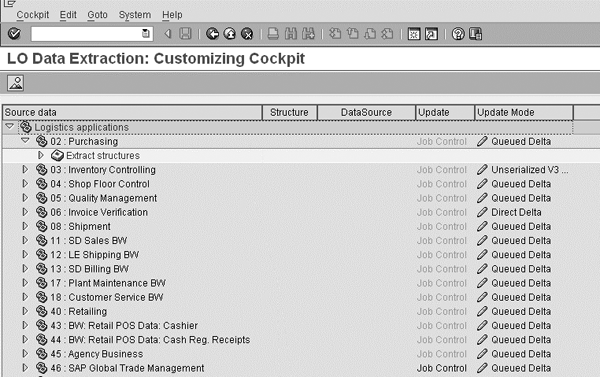
Figure 1
Customizing for LO Cockpit in transaction LBWE
Can you use LO Cockpit out-of-the box? In other words, is the configuration in
transaction LBWE all that you need to do to get data over to SAP NetWeaver BI? The answer is no.
LO Cockpit is not a switch that you can flip on to get data magically over to SAP NetWeaver BI. You still
need to go through all the steps of installing and activating business content as you would for any other application. In
fact, installing and activating business content is a prerequisite to using LO Cockpit. If you are considering switching
from LIS to LO Cockpit, you need to follow a series of steps before you can use LO Cockpit. Conversely, although you have
carried out all the general steps involved in installing and activating business content you cannot bypass the
configuration of LO Cockpit. For more information about installing and activating business content, refer to https://help.sap.com/saphelp_nw04/helpdata/en/d0/a19dbe4953644cb050900f06d80bcf/frameset.htm.
What are setup tables and why do we need them? A setup table is part of SAP CDM. It
connects the extract structure to the corresponding logistics DataSource. The system must move data from the LIS
communication structures into the setup tables via extract structures. SAP NetWeaver BI uses these setup tables to load
deltas to the connected SAP NetWeaver BI system following a delta initialization via an InfoPackage from SAP NetWeaver
BI.
Note
The name of each setup table is the name of the extract structure with SETUP suffixed to it. So, the setup table for the notification items extract structure for plant maintenance is MC17I00ITMSETUP. The name of the corresponding extract structure is MC17I00ITM.
What is the purpose of the BW delta queue in R/3? The delta queue is an important feature
in a source system from which you extract data to SAP NetWeaver BI. It acts as a buffer between R/3 applications (not just
logistics applications) and the extraction framework. The system stores compressed data in the delta queue after an update
process updates the data from the applications or after a function module has extracted data following a request from SAP
NetWeaver BI. The data in the queue is displayed per DataSource.
From a technical standpoint, the delta queue leverages the queued Remote Function Call (qRFC) technology.
It consists of three major tables. These three tables store the data you see in the delta queue. You access the delta
queue by running transaction RSA7 as shown in Figure 2.
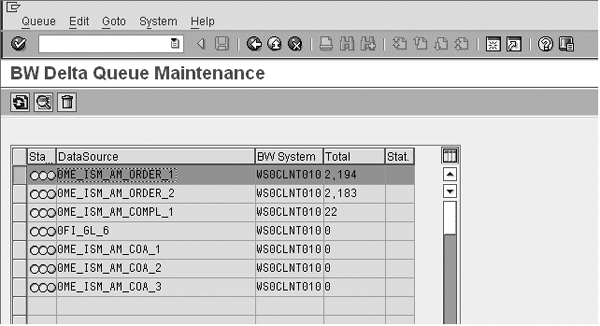
Figure 2
The BW Delta Queue in transaction RSA7
What are the various delta upload mechanisms available in LO Cockpit? Before I answer this
question, it is important to understand what I mean by a delta upload from an R/3 logistics standpoint. It is the process
of scheduling a load of deltas for each logistics application from the update tables to the BW delta queue in the source
R/3 system. After completing a delta request successfully, SAP NetWeaver BI triggers a delta request. SAP NetWeaver then
extracts the delta loads from this BW delta queue. Prior to plug-in PI 2001.2, the only delta upload mechanism was a
serialized V3 delta. This plug-in introduces three new options: unserialized V3, direct delta, and queued delta
(Figure 3).
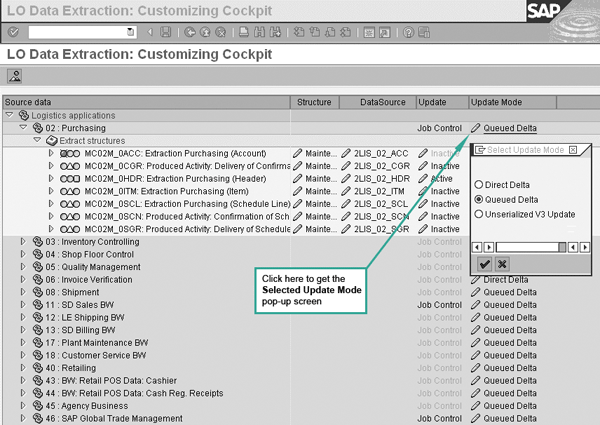
Figure 3
Maintain the delta upload method in LO cockpit (transaction LBWE)
The delta upload type is set per application area (e.g., Purchasing, Invoice Verification, Sales and
Distribution [SD]) and not per DataSource. Different logistics applications have different default delta upload modes.
Changing the mode requires careful analysis. You should consider items such as data volumes and activity on your
application system to determine if you need to change the delta upload method. The reasons to choose one method can be
highly technical and are beyond the scope of this article. For more information about this, refer to SAP Note 505700. A
member of the SAP support team can change this setting, if necessary.
I’ve noticed a buzz around the unserialized V3 update method. Is this the method I should
use? SAP introduced the unserialized V3 mechanism to mitigate some of the shortcomings of the serialized V3
mechanism. However, the unserialized V3 delta update mechanism has introduced a paradigm shift in that it disregards the
sequence in which changes took place in a document.
The unserialized V3 update works in the following way: When you post a document in a logistics
application, a V3 update module writes data into a set of tables called update tables. The system transfers the data in
the update tables to the BW delta queue by kicking off an update collective run job when you select Unserialized
V3 Update for the relevant application in LO Cockpit. Of course, you have to specify date and time parameters,
too. When the system triggers an InfoPackage from the connected SAP NetWeaver BI system, it extracts the delta data from
the BW delta queue to SAP NetWeaver BI.
It is important to keep in mind that you can retrieve delta data from BW delta queue only after you have
carried out a successful delta initialization run from SAP NetWeaver BI. Figure 4 illustrates the
unserialized V3 upload method.
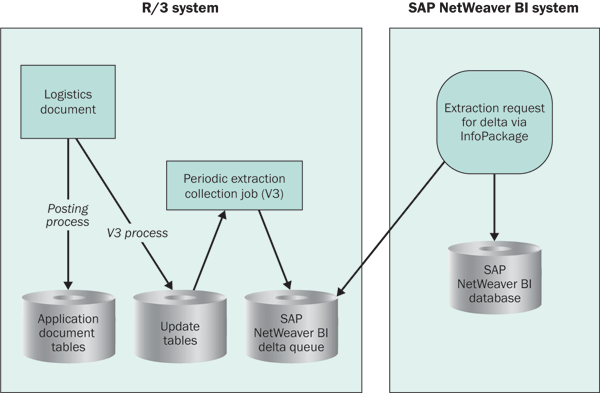
Figure 4
The unserialized V3 upload process
Among other things, you should use this upload method only when the sequence of changes is not important.
The sequence often is important, so this method is by no means the most popular one.
When I compare extracted data in SAP NetWeaver BI with data in the delta queue in the source R/3
system, I encounter incorrect or missing data. What could be the reason for this? This is a common situation. A
few things that you need to keep in mind are:
- The number of records in your logistics application tables does not usually match the number of records
in the corresponding setup tables. The setup table does some clustering of records and it results in a smaller dataset, so
setup tables tend to have fewer records than application tables.
- The number of records loaded into a DataStore object or InfoCube does not usually match
the number in the corresponding setup tables, but should match those in the application tables. The number of records in
your DataSource usually does not match the number in an InfoCube because an InfoCube aggregates data. However, it is also
likely that the number of records loaded into a DataStore object may not match. This mismatch could be because the data
store has a different set of key fields than the source table from which the system extracts data, which leads to some
aggregation. It could also be the result of an update rule (transformation) that adds the data fields for records coming
from your R/3 logistics applications into the data store.
Some of the reasons for such errors and inconsistencies are:
- Errors in the delta queue
- Errors during extraction. This is a common problem area. If you enhanced your DataSource,
and therefore the logic in your extractor via SAP enhancement RSAP0001 or via Business Add-In (BAdI)
RSU5_SAPI_BADI, you may have introduced some erroneous logic, thereby causing incomplete data or
termination of the extraction job.
- Either the source or the target system may have gone down during data extraction
- The timing of certain processes in the source application may cause the system to ignore
some changes or new records in the delta upload. A common example is when documents are posted in the source R/3 system
before the delta initialization is complete. This can lead to inconsistencies, so I recommend you avoid doing this.
- Sometimes an extract structure is changed before the delta queue is completely empty.
This should not be done, but when this happens the extraction load does not capture certain changes.
The following are some ways you can troubleshoot these errors:
- Run the extractor checker (transaction RSA3) to test data that the DataSource
extracted. The extractor checker offers you an early opportunity to correct errors, especially when you have enhanced your
extract structure or DataSource with customer-specific fields. This tool also works if you added logic in SAP enhancement
RSAP0001 or implemented BAdI RSU5_SAPI_BADI to populate fields.
- If the delta queue has no data, despite the fact that you scheduled the update
collective run, check the status of your job for any failures (or core dumps) in transaction SM37. If the
job has aborted or terminated, you may have to reschedule the update collection run.
- In your SAP NetWeaver BI system, check update rules (transformations in SAP NetWeaver
2004s) and start routines. They could contain logic that causes insertion, deletion, or change of records.
- You may have certain selection filters in the InfoPackages that the SAP NetWeaver BI
system creates for extracting data from your logistics DataSources. These could lead to a reduction in the number of
records transferred into SAP NetWeaver BI versus the number that is returned when you run the corresponding extractor in
test mode (and presumably, without the selection filters). So, make sure the selection filters match.
I must make a new logistics field available in the corresponding DataSource. What are my options?
You have a few options. Some of these options are common to other applications and DataSources. The other options
capitalize on the access to LIS communication structures and LO Cockpit’s flexibility.
Say you want to enhance the item structure for SD documents so the system displays each sales document
creator’s ID when you run a query in SAP NetWeaver BI. In this case, you must include the ID field in the
corresponding extract structure. In my example, this field (technical name ERNAM) is available in the LIS
communication structure for sales documents headers, MCVBAK.
Option 1: Click on the maintenance icon in the MC11VA01TM extract
structure in LO Cockpit application area 11 (SD Sales BW). The pop-up window that appears displays
all the fields that are in the standard extract structure on the left side (Figure 5). On the right side
you can see all the fields supplied by the various corresponding LIS communication structures. Find the field you want to
add, highlight it, and click on the left arrow button to include it in the list on the left. The system tags this field
onto this structure in a custom include. After this, you need to generate the corresponding logistics DataSource. In the
DataSource view, you should expect to see the field that you included in your extract structure.
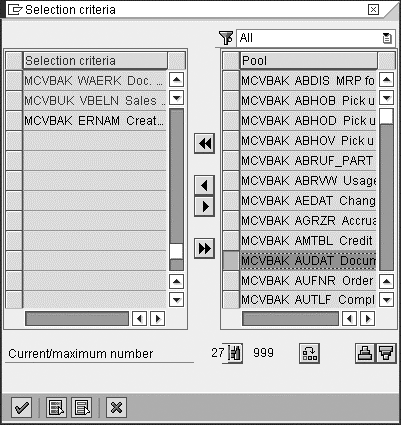
Figure 5
Enhance the extract structures in LO Cockpit
This option is feasible only when the field you want to add is available in LIS communication structures.
Changing an extract structure is not a trivial thing. It can cause problems when you upgrade, import a new Support
Package, or apply a relevant SAP Note or transport in, for example, your production system. Therefore, observe certain
precautions before and while you create this change.
The following are some of the precautions you should take:
- Make sure the delta queue is empty and that you load all data in the queue to the connected SAP
NetWeaver BI system
- Do not post documents in the logistics applications or update any queues during this
activity. It’s best to lock users out of the system for this time.
Option 2: If the corresponding LIS communication structures do not contain the desired
fields, you can append them to the relevant communication structures in the Data Dictionary transaction (transaction
SE11). The logic to populate the newly appended fields should go into the corresponding LIS user exits in
the CMOD/SMOD transactions.
Option 3: You can append the desired fields in the application tables and use general
user exits if available to insert logic to populate these fields.
Option 4: Append to the extract structure of your DataSource in transaction
RSA6. You should consider this option only when you are unable to enhance the LIS communication
structures. This is not a recommended option from an LO Cockpit standpoint because the system may not capture changes to
the newly appended fields in delta loads. Add logic to the relevant function module of the user exit
RSAP0001 or relevant method of BAdI RSU5_SAPI_BADI.
After you select an option, the SAP NetWeaver BI side needs to make sure that the additional fields and
their extracted values are included and available in the data targets, such as DataStore objects and InfoCubes.
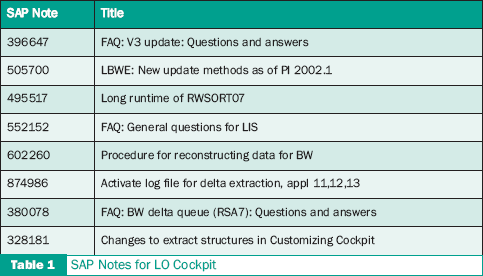
Relevant SAP Notes
SAP Service Marketplace provides a number of relevant SAP Notes for LO Cockpit.
Table 1 summarizes these.
Anurag Barua
Anurag Barua is an independent SAP advisor. He has 23 years of experience in conceiving, designing, managing, and implementing complex software solutions, including more than 17 years of experience with SAP applications. He has been associated with several SAP implementations in various capacities. His core SAP competencies include FI and Controlling FI/CO, logistics, SAP BW, SAP BusinessObjects, Enterprise Performance Management, SAP Solution Manager, Governance, Risk, and Compliance (GRC), and project management. He is a frequent speaker at SAPinsider conferences and contributes to several publications. He holds a BS in computer science and an MBA in finance. He is a PMI-certified PMP, a Certified Scrum Master (CSM), and is ITIL V3F certified.
You may contact the author at Anurag.barua@gmail.com.
If you have comments about this article or publication, or would like to submit an article idea, please contact the editor.