Depending on the setup of your system, new master data can overwrite your old data when it is loaded. However, you can view data from a certain point in time with time-dependent master data. The author debates the benefits and drawbacks of adding time dependency to your data model.
The need for time-dependent master data arises because of the nature of master data itself. Each loaded record either creates a new record or replaces the attributes of the old master data record. After a load, the former master data view is lost. Any reporting analysis of past data — sales, for example — reflects the sales using the current view of the attributes and hierarchies of master data, not the views at the time of the transaction. This can be frustrating if you need reporting analysis showing the master data as it existed in the past, especially if the master data is frequently realigned. If you analyze prior sales using current master data, you could come to incorrect assumptions. To see the master data as it was in the past or when the transaction occurred could therefore make for a more complete view of the data.
You can add time dependency to text, hierarchies, and individual attributes of master data InfoObjects. When analyzing reporting requirements, you first determine what, if anything, needs to be time-dependent. Sometimes you can achieve some of the reporting requirements for time dependency by adding master data attributes to the transactional data when loading it into the InfoCube or ODS. This preserves a snapshot view of the specific master data attributes and transactional data. However, it cannot always satisfy the reporting requirements because this simply gives a view of master data for the time of the transaction, not for on-demand specific periods of time.
It is also possible to use version-dependent hierarchies to provide multiple views of the hierarchy. Data can be loaded into the versions of the hierarchies rather than making them time-dependent. You can select the proper hierarchy version to relate to the hierarchy that is needed. This avoids the complexity and possible performance issues that can be associated with time-dependent master data. However, it does not provide all the flexibility of true time dependency. It simply allows for multiple snapshots of the hierarchy. This may not satisfy the requirements to see the hierarchy for multiple, distinct times.
Time Dependency Overview
Time dependency is established on the configuration screen for the InfoObject. Flag text master data in Text Table Properties under the Master data/texts tab (Figure 1). Time- dependent master data text is not as popular as time-dependent master data attributes, because you typically need snapshots of the changing attributes in reports, not the past descriptions stored in master data text. However, time- dependent text does allow for snapshots of previously loaded text.
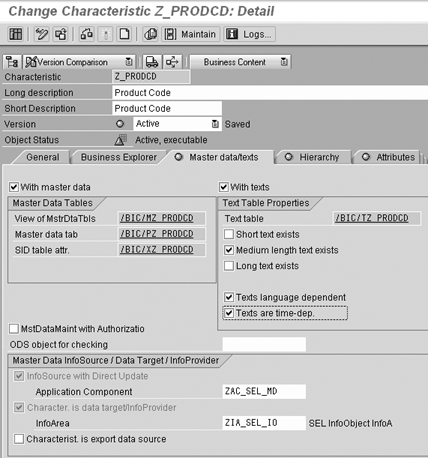
Figure 1
Set time dependency under the Master data/texts tab
Master data time-dependent attributes are more popular. If a master data InfoObject has multiple attributes, it is possible to have some attributes that are time-dependent and some that are time-independent (Figure 2). Therefore, you must determine whether to mark each attribute as Time-Dependent on the Attributes tab of the InfoObject.
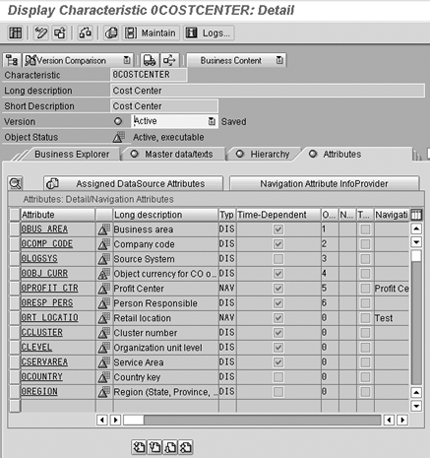
Figure 2
Mark each time-dependent master data attribute
To make master data time-dependent, the system creates another table to store the time-dependent attributes, texts, or hierarchies. Any attribute set as time-dependent is placed in the /BIC/Qxxxx table (Figure 3), where xxxx represents the InfoObject name. All time-independent entries are placed in the /BIC/Pxxxx table (Figure 4).
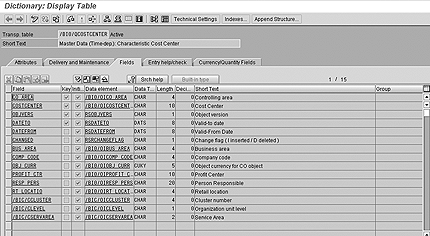
Figure 3
Time-dependent Q table — note the DATETO and DATEFROM fields
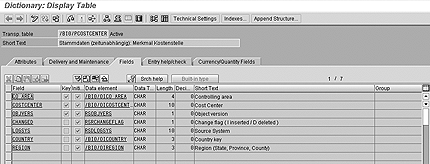
Figure 4
Time-independent P table
The /BIC/Qxxxx table has two extra fields, DATETO and DATEFROM, that are not found in the associated /BIC/Pxxxx table. DATETO is part of the key. When loading master data, you establish the date from/date to fields and populate them into the master data. These fields represent the validity dates for the master data. Because DATETO is part of the key of the table, you cannot have two entries that are time-dependent with the same DATETO. This new key field provides the time dependency but also allows for more master data volume, potentially affecting performance.
Time-Dependent Hierarchies
BW has two types of time-dependent hierarchy settings: Time-Dependent Hierarchy Structure and Entire hierarchy is time-dependent. The two hierarchy structures function differently and cannot be changed once a hierarchy is loaded. Each approach has advantages and disadvantages. This setting is established on the InfoObject Hierarchy tab. You first select the with hierarchies flag to activate the hierarchy functionality. The time-dependent options are found below this flag (Figure 5).
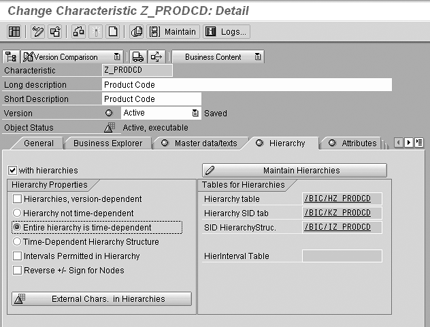
Figure 5
Setting for time dependency in hierarchies
Time-Dependent Hierarchy Structure: This setting means that each hierarchy node has a time dependency and therefore carries with it a validity date range to designate the time period for which the node exists in the structure (Figure 6). Using this setting, a node typically exists multiple times in various places in the hierarchy, each with a different validity date. This allows the system to track the movement of the hierarchy nodes. The advantage to this approach is that each node can be stored individually. As nodes move or become invalid, it is only necessary to load the moved/changed node. Typically, the query retrieval performance is better than the Entire hierarchy is time-dependent setting because the entire hierarchy structure is not completely saved upon each reload. This can, however, have an adverse affect on performance if a large number of hierarchy nodes with different validity dates are involved. The volume of data within the hierarchy can slow performance.
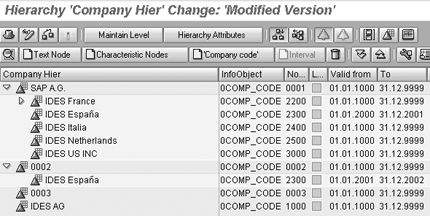
Figure 6
Time-dependent hierarchy structure
Entire hierarchy is time-dependent: This setting allows for the entire hierarchy structure to be keyed by the validity date. As the name implies, the entire hierarchy is loaded and saved with a validity period. Separate nodes do not have their own validity dates; the validity comes from the hierarchy in its entirety. You can see the validity periods of the hierarchy if you look at the loaded hierarchies in the InfoObject tab of the Administrator Workbench (Figure 7). The date displayed is the validity period for that hierarchy. A hierarchy can be loaded multiple times with different validity periods, allowing for a different complete hierarchy to be used based on the key date. The structures for this setting are useful when only a few snapshots of hierarchies need to be saved, each as its own hierarchy.
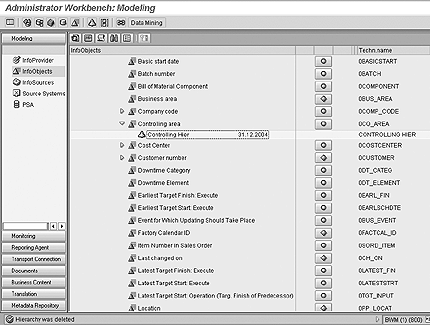
Figure 7
Entire hierarchy is time-dependent
Time Dependency and BW Functions
Time dependency has a significant effect on the following BW functions:
- Loading
- Query processing
- Aggregates
- Batch processing
- Restatement
Loading: When loading data, you can establish the granularity of time dependency by the frequency of loads and the population of the time characteristics for master data. The more frequent the loading using different dates, the more master data records created and the more granular the table. Time-dependent fields are mapped in the associated InfoSource. Routines can be created in the transfer rules to determine the date to place in the DATEFROM and DATETO fields. These can also be populated with the current date to create a snapshot each time the data is loaded. The system creates a new snapshot of each master data record loaded, even if no changes were made to the master data. It is important to evaluate the granularity of this data, as high data volume could adversely affect performance.
Query processing: Queries that show time-dependent master data attributes, hierarchies, or text, use the Key Date field at query run time to determine which master data to display on the query. It is important that users clearly understand the key date has a profound effect on their queries. It provides the ability to provide master data in its current state or as it was in the past. The Key Date field is found in the Query Properties button in query processing (Figure 8). By default, the Key Date field is set to the current date. A date can also be entered here and saved in the query. The system then uses this date each time a query is run. A key date has no meaning if no time-dependent master data is shown on the query.
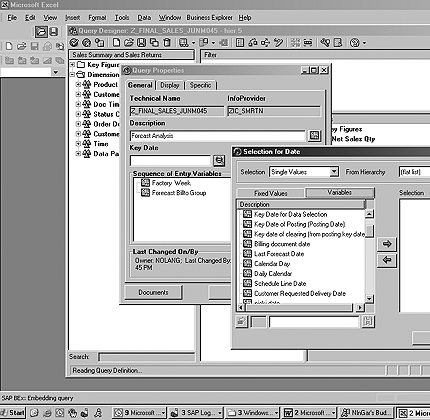
Figure 8
Establish variables on key dates — use the spyglass on the Key Date field to get to this variable creation screen
More often, a dynamic view is desired. In this case, the user could be prompted via a variable at query run time. This variable can be created on the Key Date in the Query Properties screen in Figure 8. The system uses this user-entered date for all time-dependent master data. It is also possible to set this date without prompting the user or to fill the data via custom code in a user exit.
The hierarchy has a separate Key Date field (Figure 9). This field allows the hierarchy’s key date to differ from the key date of the query when displaying the query results. Even though this field is open for input, it is used only for hierarchies set to Entire hierarchy is time- dependent. If a hierarchy is set to Time-Dependent Hierarchy Structure, the hierarchy validity date is always the key date of the query. See SAP note 674200 for detail on this differentiation.
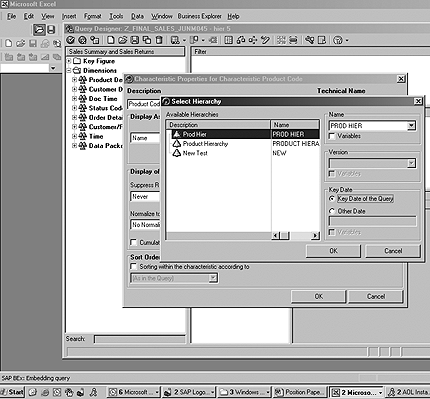
Figure 9
Hierarchy choice in query properties with Key Date field
Aggregates: With BW 3.x, you can establish aggregates for time-dependent master data (Figure 10). The aggregates can be used for time-dependent hierarchies and time-dependent master data attributes. This can greatly improve performance when running queries because the master data is stored directly in the aggregate. This prevents the system from joining and accessing the specific master data table at the time of query processing, thus improving performance.
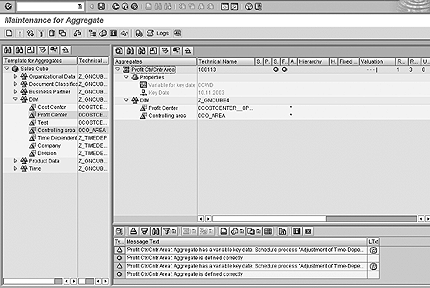
Figure 10
Aggregate with time dependency and key date
To use the time-dependent aggregates, a key date must be established in the time-dependent aggregate. Data is aggregated only by using that key date. If a query is run outside this key date, the system does not use the aggregate. This typically results in slower query performance. It is possible for multiple aggregates to be set up for other key dates to allow more queries to hit aggregates. You can also use variables on the aggregate’s key date to allow for a dynamic key date setting in the aggregate (Figure 11). This key date variable is chosen at the time of time-dependent aggregate creation. The system then automatically adjusts the aggregate’s key date and values when the called Adjustment of time-dependent aggregates job is run. This is relevant only if an aggregate is created for a time-dependent master data navigational attribute. The option does not appear if only transactional data is used in the aggregate.
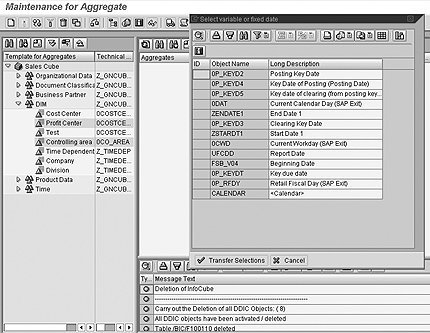
Figure 11
Choices for time-dependent variable on the aggregate creation screen
Batch Job: The job Adjustment of Time-Dependent Aggregates is used to reflect changes to time-dependent master data, and it must be run after master data loads. The job synchronizes the time- dependent aggregates to reflect any changes to the time-dependent master data. This job is necessary only if time- dependent master data attributes or hierarchies are used in aggregates. It can be run via a process chain (Figure 12), and it should be run in addition to the apply job or change run that occurs after master data loads. It is not a replacement of the change run.
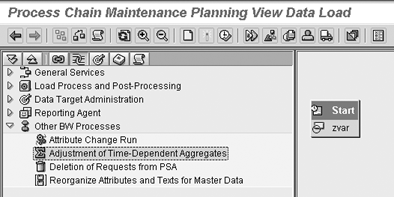
Figure 12
Adjustment of Time-Dependent Aggregates in batch
Restatement: It is possible to change a time-independent attribute to time-dependent after data has been loaded. The system moves the attribute to the Q table from the P table. This does not create any master data. A history load is needed to create the time-dependent data in past dates. It is not possible to change a time- dependent attribute to time-independent. This would require a full dump and reload of master data and all the associated transaction data — a very invasive process. It is therefore important to make sure that proper analysis is done before making an attribute time-dependent.
Performance: When using the global query cache feature from BW 3.x, the system can still cache time-dependent data for use in future queries. If a query is run multiple times with different key dates, the system does not replace the cached query with a new version, it adds new cache entries for each key date. Thus, there can be different versions of the same query in cache with different key dates. This provides the full cache features for queries using time-dependent master data.
Performance is a large factor for determining when and how to add time dependency to the data model. The addition of the new key to the master data increases volume and often negatively affects query performance. Aggregates can aid performance, but the new aggregate adjustment batch job also increases the batch loading time.
Time-dependent master data provides a useful process that allows for queries from snapshots of master data. However, you should always weigh the performance concerns against the potential benefit of this BW feature.




 Premium