Find out how to implement a BW InfoCube to enable users to query comments out of the BW Document Repository Manager that have been created on BW transactional data.
Key Concept
During a planning process or reporting process users may enter comments on the data to quantify the result. A process controller uses these comments to challenge or to include the data in a reporting pack.
Your users employ SAP NetWeaver BW to analyze and report on their data. They may add additional text information for other users to access, such as comments. To access this comment data, other users need to use a query that includes the exact combination of characteristics to display the comment.
This can be time intensive for users who view the data at an aggregated level. I describe how you can implement an SAP NetWeaver BW InfoCube that allows you to create a query that selects and displays these comments in SAP NetWeaver BW by using an SAP NetWeaver BW query.
Comments on Data
When a user creates a comment, an icon is displayed in the query result to indicate that additional information is available (Figure 1). These comments may be formatted (Figure 2) or unformatted (Figure 3).
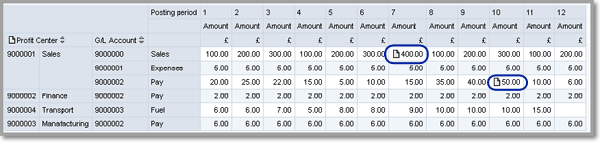
Figure 1
Report with document icons displayed
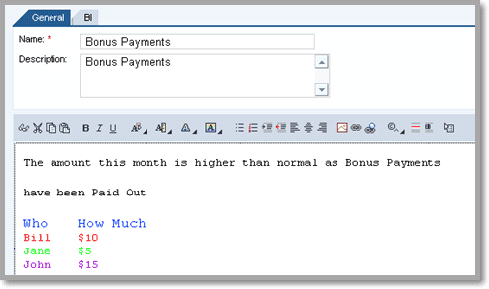
Figure 2
Formatted comment
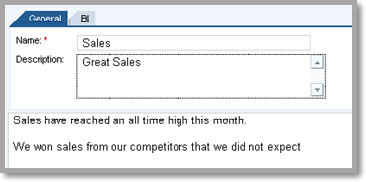
Figure 3
Unformatted comment
This information is then lost when you query data at an aggregated level (Figure 4). The user may be unaware that additional information is available.
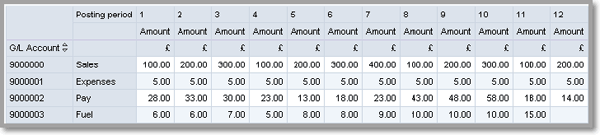
Figure 4
Report output when aggregated by account
I outline a method that helps an SAP NetWeaver BW user query the text comments from the BW Document Repository Manager, a component of SAP Business Document Services (SAP BDS), so that comments are available to see without the need to run queries at the exact aggregated level. Typically, you use this process when a controller wishes to view the comments of colleagues when preparing additional information on consolidated reporting packs.
Create the SAP NetWeaver BW InfoCube
The first step is to create the SAP NetWeaver BW InfoCube. An implementation guide I wrote for creating the InfoCube is available to download by clicking this link. In this implementation, you create custom InfoObjects; an ABAP class to extract the comments from the BW Document Repository Manager; a function module for the virtual InfoCube; and a custom InfoCube (Figure 5).
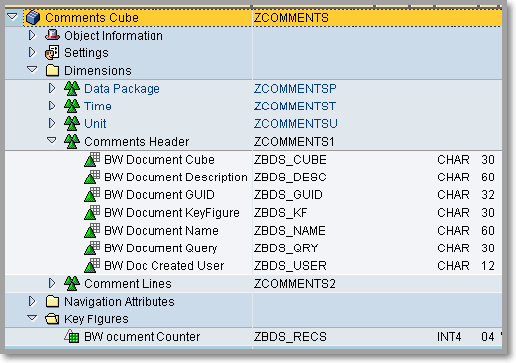
Figure 5
SAP NetWeaver BW Comments InfoCube
The comments stored in the BW Document Repository Manager (formatted and unformatted) are cut into lengths of up to 60 characters — this is the maximum size for an SAP NetWeaver BW InfoCube characteristic. I have created 16 characteristics (ZBDS_S001 to ZBDS_S016) in this implementation that can display a comment of up to 960 characters, which is suitable for most comments. However, you can create additional characteristics (ZBDS_Snnn) of up to 70 characters and add them to the InfoCube, thereby enabling a comment of up to 4,000 characters to be displayed.
Add Document-Relevant InfoObjects to the InfoCube
You need to add the document-relevant InfoObjects to the InfoCube to create a query to select the specific documents of interest. You can identify these InfoObjects as they have the Characteristic Is Document Property check box selected on the InfoObject (Figure 6).
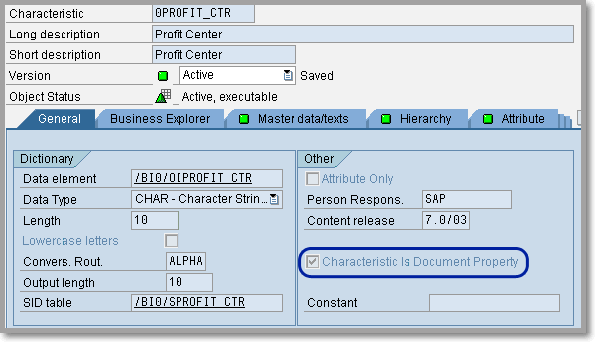
Figure 6
Document-relevant InfoObject
When you create the SAP NetWeaver BW InfoCube (Figure 5), you can see that the standard BW Document Repository Manager characteristics are included. You need to add your document-relevant characteristics to the InfoCube to create a query (Figure 7).
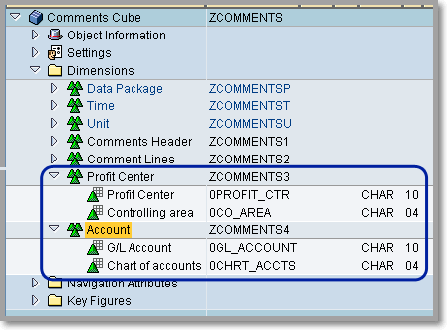
Figure 7
SAP NetWeaver BW Comments InfoCube with additional characteristics
Queries on Comment Data
Create a query on the InfoCube, entering the relevant restrictions that you desire. By default, an open restriction is applied to all other characteristics. Therefore, you do not have to hit the exact set of values to display the documents of interest. For example, consider the set of data in Table 1.
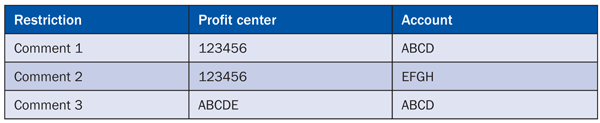
Table 1
Example set of data
If there is no restriction by account, and a restriction by profit center (123456), the system retrieves comments 1 and 2. If there is no restriction by profit center and a restriction by account (ABCD), the system retrieves comments 1 and 3.
Once you create your query, you can output them to either BEx Web (Figure 8) or, for the best result, BEx Analyzer. You can then use Excel functionality to join the separate strings into one line as shown in Figure 9.
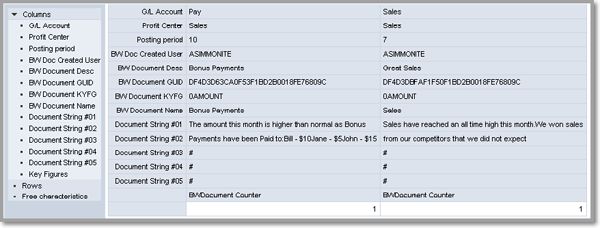
Figure 8
SAP NetWeaver BW comments query in BEx Web
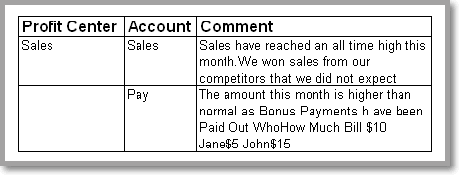
Figure 9
SAP NetWeaver BW comments query in BEx Analyzer
Andrew Simmonite
Andrew Simmonite is a senior technical strategy consultant for SAP NetWeaver BW with Capgemini. He has more than nine years of experience with SAP NetWeaver BW and more than 19 years in IT. He has experience in both reporting and planning implementations for multi-national companies in the gas and oil, public-, and retail sectors. He holds a bachelor degree with honors in computer science.
You may contact the author at Andrew.Simmonite@capgemini.com.
If you have comments about this article or publication, or would like to submit an article idea, please contact the editor.


 Premium