Become familiar with the software delivery concept for SAP’s Financial Supply Chain Management (FSCM) components. Get to know the different FSCM business functions and become acquainted with their dependencies and restrictions. Discover the SAP Solution Browser, which provides an excellent overview of the delta FSCM functionality shipped in the different enhancement packages of SAP ERP Central Component (SAP ECC) 6.0.
Key Concept
SAP Financial Supply Chain Management (FSCM) is a component of SAP ERP Financials containing a wide set of functions for managing the cash-to-cash cycle. This includes electronic bill presentment and payment, dispute management, collections management, credit management, and the setup of a corporate payment factory. The FSCM components are delivered with different business functions as part of SAP’s enhancement package strategy. Many companies struggle to identify the right business functions for FSCM and to follow the functional differences between the different enhancement packages. Understanding the basic delivery and function options is paramount for assessing the value of an SAP system upgrade.
SAP introduced its enhancement package strategy for SAP ERP in 2006 to simplify the way companies receive and deploy new SAP software functionality. The main objective of enhancement packages is to provide new functional capabilities with a limited impact on the core components of SAP ERP Central Component (SAP ECC). In the case of SAP Financial Supply Chain Management (FSCM), this means the Financials components — namely, Accounts Receivable and Accounts Payable (FI-AR and FI-AP).
The first enhancement package was followed by five others, with the latest being enhancement package 6, which was released in May 2012. Each enhancement package consists of a number of different enterprise business functions that allow SAP system users to select the business functions they need, thereby isolating the impact of a software upgrade. There are also some dedicated enterprise business functions that include the FSCM enhancements delivered during the last six years.
Before you can use the added functionality delivered with SAP’s enhancement packages you need to activate them using SAP’s switch framework transaction (SWF5). There are actually two different folders containing extensions to the SAP core: enterprise extensions and enterprise business functions (Figure 1). Both are accessible via the Switch Framework that is integrated in the ABAP workbench and controls the activation and maintenance of business functions.
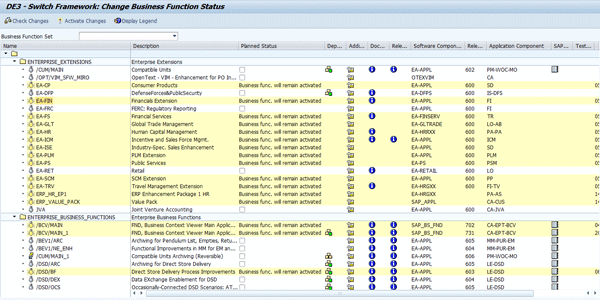
Figure 1
Enterprise extensions and enterprise business functions in SAP’s Switch Framework
Users sometimes are confused about the difference between the two. Enterprise extensions were actually the first generation of business functions containing functional enhancements. They were then implemented together with SAP R/3 Enterprise (SAP R/3 4.70). In contrast to enterprise extensions, the enterprise business functions are the second generation of functional enhancements and belong as a component of the enhancement packages for SAP ECC 6.0.
You can use enterprise business functions as an industry-independent functional enhancement. In this case you may actually deploy them for both industry-independent areas, such as ERP Financials, or if necessary for industry solutions, such as SAP for Insurance. There are also specific industry business functions containing industry-specific functionality. All industry business functions that meet the requirements of an industry solution or that can be switched on in parallel are combined to business function sets. These industry business functions or business function sets are irrelevant in the context of FSCM because FSCM is a generic application component of SAP ERP Financials.
The only enterprise extension that is relevant for FSCM is EA-FINSERV, which includes the SAP In-House Cash functionality. You won’t be able to use the payment factory capabilities in your system without activating EA-FINSERV. The other FSCM components require the add-on FINBASIS, which you can’t deploy via SWF5. Instead you use transaction SAINT (see SAP Note 438520).
When you deploy SAP enhancement packages on top of SAP ECC, the enhancement packages include the latest Support Packages as well as all the corresponding business function sets. A good feature of the enhancement package architecture is its persistency: When you implement a new enhancement package or upgrade to a higher full release, your business functions and the related settings in your ABAP-based ECC system remain unchanged. The business functions that you were using previously are automatically activated once you have activated the new enhancement package.
However, there won’t be any of the FSCM business functions active in your system at this stage — you need to activate the individual business functions via SWV5 before you can actually use them. Once you have activated them, you find new menu entries, new fields on the application interfaces, and additional implementation activities in the IMG. Before I take a closer look at the FSCM business functions, it is important to understand which kind of new developments and enhancements they actually contain. Business functions can essentially include five different types of functional enhancements:
- Software component versions of the ABAP-based ECC system
- Software component versions for Java-based applications
- Portal content such as new or enhanced portal roles
- Business Intelligence content (BI content)
- SAP NetWeaver Process Integration content (PI content) and Enterprise Services
The FSCM business functions contain all these functional enhancements.
A Closer Look at the FSCM Business Functions
If you scroll down in transaction SWF5 to the prefix FIN_FSCM, you can see that a number of business functions seem to provide functional enhancements for FSCM. There are essentially six business functions (not all of them are pictured in Figure 2) that are relevant for this purpose: FIN_FSCM_BD, FIN_FSCM_BNK, FIN_FSCM_CCD, FIN_FSCM_CCD_INTEGRATION, FIN_FSCM_INTEGRATION, and FIN_ INHOUSECASH. Using these new business functions is a bit more complex, however, because they are distributed across multiple enhancement packages. Consequently, there are different versions. Some of these business functions also depend on other SAP components or on each other — for example, you cannot install FIN_FSCM_CCD_3 without having installed FIN_FSCM_CCD_2 as well. You should carefully study the dependencies mentioned in the documentation of the individual business functions before trying to activate them.

Figure 2
Select FSCM business functions
Let’s look more closely now at the different FSCM business functions to better understand their functional scope.
SAP Biller Direct
SAP Biller Direct includes the following functions:
- FIN_FSCM_BD was made available with enhancement package 2 and contains functionality for SAP Biller Direct Buy Side, allowing vendors to view their accounts payable balance, upload invoices via a portal, and perform other self-services such as changes of master data. Prerequisites are the software components EA-APPL 602 and SAP_APPL 602 and as of SAP NetWeaver 7.0 BI Content Add-On 3 Support Package 06.
- FIN_FSCM_BD_2 was made available with enhancement package 4. It integrates with SAP Collections Management by allowing a company’s customers to initiate promise-to-pay agreements as a self-service portal. Prerequisites are the enterprise business function FIN_FSCM_BD as well as either one of the two industry business functions ISU_UTIL_1 (Utilities) or TEL_CA_1 (telecommunications). In addition you also need EA_APPL, SAP_APPL, and the Java software component FSCM-BD.
- FIN_FSCM_BD_3 was made available with enhancement package 5. It enhances the vendor portal functionality that was provided with enhancement package 2 and provides vendors with self-service access to information about your accounts payable procedure and the status of open invoices. Vendors can raise invoice inquiries in the Biller Direct Buy Side portal. These inquiries can then be processed as service requests in SAP CRM. Prerequisites are FIN_FSCM_BD as well as the software components SAP_APPL 605, BBPCRM 701 and P_BS_FND 702.
SAP Bank Communication Management
SAP Bank Communication Management includes the following functions:
- FIN_FSCM_INTEGRATION was delivered with enhancement package 2. It contains the new FSCM component SAP Bank Communication Management, which enables you to improve your batching and tracing of outgoing payments. The prerequisites are almost the same as with business function FIN_FSCM_CCD with the exception of the (optional) Java software component SWIFT 602 as part of the SAP Integration Package for SWIFT and additional enterprise services for SAP Bank Communication Management (For more information go to https://wiki.sdn.sap.com/wiki/display/ERPFI/ERP+Financials).
- FIN_FSCM_BNK was provided with enhancement package 4. It expands the functional capabilities of SAP Bank Communication Management, including multiple approval levels for outgoing payments and an audit trail for payment approval decisions. Prerequisites are only the software components EA_APPL and SAP_APPL. Optional functions include the enterprise services in ES Bundle BCM, the Java software component SWIFT 602, and the Cash Manager Work Center portal content.
SAP Collections Management, SAP Credit Management, and SAP Dispute Management
SAP Collections Management includes the following functions:
- FIN_FSCM_CCD was made available with enhancement package 2. It provides functional enhancements for SAP Dispute Management and SAP Credit Management, such as a higher degree of flexibility for the creation of dispute cases. It also introduces the newly created SAP Collections Management component. Prerequisites are the business function FIN_FSCM_INTEGRATION, the software components FINBASIS 602, SEM_BW 602, BI and portal as of SAP NetWeaver 2004s, BI Content Add-On 3 SP06, portal content (Business Package for Dispute Manager/Credit Manager 1.2) and enterprise services as of FINBASIS 602 (For more information go to https://wiki.sdn.sap.com/wiki/display/ERPFI/ERP+Financials).
- FIN_FSCM_CCD_2 was introduced with enhancement package 4 FSCM functions. It provides a number of functional enhancements for SAP Collections Management, SAP Dispute Management, and SAP Credit Management, such as the consideration of head and branch office relationships in SAP Collections Management and master data synchronization for several financials systems. Prerequisites are the business functions FIN_FSCM_CCD and FIN_FSCM_CCD_INTEGRATION as well as the software components FINBASIS 604, SEM_BW 604, BI and portal as of SAP NetWeaver 7.00, BI Content Add-On 4, portal content (Business Package for Dispute Manager/Credit Manager 1.41, SAP NetWeaver PI 7.01 or higher for SAP Collections Management, SAP NetWeaver PI 7.11 or higher for SAP Credit Management, and enterprise services as of FINBASIS 604 (For more information go to https://wiki.sdn.sap.com/wiki/display/ERPFI/ERP+Financials).
- FIN_FSCM_CCD_3 was made available with enhancement package 5. It provides some minor enhancements for SAP Collections Management, SAP Dispute Management, and SAP Credit Management, including the summarization of business partners in separate collection segments and the creation of promise-to-pay agreements with installments. Prerequisites are the business functions FIN_FSCM_CCD_2, FIN_FSCM_CCD_INTEGRATION_3, and (only for SAP Dispute Management) ERP_CF_INTEGRATION_1 as well as the software components FINBASIS 605 and SEM_BW 605.
- FIN_FSCM_INTEGRATION was delivered with enhancement package 2. It also is available with various ABAP enhancements for SAP Collections Management, SAP Dispute Management, and SAP Credit Management. The prerequisites are the same as with business function FIN_FSCM_CCD with the exception of the additional software component SAP_APPL 602.
- FIN_FSCM_CCD_INTEGRATION was delivered with enhancement package 4. It provides ABAP core enhancements for SAP Collections Management, SAP Dispute Management, and SAP Credit Management. The prerequisites are almost the same as with business function FIN_FSCM_CCD_2, but in addition this business function also requires the software component SAP_APPL 604.
FIN_FSCM_CCD_INTEGRATION_3 was delivered with enhancement package 5. It provides the core enhancements for SAP Collections Management. In addition to the prerequisites for FIN_FSCM_CCD_3, you also need the software component SAP_APPL 605.
SAP In-House Cash
SAP In-House Cash includes FIN_INHOUSE_CASH_1, which was delivered with enhancement package 5. It provides functional enhancements for the payment factory functions in SAP Financials, such as dual-control checks and reversals for payment orders. Prerequisites are the software components EA-FINSERV 605 and SAP_APPL 605.
Table 1 provides a short summary of the different SAP FSCM components, their related business functions, and the enhancement package in which they are delivered. There are no new FSCM business functions in enhancement package 6.
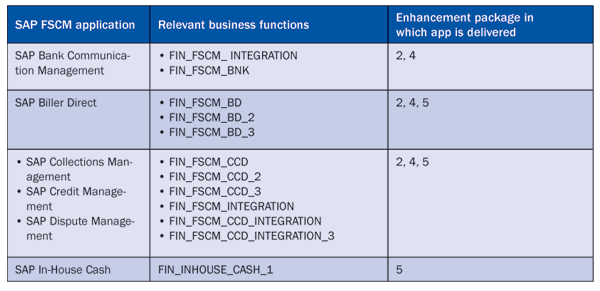
Table 1
SAP FSCM components
The SAP Solution Browser: A Business View on Functional Enhancements
The more enhancement packages SAP delivers, the more complex following the functional FSCM enhancements that are made available with the business functions is. SAP has addressed this issue with the Solution Browser, an HTML application. You can use the Solution Browser via the URL https://www.sapsolutionbrowser.com. The tool doesn’t require any registration and is available in three different languages: English, German, and Japanese. The main benefit of this tool is the possibility to compare different functional enhancements between your existing SAP release and any subsequent release up to the latest enhancement package. In contrast to SAP’s documentation that is structured by a business function deployment view, the Solution Browser provides a business-driven view.
Navigating through the Solution Browser is fairly easy. You have to enter five different attributes (Figure 3):
- Application (such as SAP ERP or SAP CRM)
- Source release version (such as enhancement package 3)
- Target release version (the Solution Browser automatically populates the drop-down box with subsequent releases only)
- Key capability or application area such as Financials or Cross ERP
- Key functional area such as Financial Supply Chain Management
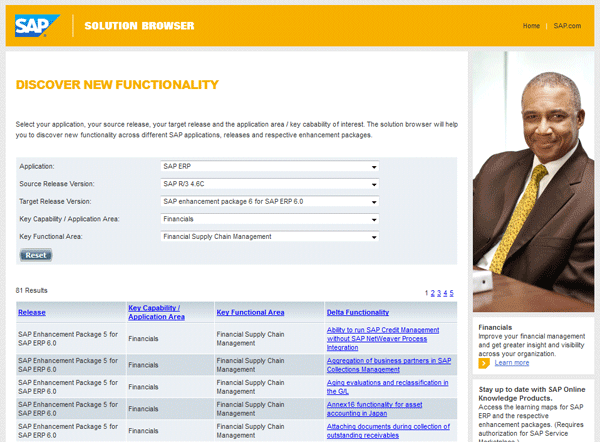
Figure 3
Delta functionality of FSCM in the SAP Solution Browser
The results listed in Figure 3 provide you with all the delta functionality that is included in the corresponding enhancement packages. Clicking the hyperlink takes you to another HTML screen that provides more details about this delta functionality and further links to documentation and licensing information. The Solution Browser is therefore a useful tool to identify the added FSCM functionality and to assess the potential value of a system upgrade.
Juergen Weiss
Juergen Weiss works in the functional area of SAP Financial Supply Chain Management. As part of SAP’s product management team, he was globally responsible for the Financial Supply Chain Management applications, including Electronic Bill Presentment and Payment, Dispute Management, Collections Management, Credit Management, Treasury and Risk Management, Bank Relationship Management, and In-House Cash as well as Accounts Payable and Receivable.
You may contact the author at juergen.weiss@sepa-now.de.
If you have comments about this article or publication, or would like to submit an article idea, please contact the editor.



 Premium