Using the new Enhancement Framework instead of classic modification technology saves a lot of time in an SAP upgrade. In contrast to the classic modification technology, all enhancements survive an upgrade. You need only to adjust an enhancement if the underlying SAP object has vanished or been incompatibly changed. The new transaction SPAU_ENH informs you about which objects you have to adjust and supports you in adjusting these objects.
Key Concept
The Enhancement Framework is the new technology for adapting SAP applications to meet business needs. If companies need to change or enhance an SAP application, they should use the Enhancement Framework instead of the classic modification technology.
You want to understand some basic benefit of the Enhancement Framework. Maybe you have already read or heard that the Enhancement Framework offers some advantages in an upgrade in comparison to the classic modification technology, but you might not yet know what exactly the benefits of the new framework are.
In this article you will learn the basic facts about enhancements that make them almost upgrade resistant. Viewed from a transport perspective, customer enhancements are objects of their own that live in the customer namespace and are controlled by the customer company. It is this fact that explains why enhancements never vanish in an upgrade, and, in general, enhancements survive an upgrade without anybody having to lift a finger.
Still, there might be situations in which the underlying SAP object is changed in a way that is incompatible with the enhancement or in a way that prevents the compiler from merging the enhancement in the appropriate position. For example, a source code enhancement might use a global data field that does not exist in the next version of the application, or you might enhance a form by using its implicit enhancement points, and the form is substituted by a method after the relevant compilation unit has been refactored. An enhancement need not only survive the upgrade to do its job, but declarations it depends on must remain available after the upgrade, for example. Furthermore, the compiler must know where to merge the enhancement into the ABAP load so that it works. In the rare cases in which these conditions are no longer given, the new transaction SPAU_ENH informs you about the enhancements that you have to adjust and offers you support to adjust them.
First, I’ll tell you the essential advantage that enhancements have over modifications. Once you have understood this, you know why you do not need to adjust enhancements if the underlying SAP object does not change in an upgrade. Next, I focus on why you have to adjust some enhancements, how you do it, and how the Enhancements Framework supports you in this process. A clever choice of the enhancement options and the objects you enhance increase the possibility that you will not need to adjust your enhancements after an upgrade, as I show at the end of the article.
Why Enhancements as Transport Objects Always Survive an Upgrade
If you enhance an SAP development object with the new Enhancement Framework, you see the enhancement as part of the object that you enhance in the relevant editor. Also, at runtime, the enhancement is compiled together with the SAP development object. In fact, the SAP development object and the enhancement are merged at compile time, which has important consequences.
At runtime, the enhancement has already been compiled together with the SAP object. For this reason, enhancements do not slow down the performance of an application. At runtime an enhancement behaves exactly as if it were a normal part of the SAP object because both are part of the same compilation unit. There is no such thing as searching in the database for an enhancement. For example, if you add UI elements to a Web Dynpro ABAP UI, at runtime, you see the enhanced Web Dynpro view with the new UI elements. Looking at the compilation unit, you could not even tell which parts are the enhancements and which belong to the original object.
It is the transport perspective that makes the difference. If you change or modify an SAP object and add, for example, some new code at several positions to an SAP object, these changes are part of the SAP object. In contrast, enhancements are transport objects of their own. Because of this, you can create your enhancement of SAP objects as objects in your own customer packages. Customer enhancements are owned by the customer, and this is why enhancements fare so much better in an upgrade. Figure 1 shows you an SAP object with some enhancements, which are stored in a customer package, before an upgrade.
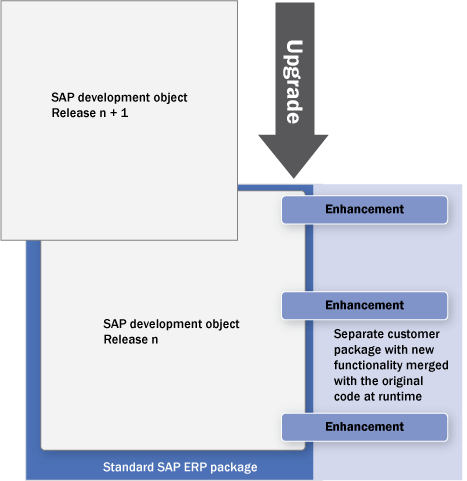
Figure 1
An SAP object of release n with customer enhancements is substituted with the same SAP object of release n + 1
In the upgrade, the SAP object of release n + 1 substitutes the SAP object of the release n. As you see in Figure 2, this has no effect on the enhancements, which live safely in the customer package.
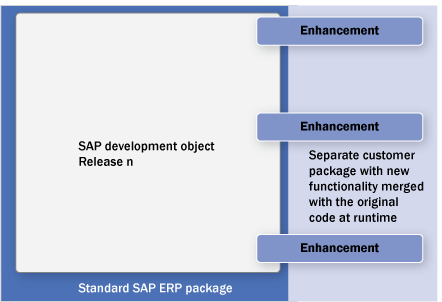
Figure 2
The customer enhancements are not affected by the upgrade. Only SAP objects are substituted by their new versions in an upgrade.
So you have seen why enhancements as transport objects always survive an upgrade. They are objects in their own right. You own them and they are separate from the SAP objects. If you understand this essential fact about enhancements, you will at once realize why modifications are not in such a comfortable situation in an upgrade as enhancements. Figure 3 shows modified SAP objects, in which the modification (as every modification) is part of the SAP object it modifies.
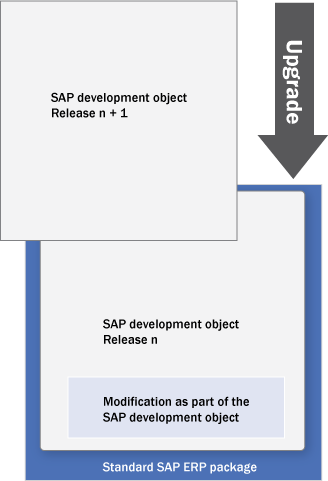
Figure 3
An SAP object of release n with a modification is substituted by the same SAP object of release n + 1 in an upgrade
In an upgrade, every SAP object is substituted by the same object of the new release. In my example, the SAP object of release n is substituted by the SAP object of release n + 1. Because the modification is part of the SAP object release n and the new object of release n + 1 does not contain this modification, the modification is gone after an upgrade as you see in Figure 4.
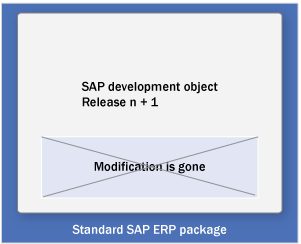
Figure 4
After the upgrade, the new version of the SAP object has substituted the old one, and the modification is gone
What you see here is the usual destiny of modifications in an upgrade. In an upgrade, all SAP objects are substituted by their new version whether the objects have changed or not in the new release. Companies running SAP systems want a short downtime in an upgrade, and it is faster to substitute all the repository objects at one go than to substitute only the objects that have changed. This way, after an upgrade, all modifications are gone — regardless if the underlying SAP objects have changed — unless you do something to prevent this.
If you want to keep your modifications after an upgrade you must perform some action, and you have to do this for every single modification. If you just do nothing, your modifications will be lost in an upgrade. For instance, to keep your modifications, you must reapply them by using transaction SPAU before they are permanently deleted. However, you have to touch and reapply every modification after an upgrade, which causes a lot of work. Otherwise all modifications would be gone.
As you have seen, enhancements as transport objects are, to put it this way, upgrade resistant. Because in the upgrade only SAP objects are overwritten, they safely live in the customer namespace in packages owned by the customer. So the Enhancement Framework is a far more flexible technology in an upgrade than the classic modification technology. Still, there are situations in which a company might have to adjust enhancements, and this is what I will explain in the next section.
When and How to Adjust Enhancements
As you probably know by now, you cannot enhance an SAP object just anywhere — you have to implement an enhancement option. The enhancement option is the position where the compiler merges in the enhancement. It carries the information for the compiler where the enhancement should be inserted. For example, consider the case in which you have enhanced a table UI element in a Web Dynpro ABAP view by an additional column. Looking at this example, some questions arise. What happens if one column in the original table UI element is deleted? The deletion of one column does not affect the enhancement with the two new columns (Figure 5).

Figure 5
The column between POSTCODE and COUNTRY lost in an upgrade, but you can still merge in the enhancement
Another question: What if the entire table or even the whole Web Dynpro view you are working in vanishes in an upgrade? Quite obviously it does not suffice that an enhancement survives an upgrade in its package. At compile time, it should be positioned in the original object to which it is attached. This can only be done if there is a hook — or, to use the technical term, an enhancement option — where the enhancement can be merged into the original object. What if this hook no longer exists after the upgrade? What about the enhancement? As shown in Figure 6, the enhancement is still there (i.e., Customer package 1), but it is no longer processed at runtime. The compiler simply does not know where to merge in the enhancement.
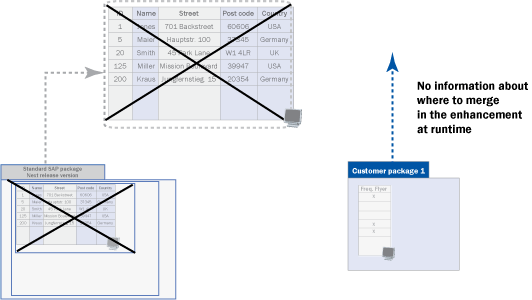
Figure 6
Example in which the compiler cannot merge with the enhancement
There might be situations in which you have to adjust an application because the enhancement option (i.e., the position at which the enhancement is called at runtime) has vanished or changed in an incompatible way.
On second thought, you will understand that there is no way to preclude that the presuppositions of enhancements change. The Enhancement Framework provides a large number of implicit enhancement options. Trying to keep all these options stable would mean to forbid almost any refactoring of the code, and this is, of course, something that can never be guaranteed. So there is no solution in the direction of keeping the interfaces or contexts of all enhancements stable. It simply is not realistic to keep almost all code of a whole application stable.
The strategy of the Enhancement Framework provides a solution in another direction. If you enhance an SAP application in your system, the Enhancement Framework keeps track of all the changes that the relevant enhancement options and their contexts may undergo after an upgrade, the import of a transport, or the installation of a support package (Figure 7).
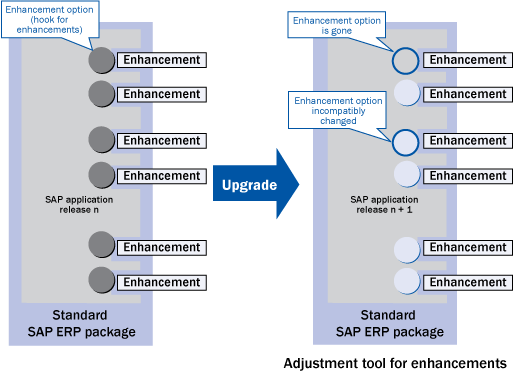
Figure 7
Why and when you have to adjust enhancements after an upgrade
The good news: In these rare cases in which the enhancement hook (technically speaking, the enhancement option) is lost or is incompatibly changed, or some other changes in the context affect the enhancement, an adjustment tool informs you that you (probably) have to adjust the enhancement. Just as there is the transaction SPAU for modifications, transaction SPAU_ENH offers you a particular view that shows you all the enhancements that you have to adjust after an upgrade (Figure 8).
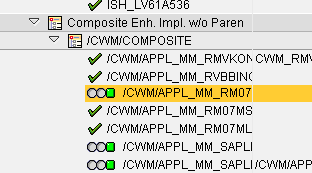
Figure 8
A look at the transaction SPAU_ENH
The color of the traffic light indicates the kind of change:
-
 A gray traffic light indicates semantic changes, such as a change in the code of a form that is enhanced. It might be that you have to adjust the enhancement because the enhancement depends on a calculation that should be executed after the enhancement is processed. However, in many cases of semantic changes, you do not have to adapt your code in any way. The strategy behind the adjustment tool is to present a larger set of possible adjustment candidates. This way it is more probable that the tool does not miss a position where you really have to adjust something.
-
 A green traffic light (the square) indicates automatic adjustment. For example, if an enhancement point is static after an upgrade and the implementation is dynamic, the tool can adjust this automatically.
 Most cases are tool-aided adjustments that are indicated by a yellow traffic light (the triangle). Such cases cover adapting the implementation of enhancement sections in a split screen control or deleting elements that have lost their parents in the Web Dynpro tree (This should be done in the first example in this section where the enhanced table column can no longer be merged in by the compiler, because the whole table UI element has been deleted in the new version. You cannot adjust an enhancement of a UI element that has been deleted in a way that keeps the enhancement).
 You have to adjust the enhancement manually (red traffic light, circle with rays) if the tools have no idea where a syntax mistake is situated. You might, for example, have a syntax error in a program, but the tool does not know if it is caused by the enhancement or by some other part of the program. You have to search for the exact location of the error.
Note
Remember, in general you need the code of the original section plus your new code in a source code plug-in that implements a section. If the original section changes, you have to adjust your code accordingly. This, of course, is a consequence of the fact that, in general, copying code (in this case, from the original object to the implementation of the enhancement section) increases the maintenance effort. Still, there might be situations in which the benefits of copying code from the enhancement section to the source code plug-in that implements the section outweigh the disadvantages that come from the higher maintenance effort.
In any case, transaction SPAU_ENH offers you a comprehensive and fine granular tracking that not only indicates where and how you have to adapt an application, but in many cases enables you to simply do the necessary adjustments, for example, by simply pressing the Delete key as in the example of the lost parent element.
The advantage of enhancements over modifications lies in the fewer number of items you have to adjust. With modifications, you have to adjust every modification. This means you also have to adjust all these cases in which the underlying modified SAP object has not changed at all. In contrast, you have only to adjust the few enhancements where something has changed that might have an effect on the enhancement.
How to Choose the Proper Enhancement Option
As you have seen, you only have to adjust an enhancement if the underlying SAP object changes or vanishes in an upgrade. If the SAP object that you have enhanced is gone after an upgrade your enhancement cannot be merged in. In cases like this, you have to find some other way to accomplish the adaptation for which the enhancement was needed. This way, a clever choice of the object that you enhance and the enhancement option you implement can increase the probability that the object does not disappear in an upgrade:
- The most stable enhancement options are Business Add-Ins (BAdIs) (classical and new ones) and customer exits because SAP tries to keep them stable and to change them only in a compatible way. Moreover, BAdIs and customer exits offer an interface, which means that the SAP developer controls the variables to which you have access. Because of this, you have only access to the parameters that are handed to you by the interface and you have no direct access to the global or local variables of the program you change. You cannot depend on a variable that might vanish after an upgrade.
- If you do not find a suitable BAdI call or customer exit, you should use class enhancements or source code plug-ins in function modules. As a general rule of thumb, the more central an SAP object is, the less likely it will vanish in an upgrade. This is, of course, only a vague rule, but it helps an experienced developer to assess how stable an enhancement option is. For example, it is far more risky to enhance a private method of a class than a public method.
In any case, a smart choice of the enhancement option and of the SAP object you enhance can influence the probability that the option might incompatibly change or vanish.
Note
Because of the huge mass of implicit enhancement options, SAP cannot keep all these enhancement options and their context stable. The strategy behind the enhancement framework is to track all the changes that may affect the enhancements and to support adjustments that may be necessary.
No matter, how intelligent you are in choosing the enhancement options you implement, if a large redesign is under way, even central classes or function units might change dramatically. However, it is for those cases in which an enhancement option has vanished or changed in an incompatible way that the transaction SPAU_ENH shows you that you have to adjust the enhancement.
Conclusion
If companies using SAP systems adapt SAP objects, some effort is required to make these objects do their work after an upgrade. In comparison to traditional modification technology, the new Enhancement Framework minimizes the effort these companies have to make in adjusting their adaptations of SAP objects after an upgrade. Enhancements cause far less work in an upgrade than modifications because you only have to adjust an enhancement if the underlying SAP object has changed in an incompatible way or is gone. The new transaction SPAU_ENH shows you which enhancements you have to adjust after an upgrade and supports you in adjusting them. A smart choice of which objects you enhance and which enhancement options you implement can help you to keep the number of enhancements you have to adjust after an upgrade as small as possible. The Enhancement Framework addresses a real pain point for companies using SAP systems, offers a new state-of-the-art solution to the traditional problems, and thereby reduces the TCO for you. If you are really sure that you have to change SAP objects beyond the possibilities of customizing, you should use the new Enhancement Framework.
Thomas Weiss
Thomas Weiss has a Ph.D. in analytic philosophy and worked as a professional writer before he joined the SAP NetWeaver product management training team in 2001 where his responsibilities included the e-Learning strategy for ABAP. After becoming more involved in writing ABAP material himself, he is now a member of Solution Management of the SAP NetWeaver Application Server ABAP. One of his main interests lies in rolling out ABAP topics both for experts and for beginners by writing weblogs in SDN such as his series on ABAP Unit or his contributions to the weblog series for ABAP beginners series part 3, part 4, and part 7. (You find the whole series with all his contributions here).
You may contact the author at thomas.weiss@sap.com.
If you have comments about this article or publication, or would like to submit an article idea, please contact the editor.






 Premium