The true value of any new algorithm or process implementation can be derived only when the batch process in which these functionalities are executed has been optimally designed. Learn the fundamentals of process chain scheduling and then walk through eight scenarios in which you can implement such scheduling using sample utilities to improve your process implementations.
Key Concept
Process chains make batch processing easy. You can make the optimal decision by scheduling process chains. These chains should be based on simplicity, modularity, flexibility, minimal human intervention, and ease of maintenance.
Designing background processes often takes lesser precedence during large project implementations and generally ends up being done at the last minute before cutover, without much thought given to the various dependencies to be considered and the schedules to be followed. This lack of proper planning, as well as time and bandwidth to develop utilities that manage the various dependencies and rules, leads to suboptimal designs. This issue is manifested in redundant batch processing elements and manual interventions required at different stages of the batch processing, both of which increase the complexity of the solution and result in higher total cost of ownership (TCO) for the solution.
I share best practices based on past experience to address this issue by describing an approach that not only provides a suite of functionalities, both standard and custom, but also explains the advantages of one approach over the other. While there are dedicated third-party products available in the market to meet complex scheduling requirements across systems, the ideas and custom functionalities I explain meet most of the scheduling requirements, thus saving on the additional investments that would be required for such products.
Process chain technology available in SAP Advanced Planning & Optimization (SAP APO) in SAP Supply Chain Management (SAP SCM) 4.1 and later, as well as SAP NetWeaver Business Warehouse (SAP NetWeaver BW), has enhanced existing batch jobs that were defined using transaction code SM36. It has automated the complex schedules with the help of the event-controlled and outcome-based processing, but the challenge still persists for scheduling these process chains in line with the planning schedules for different companies.
Each day you have to run a certain set of processes or jobs. The frequency of the jobs could be daily or weekly. The frequency of running jobs might also depend on other processes. The start process of the process chain can handle one dependency, but think of a scenario in which a process chain should start when data loading from SAP NetWeaver BW is finished, another process is finished in SAP ERP, and if it’s a second week of the month plus a Saturday. Along with the standard process chain functionalities, you can develop some simple utilities to reduce the manual intervention and manage these types of dependencies successfully without any disruption.
I walk you through the basics of process chain scheduling and show you two useful utilities that I refer to in this example. Then I look at the advanced process chain functionalities, such as interrupts, conditions, and meta chains, all of which help control scheduling according to time, day, and date, and in combination with business events. Finally, some example scenarios show you how to use these utilities and the various process chain functionalities to your benefit.
IT teams that are implementing a new solution or upgrading or maintaining an existing solution will benefit from this information, which helps optimize the monitoring effort and any manual interventions. Any team that is in the design phase of an implementation or functional upgrade will gain valuable tips for mapping the Business Planning Calendar into different scenarios and then employing the approaches suggested. It is also valuable to a maintenance or production support team looking for avenues to optimize batch processes.
Basics of Event-Based Process Chain Scheduling
A process chain comprises an arrangement of processes either sequentially or in parallel that are scheduled to wait in the background for an event or time for the scheduled execution. Some of these processes trigger a separate event that can start other processes with the possibility to trigger further processes based on the outcome of the process being executed. A process is a procedure internal or external to an SAP SCM system with a defined beginning and end condition.
A process chain can consist of a start process, individual application processes, and the collection processes.
-
The start process is used to define the start condition of the process chain. The background control options such as those for a transaction SM37 job are available to directly schedule the start process.
-
The application process is the actual process that can be an ABAP program or any of the SAP NetWeaver BW, demand planning, or supply network planning jobs. These processes need to be automated with the help of process chains in a particular sequence.
-
The collection process allows you to combine several nodes into one and form a network of processes, wherein subsequent processing is triggered only when certain conditions are met. There are AND (all predecessor processes finish successfully), OR (any or all of predecessor processes finish successfully), and XOR (one process finishes successfully and another finishes with failure) available in process chain maintenance. With the help of process variants (as with program variants), you can configure different processes with different program variants.
Illustration of Typical Dependencies in Batch Processing
Now I walk you through an example of a weekly demand planning cycle before getting to the utilities. You have the master data and historical demand data loaded daily (Monday to Friday) in SAP APO from SAP NetWeaver BW. Subsequently, the forecast preparation steps are triggered in SAP APO DP (e.g., creation of new characteristic value combinations [CVCs], realignment for old and modified CVCs, adjustment of time series), and the frequency of running all these forecast preprocesses is daily. The frequency for calculating the forecast and releasing this forecast to SAP APO SNP, however, is weekly. To meet this requirement, you need three different process chains (Figure 1).
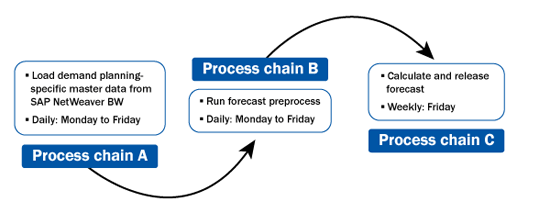
Figure 1
Typical dependencies in batch processing
These process chains are required to run sequentially. If process chain A is delayed, then process chain B cannot be started. Therefore, there should be a trigger that sends the message from process chain A to process chain B once the process chain A is finished successfully (and from process chain B to process chain C from there). This is where the utility or mechanism is required to trigger an event. The last step in process chain A is the utility, which confirms and sends an event in the system as Process Chain A Finished. Now the start process of process chain B is event based starting with this event. You can then use a similar approach to link process chain B and process chain C.
After you create the process chain, you can schedule it via the start process (e.g., a job in transaction SM37). You can use events to trigger these process chains, or you can schedule them based on time and date. Moreover, you can control the sequence of execution of the programs and processes (i.e., process variants) within the process chain with the help of interrupts, decision boxes, and conditions.
There can be many dependencies to start a process chain. The example shown in Figure 1 illustrates the need for an event-triggering mechanism. I discuss more scenarios later, but for now, let’s better understand process chain scheduling by looking at event-triggering mechanisms and the consumption of events to control the execution of process chains and programs within the process chains.
The utilities or functionalities described in this section can raise or trigger events (transaction SM62), and these raised events are consumed later to start or schedule the process chain. ABAP developers can develop these custom utilities to manage simple dependencies, such as frequency, time, period, and other events, or be designed to handle a complex set of rules or a combination of dependencies and subsequently trigger the events that are incorporated in the start process of a process chain to initiate its execution. You can develop the utilities with a varying degree of capabilities to handle complex dependencies based on the need of the processing calendar being automated as follows:
Utility 1: Trigger Events in a Local or Remote System
You can schedule this utility within the process chain or run it as a job in transaction SM37 to trigger the event to start another process chain. In SAP APO, you can use function modules BP_EVENT_RAISE and ROPC_EVENT_RAISE to develop this utility (Figure 2). You can provide the event name, event parameter, and Remote Function Call (RFC) destination of the destination system to raise an event in the destination system.
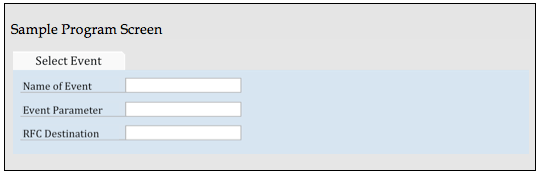
Figure 2
The sample screen for a simple event trigger utility
Utility 2: Trigger Events Based on Date-Related Parameters or Rules
The business processes defined in an organization generally mandate a processing calendar be in place to execute different processes or tasks at different points in time (e.g., quarters, months, weeks, days). Let’s look at an example: You have a monthly forecasting process wherein forecasts are generated in the background during the first weekend of the month. During the remaining weeks, the forecasts adjusted by the demand planners are released to the Supply Network Planning module. In this case, processes executed in the first week are different from those executed in other weeks. To add another layer of complexity, the organization follows a fiscal year calendar with the start of the year being April and has every quarter defined with 13 weeks, the first month having five weeks and the remaining two months having four weeks each.
Standard scheduling options that the SAP system provides fall short in being able to schedule these different processes. A utility built along similar lines (as detailed later in this section) is handy to raise the appropriate event based on the week in the month and the quarter, either based on the Gregorian calendar or the organization’s specific calendar. Figure 3 shows a simple, but powerful utility that can be designed with the help of both standard and custom function modules provided for date-related processing. This utility can be easily scaled to meet the changing needs of the business.
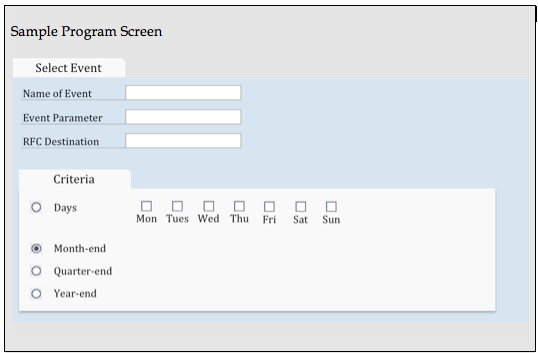
Figure 3
The sample screen for a utility to trigger an event based on a date-related parameter
The custom program checks day dependencies with the function module DATE_COMPUTE_DAY, which provides the number of the day of the week (for example Monday is 1), based on the date. This data can be converted by date through the function module DATE_TO_PERIOD_CONVERT. Other useful function modules are LAST_DAY_IN_PERIOD_GET, LAST_DAY_IN_YEAR_GET, and /SAPAPO/MC_DATE_GET_FIRST_LAST. Once the week, day, and time are calculated, then they can be matched to the condition (like quarter end). If it matches, you can use the function module given in utility 1 to raise the events in the same or another system.
You can trigger an event from another process chain or a job executed in either the local or another system. Consumption of these events at the right time and in the right process chain can be controlled with the standard process chain functionalities, such as the start process of the process chain, interrupt, and condition. Figure 4 shows a process chain structure.
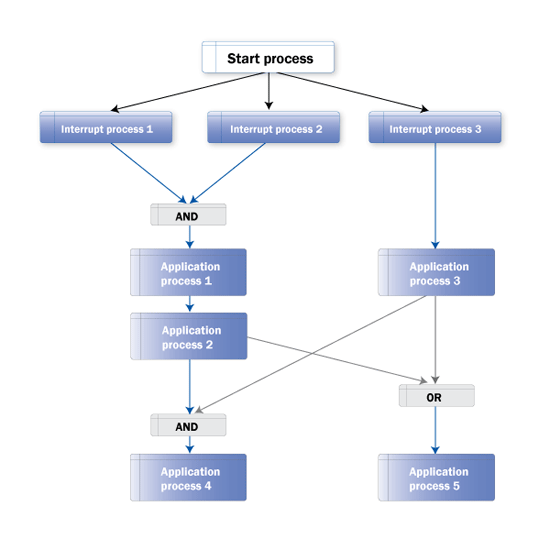
Figure 4
Typical process chain layout
Now I explain a few different process types in more detail, including:
-
Start process
-
Interrupt process
-
Decision between multiple alternatives
-
Is the previous run in the chain still active?
-
Meta chains (local and remote)
Start Process
Every process chain should start with the Start process. This part of the chain describes when the process chain starts, via direct scheduling (e.g., immediate, based on the time, scheduled job, or event) or as meta chains. The process chains depend on only a single factor (e.g., time, event, job).
Use transaction RSPC and follow Process Types > General Services and select the Start Process Type from the menu. The direct scheduling is similar to the start condition of transaction SM37 jobs. You can use the Start process using a meta chain or API option when the chain should start as a meta chain (from some other process chain). After you select Direct scheduling, another screen pops up in which you can set a dependency to schedule the chain (Figure 5).
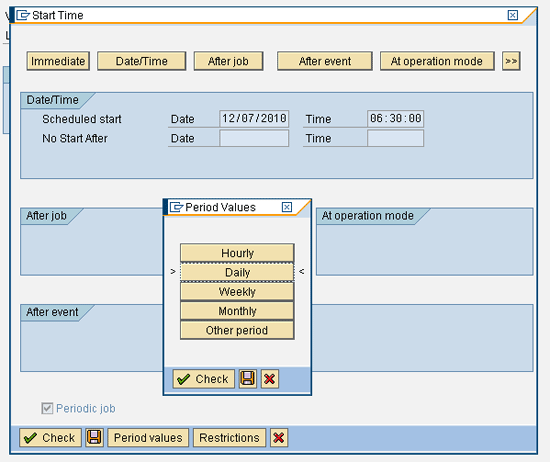
Figure 5
Start the process type variant
You can use an Interrupt process to apply multiple start conditions for the entire process chain or certain processes within the process chain. You can use the Interrupt process type to interrupt the processing of a process chain until a given condition has been met. In scenarios in which you have more than one dependency to be modeled, you can have multiple Interrupt processes (with each addressing a specific dependency). They could either be connected to the collector processes (e.g., AND, OR) to trigger one successor process or be connected individually to the successor processes, where you have multiple parallel processing in the process chain. Both of the aforementioned scenarios are shown in Figure 4. The Interrupt process can handle the same type of dependencies as the start process type.
You can create an Interrupt process type by choosing it from the General Services. Provide a name and description, and then you reach the screen shown in Figure 6. It is important to have the Periodic job check box selected while defining the dependency based on an event. This action results in the Interrupt process being triggered every time the event (maintained in the Interrupt process) is triggered, regardless of whether the process chain (in which the Interrupt process is used) is currently running or not. This adds a lot more flexibility to the overall design of such event-based dependencies, as you do not need the process chain to be running while the event in question is being triggered.
You could, for example, have a predecessor process chain A run and trigger an event (which is maintained in one of the Interrupt processes in process chain B), wherein process chain B has not yet started its execution. When the start process of process chain B is triggered, the Interrupt process for which process chain A triggered the event finishes (and turns green). Process chain B can now execute the process after this Interrupt.
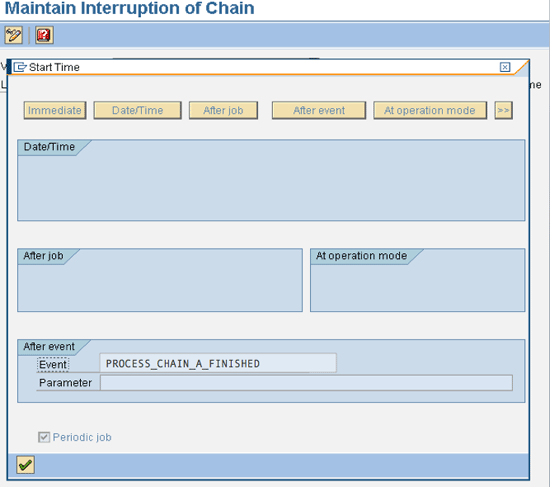
Figure 6
The Interrupt process type variant
When a process chain containing the Interrupt is activated, the jobs with the name BI_Process_interrupt can be seen with the finished status in transaction SM37. This activity creates entries in table RSPCINTERRUPTLOG that is the log table for the Interrupt. Once the condition provided in the Interrupt is fulfilled, another job can be seen in transaction SM37 with the name BI_Interrupt_wait as finished. These jobs make the Boolean status for the earlier created entries in table RSPCINTERRUPTLOG as X. Every time the process chain is started, entries in table RSPCINTERRUPTLOG are created for each Interrupt process, and once the event, time, and job provided under this Interrupt process variant have been completed or raised, the entry in the table is changed from blank to X in the Boolean field. This table is one way to determine whether the Interrupt is waiting for the given event.
You can use a decision process when you need to make a decision based on specific rules and their actual values to choose a path in the process chain. A decision process uses If-then-Else conditions. The SAP system provides a variety of fields and functions you can use to create a formula. Figure 7 shows where you can find the Decision Between Multiple Alternatives process type. Use transaction RSPC and follow Process Type > General Services.

Figure 7
Select the Decision Between Multiple Aleternatives process type
Let’s look at an example. I use the formula function DATE_WEEKDAY1 to calculate the day of the week as a technical specification (1 through 7) from the date. This function allows you to change the way the chain runs on Monday, Wednesday, or Friday, in comparison with the other days of the week and the weekend.
You can run the chain during alternate workdays with the decision box as follows:
-
In the first step of the formula, the system checks which day today is according to the system date, and if it finds it as 1 (Monday), then option 1 is executed and comes out of the loop.
-
If the condition fails when it’s not Monday, then it comes to the second step during which it checks whether the system day is Wednesday. If yes, it executes option 2.
-
In the same way, if it’s Friday it executes option 3.
-
If all three conditions fail, then the process chain comes out of the decision maker as failed, and the next process that is connected with the failed node is executed. In this case, processes connected to option 1, 2 and 3 will not run.
You can incorporate the decision process in the process chain as shown in Figure 8. Once you select Decision Between Multiple Alternatives from General Services, you need to provide a name and description for the variant. Now you reach the screen shown in Figure 9. Here I have shown you how to create different conditions to be followed by a process chain. On this screen, you have to provide a short description about the condition. You also need to create a formula for how the condition is calculated.
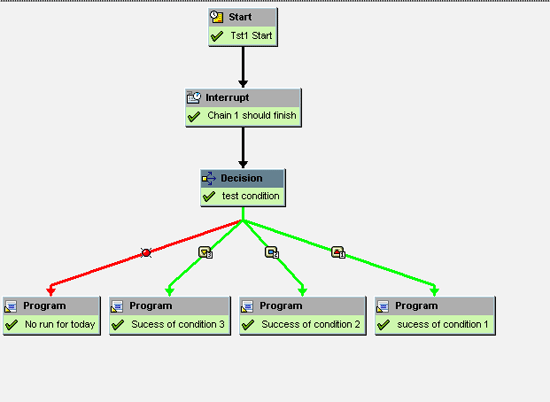
Figure 8
Decision between multiple alternatives within a process chain
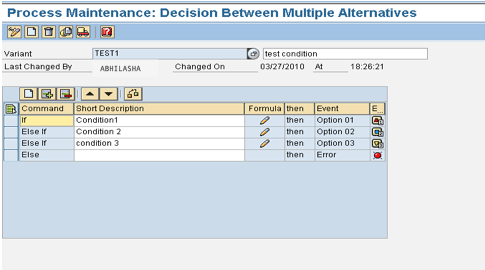
Figure 9
Decision process type variant
Figure 9 shows the Decision Process type variant and Figure 10 shows the formula builder screen. In these figures, I apply the same conditions as provided in the example. The different conditions can be deployed in the decision process using IF, ELSE, ELSEIF, and formula statements. You can write an individual formula statement as shown in Figure 10.
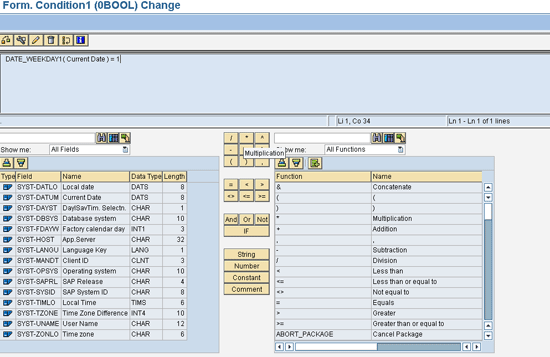
Figure 10
The Formula builder screen for the Decision Between Multiple Alternatives process type
Note that the SAP system provides many standard functions that can cater to most of the requirements. You also have the option to create your own custom functions by using the Business Add-In (BAdI) RSAR_CONNECTOR.
You can use this functionality to avoid the failure of chains due to locking issues (e.g., a run of the same variant or on the same data set within capable to match [CTM] in Supply Network Planning) as the same chain does not run if the earlier run is active. Also, this functionality can be very useful when the chain is based on the time and period (e.g., every two hours) and the runtime could be more than the periodicity based on data (e.g., run time can be 2.5 hours based on data).
This process step checks whether the previous run of the chain is still active and triggers subsequent processes specifying whether the chain is active or not active. You can use three options to connect the successor processes to this process variant: Active, Inactive, and Error. This is an example of a Decision Between Multiple Alternatives process type in which the condition is whether the previous run of the same chain is still active. Figure 11 shows where you can select this process type. Figure 12 shows how you can use it within a chain. In Figure 13, you can see the different options provided by this process type.
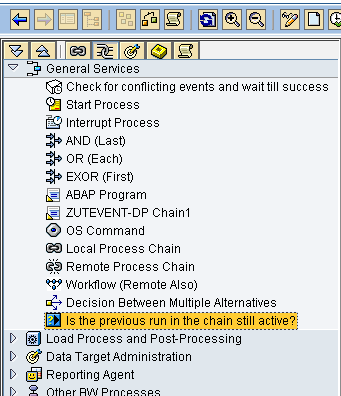
Figure 11
Select the process type
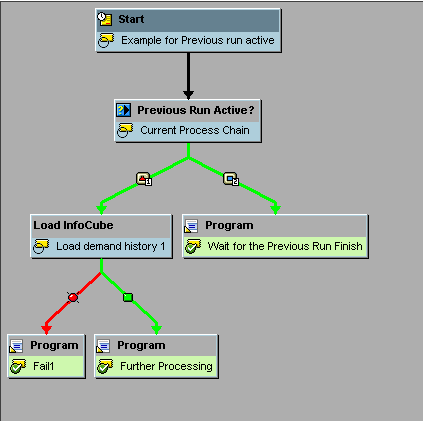
Figure 12
The Previous Run Active? process type within a process chain
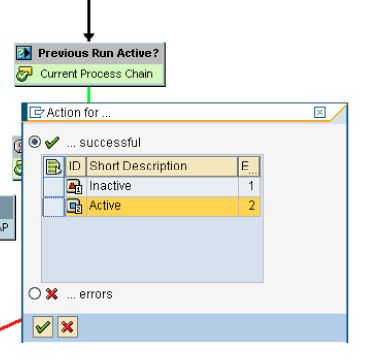
Figure 13
Options provided by the Previous Run Active? process type
Meta Chains (Local and Remote)
You can schedule a process chain as a separate process in other process chains. This separate process is known as a meta chain. If the process chain that has to be run as a part of another chain (main) exists in the same system, then it is called a local meta chain. If the system is different, then it’s a remote meta chain. You can use these chains when a certain set of activities/processes has to be executed multiple times, under different process chains. You can create the meta chain (a process chain only) with these sets of activities. These meta chains then are called in the different main chains. This functionality brings in a lot of modularity in the design of the process chains.
Figure 14 shows how to reach the meta chain process types. Click Local Process Chain, and the system asks you to select a chain to be used as a meta chain. You can create a new chain or choose from the existing chains. If you create a new chain, the system leads you to a screen in which you can create a new chain. When creating a Start process type, you need to select Start Using Meta Chain or API. In the screen in Figure 15, you can set the right scheduling options. Figure 16 shows how the meta chain looks within a main process chain. Figure 17 shows the Start process type of the remote process chain.
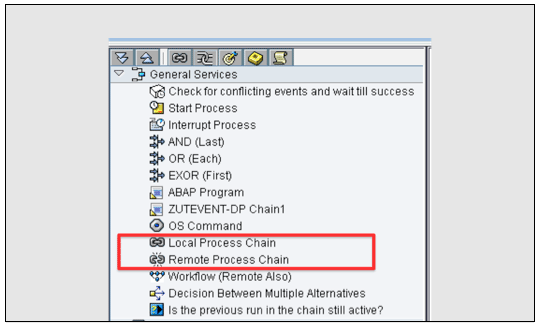
Figure 14
Select the meta chain process types
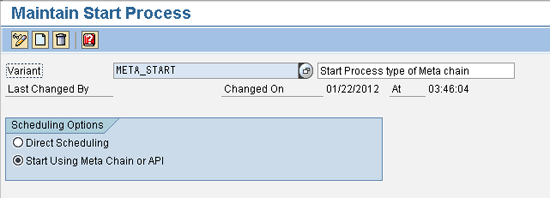
Figure 15
The local meta process chain
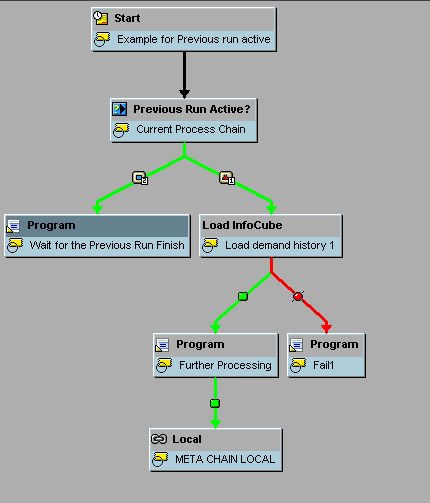
Figure 16
Use the local meta chain within a main process chain
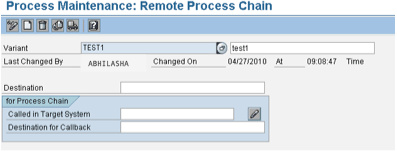
Figure 17
The remote meta process chain
Now I’ll look at different approaches to schedule process chains and explore a few different scenarios.
Note
For related information, follow these links:
There is more than one way to schedule the process chains based on the business requirements and processing calendar. The decision to choose the optimal design to schedule a process chain should be based on the following parameters: simplicity, modularity, flexibility, minimal human intervention, and ease of maintenance. I discuss eight scenarios for process chain scheduling and the recommended approach for each based on my experience:
-
Time-based periodic (weekly or daily) run
-
Single dependency on another process or process chain (single event)
-
Event and time dependency
-
Multiple events, time, and periodic
-
Dependency on other processes at the different stages of the process chain
-
A different version of the process chain must run based on the system day
-
The chain has to wait until its previous run has finished
-
Multiple chains use the same set of processes in the same manner
Scenario: A process chain should run biweekly on a certain day and at a given time.
Trigger: The Start process of the process chain can control this by maintaining the time and periodicity with the periodicity functionality. In this case, the trigger is just the time and periodicity. The process chain starts its execution once the date and time determined by the periodicity are reached.
Tip: When you transport process chains from the development system to the production system, the date in the Scheduled start field is set as the current date. If it is not changed, it would run on the time set. Change the date or time in the start process if it is time based once the transport reaches the target system.
In the screen in Figure 18 (which is a Start process type variant for a process chain), it is scheduled for a biweekly run at 20:00. The date for the next run is determined by the date and time maintained in the Date and Time fields.
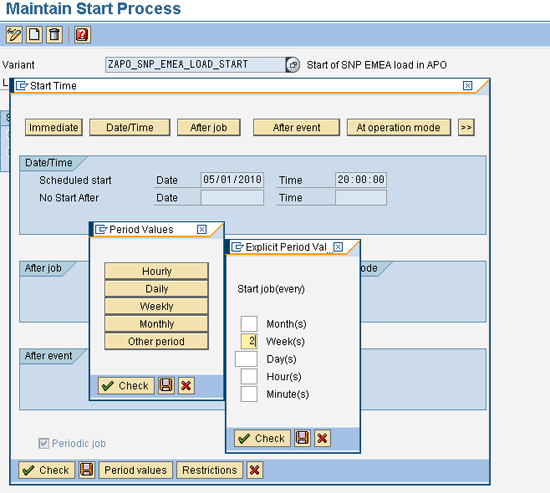
Figure 18
The time-based periodic chain’s Start process variant
Scenario: Process chain B has to start when process chain A has finished.
Trigger: In this scenario, you need to deploy the custom utility (utility 1) that triggers the event to process chain B that should run when the earlier process chain A has finished. Here the event, parameter and RFC destination of the destination system (in this scenario SAP APO) can be provided to raise an event in the destination system. Place the utility at the end of process chain A, after which you need to start process chain B.
Consumption: The Start process is used to control the consumption of the event with the option After Event selected.
Tip 1: You can develop the utility in other systems and then send the events to start a process chain in SAP SCM and vice versa. If system A sends event A.1 to system B, and system B sends event B.1 in system A to start the process, then event B.1 should exist in system A, and event A.1 should exist in system B. It is not required that the events should exist in the system from where they are being raised.
Tip 2: It is important to check the Periodic Job indicator, as this would ensure that every time the event specified in the system is triggered, the process chain starts its execution. Figure 19 shows how the Start process variant of process chain B would look.
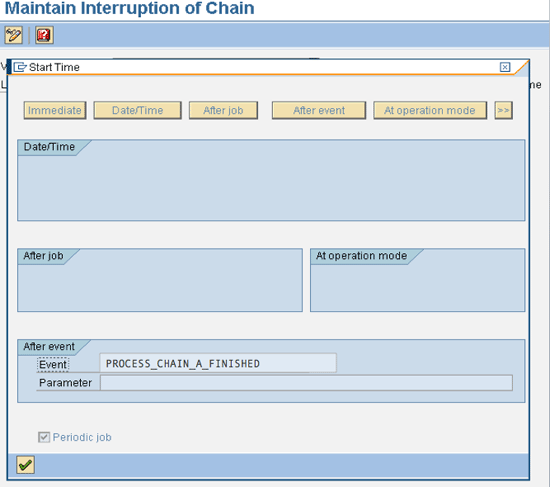
Figure 19
The event-based Start process variant
Scenario: Process chain 2 has to start when process chain 1 has finished, as well as after a specified time (e.g., after 4:00 pm only).
Trigger: Deploy utility 1 to trigger the event to process chain 2, which should run when process chain 1 has finished.
Consumption: You can maintain the time dependency by setting up the Start process of the process chain 2 as time based and the dependency based on the event trigger (triggered by process chain 1) can be controlled by the Interrupt.
The system waits for process chain 1 (which loads CVCs to master planning object structure [MPOS]) to finish before running the processes after this Interrupt defined in process chain 2 in Figure 20. This provides flexibility to wait for the other process chain to finish all its processes (or part of the processes of process chain 1 to finish). Then at the end (or after some processes are finished as required), you use utility 1 (detailed in scenario 2), which raises the event in the target system. As soon as the Interrupt receives the event, the system runs the processes after the Interrupt in process chain 2.
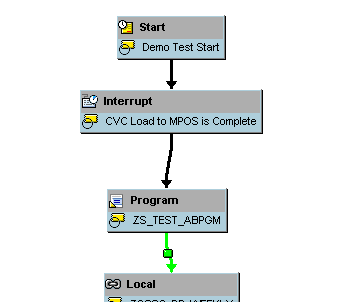
Figure 20
Process chain 2 based on the scenario
The chain starts at the given time, but waits for the event at the Interrupt process. If the event is received before the chain has started (e.g., 4:00 pm), the chain starts at 4:00 pm and continues the processing without waiting at the Interrupt process, as the event used in the Interrupt is already received (i.e., process chain 1 is finished).
Scenario: A process chain has to start every week (or daily, or on a particular day in the week) when more than one event has been triggered in the system (i.e., more than one process chain or job has finished and raised events at the end) and after a particular time. Figure 21 shows this typical scenario in which process chain D only starts at 4:00 pm and only when process chains A, B, and C have finished.

Figure 21
Scenario illustration for multiple events dependency as well as time and periodicity
Trigger: Deploy utility 1 to trigger the event to process chain D, which runs when process chains A, B, and C have finished (Figure 21). In the event that the periodicity has to be factored in while triggering the event, you need to deploy utility 2.
Consumption: You can maintain the time dependency by setting up the Start process of the process chain D as time based. You can then control the dependency based on event triggers by using the Interrupt process type in process chain D. Now connect the Interrupts defined in process chain D to a Collector process (e.g., AND) or individually connect them to Successor processes based on the processing requirements. You can trigger utilities at the end of process chains A, B, and C to raise the events. These events are received by the Interrupts used in process chain D.
Tip 1: If a daily running chain has three Interrupts (three dependencies to start this process chain) and because of some unavoidable delay, one Interrupt has not received the event, then this chain does not run this day. On the next day, it has to run based on its three dependencies for the next day. In this scenario, you have to reset the entry for the two Interrupts for which corresponding events have been received a day before. This ensures that in the next day’s processing, the chain does not start based on the previous day’s events. Right-click the respective interrupt process and select the option Reset Interrupt, which resets the entry in the table RSPCINTERRUPTLOG in the Boolean field.
Tip 2: In a more complex scenario, if process chain D runs once a week, but process chains A, B, and C run daily, then use utility 2 in process chains A, B, and C. Because the periodicity is different, you don’t want to trigger process chain D daily. The logic in utility 2 determines first whether it’s a particular day or not when you need to run process chain D and accordingly triggers the event.
Scenario: There is a requirement that the chain should start at 4:00 pm daily, but after running a particular point in the processing of process chain C, it has to wait to finish process chain A to continue with further processing.
Trigger: Deploy utility 1 to trigger the event to process chain C, which should run when process chain B has finished (Figure 22). After program C.4, process chain C should wait for an event raised by process chain A. If you need to factor in periodicity, you need to use utility 2.
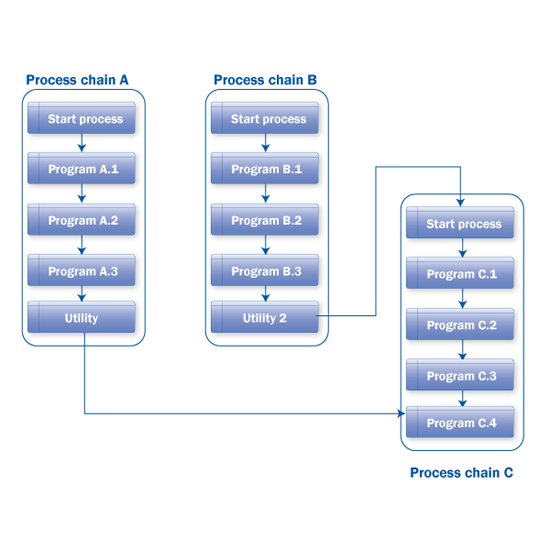
Figure 22
Multiple dependencies on other process chains at the various stages of a process chain
Consumption: You can maintain the time dependency by setting up the Start process type of the process chain as time based. You can use Interrupts to control the dependency of events triggered by other process chains. The Interrupts defined in process chain C wait for processing at different points in the process chain based on the processing requirements and dependencies to be considered. In this scenario, you need to use two Interrupts. One connects to program C.1, which consumes the event triggered by process chain B. The second Interrupt consumes the event triggered by process chain A and connects to the AND process that is also connected from program C.3. With this arrangement, at 4:00 pm process chain C starts. It waits for process chain B to finish. Once process chain B finishes, process chain C processes programs C.1, C.2, and C.3. Process chain C waits for process chain A to finish. Once process chain A finishes, then it runs program C.4 (Figure 23).
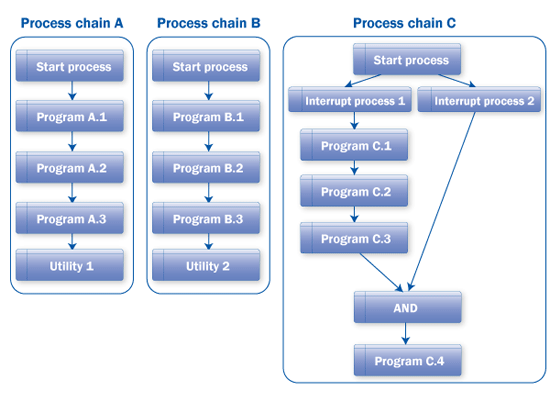
Figure 23
Chain arrangements for multiple dependencies
Tip: To map this scenario, you can have Interrupts in parallel connected with the connector AND. In this way, you can optimize the total runtime by not waiting for the nondependent processes (programs C.1, C.2, and C.3) in the process chain.
Scenario: For any business process in which a parameter’s value (e.g., day, time) decides the sequence of successive processing, you can use the decision process type variant (decision between multiple alternatives) to map it. For example, think of a business process in the system that varies based on the day on which it is being executed. The Decision process type can map this scenario. You can also do this by creating similar chains and running them manually based on the parameter’s value (e.g., day). However, this design is not optimal. You can create just one chain, and after the Start process variant, with use of the Decision functionality, you can decide which version of the chain should run on the given day. These different parallel parts can be connected with OR and then the chain can run common programs that have to run any given day.
Figure 24 shows a representation of this scenario. In Figure 25, you can see the arrangement of the chains.
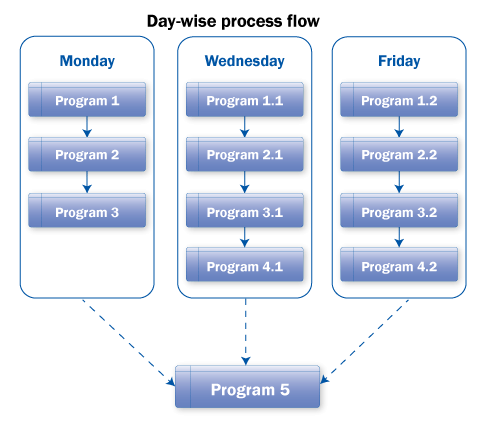
Figure 24
The scenario for different processing on different days
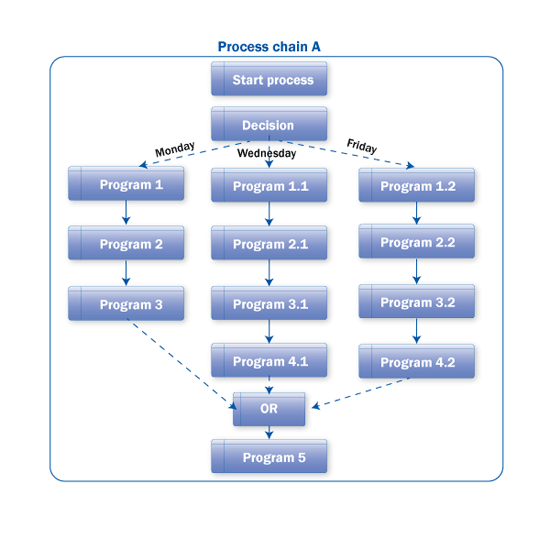
Figure 25
The decision process type used for different processing based on the day
Tip 1: SAP provides BAdI RSAR_CONNECTOR to write any user-specific functions to build conditions and take decisions based on those conditions. For example, a function can be built to check the value of a variable in a custom or standard table like TVARVC, which can be compared with any system variable like day, time, and date, or any other parameter. Now the condition can be built on this function
Tip 2: Users can also connect different functions with Boolean logic in formula builder. For example, you want to run certain programs only when the system day is Friday and the time is between 3:00 PM to 5:00 PM. Decision Process Type is a very powerful tool to optimize the Process chain design.
Scenario: A chain runs frequently (e.g., every 30 minutes), and the previous chain should be finished before the next run starts. You can set this up with the help of standard functionality of the Is the previous run in chain is still active? process type. This is useful when the runtime of a chain is variable and can be bigger than the frequency (e.g., process chain runs every 30 minutes) of the chain. It provides you the options to choose if the previous run is active and stop the further processing or choose a different path in the chain.
Tip: You can use Is the previous run in the chain still active? process type in chains that run based on a very high periodicity or frequency (e.g., every hour or so).
Multiple Chains Use the Same Set of Processes in the Same Manner
Scenario: If the process chains use the same programs with the same variants and are connected in the same manner, then you can create these programs as meta chains. In the examples in Figures 26 and 27, programs 1, 2, and 3 can create a chain, and process chains A and B can call it as a meta chain.
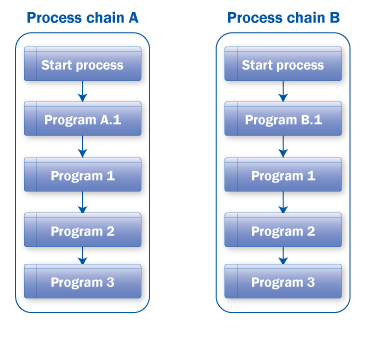
Figure 26
The same programs used in different process chains
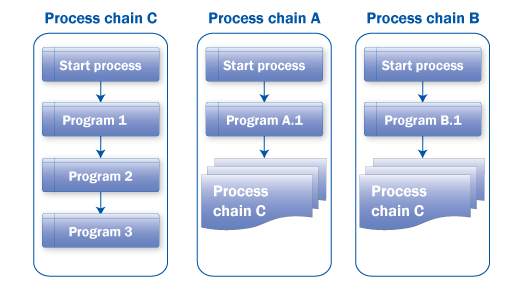
Figure 27
Use of meta chains for group of programs
Note
The above example is just one scenario for meta chains. This is very useful functionality, which provides simplicity and modularity to the whole network of chains.
Abhilasha Jain
Abhilasha Jain is an SAP SCM consultant at Infosys Technologies Ltd. She has more than six years of experience in supply chain consulting working for life cycle implementation and enhancement projects. She has served multinational corporation (MNC) clients in industries such as high tech, consumer electronics, communications, and oil and gas, particularly in the areas of demand planning, supply network planning, and global available-to-promise. She holds a post-graduate diploma in SCM from NITIE and a bachelor’s degree in electrical engineering from Rajiv Gandhi University.
You may contact the author at Abhilasha_Jain@infosys.com.
If you have comments about this article or publication, or would like to submit an article idea, please contact the editor.




 Premium