Manager
Discover the concept and approach to use when coordinating and executing user acceptance testing for Change Request Management (ChaRM). Learn about the key roles in testing and the objectives you need to meet to ensure successful user sign-off before turning ChaRM on in a production environment.
Key Concept
| Effective rollout of your ChaRM solution is dependent on the successful completion of user acceptance testing (UAT). Without this critical step, you may miss defects in your configuration and coding that were not identified in functional unit and technical unit testing. UAT helps drive the adoption of the ChaRM functionality within your user community. |
The objectives of a user acceptance test (UAT) are to ensure that all the business requirements have been met, that the system works as designed, and that it provides consistent and dependable business value in a production environment. Completion of UAT instills confidence in your end-user community that the solution will work as planned.
Your UAT should include a subset of your user population that is representative of each role that will be used in the operations of your productive systems. Real life use-case scenarios should be used and test scripts written to cover each step and transaction that would occur in each scenario. The UAT occurs in a dedicated test environment that is typically a standard part of the lower systems in your SAP landscape. This activity serves as a dress rehearsal to confirm the readiness of all aspects of the design prior to moving to a production environment.
Defining Scope and Expected Outcomes
The scope of the ChaRM user acceptance test should document the processes, schedule, tools, and resources needed to effectively conduct UAT for all functionality included in ChaRM and Service Desk. ChaRM and Service Desk are both functionalities within SAP Solution Manager.
Suggested testing outcomes include:
- Effective and complete testing of all roles within the entire ChaRM workflow process
- Testing completed by persons within each affected or contributing team in the production change control process
- Effective and timely defect management for issues or defects encountered in the testing cycle
- Testers exhibit subject matter expertise per specific role tested
The scope of testing should include all functionality within the ChaRM and Service Desk modules of SAP Solution Manager. You need to define a dedicated environment in which testing will occur. This ensures that any testing that is done does not interfere with development work that is underway for other releases or other proof-of-concept work occurring in your lower systems. The dedicated testing environment ensures that a specific portion of your lower systems is dedicated for testing efforts and you can eliminate any interference of other users or development activity. Typically, you need to use clients within the development and quality assurance environments so that you can test development as well as transport movement through the landscape.
Typical in-scope items include:
Prerequisites to Beginning UAT
Prior to embarking on your UAT plan, your development team should ensure that ChaRM and SAP Solution Manager are correctly configured. You should have a minimum of three landscapes: development, quality assurance, and production. Within the lower environments, you need dedicated clients to be established within which your testing will occur. Confirmation and review of configuration settings can be done by accessing transaction code SPRO_ADMIN and following menu path Additional Information > Display Key > Maintenance Object.
The development team should confirm within Transport Management System (TMS) that transport settings are appropriate defined. From TMS, you can define your transport routes throughout the system landscape, activate domain links, and configure transport strategy. Many other activities required to define how your system handles transports can be achieved through accessing TMS.
Note
Specific details on configuration and transport management are outside the scope of this article.
Now that you have confirmed your landscape is correctly configured and transport management is defined, you need to complete a series of tests to ensure the system is ready to engage the end users. These tests should include at least what is listed in Table 1 (or a variation of these) and you may want to include additional tests depending on the complexity of your design (i.e., if you have used any customization). The tests should occur in the order listed below as each one progresses from testing an individual development item, to the testing of all development items in a system. Your final confirmation of readiness for go-live is completion of your UAT.

Table 1
Examples of UAT prerequisite tests
Defining Roles and Creating Security Access in Your UAT Plan
It is important to establish the appropriate roles in your test plan. Identifying the roles to test must occur prior to the actual selection of end users to participate and test for each role. Establishing your roles requires the analysis of which ChaRM components you are implementing, what roles your organization has in place, and how these roles map to ChaRM standard user roles. The UAT should be completed by a combination of technical, functional, and operations or help desk employees within your company. This ensures that all roles that use ChaRM are included in the test and their respective functions within the system are completed. Typical roles I have used in UAT are shown in Table 2.
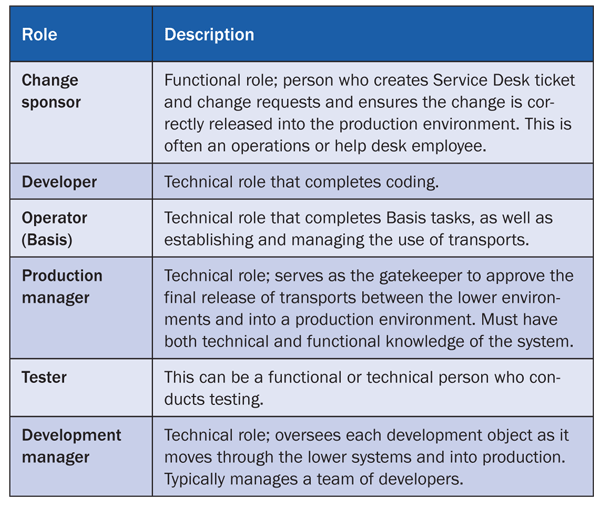
Table 2
Typical UAT roles
For each of the defined roles, you need to set up a unique ID and password. It is standard practice to use dedicated test IDs and passwords. This allows you to create specific access rights per role. Following the example in Table 2, each of the defined roles should have a unique ID and password established. Per the information shared regarding prerequisite tests, you should have already confirmed that these roles work as designed with appropriate access levels and security permissions in your security role testing. Because you most likely have multiple users testing for each role, you need to create multiple IDs for each role (e.g., UTCHGSPR1, USTCHGSPR2, and so on).
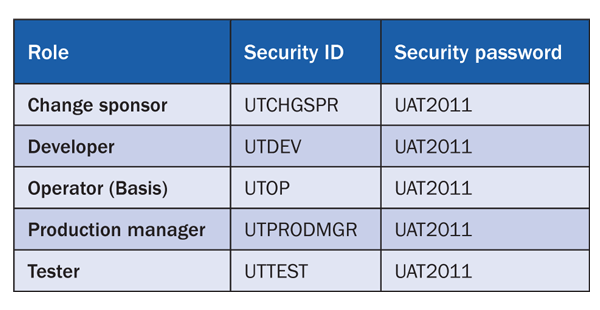
Table 3
Example of how you can set up test roles and IDs
Defining Scenarios to Test and Generating Test Scripts
When defining the scenarios to include in your UAT approach, you need to have a solid understanding of the ChaRM workflow and how it integrates with SAP Solution Manager. It is helpful if your organization is already using SAP Solution Manager Issue Management and User Support Capabilities within Service Desk. Use transaction SLFN to generate Service Desk tickets.
The business transactions that support help desk and change control management can all be accessed from transaction code CRMD_ORDER. From there, you enter a specific document type that signifies what type of business transaction you are using. Within ChaRM, you have additional document types that are used in your scenarios: SDCR is used for a change request, SDMK for a normal correction, and SDHF for an urgent correction. At the core of your scenarios, you should include these four transaction codes (including the previously mentioned transaction SLFN) and build out use cases for each one individually and a combination of all four.
When developing the scenarios, solicit input from the various users in your organization who will participate in the UAT event. Since UAT for ChaRM is an end-to-end test, integration between each team during the test is critical. Establishing this integration up front contributes to the success of your UAT.
Here is a standard scenario that you want to test:
- An end user reports a system issue to the Service Desk, and a Service Desk associate enters a support ticket using transaction SLFN
- It is determined that a change request is needed for this issue and using the ChaRM workflow, the Service Desk ticket is turned into a change request via transaction SDCR. This step is typically completed by a change control board, and a member of your operations support team would make the changes to the ticket.
- When approved, this change request is made into a normal correction, transaction SDMK, because this is not an emergency fix. This also would be done by someone within your operations support team.
- The development manager assigns to a coding resource and development begins in the development environment. A transport is created and released by the Basis team, and when ready, the production manager approves the transport to be migrated into the quality assurance environment.
- A member of the operations or testing teams picks up the item in the quality assurance environment, completes the testing, and confirms the issue is resolved
Note
Because this is just UAT, you won’t test the moving of anything into a production system. Moving transports between the lower environments though can confirm the security roles associated with the production manager and confirm that TMS has been set up correctly.
As you can see in this scenario, many different roles participate in the test and it is clear that all teams must communicate well and be integrated in the testing process.
Other suggested scenarios that you can build out include:
- Confirmation of function of a Service Desk ticket changing into a change request
- Confirmation of function of an emergency correction being created and released without a prior change request
- Confirmation of a change request being created without a prior Service Desk ticket
- Confirmation of the workflow of the change request to urgent correction release or the change request to normal correction and release
Test scripts for all scenarios that could occur in a typical day in the life of your organization should be included in the UAT. It is helpful to have an all-hands-on-board approach for execution of the UAT so that as one transaction is created (e.g., transaction SLFN for a Service Desk ticket), it can immediately be picked up by the next-in-line resource in the workflow.
Because multiple resources conduct tests on each scenario several times, a tracking routine should be put in place to record the handoff of each transaction as it moves through the workflow. Your organization may have sophisticated testing software that can handle this, but I have found that it is helpful to use a simple Microsoft Excel spreadsheet and manually track each test as it moves through the workflow cycle. An example of this is shown in Table 4.

Table 4
Example of test tracking spreadsheet
Use of this or a similarly constructed report can provide assurance that the right resources are picking up the right transactions in the test cycle. You can store this on a shared drive and allow all participants to have edit permissions so that as the handoff occurs between each step of the test, there is a record of the identifying information for each transaction.
Executing UAT — Pass/Fail Criteria
You need to define your success metrics and pass/fail criteria for the UAT so that there is quantifiable data to support the end of UAT and a go or no-go decision. The criteria suggested below are standard across many industries:
A test is passed if:
- The test was executed exactly as documented
- The test produced the correct and expected output
- No problems were encountered as a result of the execution
- Actual test results match expected test results
A test is failed if:
- The test does not meet expected results
- System problems, such as corruption, errors, or crash, are encountered
- Unexpected error messages are received following data input
- Data is displayed incorrectly
- Invalid responses are received to correct or validate test data
You also need to establish entry and exit criteria. I have noted earlier the prerequisites to begin UAT. The entrance criteria listed below is a summary of that and is useful to have when sharing your UAT test plans with people who may not be familiar with the details of configuration requirements.
Entry criteria:
- Configuration and development are completed
- Prerequisite testing is completed
- No outstanding transaction SEV1 and SEV2 unit testing defects exist
Exit criteria:
UAT Defect Management
I’m assuming that your organization is already using the SAP Solution Manager Service Desk. Since Service Desk is in place, you can use this functionality to track UAT defects. All defects found during UAT should be recorded by creating a Service Desk ticket (via transaction SLFN) and assigning this ticket to a ChaRM UAT ownership queue.
Note
You can establish a dedicated test queue by using transaction code PPOCA_CRM (to create an ownership queue in an organizational model) and PPOMA_CRM (to edit an organizational model and respective ownership queues). These transaction codes take you to the General Attribute — CRM Create screen. You most likely already have other queues set up for operations and technical teams that support your organization. Defining a dedicated queue for your UAT establishes a business partner ID and allows for ease of recording defects and assigning to a queue. You can also use the business partner ID as a search parameter for generating reports on the status of testing defects.
You can obtain basic reporting on defects logged in Service Desk by using transaction code CRM_DNO_MONITOR
A designated team should monitor the defect queue and address identified defects. Typically, this is led by a development team manager, who assigns defects to the members of the team to resolve. When a defect is corrected, the Service Desk ticket is assigned back to the tester who is then informed through the automatic email function of the new status of the defect. Here are the three defect resolution steps:
- A defect is identified by the tester: A Service Desk ticket is logged in Service Desk. It describes details of the defect and is assigned to the ChaRM UAT ownership queue. The development team manager assigns the defect and associated coding work to a team member.
- The defect is corrected in the development environment: The technology team corrects the defect and assigns it back to the original tester. An email notification is sent to the tester that the issue is ready for retest.
- When the defect is confirmed as corrected, the original tester updates the ticket with confirmation of a successful test and sets the status to Confirmed to close.
Note
There are many resources available online that go into greater detail on many of the components of this article. A few of these are listed below:
Allison Flexer
Allison Flexer is a graduate of Georgia Institute of Technology with a degree in business management and information systems. She is a senior change manager supporting large-scale, global rollouts of people, process, and technology change. Allison has supported SAP migrations in various capacities including integration management, implementation, and production support, and was the business lead for the rollout of Service Desk, ChaRM, and project implementation support. Allison lives in Charlotte, NC.
You may contact the author at Allison.Flexer@gmail.com.
If you have comments about this article or publication, or would like to submit an article idea, please contact the editor.