SAPexperts'Financials
Since 1998, SAP has supported more than one costing philosophy in the R/3 CO module. This means that the CO user/designer has more and potentially confusing options when making scope decisions. The author focuses on one of those costing philosophies--Resource Consumption Accounting--and compares it to the better understood full absorption accounting so that you better understand the available CO options.
Key Concept
I’ve heard from readers wondering about CO module functionality options that they have never used: "Are we missing out on something good?" I discussed such points with this month’s guest expert, Dawn Sedgley, a senior consultant with the Alta Via consulting company. To her, it is no surprise that R/3 sites are noticing the ever-expanding list of options in the CO module. The next few pages are the highlights of my discussion with her, starting with a brief historical background on R/3’s CO module. I think you’ll reach the same conclusion that I did, which is that some of the stranger-sounding options in CO are actually there to allow implementation of a costing philosophy and practice known as Resource Consumption Accounting, or RCA. —Kurt Goldsmith
Different R/3 sites believe in and practice different costing methodologies. SAP wanted all of you to be happy. Thus, the CO module is delivered with a variety of options to help each site decide for itself what will be the easiest way to get the data it needs to respond to commonly asked questions. This wasn’t always the case, though.
Did you know that the CO module in R/3 was developed based on a specific German costing philosophy known as "Grenzplankostenrechnung" (more easily pronounced as GPK1)? The functionality in releases 2.2, 3.0, and 4.0 adhered to this one philosophy.
In 1998, however, SAP stopped enforcing any single costing philosophy within CO and attempted to satisfy as many customer requirements as it could reasonably and technically support. This shift meant that a larger variety of mutually exclusive options confronted the CO user/designer, including some that provide potentially conflicting decision-support information. It is not your imagination — it has become more difficult to make scope decisions about what to use and what to ignore. These changes are not necessarily good or bad, but they definitely are confusing.
The question for 2003 is becoming what to do with all the options that each new release of R/3 brings. Can you keep your accounting customization choices as simple as the business questions that the accounting data is meant to answer?
- Finished good #M-12345: Make it ourselves, or buy it as a resell item?
- Should we shift the sales mix away from product line "A" toward product line "B"?
- Are we better off or worse off if we drop customers that aren’t doing at least "X" volume of trade with us each month?
In this article, I’ll talk about two costing approaches that typically use quite different sets of CO module functionalities. With just this initial understanding of these approaches, you should find that your ability to think about the many other CO options improves.
- Full absorption accounting. Most of you may already be familiar with this option. The idea is to reflect all of the organization’s costs that support the manufacturing steps in a single rate.
- Resource Consumption Accounting (RCA).2 This might be brand new to you. It builds on the GPK methodology, adding many more concepts. Not surprisingly, the SAP R/3 system is the world’s leading ERP package that most closely allows you to implement RCA principles using 100 percent standard functionality.
The best way to engage the topic is to present one simplified example. I’ll describe an organization that has just three departments. This organization wants to develop a per-unit cost rate for its manufacturing department, and it wants this rate to reflect "full absorption" of the other two departments.
I’ll take a quick look at what kinds of CO functionalities you might use to set that up. Then, I’ll walk you through the very different options in CO that an RCA consultant would turn to instead. This will arm you with at least one extra comparison tool for evaluating why the folks at SAP included so many different and unusual ways in CO to allocate costs, calculate rates, and model relationships.
My Three-Department Organization
For this simplified example, imagine that you have a company with just three departments, as shown in Table 1. Furthermore, in this make-believe world, the only kind of inputs that cost money are human (labor costs). This will allow you to more easily see the reasons why some CO module options seem to contradict each other.
(X) Facilities department: Responsible for keeping the company’s 800 square feet of floor space in working condition.
Capacity comes from one senior ($50 per hour) and one junior ($30 per hour) technician who, together, can cover the entire facility once each day. The facilities department uses 200 square feet of the 800 square feet of floor space.
(Y) Safety department: Responsible for giving safety classes to the employees in departments X and Z.
Each employee in X and Z must attend one class each day. Capacity comes from two full-time trainers ($250 per day), who give the lessons in the morning prior to the start of X’s and Z’s work day and then spend the rest of the day preparing the data for the next day’s lesson. Combined, they can give lessons to 10 employees per day. The safety department uses 200 square feet of the 800 square feet of floor space.
(Z) Assembly department: Responsible for assembling five components into one finished good, #P-12345.
Capacity comes from one manager ($400 per 10-hour day) and one operator ($25 per hour). As long as the manager keeps the flow of inbound components (from vendors) and outbound finished goods (to customers) properly coordinated, the operator can create one finished good every two hours. The assembly department uses 400 square feet of the 800 square feet of floor space.
Table 1
The XYZ Corporation’s three departments
The Full-Absorption Rate = $195/Hour (or $390/Unit)
I will list briefly the functionalities in the CO module that a full-absorption site might turn to, as well as the outcome of implementing those functionalities (a calculated manufacturing rate of $195 per hour). Assume that the accounting period is just one day, and that one workday consists of 10 hours.
Ultimately, a full-absorption model will reflect all of the day’s facility costs ($500 + $300 = $800) and all of the day’s safety costs ($250 + $250 = $500) into the fixed costs of the assembly department ($400), as a way to more easily determine how much to add to the $25 per hour rate of the direct labor operator.
In this example, the total fixed costs ($800 + $500 + $400 = $1,700) divided by the 10-hour day gives a rate of $170 per hour. Adding that to the operator’s salary gives the full-absorption rate of $195 per hour. Since the assumption is that an operator assembles a finished good in two hours, this brings us to a planned rate of $390 per unit.
In support of the need for a full- absorption site to model the kinds of monetary relationships just described, the CO module offers the variable tracing factor in the allocation method known as "assessment." A common functionality used in combination with this is the manual data entry known as Statistical Key Figure Planning, as shown in Figure 1. In the case of the XYZ organization, you could use this to record the floor space occupied by each of the departments.
At this point, the Assessment Cycle can be set up to automatically calculate the percentages needed to allocate 100 percent of the facilities department’s costs to departments Y and Z, if the variable tracing factor used in the allocation is the Stat. Key Fig. in Figure 2.
Table 2 lists a small sample of CO functionalities popular with full-absorption sites, due to these options being easier to use than other CO module options for modeling the assumed planned cost relationships among the organization’s cost centers.
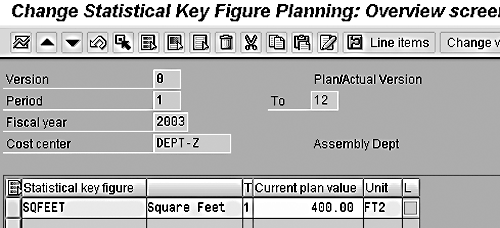
Figure 1
The Statistical Key Figure Planning functionality in CO

Figure 2
Using the Statistical Key Figure option as the variable tracing factor in cost center assessments
| Functionality |
How It Could Be Used in the XYZ Organization Example |
| Cost center planning: |
Departments X, Y, and Z each type in their planned spending by cost element spending for labor related account numbers (cost elements). |
Cost center planning:
distribution or assessment of planned costs, with optional use of the variable tracing factor |
In the simplest case, there would be a cost allocation (using either a distribution cycle or an assessment cycle) from X to Z and from Y to Z.
If a value relationship is to be modeled (facilities expenses allocated to all other departments based on floor space occupied), then the allocation will be from X to Y and Z first, followed by a second allocation from Y to Z.
|
Cost center planning:
activity type rates |
In the simple case, an activity type called Assembly is created. Then, an expected output of 10 hours and a rate-per-hour of $195 can be typed in for the combination of Assembly and DEPT-Z. When this data entry is saved, R/3 automatically records a planned credit of $1,950 to Z. In a report, the planned costs for Z will be $1,950 (its own $400 + $250, plus the $1,300 it got from X and Y). Its planned credit will also be $1,950 (10 hours x $195 per hour), for a planned Over/Under-Absorbed balance of $0. At that point, all three departments show a net balance of $0. You are “fully absorbed” (the $1,950 ends up as planned cost of sales or as planned finished goods inventory, depending on your assumptions regarding how quickly the assembled goods can be sold). |
|
| Table 2 |
Typical functionalities used to implement full-absorption costing |
The "Fully Burdened" Rate = $253/Unit
As opposed to wanting access to CO options that allow easy data entry and allocations of planned cost center costs, a site that practices RCA wants access to CO options that allow easy data entry and allocations of planned cost center quantities. The goal is not a fully absorbed calculation, but something referred to as a "fully burdened" calculation.
In Figure 3, notice how the option in CO called Activity Input Planning can be used to record how two units of the safety department’s outputs (number of classes performed by Y) and 400 units of the facilities department’s outputs (square feet of floor space maintained by X) act as a fixed input for the assembly department’s output (receiver activity type, ASSEMB). Figure 3 does not show how much output is expected from the assembly department, but it does show that even if this output equals zero units, consumption from the other two departments cannot be avoided.
For an RCA site, this is perfect, since one of its rules is to make sure that all inputs consumed in the creation of one department’s capacity to produce outputs — even those inputs that come as outputs from other departments — are represented in the planning system.3 This is known as "fully burdening" the resource (the cost center).
In this case, you are focusing on department Z’s capacity to produce its assembled units output. At this point of the modeling, you do not know its cost rate. You would only know that its capacity comes from one fixed monetary element ($400-per-day manager), one variable monetary element ($50 for the operator for each assembled unit), and two fixed quantitative elements (400 square feet of maintained floor space from X, and two daily safety lessons from Y).
To get that planned cost rate, an RCA site would first want to "fully burden" every resource in the XYZ organization model. Notice back in Table 2 that department X gets some of its capacity from department Y (two daily safety classes), and that department Y gets some of its capacity from department X (200 square feet of maintained floor space). In an RCA model, this must also be recorded as a planned relationship.
The second step is to type in the planned capacities for X (800 square feet of daily maintenance), Y (10 daily safety lessons), and Z (five daily assembled finished units). As shown in Figure 4, this is a standard option (the Capacity column) in the Activity type/Price Planning transaction. It is quite popular with RCA sites and rarely used by full-absorption sites, since each focuses on a different central concern (cost allocation relationships vs. quantity relationships).
The third step is to have R/3 automatically calculate the cost rates for each department’s output, based on the department’s monetary inputs ( $400 manager), its quantitative inputs (two daily safety classes), and its planned capacity to convert those inputs into outputs of its own. The standard transaction Calculate Activity Type Prices does this. What makes this transaction especially appealing to an RCA site is how the iterative relationship between X and Y (each consumes the other’s outputs) is automatically accounted for in the unit rate calculation.
Ultimately, this iterative calculation will lead to a planned cost rate for department X (facilities) of about $1.18 per square foot of maintained floor space of output, and for department Y (safety) of about $72 per class given.
With these values, the system can calculate the planned cost rate of approximately $253 per assembled unit coming out of department Z ($650 of its own costs + $472 from X (400 square feet x $1.18 per) + $144 from Y (two lessons x $72 each) divided by planned capacity of five finished units).
Did you notice the conflict among the functionalities preferred by an RCA site vs. by a full-absorption site? In a word: variance. Full-absorption modeling (via the variable tracing factor) leaves zero variances on any cost center. All costs are absorbed into planned cost of sales or planned increases to finished goods inventory. However, RCA modeling (via the activity input planning function’s interaction with the iterative price calculation) leaves $72 x 6 = $432 of variance on the safety department, and $1.18 x 200 square feet = $236 of variance on the facilities department.
The two scenarios also lead to very different per-unit rates. In the full-absorption scenario, the unit price comes to two hours x $195/hour = $390. In the RCA scenario, the unit price is just $253. Neither is "right." The difference is merely due to the different assumptions and modeling preferences in each costing philosophy.
In Table 3, I’ve listed some of the CO options an RCA site might reach for, as a way to more easily model the principles behind RCA. Perhaps you’ll notice that this list consists of functionalities you’ve always felt were strange-sounding, and thus ignored.

Figure 3
The Activity Input Planning functionality in CO

Figure 4
The Capacity data entry option in the Activity Type/Price Planning: Overview Screen
| Functionality |
How It Could Be Used in the XYZ Organization Example |
| Cost center planning: planned spending by cost element per each activity type |
Departments X, Y, and Z each type in their planned spending for labor related account numbers ($400 for the manager’s salary expense in DEPT-Z), but link this to output categories (activity type ASSEMB in DEPT-Z) so that the system can calculate a price specific to that output category. |
| Cost center planning: activity input planning |
Departments X, Y, and Z each type in how much of each other’s outputs (units of each activity type) they will need to consume, based on how much of their own output they will be able to produce (capacity). The planned consumption gets categorized as either fixed or variable depending on the relationship between the input and the consuming department’s own outputs. |
| Preallocation of fixed costs |
You know in advance that department Y has an unavoidable 60 percent slack capacity (can give classes to 10 employees per day, yet X and Z have just two employees each). So, you want to end up with a planned variance of the fixed costs, rather than blend that money into some other department’s cost rate the way that a full-absorption site would. |
| Purely iterative price calculation |
In my example, the X and Y departments consumed each other’s outputs. Thus, you would like the calculation to reflect this relationship. |
| Cost center planning: activity type price planning - capacity |
Each of the three departments had a planned capacity: X (800 square feet of maintained floor space), Y (10 safety classes), and Z (five assembled finished units). |
|
| Table 3 |
Typical functionalities used to implement RCA-style costing |
Summary
Now that you have seen the conflict presented though the simplistic example of the XYZ Corporation (in one case you ended up with $0 variance and a $390 planned unit cost; in the other, a $432 and a $236 variance and a $253 planned unit cost), you should be better prepared to evaluate the ever-increasing variety of CO module functionalities and options. When you see something in CO that does not seem to fit—or even contradicts—your site’s cost-accounting method, you do not need to feel lost or hopelessly confused about why SAP has put it there.
Worst case, you can feel confident that it exists to help sites that believe in a costing philosophy other than yours. Best case, your knowledge of what full-absorption and RCA practitioners want to do will let you figure out on your own why that functionality comes standard in your system.
1Flexible Grenzplankostenrechnung und Deckungsbeitragsrechnung3 Rule #1 is to identify the limited number of measurable output categories in the organization, and to identify the persons, equipment, and/or departments ("resources") that the capacity to produce those outputs resides in. Rule #2 is to make sure that all costs and all internally generated outputs not sold as services to external customers are represented as inputs to at least one resource, and that each input (small or large) of each resource is classified into fixed and variable portions, based on the input’s relationship to that resource’s output(s). Rule #3 is to allocate the costs of one resource to a receiver only if the receiver consumes some of the output of the resource (cost allocations can only follow quantity allocations).
Kurt Goldsmith
Kurt Goldsmith is a senior business consultant for Enowa Consulting, specializing in the diagnosis and resolution of productivity-related integration issues between a company’s division of labor (end users, managers, executives) and SAP software (R/3, BW, APO, CRM). He also has a lifetime performance record of one win and two third-place finishes from five career starts as a thoroughbred racehorse trainer.
You may contact the author at kurt.goldsmith@enowa-consulting.com.
If you have comments about this article or publication, or would like to submit an article idea, please contact the editor.




 Premium
