The author demonstrates how to optimize reconciliation account determination. He introduces the fundamentals of reconciliation account determination, special G/L indicator configuration, and manual adjustments. With examples, he shows how to use reconciliation account determination with a special G/L indicator in the FI-A/R module.
Using reconciliation account determination, you can post customer invoices to a reconciliation account other than the one defined in the customer master record. This allows segregation of outstanding customer balances in the balance sheet.
For example, say a company sells training credits as part of its system sales. The training credit needs to be recorded as a customer liability, which the customer consumes as it sends its employees on training. Using reconciliation account determination, the training credit line of the sales order is posted to a separate balance sheet account, allowing proper identification of this liability for external reporting.
Currently, many R/3 sites use separate G/L reconciliation accounts for different customer types (e.g., external customers vs. inter-company customers), but this separation is limited to the customer level and cannot go lower to the sales document or business areas. With reconciliation account determination for invoicing, you can make the debits and credits go to separate accounts.
The configuration behind reconciliation account determination is virtually the same as for revenue account determination, which is a more well-known and widely used functionality. I will demonstrate how you can use reconciliation account determination in the FI-A/R module in conjunction with a special G/L indicator, which is an even less well-known trick. The special G/L indicator manually adjusts the balances posted in the alternate reconciliation account. I've assumed that the reader has experience with revenue account determination or pricing (Figure 1).
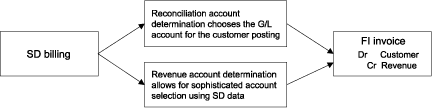
Figure 1
Revenue and reconciliation account determination select accounts for the FI invoice
Note!
The special G/L indicator is the manual way to perform the same task that SD reconciliation account determination does automatically. Occasionally you may want to debit or credit the customer's default reconciliation. There are two ways to accomplish this without resorting to the "create a dummy G/L account called A/R manual entry" trick — the one in SD (reconciliation account determination) and the one in FI (special G/L indicator).
The Basics of Reconciliation Account Determination
Reconciliation account determination is a functionality in the SD module that allows you to choose to which reconciliation account an invoice or credit memo posts. Normally the standard default reconciliation account from the customer master is used when an invoice posts to FI-A/R. This functionality allows you to segregate customer postings by reconciliation account. This can often simplify balance sheet preparation if you have special local regulations — for example, that all credit memo balances need to be shown as a liability, even if the customer has a debit balance (Figure 2).
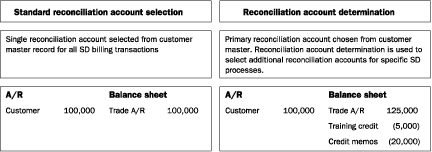
Figure 2
Balance sheet impact of reconciliation account determination
Integration Between FI-G/L and the Subledgers
Here's a brief overview of how an A/R posting integrates with the G/L in R/3. A typical A/R posting would be to a cash payment by the customer. This is a two-line JV entered by the user into SAP using transaction F- 28.
| Dr |
104700 |
Cash |
| Cr |
13564 |
Customer X |
You can think of this as a three-line entry, a balancing JV to G/L, and a single-sided entry in the A/R subledger. The three entries happen automatically based on the two-line JV entered by the user into R/3. Remember that A/R is a single-sided sub-ledger while the G/L is a balancing double-sided ledger. The reconciliation account represents the single account summarization in the G/L of the many customer account balances in A/R.
| Double-sided G/L entry |
| Dr |
104700 |
Cash |
| Cr |
120000 |
Trade A/R
reconciliation account |
| Single-sided A/R entry |
| Cr |
13564 |
Customer X |
The single customer line is posting to both G/L and to A/R.
How Are Invoice Accounts Determined?
Let's look at a typical FI invoice (Figure 3), which was created by SD billing functionality via transaction VF01 or VF04. For the debit to the customer account, the G/L reconciliation account is usually chosen from the customer master record. For the credit to revenue, the account is always chosen using revenue account determination in SD configuration (Figure 4).

Figure 3
A typical FI invoice created by SD billing
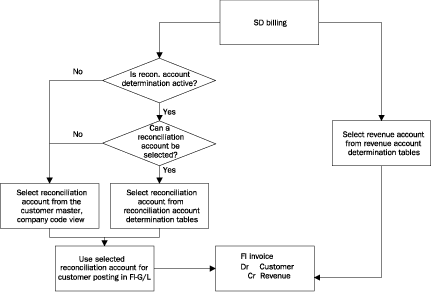
Figure 4
Revenue and reconciliation account determination work together to select G/L accounts for the FI invoice
Revenue Account Determination
As I mentioned, the configuration of reconciliation account determination is similar to revenue account determination. (For step-by-step instructions on how to configure reconciliation account determination, see the download at the bottom of this article.)
Revenue account determination is a standard R/3 functionality that allows the G/L account for the revenue posting to be chosen based on a complex set of user-defined criteria, e.g., sales organization, order type, or item category. This allows for a detailed analysis of revenue to be shown from FI-G/L. In the case of Figure 3, a series of configuration table entries would have selected account 40500002 as the revenue posting account.
Revenue account determination uses the condition table, access sequence, and condition type logic that are used in SAP for pricing, output determination, material determination, and other functions.
Reconciliation Account Determination
Normally the G/L reconciliation account for an invoice is based on the value in the customer master record (Figure 5). When a regular invoice is posted, the reconciliation account from the customer master company code view is used (Figure 6). When reconciliation account determination is active, an alternate reconciliation account can be selected (Figure 7). To see a JV line that impacts both A/R and G/L, see Figures 6 and 7. The single line posts to customer 13564 on the left and G/L reconciliation account 12000002 or 24522002 on the right.

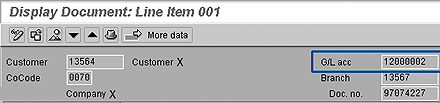

By activating reconciliation account determination, you can develop sophisticated rules to determine exactly which reconciliation account should be used for a specific transaction.
Note!
Reconciliation account determination does not need to select an account in all cases. If an account is not found, the reconciliation account from the customer master company code view is used as a default value. This is unlike revenue account determination, in which a failure to select an account results in an error in the SD-to-FI invoice posting interface.
Making Manual Adjustments
Once the invoice has been posted to FI-A/R using reconciliation account determination, you cannot post to the reconciliation account directly if you need to make any manual adjustments to the balances. Instead, you need to create a special G/L indicator. Reconciliation accounts can only be posted to via a customer account. Normal postings to a customer use the default reconciliation account in the customer master accounting view.
You might need to make manual adjustments in a number of circumstances, including:
- Incorrect invoicing
- Customer dispute
- Offer of a discount or credit to customer
- The nature of the transaction changes and the balance needs to be moved to a new reconciliation account
Normally when you make adjustments to a customer account, you make postings using the regular customer posting keys 01 to 08 and 11 to 18. They make postings to the customer's regular reconciliation account. In this case, you want to make an adjustment to the customer balance and impact the new reconciliation account selected by account determination. As the account 24522002 in the previous example is a customer reconciliation account, you cannot post to it directly, only via a customer posting.
To get around this problem, you can define a special G/L indicator to be used in conjunction with posting keys 09 and 19 to change the balances on the reconciliation account 24522002. Special G/L indicators are a way of making customer or vendor account postings to alternate reconciliation accounts. They are commonly used for bill of exchange and down payment processing. Think of this as a manual approach to achieving what reconciliation account determination does automatically for SD billing postings.
What Is a Special G/L Indicator?
Special G/L indicators are a way of making customer or vendor account postings to alternate reconciliation accounts. You may have noticed the field for entering the special G/L indicator at the bottom of the FI document entry screen, FB01 (Figure 8).

Special G/L transactions in accounts receivable and accounts payable are shown separately in the G/L and sub-ledger. In the case of line item reporting using FBL1 or FBL5, the special G/L transactions are broken out into their own sections (Figure 9).
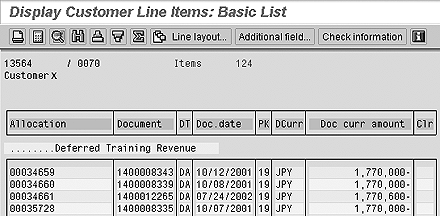
Some typical uses of special G/L indicators are:
- Security deposits
- Down payments
- Bills of exchange
- Guarantees
- Individual value adjustments
- Amortization
- Interest receivable
Configuration for Special G/L Indicator
You can configure the special G/L indicator via transaction OBXY or IMG menu path IMG>Financial Accounting>Accounts Receivable and Accounts Payable>Business Transactions>Postings with Alternative Reconciliation Account>Other Special G/L Transactions>Define Alternative Reconciliation Account for Customer.
Select special G/L indicator T for a deferred training credit (Figure 10). Although for this example I chose special G/L indicator T, you are free to choose any letter or number that SAP has not selected. It is safest to use the number range 0 to 9, as SAP has reserved this for customer use. Any letter you select may be used by SAP in the future. This special G/L indicator can be marked as not relevant to credit management in the configuration (Figure 11).
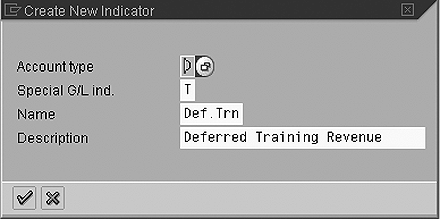
Figure 10
Define special G/L indicator T for account type D customers
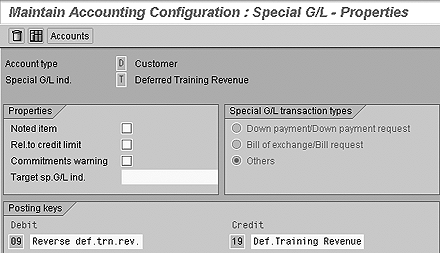
Figure 11
Define properties for special G/L indicator T (relevant to credit check box is not checked)
After saving the special G/L properties, click on the Accounts button to enter the alternate G/L reconciliation account (Figure 12). Alternate reconciliation accounts are determined on the basis of the chart of accounts and the default reconciliation account in the customer master record.
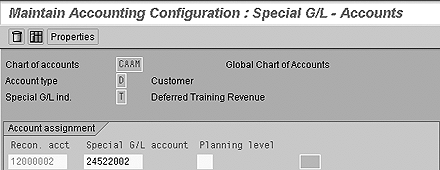
Figure 12
Define the alternate reconciliation account for the special G/L indicator
The special G/L indicator is now defined. You can double-click on the entry to enter further G/L reconciliation accounts. Once completed, the list of special G/L indicators for customer use will contain indicator T (Figure 13). Figure 14 shows a customer account posting made with special G/L indicator T to the alternate reconciliation account 24522002.

Figure 13
Define special G/L indicator T
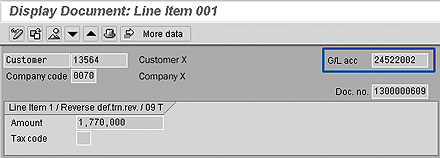
Figure 14
Posting with special G/L indicator T posts to reconciliation account 24522002

Rohana Gunawardena
Rohana Gunawardena heads the SAP practice division at Exium Inc. Exium is a leading business and technology consulting firm that enables companies to achieve their strategic business goals. Exium specializes in delivering superior IT solutions using ERP systems, with a special focus on SAP products. Rohana has been working with SAP since 1992. During his career he has assisted multiple clients on detailed system correction projects, such as correcting inventory balances, controlling area reorganizations, retrospectively activating group currency, and optimizing inter-company accounting transactions. He has spoken at many SAP conferences and has published more than 20 articles in Financials Expert, SCM Expert, and SAPtips on various aspects of SAP. His presentations have focused on Financials module selection, the order-to-cash process, global rollouts, business segment reporting, cross-module integration, and the financial impact of SCM transactions. Rohana is widely acknowledged as a leading SAP expert. Rohana is a Fellow of the Institute of Chartered Accountants in England & Wales. Previously Rohana has worked with the consulting practices of Accenture, Deloitte, and PwC.
Rohana will be presenting at the upcoming SAPinsider Financials 2018 conference October 16-18 in Prague. For information on the event, click
here.
You may contact the author at Rohana@Exium.com .
If you have comments about this article or publication, or would like to submit an article idea, please contact the editor.