Management
Every IT manager is under pressure to deliver within ever-tightening budgets. But how? Cindy Rasey, a practice manager at Symmetry Corporation, follows a five-step plan that can help you lower your IT organization’s operational costs.
In these days of tighter budgets, any financial cut backs across the business can improve the bottom line and please management. To this end, companies are constantly searching for the best way to lower operational costs while keeping the company productive and successful.
Cindy Rasey is a practice manager at Symmetry Corporation, a consulting company with a full focus on SAP technology. She has spoken at various SAP-focused conferences and has worked with SAP systems for nine years. Rasey follows a five-tiered plan to bring down operational costs in an IT organization. This comprehensive method will help you look into various areas of your business and determine where you can bring savings to your company.
1. Roadmap Business Needs
“This is the place to start when you don’t know what to do first,” Rasey says. When you begin to look at cutting operational costs, start by roadmapping your business’ needs to get a big picture view. Looking across the entire IT organization, it will be easier to see which areas could stand cost reductions.
This high-level view should take into account all the areas covered in Figure 1. Are the licenses you’re paying for, both SAP and non-SAP, being used? Can you reassign staff to more important areas? Do you need to do your upgrades now, or can they wait until the business is standing on more solid financial ground? Rasey believes researching all these areas gives a better picture of where your business stands.
It’s important to look even at the corners of the organization that are doing well. “There may be no reason to change certain things in certain departments,” Rasey says, “but it does make sense to at least evaluate every area. The key is to improve and reduce certain things in every area, not just one.” Assess each area fully before making any cost cutting decisions.

Figure 1
Look into every area of your business to lower TCO
Tip!
When you hold this roadmap session, be sure to include all the necessary people — without going overboard. You need to define the appropriate people and keep the group to that number so meetings don't get out of hand, Rasey says.
2. Work Your Staff Smarter, Not Harder
When faced with budget cuts, too many companies end up assigning more work to fewer staff members. Overloading your staff with work, however, leads to burnouts and position vacancies. Instead, Rasey promotes working in smarter ways to get the most out of your staff without driving them to leave. Reassess your staffing structure to make sure every area of the organization is appropriately covered with skilled resources (Figure 2). See the sidebar “Staffing Model Questions to Ask Your Business.”

Figure 2
Make sure no gaps exist in your areas of knowledge
“People are the most expensive resource,” Rasey says. Thorough documentation is a great way to be sure they’re not wasting time and money by revisiting issues that had previously been solved. If a problem happens once a quarter, it’s worthwhile to document the issue and resolution to save the time in next quarter that your team would have spent looking into the issue. Instead they can cut right to the solution.
“IT departments, generally speaking, are usually being asked to do more with less,” Rasey says. Therefore, “it is really about evaluating what is everybody doing, identifying the gaps that are there, and then once you know what your department is currently doing, you can figure out what they really need to be doing to work smarter.”
Taking a closer look at this might uncover some tasks that it doesn’t make sense for them to be doing. Redistributing responsibilities ensures that the right department is handling the right tasks in the most efficient manner. Rasey uses the examples of ad hoc queries – if your IT department is running these but the super users need them, it might make more sense to move the responsibility over to the super users.
Note
Assessing your staff requirements can be done internally without bringing in outside resources as long as the company has good internal communication. If your company has an issue with this, however, bringing in an outside firm to handle reorganization might be worth looking into.
Automating processes can be a significant improvement on resources. In times when money is tight, the upfront cost of automating processes is generally well worth the long-term payoff. However, even with automated processes, you should still confirm results manually. “Automation is something that we definitely want to take advantage of,” says Rasey, “but it really does not replace diligence.”
Staffing Model Questions to Ask Your Business
Rasey suggests taking a closer look at your staffing model to see where costs can be cut or scaled back. Use these questions as a jumping-off point:
- Do you have the available depth of knowledge and experience to manage your day-to-day activities, as well as project work?
- Are your more experienced and expensive technical resources being underutilized?
- Are you spending your training dollars on ways to recognize true return on investment (ROI)?
- Are you burning costly staff hours executing repetitive activities?
- Do your existing consulting arrangements best meet your needs?
3. Design Your Long-Term Purchasing Plan
Your purchasing plan should be mapped out just as your business needs are. “Upper management always likes it when they don’t have any surprises like a bill on their desk that they weren’t expecting,” Rasey says.
Included in this roadmap should be software and hardware needs as well as process improvements. Additionally, document not only what technical infrastructure requirements your business will need over the next few years, but also your current infrastructure to build a clear picture.
Rasey suggests detailing operational levels, planned initiatives, and SAP support required, combining them all into a document that should be continuously updated as new information arises or as plans change course. “You’re looking at where you are today and where you want to go with your business over the next six to 36 months,” Rasey says.
Rasey stresses that in-depth research should be done before making any decisions or requests. Lack of research can lead to surprise costs. One client she worked with didn’t realize the company’s backup solution was a shared solution. Backups were not being completed in an acceptable time frame, nor were they able to schedule them for the frequency initially designed due to the speed issues. Should they have needed to restore their production system, the time frame to do so would have been unacceptable to the business. In addition, they were unaware of the fact that they were to pay by the gigabyte for any backups performed. To accommodate a more reasonable solution to fit their business needs, they purchased additional disk space, which was yet another unexpected cost they weren’t planning for.
Note
Hardware-knowledgeable staff in charge of purchasing may not know the business needs of the company. Hardware and business staff need to get together to discuss the needs of both sides and come to an educated decision about what environment will be best.
4. Reduce Your Data Storage Costs
Perhaps the most practical way to reduce your data storage costs is to archive. This option can significantly bring down costs by reducing the amount of data that is regularly processed by your system. Rasey has seen archiving left out of many project plans because it’s seen as a task that can be handled further down the road. The longer archiving is put off, however, the more complex the job can be, and the longer you’ll spend missing out on the cost savings that come along with archiving (Figure 3).
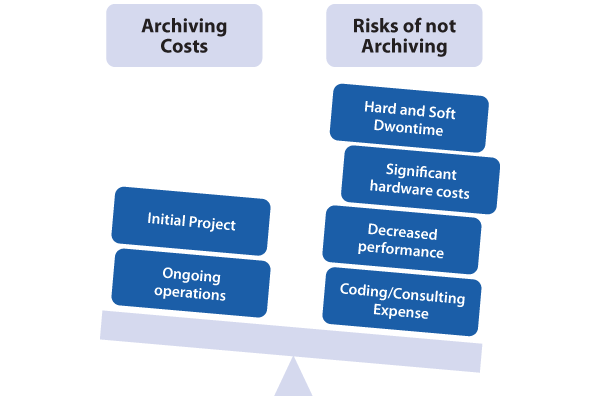
Figure 3
The risks of not archiving outweigh the cost of archiving
- Over the lifetime of both options, archiving is less expensive than consistently adding more disk space
- Adding more disk space creates amounts of data that negatively affect performance, which causes the need for costly add-ons such as more CPU and memory
- Downtime due to back-up runs proportionally increases with the amount of data you have
Virtualization is a concept that’s gaining popularity as a solution to large and pricey data storage environments. Rasey feels this is a good solution when looking to lower data storage costs – it can save your company hardware, rack space, and energy costs. She points out that in addition to these tangible savings, it also saves administrative costs when the number of servers is reduced. “Two servers for an entire environment as opposed to five or six can save a lot of money,” she says.
5. Take Advantage of Proof of Concept Upgrades
When budgets are tight, a proof of concept upgrade, a.k.a. a sandbox upgrade, may be just the test you need to run before spending large amounts on the real upgrade, only to find out that elements won’t work or something is wrong. In a proof of concept upgrade, an upgrade is performed on a copy of a company’s production system. “It allows a company to basically test everything out, to see how things are really going to change,” Rasey explains. She suggests performing this step six months before the start of the real project.
A proof of concept upgrade provides you with an inexpensive look at how your business will be affected in time to change things that aren’t going to work. Rasey suggests renting a server to save on costs or investing in a new server that can be used later – for example, as a production server.
“A lot of people want to know what all the things are that are going to change with an upgrade. While there’s some documentation that SAP provides, customizations that each client has mean it’s not going to be able to itemize every minute detail that will change in an upgrade,” Rasey says, especially issues specific to your business. “Doing a sandbox upgrade using a copy of your production database is one of the best ways to really figure out how it’s going to impact your business.”
This type of upgrade gives you a look at any technical dependencies you’ll need to prepare for and a better idea of the new functionality the solution offers. Once this upgrade is done, if during testing you find that some aspects don’t work, you can make adjustments, do further testing and training can be done, and tweak the project plan accordingly well before your start your upgrade project. This will avoid costly delays during the life of your project, especially during go-live.
Laura Casasanto
Laura Casasanto is a technical editor who served as the managing editor of SCM Expert and Project Expert.
You may contact the author at lauracasasanto@gmail.com.
If you have comments about this article or publication, or would like to submit an article idea, please contact the editor.


 Premium
