Companies sometimes fail to integrate R/3 Warehouse Management with other R/3 logistics modules as well as they could. This results in inefficiencies and perhaps an expensive fix on a live system. We show you the points you need to consider to make WM work well with the rest of your R/3 logistics system and avoid potential problems.
With greater emphasis on shipping efficiently and cost-effectively,
it is important to have a successful and easy-to-work warehouse.
This is why more companies are implementing the SAP R/3 Warehouse
Management (WM) module. In my experience, however, some companies
are not achieving all the possible benefits that WM can provide.
The problem is that companies often do not integrate WM well with
other R/3 logistics modules — Inventory Management (IM), Production
Planning (PP), Sales and Distribution (SD), Quality Management (QM),
and Plant Maintenance (PM). Consequently, the functions that WM
was designed to perform are executed inefficiently.
Achieving those benefits requires that business managers, SAP project
managers, WM design and implementation teams, and logistics module
teams understand the touch-points and other factors that affect
the interaction among various modules and provide integration tips.
I will describe those factors and also provide a list of common
implementation mistakes and tell you how to avoid them. If you've
already implemented WM, then the information presented here might
give you ideas for improving its operation.
WM vs. IM
You might be wondering what WM can do that IM can't. IM,
which resides within the Materials Management (MM) module, lets
you manage your inventories at the plant and storage location level.
The materials may be batch-managed. All transactions such as goods
receipts, goods issues, and stock transfers/transfer postings involve
creation of material documents with accounting documents. Accounting
documents have all the General Ledger items and further actions
such as accounts receivable or accounts payable.
WM functions take place a level below IM. The significance here
is that WM has nothing to do with accounting documents. WM allows
you to manage stocks of materials at the bin level, which is below
the plant and storage location level. If you are able to manage
material stocks at the plant and storage location level, you do
not need WM; IM does the job. With the huge monolithic warehouse
structures in most large businesses, however, managing materials
at the bin level — and consequently WM — is a necessity.
The sidebar, “7 Most Important Features of WM,” provides
more details on the module's capabilities, and the sidebar,
“9 Questions to Ask Before Implementing WM,” helps you
decide if WM is right for your organization.
The WM implementation process presents four distinct key areas:
- Warehouse design
- Warehouse operations
- WM master data
- Interfaces with other R/3 modules
I will list the most common pitfalls and considerations for each
of these areas and provide advice on how to avoid them.
Warehouse Design
1. Incorrect number of storage types. The storage
types must reflect the areas where the materials are actually stocked.
You must have a judicious number, neither too many nor too few.
Divide the whole warehouse into clearly distinguished storage types
such as finished goods, raw materials, solvents, chemicals, or south
room. Understand that major configuration works at the storage type
level, — e.g., capacity checks, confirmation requirements,
and so on.
2. Design complexity in storage types. Each storage
type design should be based on considerations of confirmation requirements
for putaway and picking, and on automatic confirmation of transfer
orders (TOs) on creation itself or in a separate step (Figure
1). Important features are placement and removal strategies,
need for change of destination bin at confirmation, negative stock
allowed in bins, and mixed stock. Too many WM implementations fail
due to lack of clear understanding in this area.

Figure 1
Storage type design defines important features such as placement and removal strategies, inventory methods and hazardous material
3. Palletization. Can the material be
palletized for putaway? One pallet might have four boxes, each containing
three cartons with four pieces each. Different pallet types can
be used for different types of materials handled in warehouses.
4. Stock putaway and picking strategies. SAP provides
standard strategies such as “next available bin,” “first
in, first out,” and “partial pallets.” If you
are convinced that standard strategies do not meet your requirements,
then resort to custom strategies only through user exits. Standard
strategies meet most of the common requirements and work efficiently.
Note that custom strategies require a strict definition of rules
and are difficult to implement. Many companies that choose custom
strategies later switch to standard ones.
5. Mixed storage/addition to stock. Take into
account whether different materials and batches will be allowed
and whether stock will be added to the same material batch present
in bins.
6. Capacity checks in bins. Bin capacities need
to be defined at storage type to automate putaway. You may define
by weight, quantity, or palletization. This is another area where
WM's rules are strict. Capacity checks make the system slow
and operations restrictive.
7. Negative stocks. You need to be careful when
allowing negative stocks for any storage type. It might look like
an attractive option, but it causes serious interference in warehouse
operations. Users forget to move stocks to balance negative stocks.
For example, it might
be more beneficial to work through transaction COGI (Failed Goods
Movements) than to allow negative stocks in production bins.
Tip!
Use the simplest possible configuration design that will meet
the business requirements. Demonstrate the complexities involved
in each of the above design factors to everyone involved during
the design phase and get acceptance for the design at the highest
level. I've seen this factor ignored too often. Inevitably,
someone is unhappy with the result, and the company spends thousands
of dollars to fix a live system.
Warehouse Operational Considerations
8. Types of TOs to be confirmed by separate transactions.
You can simplify the steps involved in warehouse operations by allowing
automatic confirmations of TOs. The rule should be: “If you
provide the bin information at TO creation, confirm it immediately.”
Look and cash in on all opportunities of automatic TO confirmation
— PCNs, for example.
9. Type of TOs to print. Select a limited number
of types for only required TOs — e.g., picklists, putaways
for goods receipts from purchase orders, and process/production
orders.
10. Who performs the transactions. Identify the
operators/users who will be carrying out WM transactions. Will they
have enough time to do these transactions in addition to their other
warehouse responsibilities? Estimate the total transactions and
anticipate growth of warehouse operations.
11. Unacceptable number of transactions/steps in WM operations.
This factor is usually ignored until after go-live. Understand that
if you have 5,000 goods receipts from purchase orders in a months
and you make TO creation and confirmation separate steps, warehouse
operators/users will need to do 10,000 transactions. Is this justified?
Discuss and question each requirement, as it is a drain on scarce
user resources.
WM Master Data
12. Warehouse units of measure (UOM). Follow the
SAP recommendations on selection and use of the various UOM shown
in Figure 2 — base UOM and WM UOM. The warehouse
operations should be done in WM UOM, since it is a larger unit (case,
pallet, drum). Strict rules need to be observed for WM UOM. The
importance of WM UOM is often underestimated.
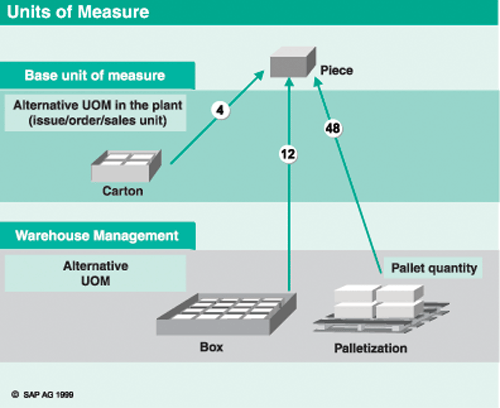
Figure 2
Base, alternative, and WM UOM: base unit = piece, sales unit = carton (four pieces), WM unit = three cartons (12 pieces), and palletization = four boxes (48 pieces)
13. Palletization data. Within WM, movements are
done in palletized units. This considerably simplifies the number
of TO items and subsequent handling of these units in the warehouse.
This is another area of neglect; palletization data needs to be
well defined and implemented to conserve on warehouse effort both
physically and transaction-wise. In Figure 2, if a pallet is stocked
in the warehouse, it is one pallet of four boxes, or 48 pieces,
where the base UOM = PC and WM UOM = pallet.
14. Inaccurate conversion factors. Inaccurate
UOM conversions between the base and alternate UOM lead to interruptions
in warehouse operations as the quantities within the TO have to
match to three decimal places. For example, if the base UOM is kilograms
and the sales and WM UOM is PC with a conversion of 333 PCs = 10,000
kg, it will result in an unfavorable conversion factor within SAP
leading to a recurring value of 3.003003003003. The TO can never
be confirmed, as the system is looking for exactly three decimal
places. Simplify the conversion formula to 33,333 PCs = 999,999
kg, and you have a perfect answer. Another problematic conversion
is pounds to kilograms, which affects almost all U.S. implementations.
If you don't address these UOM conversion issues, you will
end up with “decimal dust” in bins, which interferes
with picking and putaways, particularly if you use capacity checks.
A lot of manual intervention will be required to add decimal fractions
in bins to enable picking. This is another problem that companies
spend a lot of money on to fix after going live.
WM Interface with IM
15. IM process automation. Manual processes are
time-consuming, inefficient, and require more warehouse personnel.
You can automate IM processes — e.g., goods receipt for purchase
and production orders or stock transport orders — so that
the system selects bins for putaway based on putaway strategies.
Likewise, goods issued to process/production orders and PM orders
should be automated so that the system selects bins according to
picking strategies. Stock transfers between plant and storage locations
within the supply chain can also be automated — a significant
benefit where large quantities of materials move between plants.
16. WM movement types and links with IM movement types.
The automation of various WM movements is achieved through the IM-WM
Interface, which links the actions under the different processes.
If need be, design multiple WM movement types to link with one IM
movement type using special movement indicators. Remember that it
is much easier to copy WM movement types than to create new ones.
Also, designing these movement types is much simpler than designing
IM movement types within MM.
WM Interface with PP
17. Staging of materials to production supply areas (PSAs)
and methods of staging. Select different staging methods
carefully. Remember that items within bills of material (BOMs) can
have different methods of staging.
- Pick-order parts: materials staged per production/process order
- Release-order parts: materials staged for multiple process/production
orders depending on material stocks in production bins
- Crate parts: common-use materials staged independent of process/production
orders
Do not default to using only one method.
18. Backflushing. Clear consumed materials from
PSAs by backflushing to simplify the interface. Integrate this step
during production order/process order confirmations along with automatic
goods receipts from orders. This makes the consumption of materials
transparent to users and saves considerable time and effort. Figure
3 shows the typical material staging and consumption process
in process industry. The process orders for bulk and finished goods
materials are staged to the “Bulk” and “Finish”
PSAs from where the backflushing takes place at time of process-order
confirmation.
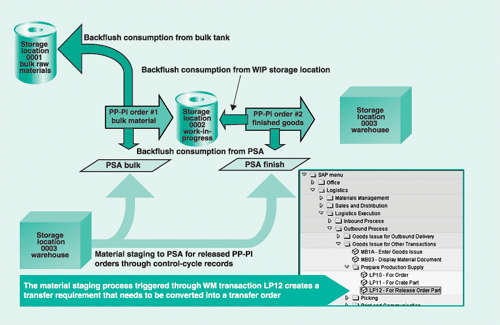
Figure 3
Material staging and consumption process in the process industry; materials are backflushed from IM and WM storage locations
7 Most Important Features
of WM
1. Management of stocks at bin
level. This provides a capability to put away and
pick materials from specific bins. It is possible to manage
material movement at a level below the bin level by using
storage unit (SU) management, but this adds a level of complexity.
2. Downstream management of material movement.
The movement in WM is usually initiated in IM, and WM manages
actions downstream of placement/removal of materials from
bins.
3. Represent multiple plants or storage locations
within one warehouse. The WM structure consists of
multiple storage types, storage sections, and storage bins.
Each bin has a key “storage type/storage section/storage
bin.” A storage type divides the entire warehouse by
organizational, storage technique, or even geographical considerations.
Examples are “high racks,” “raw materials,”
or “building 51.” A storage section is a necessary
evil. You need at least one, as a storage section allows grouping
of storage bins in sections. This improves bin management.
Examples are “fast-moving” or “south racks.”
A storage bin is the smallest addressable location within
a warehouse. There could be any number of bins with any names
you want. Simple names help with manual data entry, but naming
does not matter if you use mobile data entry with RF or bar-code
scanners. The Figure shows a typical warehouse
structure in WM.

Warehouse structure as represented in WM
4. No affect on the general ledger. WM uses
movement types similar to those in the IM module, but not
exactly the same. Movement types in IM involve accounting
documents, but those in WM do not. WM movement types link
with IM movement types, however, and are used within other
modules: SD, QM, PM, etc.
5. Automation of confirmation processes.
WM uses a mechanism of transfer requirement (TR) or posting
change notice (PCN), transfer order (TO), and TO confirmation
for actual movement of materials. TRs are usually created
automatically as a result of actions within IM. For instance,
a goods receipt from a purchase order creates a TR, telling
the warehouse to place the received material in a bin. Depending
on the business process requirements, TR, TO, and TO confirmation
processes can be automated.
For instance, TOs can be automatically confirmed when created.
6. Master-data sensitive. For instance,
you can restrict placement/removal in/from storage types in
the warehouse. Also, bin capacities can be defined. This is
important in some business situations, such as when only four
pallets can be placed in a bin. The capacity may be in terms
of weight (say, 2,000 pounds), neutral number (say, 25 against
a bin capacity of 100), and so on. Specific rules or practices
should be important considerations, but these tend to be restrictive.
For example, you might restrict each bin to four pallets,
each representing a number 25 against a bin capacity of 100.
Once bin capacity is defined, you should not expect to place
six pallets in a bin as this would require a change in the
master data (for bin capacity).
Do not use such restrictions unless they are absolutely necessary for your warehouse process. This rule is often violated.
7. Automation of bin selection. WM provides
automation in bin selection using various SAP-standard and
custom putaway and picking strategies. It is possible to specify
that different materials be placed in or removed from specified
storage types in a particular sequence.
9 Questions to Ask
Before Implementing WM
If you are considering whether to implement
WM, the following factors will help you in your decision making.
You may assign different weights to various factors according
to your specific requirements.
1. Does your warehouse handle a large number of materials?
The greater the number of materials, the more likely it is
that you need WM. You should certainly consider WM if your
warehouse manages 2,000 different materials or more. You can
easily manage just finished goods in WM and have raw materials,
packaging materials, tank farm materials, or works-in-progress
managed within IM.
2. Are your materials batch-managed? Each
batch of a material adds complexity to material management
in a warehouse. If you have multiple batches for each material,
it will be more difficult to manage materials without WM.
3. Are the materials in your warehouse randomly placed
in bins? The ability to place material randomly helps
you use the available warehouse more efficiently, as any material
may be placed in any available location. If materials in your
warehouse are managed by a fixed bin for each material, you
can manage materials within IM and may not need WM.
4. Are your materials already managed in bins by
a legacy system? This could be an important overriding
factor in favor of WM. If materials are already managed using
some warehouse procedures and techniques in a legacy system,
then WM needs to be implemented.
5. Do you find it difficult to locate material batches
in your warehouse? Since batch numbers allow management
of the same material with different characteristics under
one material number, say 10 batches for a material, WM can
be a big asset here. Are you typically hunting for materials
to be issued to customer orders/production in your warehouse?
You need the specific material batch, and different batches
could be in different bins in the warehouse.
6. Do you wish to eliminate manual processes and
automatically select bins for putaway (goods receipts) and
pick (goods issues) materials from bins? WM is your
only option to achieve this within SAP.
7. Do you need to identify specific pallets or containers?
For example, you might have large bin sizes, or a customer
or production needs a specific pallet reserved. This is only
feasible using the storage unit (SU) management functionality
within WM. Each SU has a unique ID.
8. Do you have clearly defined rules or warehouse
practices? This is extremely important, as the design
will revolve around the rules. WM's rules are unforgiving.
Once set, rules can be changed only with a lot of effort through
design reconfiguration and possibly master data.
9. Do you wish to use RF or bar-code scanners to
automate putaway or picking from bins? RF and bar-code
scanning eliminates manual data entry, which is error-prone.
It improves data integrity and efficiency.
WM Interface with Shipping
19. Delivery Monitor. The Delivery Monitor acts
as a delivery cockpit from which you can monitor the sales and stock
transport orders to be picked, picking confirmation, goods issues,
and invoicing. Encourage use of this functionality to monitor the
outbound delivery processing.
20. Pick lists for sales orders/stock transport orders.
Collective processing of sales order/stock transport order deliveries
with automated printing of pick lists must be encouraged, because
running single pick lists is time-consuming. Figure 4
shows the process for single and collective processing of pick lists
(TOs) for deliveries.
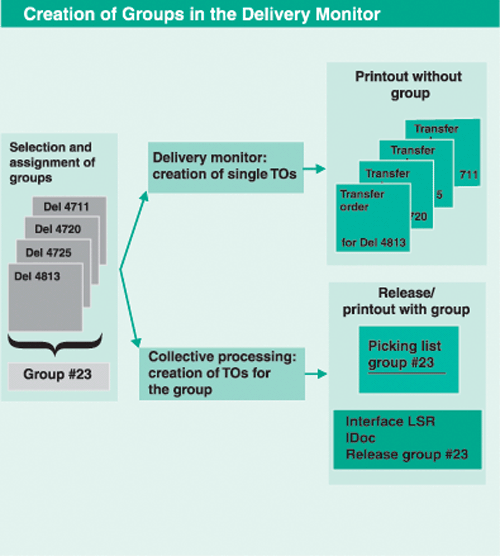
Figure 4
Delivery monitor with single and multiple processing of deliveries
21. Delivery processing for shipping (full/partial).
To make picking processes more efficient, warehouses must be encouraged
to run deliveries at set intervals by combining multiple sales orders
in a single delivery. This saves material-handling effort within
the warehouse, shipping charges, and handling costs.
22. Wave picks. If it is feasible to run deliveries
at set times during the day — say, every hour — it will
conserve shipping effort, as all picking for a bin for different
deliveries can be combined. This is called “wave picking,”
and it is particularly attractive in big, mechanized warehouses.
23. Customer manifesting, order tracking/express ship.
After the picking is confirmed, the information can be directly
passed to an order-tracking system for your customers. Many shippers
and carriers allow customers to track orders through the Web. Making
this visible through your customer interface requires programming,
but it is highly rewarding in terms of customer satisfaction.
WM Interface with QM
24. Usage decisions. The usage decision functionality
allows you to set stock movements to unrestricted stock, blocked
stock, or scrap. It uses IM movement types. Remember that with the
QM interface, the movement is only allowed through QM usage decisions
to maintain integrity.
25. Posting change notices (PCNs). Material movements
through QM use PCNs, which are often misunderstood. Think of them
as an equivalent of a transfer requirement. Wherever batch numbers
or material numbers are changed in logistic processes, a PCN is
generated. The processing of PCNs into a TO is slightly different.
It should be largely automated through the process of TO creation
in the background and during confirmation. This makes the process
transparent to users.
26. Rework. The materials may need to be reworked
due to quantity problems, and this can be done through the QM interface
by placing the material in the quality stock through the process
of manual inspection lot creation. The movement invokes a PCN and
the usual processing. On completion of rework, the material may
move back into the warehouse if it is declared as unrestricted stock.
WM Interface with PM and PS
27. PM orders/PS orders. The PM orders are created
within PM as a result of planned preventive maintenance schedules.
The PS orders are created as a result of a project's work
breakdown structure (WBS) elements. The pick lists supply materials
for both order types from the warehouse.
28. Pick lists for PM orders. The picking is created
in the same manner as it is with production order issues. PM orders
must be automated to ensure timely goods issues.
As you can see, it is feasible to have an easy-to-use WM implementation
designed to meet conflicting business requirements using SAP standard
functionality. Avoid pitfalls in the early design stages and keep
up on maintenance during the project design and implementation phases.
There is no substitute for demos or walk-throughs with different
options that simulate how the system works in a live warehouse environment.
They will help provide an acceptable warehouse design that is efficient
and effective.
Vijay Garg
Vijay Garg, PMP, has more than 14 years of SAP project management and implementation experience with Fortune 500 companies in the high-tech, chemicals, CPG, and engineering industries using various SAP Business Suite applications as well as SAP APO. Prior to working in SAP, he had vast experience in the engineering industry, including software development and applications.
You may contact the author at vgarg@crestron.com.
If you have comments about this article or publication, or would like to submit an article idea, please contact the editor.