In terms of performance, you get the biggest return on ETL optimization in the design and modeling stages. We give you tips in six categories: general design and data modeling, PSA design, InfoCube design, ODS design, Dimensions and characteristics design, and aggregates.
The extract, transform, and load (ETL) process is a key aspect of designing and maintaining a data warehouse. It might constitute 60 to 75 percent of the work and cost in a business intelligence project. ETL also represents most of the risks in terms of data loss, recovery, system downtime, and untimely reporting.
The benefits of ETL optimization are greatest during the design stage and decrease exponentially as the implementation progresses into development and production. Conversely, the costs of ETL optimization are lowest during design and increase exponentially as the project progresses into development and production. Therefore, ETL optimization is most effective during the design and data modeling phases, both in terms of cost and time required.
What follows is a series of practical tips and techniques for ETL optimization that you can apply during the design and data modeling phases of the BW project. We will not cover other ETL optimization techniques such as tuning of source systems, ETL configuration, and Basis parameters.
ETL optimization is a complex topic and involves various factors with a high level of dependencies such as data modeling, query, and Basis parameters. As a result, some of these tips come with trade-offs, especially between query and ETL performance. For instance, aggregates are tools for improving performance in reporting, but they create additional processing and overhead at data-load time. This might result in
suboptimal ETL performance.
These optimization tips and techniques — 24 in all — are organized in six categories:
- General design and data modeling
- PSA design
- InfoCube design
- ODS design
- Dimensions and characteristics design
- Aggregates
General Design and Data Modeling
1. Always start with Business Content. Using standard Business Content considerably reduces ETL development and maintenance efforts. Delivered extractors use standard extraction and recovery methods and can handle extraction of R/3 data in the required, precalculated way. Design and maintenance of these extractors is easier than that of custom-built extractors, and they have less potential for suboptimal coding that could present data and performance issues.
These extractors are application- specific and can transform the data from multiple tables into meaningful business information. As an added benefit, most Business Content extractors have built-in delta load capability, reducing the ETL volume by avoiding full loads. It is difficult to duplicate this delta change capability on a custom basis or with a third-party tool, and it could be expensive from a performance perspective.
2. Look for data requirements that are good candidates for BW. Not all data requirements are good candidates for BW, including:
- Where up-to-the-minute data is required, such as profitability calculations or bill of material (BOM)
explosions. We suggest you avoid operational reporting through BW.
- Where forms or documents are produced — e.g., invoices or purchases.
- Where the data is not held in BW and not required in BW.
Also, leverage existing reports in the source systems — e.g., R/3 — to meet some of your reporting requirements. In many projects, considerable effort and money is spent duplicating or reimplementing existing reports without fully evaluating the standard reports available in BW. Note that the additional reporting activity may increase overhead on the source system.
3. Avoid large data loads and complex calculations. Make sure that all the data is needed in BW before you load and replicate it. In cases where complex calculations are required, it may be easy and reliable to perform calculations/aggregations in the source system. This is often the case for complex calculations such as profitability calculations and BOM explosions that require data from extremely large tables that may not be required to be stored in BW. If the calculation is done in BW using different large tables, you need to confirm that the referential integrity is maintained. If the calculations are done in the source system, the calculations will be up-to-date and accurate in the source system and make reconciliation of BW data straightforward. Most of these calculations can be done at the load user exit EXIT_SAPLRSAP_001. Note that the additional processing overhead might have a negative impact on the source system.
Rather than loading detailed data that is not required for reporting into BW, you could bring in aggregated data wherever possible. This not only improves data load and staging, but it also minimizes the need to store large amounts of data in BW.
4. Remember all your options based on BW functionality. The report/report interface allows you to link reports for drill-through reporting. This functionality can be especially useful for complex reports and to jump from BW to source-system reports for
document-level reporting.
Remote InfoCubes are ideal for situations where you require up-to-date data from the source systems. Since the remote InfoCube is not managed within BW, but rather stored on the source system, executing a query against it requires additional communication and processing, thereby negatively impacting reporting performance compared to queries against objects stored in BW. As a word of caution, remote InfoCubes typically perform better when they hold a small amount of data for a small number of users.
InfoCube Design Optimization
5. Leverage virtual InfoProviders — MultiCubes/MultiProviders. InfoProviders are physical or virtual data objects that provide information for reporting purposes. In BW 2.x and earlier, the only InfoProviders available as data targets are InfoCubes, ODSs, and master data objects. Starting with BW 3.x, additional InfoProvider options such as InfoSets and MultiCubes/ MultiProviders are available.
MultiProviders (BW 3.x and above) are the union of at least two InfoProviders in these combinations: InfoCube, ODS object, InfoObject, and InfoSet, as Figure 1 illustrates. Note that in BW 2.0B/2.1C, only MultiCubes are available. MultiCubes are equivalent to MultiProviders in nature but provide less flexibility and InfoProviders options. For example, MultiCubes can get data only from InfoCubes, whereas MultiProviders can get data from a variety of virtual and physical data stores.
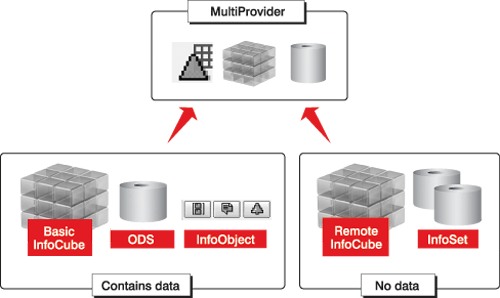
Figure 1
MultiCubes and MultiProviders are combinations of different InfoProviders
MultiCubes and MultiProviders have negligible impact on data load, as they do not store data since their data comes entirely from the InfoProviders on which they are based.
Another advantage of MultiProviders is their flexibility to leverage InfoSets for reporting. InfoSets are the only means of defining joins of ODS objects and InfoObjects. An InfoSet is the join of multiple ODS or multiple master data objects. A classic InfoSet is a join of two or more basic tables. BEx reporting is available on InfoSets starting in BW 3.x.
6. Model large InfoCubes into smaller ones. Keep in mind that MultiCubes and MultiProviders are alternatives to modeling large InfoCubes and ODS objects holding a large amount of information. MultiCubes and MultiProviders avoid redundant data storage and provide the flexibility to use database partitioning.
Find appropriate characteristics to logically divide the larger InfoCubes into smaller ones. This not only reduces the execution time for queries requiring specific data, but also improves ETL, data recovery, and maintenance. Using smaller InfoCubes means less time and effort for ETL and recovery, aggregate roll-up, and parallel loading. For queries requiring complete data across all characteristics, MultiCubes can be used. In this case, the base InfoCubes should be exact copies from a design standpoint to ensure data consistency in reporting.
For instance, you may divide a large InfoCube into smaller InfoCubes using company code. Most of the reporting by company takes place on individual InfoCubes, and if reporting is needed across all companies, then MultiCubes can be used.
PSA Design Optimization
7. Leverage the PSA for staging. The PSA is ideal for error handling and repeated transformation of raw data because of its key features:
- The PSA is the only area in BW where erroneous data can be corrected. Records marked as incorrect are stored separately in PSA for correction and reloading.
- The PSA allows you to perform
transformations repeatedly based on the data stored without having to reextract from the source systems.
- When you create additional data targets or change update rules, data can be reloaded to an ODS or InfoCube from the PSA without having to reload from the source system.
- Debugging of update rules is possible only at the PSA level, using update simulation.
8. Load the PSA before an ODS. The PSA has to be loaded first before data can be loaded into an ODS to avoid serialization issues in case of delta updates. Since the update for the ODS can use either the incremental or overwrite method, ODS data must always be transferred to the BW system in the correct order. That means that if a document is changed several times prior to a data transfer into BW, all changes are transferred separately. These changes must be transmitted in the correct order so that the last (current) value always exists in the fields that are overwritten. Therefore, you should load the PSA first and then the data targets. Also, when the transfer method is the PSA, the transfer type will be TRFC, which is faster than IDoc. If you do a full update, serialization is not an issue and data can be loaded directly to the data target. In other words, the PSA is not mandatory.
9. Manage your PSA. Periodically review the data in the PSA to delete or archive unwanted and unused data, according to your requirement, to free more table space and enable more efficient data loads. As a word of caution, PSA table names change when the transfer structure is changed, and therefore creating InfoSets on PSA tables is not recommended.
10. Leverage PSA partitioning. This improves data-load performance. With a partitioned PSA, it is possible to insert arrays (multiple records at a time). These insertions occur into smaller database objects and therefore result in faster data loads. The partitions are created based on the threshold value for the data load defined via transaction RSCUST6. The partition size is set by the BW administrator on a trial-and-error basis. The default value is one million (SAP note 325839). This threshold setting (below) defines the partition size and determines if a new partition is required when a new data load is added.
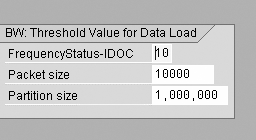
A partition can hold records from several InfoPackages and, conversely, records from one InfoPackage can never span more than one partition. Therefore, partitions can become very large for high data volumes.
ODS Design Optimization
The ODS is a multi-level layer in BW that stores the result of the data-cleansing and transformation process in transparent tables. An ODS has the ability to:
- Store the integrated, granular data from the staging process as an historical foundation of a data warehouse.
- Transform, merge, hold, and export data.
- Handle volatile and most-recent reporting scenarios.
Wherever the source system cannot handle the delta mechanism, you must use an ODS to handle the delta. Data from different InfoSources is collated in an ODS in some cases, and the collated data is updated to the InfoCube. In this scenario, the delta changes are managed at the ODS level.
11. Make sure that the key characteristics of a first-level ODS are non-changing. The summarization in an ODS object is controlled by the key fields. If a key field changes, the before image updates the earlier key and the after image updates the latest key when the delta records come from the source system.
In the inbound ODS, we suggest you always store the data at the same level of granularity as that offered by the PSA — i.e., the source system. This becomes the foundation of a singular level of granularity. Aggregation can be based on the reporting scenarios and can be done on a higher-level ODS object or InfoCube.
12. Avoid loading more than one million records to an ODS in each load. One limitation of the ODS before BW 3.x is that it cannot handle more than one million records in new tables. If the number of records in a new table is higher than one million, the activation job takes undue time to complete, and the load will probably fail. If the data volume is more than one million, break it down into several loads and activate after each load so that the new table remains under one million records. In BW 3.x, the activation is managed through the activation queue instead of new tables.
13. Leverage the ODS to store detailed data. An ODS is a better solution than an InfoCube to handle details. While InfoCubes are suited to store and handle large granular data sets, overloading them with details not required for reporting and analysis is not a good idea. Overloaded InfoCubes slow down query performance. Having an ODS with all the details allows you to add information to InfoCubes as requested, and you will be able to load or reload the InfoCubes from ODS if needed. The breadth of information stored in the ODS object is the main reason for using ODS objects as opposed to InfoCubes.
14. Avoid enabling the BEx Reporting setting for ODS objects. Reporting based on ODS data is possible either through InfoSets or BEx queries. However, turning BEx Reporting (Figure 2) on causes additional overhead in the data load process to generate the surrogate IDs (SIDs). Check this setting only if critical for reporting, and ODS reporting should not be an option if you want to do complex analysis. Instead, consider using BW 3.x InfoSets on top of an ODS object for reporting. The BEx Reporting flag can be checked or unchecked while creating an ODS or by using the Change ODS menu item of transaction RSA1.
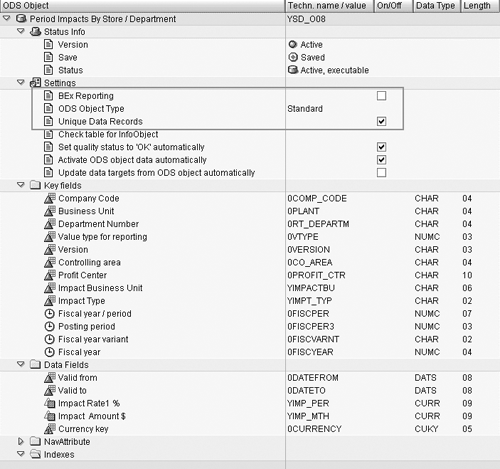
Figure 2
Setting ODS object types and the Unique Data Records flag
15. Leverage ODS object types. Starting with Release 3.x, BW has two types of ODS objects: standard and transactional. Standard ODS objects are updated in batch mode based on the schedule defined by the BW administrator, whereas transactional ODS updates are synchronous. Transactional ODS objects do not follow the regular BW staging process; the records are written directly into the ODS object tables, thereby bypassing all transfer/update rules and monitoring functionality. Transactional ODS objects are ideal for SEM scenarios where requirements focus on large amounts of data and up-to-the-minute reporting. As Figure 2 shows,
you can specify the type of ODS object during ODS object creation.
16. Set the Unique Data Records flag. This improves the data-activation speed by leveraging parallel loading. This feature is available in BW 3.x and above. As shown in Figure 2, you can set this flag when you create the ODS, and you can change it at any time using the Change ODS option in transaction code RSA1. Make sure that no duplicate records with the same key are in the data package.
Dimensions and Characteristics Design Optimization
17. Optimize large dimensions using line-item dimensions. A large dimension, or degenerate dimension, might be a document number with a cardinality close to that of the actual fact table. You can flag large dimensions in BW with one characteristic assigned as a line-item dimension; this results in the surrogate keys of the characteristics of that dimension being stored directly in the fact table rather than in the dimension table. Line-item dimensions can speed up both data-load and query execution when large dimensions are involved. Data-load performance is improved by saving the maintenance effort for an additional dimension table. As Figure 3 shows, line-item dimensions can be flagged while creating or changing an InfoCube (in transaction RSA1) using the Define Dimensions option.
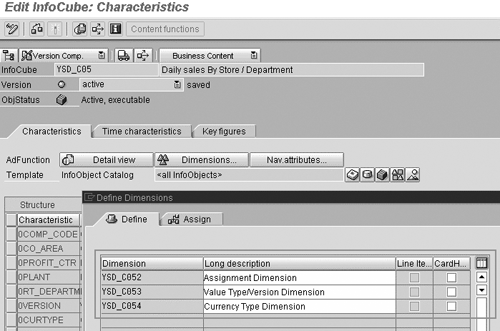
Figure 3
CardHigh and Line Item dimension settings for large dimensions
18. Use the cardinality flag for large dimensions. To help you manage large dimensions, BW provides a cardinality flag. This flag enables additional tools to optimize databases — e.g., indexes used for the dimension key indexes.
Switch on the CardHigh flag to adjust indexing. If the cardinality of the dimension is low, then using a bitmap index (values often repeated) is fine. If the cardinality of the dimension is high, then a B-trees index (values not often repeated) is ideal.
The cardinality flag should be used in conjunction with line-item dimensions. As Figure 3 shows, you can add a cardinality flag to a dimension for a given InfoCube. This flag can be set while creating or changing the InfoCube (in transaction RSA1) using the Define Dimensions option.
19. Avoid time dependencies and navigational attributes. When using time-dependent master data, the master data tables grow exponentially as each change to the time-dependent master data inserts additional records. This increases ETL overhead. Similarly, navigational attributes create significant ETL overhead for master data due to additional processing — e.g., SID tables. Therefore, avoid time dependencies and navigational attributes unless they are critical to your requirements.
20. Limit the size of your hierarchies. For optimal query and ETL performance, a hierarchy should contain no more than 100,000 leaves. For larger hierarchies, add a level to be used as a navigation attribute or separate the characteristics in the dimension. If you have to deal with large hierarchical structures, one large hierarchy is better than several small ones. For example, you might use variables to restrict the hierarchy.
For large hierarchy updates, leverage the Insert Subtree (BW 2.0B and above) or Update Subtree (BW 3.x) functionalities to load only the nodes that have changed since the last update. You can find Insert Subtree and Update Subtree for an InfoPackage using transaction RSA1 (Figure 4). This strategy avoids having to load the full hierarchy, improving data load and maintenance. Insert Subtree lets you add a new subtree to an existing tree without having to reload the entire hierarchy. Likewise, Update Subtree allows you to insert only the part of the tree that has changed.
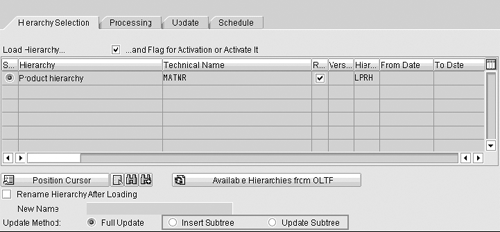
Figure 4
InfoPackage to load a hierarchy
Aggregates Design Optimization
Aggregates boost query performance as they store InfoCube data redundantly in a summarized or condensed form in an aggregate table. Unfortunately, this creates additional processing overhead at data-load time when, for example, you update aggregates after a new data load or change master data/hierarchies.
21. Be cautious when creating new aggregates. Create aggregates if:
- A lot of data is saved in the InfoCube.
- You often use attributes in queries.
- You want to speed up reporting using characteristic hierarchies by aggregating certain hierarchy levels.
- Hierarchies and attributes do not change much.
- Delays occur with a group of queries when executing and navigating through the query.
- You want to speed up the execution and navigation of a particular query.
When creating aggregates, balance the costs of aggregate maintenance versus the query evaluation. Take into consideration the frequency of changes that cause aggregate recalculations versus time to run the calculations. For example, during recalculations of aggregates, there is no roll-up, no master data update, and no hierarchy update, and the changed aggregate data is not available.
22. Manage existing aggregates. An aggregate that contains a navigational attribute can cause high aggregate maintenance cost. If an aggregate is no longer used, it should be deactivated or turned off. Deactivating an aggregate results in data loss, and turning off an aggregate results in no data loss.
23. Maintain aggregate alignment run parameter (RSCUSTV8). Aggregates are adjusted to the new attributes and hierarchies during hierarchy, attribute, and realignment runs. The aggregate alignment run parameter is a number between zero and 99 where zero means that the aggregate is reconstructed during each run. This parameter is set on a trial-and-error basis, and you typically change the parameter until the system is running at its fastest.
24. Avoid time-dependent attributes in aggregates. Before BW 3.x, time-dependent attributes used as navigation attributes in an InfoCube could not be used in aggregates. From BW 3.x on, it is possible to have aggregates with time-dependent attributes. Unfortunately, the adjustment of those aggregates is usually an expensive process, as it occurs every time data is loaded.
Applying the above tips and techniques during ETL design and redesign phases will help you proactively avoid and resolve the majority of data-load and staging performance issues. If you are still experiencing performance issues during extraction and loading, consider additional areas of performance optimization such as tuning Basis parameters, optimizing ETL configuration, and reviewing ETL on your source system. Finally, consult the SAP Service Marketplace (https://service.sap.com) as well as database, hardware, and system software documentation.
Catherine Roze
Catherine Roze is a senior BI consultant with more than seven years of full life cycle experience in SAP reporting and SAP NetWeaver BW with special focus on SAP NetWeaver BW enterprise reporting, performance optimization, and SAP NetWeaver BW Accelerator. A seasoned BI professional, she has contributed to more than 15 SAP NetWeaver BW implementation projects for Fortune 500 companies. Catherine holds an MBA and MS (industrial technology) and is the author of SAP BW Certification: A Business Information Warehouse Study Guide.
You may contact the author at cmroze@yahoo.com.
If you have comments about this article or publication, or would like to submit an article idea, please contact the editor.
Joffy Mathew
Joffy Mathew is a senior BW consultant with over nine years of experience implementing enterprise business applications and business process. As a seasoned SAP BW professional, he has contributed to many BW implementations in Fortune 500 companies in the distribution, trading, travel, and consumer industries during the last three years. Prior to that, he was a technical consultant in LIS and SD modules. He has a thorough knowledge of the BW and SAP R/3 systems, especially in the area of data extraction and configuration.
You may contact the author at Mathewj@Quinnox.com.
If you have comments about this article or publication, or would like to submit an article idea, please contact the editor.



 Premium