Disk space availability is a concern for every business. It is possible that your company's tax calculation functionality, even if you use a zero percent tax code, is slowing down your system. The author explains how a little-known table may be to blame for your company's lack of disk space.
Once your site has been live on R/3 for a few years, disk space availability might start to be a concern. Reports take longer to run. Navigational pauses from screen to screen become visible. Even the act of saving your data entry documents seems noticeably slower. Of course, the accounting department gets the blame. (Everything is somehow deemed our fault!)
This time, though, it's really true. Of the thousands and thousands of individual database tables in the system, most of the "top 10" in terms of disk space consumption belong to FI or CO, such as table BSEG (FI line items), table COEP (CO line items), and … what is this … table BSET (tax line items)?
When readers of the FI/CO Expert newsletter think of their R/3 system-generated purchase orders and vendor invoices, it is not likely that they are also wondering if the tax calculation functionality in those transactions has a relationship to overall system performance and database size growth. This is because purchase orders from one business to a vendor might not require any tax to be calculated or collected (especially in the United States).
As most of us know, the R/3 processing side of vendor A/Ps recorded via the Purchasing module's invoice verification must include a tax code — not necessarily a tax, just a tax code. The workaround for non-taxable purchases is to go with a zero percent tax code. Typical examples in the standard system are E0 and I0. Okay, get ready for a surprise!
Look closely at Figure 1 for a common situation that I see at sites with one or more zero percent tax codes in use. Notice the rate 0.000 that is in every row. This is wrong. It is an easy mistake to make, often done during a site's original R/3 project and carried forward from that point. Silently. Because, unless you know where to look, you'll never know that it's hurting you.
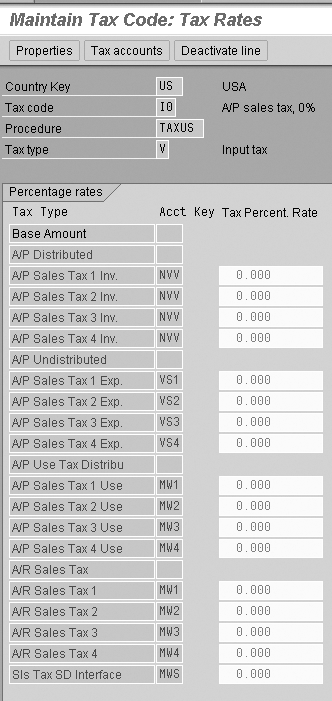
Figure 1
An example of zero percent tax code (transaction FTXP)
Take a quick look at your own system. Call up transaction code FTXP and view the entries for any of your site's zero percent tax codes. How many rows have the zero? Just one row? Two? Five? More?
If you see more than one row, I'll show you in the next few pages why you might want to scale that back. This is because each vendor invoice that uses a tax code triggers quite a lot of data about that tax, storing the data in its own special table (BSET). Even zero percent tax is saved. One update record per populated row in FTXP. Two rows with a zero? Two update records to table BSET. Twelve rows with a zero? Twelve update records to table BSET. Yikes!
Quick Background: How We Got Here
Figure 1 clearly shows zeroes in every row. It is from an R/3 Release 4.7. If, instead, you were looking at a screenprint from Release 4.0B or earlier, you would not see the zeroes. The zeroes would still be there, you just would not be able to see them using transaction code FTXP. And, thus, a problem was born.
Here's how. At some point during an implementation project — long, long before a cutover — someone on the team received an error message while testing out the invoice verification transaction: "Tax Code xx Does Not Exist." What that message really meant was that no rate had yet been linked to that two-character tax code. Even if a tax code is to be zero percent, it still needs at least one row in transaction code FTXP to have a 0 typed in. But type it into a 4.0B system and press your enter key, and the zero disappears from view. It was there, but you just couldn't see it. So, to make sure of their entry, the team member would put a 0 in every possible row, and then save. The other team member's tax code error message went away. As far as anyone on the team knew, that was that. As you'll see in the next section, there's a surprise consequence to that seemingly innocent quick fix.
The Surprise Relationship between Invoice Verification and Table BSET
Technically speaking, the invoice verification transaction is not part of the FI or CO modules. It belongs to the MM module. It creates FI and CO documents as part of its save routine. Figure 2 shows an example invoice verification document and the FI accounting document that it automatically generated. Notice in both how this is a very simple invoice — one debit and one credit entry.
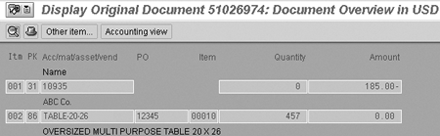
Figure 2
Example of linked documents – invoice verification and its FI document
If you were to look at the database table that stores the FI line items for the invoice from Figure 2, you would see three records in the BSEG table — one for the debit, one for the credit, and one for the zero-dollar posting to the GR/IR account. How many records to you think this single invoice led to in the BSET tax code table?
The answer is 13, as shown in Figure 3. Thirteen!
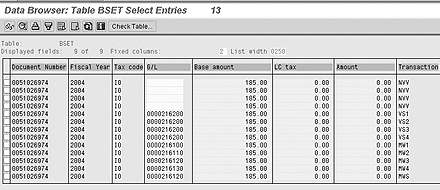
Figure 3
The table BSET entries from Figure 2’s vendor invoic
Understanding the Relationship
The two most important fields to understand in Figure 3 are the Tax code column and the Transaction column.
The Tax code column shows the same value in every row — tax code I0. Meanwhile, the Transaction column has one value that repeats a few times (NVV), and other values that do not (e.g., MW1, MW2, etc.). Confusing?
Take a quick look back at Figure 1. What do you see in the column labeled Acct Key? Hmmm. Maybe the relationship between the place in R/3 where you set up your rates for a particular tax code (i.e., transaction FTXP) and the volume of data stored in tax table BSET is clearer now? The rule is simple. For each unique account key (also referred to in R/3 as an automatic accounting "transaction") that has any rate (even a zero percent rate) for any given tax code, the system calculates and creates one row of data in table BSET each time that tax code is used.
Understanding the BSET Table Column Called "G/L (Account #)"
In Figure 3, you also see a column called G/L (account number). Yet, if you also look at the FI document in Figure 2, you do not see any match between the G/L account numbers there and the ones in Figure 3. Why not?
You can see the answer in Figure 4, which shows the transaction code OBVU customization settings in my R/3 system for two of these so-called automatic tax accounting "processes" (also referred to on some screens in R/3 as Account keys or Transactions). Notice that the NVV entry has a posting indicator (i.e., instruction) of Distribute to relevant expense/revenue items, while the MW1 entry has an instruction to post a Separate Line Item.
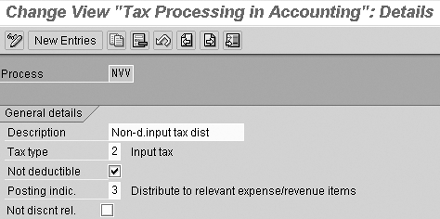
Figure 4
Settings in customization transaction code OBVU for NVV vs. for MW1
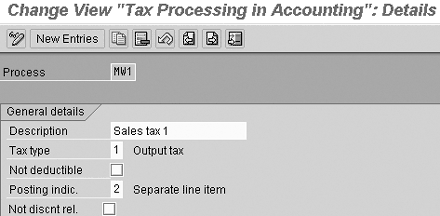
These two terms are simply a way of telling R/3 whether or not you want a calculated tax amount to go into the automatically created FI document as its own debit or credit. Of course, if the tax amount is 0.000, then no debit or credit is created in the FI document no matter what setting you have made. However, that does not mean that nothing is happening elsewhere in the database!
Look at Figure 5, which you access via transaction code FBKP, then double-click on the row Taxes on sales/ purchases. It shows the customizing screen from my R/3 system for Automatic Posting - Procedures specifically related to tax code "transactions" such as MW1 and MW2, but not for NVV. The reason for this is that, at least in my system, the NVV process had the Distribute setting while the MW1 (and MW2, etc.) process had the Separate line item setting. Separate line items need a G/L account number to post to. What you see in Figure 5 is the place where you make the link between a tax process and a G/L account number.
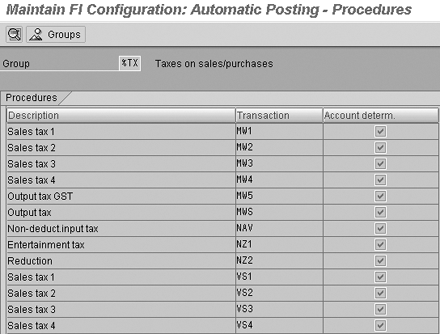
Figure 5
The Taxes on sales/purchases automatic accounting customizing screen
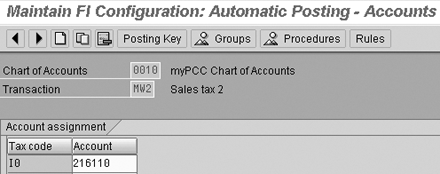
More importantly, in Figure 6, look at the specific G/L account numbers that in my system have been linked to process MW1 and MW2. You see G/L account numbers 216100 and 216110. Hmmm. Can you see the connection now between the data in the BSET table column G/L (account) back in Figure 3 and the zero percent tax code I0 being used in my example invoice from Figure 2?
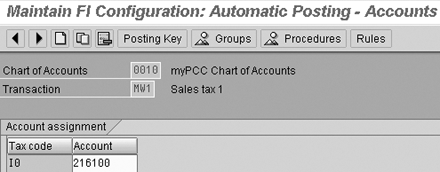
Figure 6a
Example of G/L account numbers linked to MW1 and MW2
In short, storing all of this extra data in table BSET is unnecessary. It accomplishes no business purpose. If you are using a zero percent tax code, only one row in the FTXP screen needs to have a zero. If more than one row has a zero, then each and every vendor invoice is filling up table BSET needlessly. You can correct that by deactivating all the rows that have a zero, except for one.
Kurt Goldsmith
Kurt Goldsmith is a senior business consultant for Enowa Consulting, specializing in the diagnosis and resolution of productivity-related integration issues between a company’s division of labor (end users, managers, executives) and SAP software (R/3, BW, APO, CRM). He also has a lifetime performance record of one win and two third-place finishes from five career starts as a thoroughbred racehorse trainer.
You may contact the author at kurt.goldsmith@enowa-consulting.com.
If you have comments about this article or publication, or would like to submit an article idea, please contact the editor.






 Premium