R/3 stores G/L account numbers differently depending on whether they are stored internally or externally. This can cause problems when a user searches for G/L account data using transactions SE16 or SE17. The author explains conversion exits and their implications and also provides tips for user-friendly G/L account searches.
Key Concept
A conversion exit is a piece of ABAP code that translates data from an internal to an external format and vice versa. R/3 uses conversion exits to ensure consistent sorting and storage of data across multiple databases and languages. Conversion exit ALPHA is used for G/L accounts, cost elements, cost centers, asset numbers, customer numbers, vendor numbers, and other business objects.
Often, the way that R/3 stores data differs from the user's expectation of how data should appear. This difference can cause a lot of confusion to users, especially when they search for data.
Let's consider users who run a report for a range of G/L accounts: They want to select all of the loan accounts in the 140000 range using report RFSSLD00, G/L account balances. When they enter the range 140000 to 149999, they get all of the accounts they want (Figures 1 and 2). However, if they use the pattern 14*, then they find nothing (Figure 3).

Figure 1
RFSSLD00 selection with a G/L account range

Figure 2
Successful selection with a G/L account range

Figure 3
Unsuccessful selection with a G/L account pattern
This problem occurs because of the difference between the external display of account numbers and R/3's internal storage format. This is an issue that affects customer numbers, vendor numbers, material numbers, cost center numbers, and numerous other types of master data numbers.
A G/L account number such as 144099 is stored internally by R/3 as 0000144099. The translation between internal and external format is performed in R/3 by a conversion exit (Figure 4).

Figure 4
How a conversion exit works
Where Else Are Conversion Exits Used?
I will focus on the ALPHA conversion exit in this article, but it is important to note that many other fields make use of SAP R/3 conversion exits. Fields such as customer numbers, vendor numbers, material numbers, cost center numbers, and numerous other types of master data numbers all use conversion exits. See Table 1 for a list of common fields and their associated conversion exits.
| Accounting document number |
ALPHA |
BELNR |
12345678 |
0012345678 |
|
| Asset number |
ALPHA |
ANLN1 |
12345678 |
0012345678 |
|
| Asset sub-number |
ALPHA |
ANLN2 |
1 |
0001 |
|
| Cost center |
ALPHA |
KOSTL |
1234 |
0000001234 |
|
| Cost element |
ALPHA |
KSTAR |
123456 |
0000123456 |
|
| Customer number |
ALPHA |
KUNNR |
54321 |
0000054321 |
|
| Debit/credit indicator |
BEKNZ |
BEKNZ |
D |
S |
English D(ebit), C(redit) con- verted to German S(oll), H(aben). Language-dependent conversion. |
| Fiscal year |
GJAHR |
GJAHR |
98 |
1998 |
Two-digit year input converted to four-digit year. No action on output. |
| G/L account number |
ALPHA |
SAKNR |
123456 |
0000123456 |
|
| Language key |
ISOLA |
SPRAS |
EN |
E |
Two-character ISO language code converted to old SAP one-charac- ter language code |
| Ledger |
ALPHA |
RLDNR |
9 |
09 |
|
| Material number |
MATN1 |
MATNR |
567894 |
000000000000567894 |
|
| Order number |
ALPHA |
AUFNR |
20022791 |
000020022791 |
Domain is also used for networks |
| Profit center |
ALPHA |
PRCTR |
1234 |
0000001234 |
|
| Project number |
PROJN |
PS_PSPID |
3000 |
00000371 |
Project ID mapped to sequential number |
| Purchasing document number |
ALPHA |
EBELN |
12345678 |
0012345678 |
|
| Sales document number |
ALPHA |
VBELN |
12345678 |
0012345678 |
|
| Units of measurement |
CUNIT |
MEINS |
DAY |
TAG |
English code (DAY) converted to German code (TAG). Language- dependent conversion. |
| Vendor's account number |
ALPHA |
LIFNR |
54321 |
0000054321 |
|
| WBS element |
KONPR |
PS_POSNR |
3000.0005 |
00003752 |
WBS element ID mapped to sequential number |
|
| Table 1 |
A summary of conversion exits |
Why Does R/3 Use Conversion Exits?
Given the data selection problems shown in Figure 3, what is the benefit of a conversion exit? The main reason R/3 uses conversion exits is to ensure consistent sorting and storage of data across multiple databases and languages. You must keep in mind that a G/L account does not have to be just numbers; it can also be letters. In addition, the number of characters in a G/L account does not have to be consistent, i.e., it is possible to have a chart of accounts with both six- and eight-character G/L accounts. See Table 2 for a comparison of how data is stored internally and externally.
| Numeric |
1234 |
0000001234 |
Leading zeroes are added to pad the account number to the full length of the 10- character G/L account field |
| Text |
EXPENSE |
EXPENSE |
Character-only accounts are left the same |
| Text and numeric |
123AB456 |
123AB456 |
Combination numeric and character accounts are left the same |
|
| Table 2 |
External vs. internal format of G/L account numbers |
Looking at Tables 3 and 4, you can see that sorting the G/L account numbers by the internal format results in a sort order that is more consistent with end-user expectations than sorting by the external format.
| 12340000 |
0012340000 |
| 140000 |
0000140000 |
| 144099 |
0000144099 |
| 15670000 |
0015670000 |
| EXPENSE |
EXPENSE |
| INCOME |
INCOME |
|
| Table 3 |
G/L accounts sorted by external format |
| 140000 |
0000140000 |
| 144099 |
0000144099 |
| 12340000 |
0012340000 |
| 15670000 |
0015670000 |
| EXPENSE |
EXPENSE |
| INCOME |
INCOME |
|
| Table 4 |
G/L accounts sorted by internal format |
Viewing Internal Format
Given that most of the time you will see data in the external format designed for end users, how can you view the data in R/3's internal format? The best tool for doing this is transaction SE16, which has an option to turn off the conversion exit for data display. To change your user settings to turn off the conversion exit check, select Settings>User parameters from the menu, then turn off the Check conversion exits check box in the pop-up window (Figure 5). Figure 6 shows externally formatted data, and Figure 7 shows internally formatted data, which is what your data should look like once your Check conversion exits setting is deactivated.
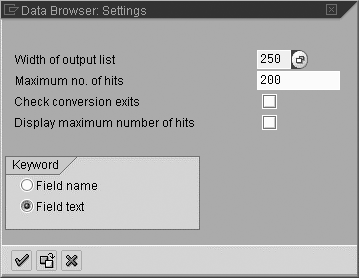
Figure 5
Disable the Check conversion exits setting in the user parameters pop-up of SE16
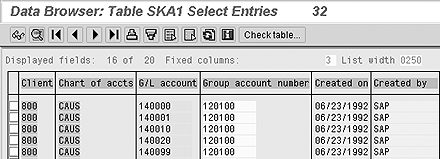
Figure 6
G/L account displayed with conversion exit active, external format
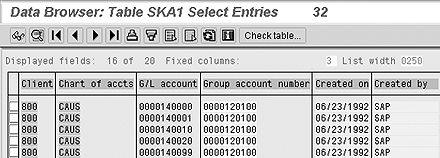
Figure 7
G/L account data displayed with no conversion exit, internal format
How to Find Data
In my first example, when a user enters the G/L account range 140000 to 149999 (Figure 1), R/3 uses conversion exit ALPHA to change the range to 0000140000 to 0000149999 and the correct data is found. When the user enters 14*, R/3's conversion exit ALPHA transforms 14* into a combination of numeric and non-numeric characters. Internally, no G/L accounts start with 14, so nothing is found. Once users recognize the difference between internal and external data formats, then they realize that they are in fact searching for the internal pattern 000014* (Figure 8).

Figure 8
RFSSLD00 selection with the correct G/L account pattern
Tip!
When searching for patterns in SAP, * is the multi-character wildcard symbol and + is the single-character wildcard symbol. To search for all names starting with A, use A*, which would find Ann and Alice. To search for all names three letters long starting with A, use A++, which would find Ann but not Alice. These symbols can be used in combination to form more complex search criteria. To search for all names ending in e with the third to last character i, use *i+e, which would find Alice, Alize, and Clarice. Consider whether the field you are searching for is case sensitive — usually name, address, and description fields are.
However, the data searching problems can become more acute when looking at raw data using transactions SE16 or SE17. This is also true when you search for more complex patterns, e.g., accounts starting with 2 and ending with 5, which can be found with the pattern 00002++++5 (assuming a six-character G/L account number). To reduce the problems that conversion exits can create, end users must remain vigilant in their data search techniques.
What About Dates?
Strictly speaking, date fields do not use conversion exits, but their behavior is similar to a field with a conversion exit. The conversion from internal to external format is embedded in the data type DATS, so no separate conversion exit needs to be defined in the domain. The external presentation of the date and validation of user input is based on the user defaults selected in transaction SU3, which covers all commonly used date formats, e.g., DD.MM.YYYY, MM/DD/YYYY, and YYYY-MM-DD. The internal storage is in format YYYYMMDD, which ensures that all dates sort correctly regardless of the user input date format.
Technical Aspects of Conversion Exits
You can use transaction
SE11 to look at the domain behind the G/L account field. The link to the conversion exit is defined in the Convers. routine field in
Figure 1 below. Conversion exit
ALPHA is just one of many conversion exits used by R/3, but it is the one that is most frequently encountered by finance users.
ABAP function modules implement conversion exits in R/3 — your programmers can use them to convert data from internal to external format and vice-versa. This technique is quite useful when developing data upload programs. The function modules are always named CONVERSION_EXIT_xxxxx_INPUT and CONVERSION_EXIT_xxxxx_OUTPUT, where xxxxx is the conversion exit name, e.g., CONVERSION_EXIT_ALPHA_INPUT and CONVERSION_EXIT_ALPHA_OUTPUT.
Programmers need to be mindful of conversion exits in situations like automated upload programs. During automated upload programs, data from a MS Excel file is imported into a custom report so G/L account numbers like 144099 are imported. To validate the G/L account, the report reads the G/L master table SKA1. The validation fails because SAP has no master data for account 144099, but it does have master data for account 0000144099. The programmer needs to convert the account number from the file into SAP internal format using function module CONVERSION_EXIT_ALPHA_INPUT.
Rohana Gunawardena
Rohana Gunawardena heads the SAP practice division at Exium Inc. Exium is a leading business and technology consulting firm that enables companies to achieve their strategic business goals. Exium specializes in delivering superior IT solutions using ERP systems, with a special focus on SAP products. Rohana has been working with SAP since 1992. During his career he has assisted multiple clients on detailed system correction projects, such as correcting inventory balances, controlling area reorganizations, retrospectively activating group currency, and optimizing inter-company accounting transactions. He has spoken at many SAP conferences and has published more than 20 articles in Financials Expert, SCM Expert, and SAPtips on various aspects of SAP. His presentations have focused on Financials module selection, the order-to-cash process, global rollouts, business segment reporting, cross-module integration, and the financial impact of SCM transactions. Rohana is widely acknowledged as a leading SAP expert. Rohana is a Fellow of the Institute of Chartered Accountants in England & Wales. Previously Rohana has worked with the consulting practices of Accenture, Deloitte, and PwC.
Rohana will be presenting at the upcoming SAPinsider Financials 2018 conference October 16-18 in Prague. For information on the event, click
here.
You may contact the author at Rohana@Exium.com .
If you have comments about this article or publication, or would like to submit an article idea, please contact the editor.