SAP Warehouse Management’s (SAP WM’s) functionality growth coupled with the rapidly aging state of many companies’ warehouse management systems has led more companies to initiate SAP WM implementation projects. Find out some best practices for approaching a move to SAP WM.
Key Concept
SAP Warehouse Management applications are available in three formats: as part of your R/3 system, as part of your SAP ERP Central Component (ECC) system, or as a separate SCM system. Choosing which one to implement depends on factors such as your warehouse size and your current ERP system.
However, companies that did not stay current with their warehouse management system are faced with a transition
that is not an upgrade but a re-implementation. Having to conduct a new implementation often negates the cost advantage of
staying with the same provider and opens some companies’ software evaluations to include SAP’s warehouse
offerings.
I’ll cover what many companies encounter as they review their warehouse management technologies. As with any
time you implement an SAP system, but especially SAP Warehouse Management (WM), it’s important to consider user
resistance, support strategy, and enhancements. Let’s start with the new SAP WM features that can get your users
excited about it. Then, I’ll discuss how to address the key considerations when you migrate to SAP WM.
Current Features in SAP WM
Figure 1 shows the evolution of SAP WM, which now includes a real-time radio frequency (RF)
application that your ABAP development team can use to enhance or develop new RF transactions. SAP WM now also contains
wave planning with tracking capabilities to manage your workload. SAP also has addressed a historical limitation that
prevented you from counting bins with open activity against them. Ancillary warehouse activities, such as yard management
and value-added services, are now also included.
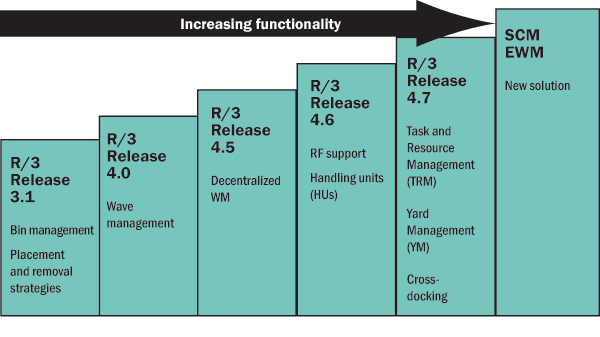
Figure 1
Evolution of SAP WM functionality through SAP releases
In addition to SAP WM functionality available with your SAP ERP system, SAP now offers a new, separate
warehouse management solution called Supply Chain Management Extended Warehouse Management (SCM EWM). Although challenges
within the spare parts industry spurred the development of this release, it is not solely for the spare parts industry
— SAP also intends it for large, complex, high-volume warehouses across many verticals. This resulted in three
different SAP warehouse management offerings (Table 1). With this background about the different
versions, let me shift to discussing challenges you might have transitioning to SAP WM and how you can make your
implementation go smoother.
| Feature set |
Basic picking, removal, and RF capabilities |
Everything in WM plus YM, TRM, and cross-docking |
Most of the functionality in prior versions. Rewritten to optimize for high-volume distribution
centers |
| Best applied to |
Production supply warehouses, low- to medium-volume distribution centers |
Production supply warehouses, medium- to high-volume distribution centers |
High-volume
distribution centers |
| Less of a fit for |
Complex distribution centers |
Third-party logistics providers and companies that want to incorporate labor management type
systems |
Production warehouses |
Can be
decentralized |
Yes, but consider if necessary in a
production supply or heavy quality management environment |
Yes, but consider if necessary in a production supply or heavy quality management
environment |
Must be decentralized |
| SAP’s plans |
SAP Note updates |
SAP Note updates |
SAP Note updates and other plans |
Version
compatibility |
N/A; part of whatever release you are running |
Release 4.6C (if decentralized)
Release 4.7 (centralized/decentralized)
ECC 5.0 (centralized/decentralized) |
ECC 6.0
Release 4.7 (customer development)
Release 4.6C (customer development) |
|
| Table 1 |
Summary of different SAP WM releases and their capabilities |
SAP WM Migration Considerations
Besides the normal challenges of configuring the system, I’d like to discuss three challenges that
companies that choose to implement SAP WM face. These are change management, support strategy, and enhancements.
Let’s look into each of these in detail.
Change Management
When companies first approach moving to SAP WM, they may encounter a strong negative reaction from the
business community. This can be the result of the following factors:
- Evaluations of earlier releases: It is important to quickly communicate what SAP WM can
offer in the current release and how the product has changed since prior evaluations
- Relationship with the current warehouse management vendor: Chances are that the
warehouse manager has an established relationship with the vendor for your current warehouse management application.
Introduce your warehouse manager to the appropriate SAP contact to make this person more comfortable with the new
software.
Other considerations as part of the overall change management program could include:
- Establish a training program: It is important to help users understand SAP WM and the
new vocabulary associated with an SAP system. At the onset of the project, offer a delta training class that addresses
topics such as how the prior system’s terminology translates into SAP’s terminology and how concepts such as
SAP transfer orders and delivery notes relate to the prior system’s documents. Also, it is important to talk about
some of the negative experiences that users had with the prior system and how the move to SAP can negate these.
- Know your users: When discussing your plans with business users for moving to SAP WM,
do not express concepts in technology terms. For example, the statement, “The interfaces had errors and took a full-
time person to manage,” is irrelevant to the business user. Instead, explain how SAP WM helps them address issues
that they may have had with the previous system. For example, if you used to have to wait a long time for a PO to show up,
demonstrate how POs work in SAP WM. Or, if your users had to log into multiple systems, tell them how the processes
function with SAP WM.
In many ways, preparing for the change management discussion is an excellent way to justify your project.
Done objectively, this process helps you to understand why your business users are apprehensive about moving to SAP WM. If
you cannot explain in business terms why the new system makes the users’ lives better and how the new system relates
and is comparable to the prior system, then you are likely to have issues obtaining the associates’ support later in
the project.
Support Strategy
Usually support for warehouse management packages is at the fringes of a corporation’s IT help desk,
and the sites are mainly left to address their own concerns. A reason for this may be that compared to most other systems
in your company, warehouse software likely has a very small user base and supporting it is significantly easier if the
support team can see the problems.
Traditionally, this resulted in site users becoming the focal point for system support, granting them
influence over changes in the system. Migrating to SAP WM often means revisiting help desk and change request control over
the warehouse application. You need to make sure you address three concepts during an SAP WM implementation: how the
centralized control works, how SAP’s transport system operates, and how the warehouse hours may affect the system.
Centralized control: This can be challenging for warehouse managers. Often customer
requirements arise that involve changes to a picking strategy or other warehouse activities. In turn, this can cause
changes in the warehouse-centric master data, such as strategy or palletization data. If you don’t address these
changes properly, items may end up in receiving error or remain on the dock. Items left in limbo — be it on the dock
because a putaway strategy is wrong or in the aisle because a bin capacity check failed — are more likely to be
damaged, lost, or even stolen.
You need a support strategy that allows some flexibility for the warehouse. Some system considerations,
such as new strategies, are part of the SAP WM application configuration. Unless you are going to give warehouse users
significant access to the configuration, they are unlikely to create or change strategies on their own.
This could be a dramatic shift for your users. In a non-SAP environment, the warehouse application was
relatively isolated. A user having significant access, even to the production system, was of less concern because any
mistakes would be isolated to the warehouse system. However, in SAP WM, providing users with the same level of access
would expose many other areas to risk — it’s not a good idea in general. It is important to set up the system
so that most configuration items are flexible enough to allow you to address issues, such as customer concerns and new
bins, by changing data parameters rather than by configuring the system.
For example, today's material master data might be a centralized process. In the future, it could be an
area that the SAP security model and efficient business operations could support, decentralizing some master data
maintenance for elements important to the warehouse. Giving the warehouse user the ability to change palletization data or
the storage indicator on the material master screen is valuable to manage receiving errors and promote efficient warehouse
operations.
SAP’s transport system: You need to introduce the notion of SAP’s change
requests and promoting transports to the warehouse users. They must understand that some attributes are governed by
SAP’s transport system and the system promotes those changes according to the broader corporation’s change
control procedures. This could result in a slower implementation of requested warehouse configuration changes.
You should have a very frank discussion about the types of changes the current warehouse support staff is
making on a daily, weekly, and monthly basis. This allows you to compare the current process to the planned SAP security
model and your company’s SAP configuration promotion process. It may result in less flexibility than the site
enjoyed in the past.
Warehouse hours: The warehouse may have very different hours of operation than the other
departments, such as finance or human resources, which use other components of the SAP ERP system. If your company has
based its SAP support schedule around when the finance or human resources department accesses the SAP ERP system, then you
must consider what would happen if the warehouse works earlier or later than those departments (e.g., the warehouse has a
night shift). You also could have a more challenging situation in which the warehouse schedules 20 hours of overtime at
the end of each quarter to close out the final order push. Or, even worse, you could have an unplanned event, such as a
piece of equipment in the warehouse failing, forcing the warehouse to schedule overtime when the equipment comes online
again.
The warehouse can have variability based on many factors, so static help desk hours of operation might not
be ideal. Strong communication between the SAP support team and the warehouse business users is imperative to avoid
surprises. Also, this variability can be a reason to not completely centralize warehouse management support — a
support person reporting to the warehouse manager at the site is generally much better informed about these changes and
able to respond to this flexibility.
Enhancements
Most companies enhance SAP WM at the time of implementation. This could include specialized labels,
shipping documents, reports, or even more complex items such as enhanced putaway strategies or RF transactions.
One option to consider is that the corporation or system integrator can undertake the enhancements. In the
SAP ecosystem, you do not need to return to the software vendor for enhancements. This open enhancement strategy, compared
to the generally closed enhancement strategy of many warehouse software vendors, allows groups to take on enhancements and
other tweaks that, if an external entity were required to do them, might not be accomplished. It is important, however, to
not allow the business to be carried away in enhancements. You should follow a justification process that is similar to
developing the business case to pay an external entity to modify the software.
Chris Moose
Chris Moose is a partner in IBM's Global Business Services organization where he is the sponsor of SAP warehouse management and transportation management offerings. With worldwide responsibility for these offerings, he has helped expand IBM's delivery capabilities globally and has personally delivered projects on four different continents. His specific interests include the use of technology to address the historical fixed cost nature of supply chains enabling flexibility and then quantifying that business value with a benefits realization focus. In addition to his practice management and delivery focus, Chris is a frequent speaker at industry events as well as an author for industry magazines.
You may contact the author at chris.moose@us.ibm.com.
If you have comments about this article or publication, or would like to submit an article idea, please contact the editor.




 Premium