The first important consideration is
to separate the method of picking from
the strategy for sourcing material. The
method of picking addresses how the picking
activity is organized. It could include
use principles such as wave picking and
two different forms of batch picking.
The strategy for picking deals more with
the determination of what item will be
picked. Strategies such as first-in-first-out
(FIFO), last-in-first-out (LIFO), or
shelf-life expiration date (SLED) all
fall under this category.
Methods
Sending pickers out one delivery
at a time and expecting the picker
to retrieve all material for that specific
delivery is most likely an ineffective
method to move products through your
warehouse. Depending on your order
profiles, WM supports many methods
that promote more operational efficiency
than simply picking an order at a time,
including wave picking and batch picking.
Wave Pick
One of the most common picking methods
is a wave pick. This is a grouping
of orders together and a release for
retrieval at a single point in time.
Since the orders have been grouped
together, you can monitor their status
as a single work unit and as discrete
orders. For example, if I group 10
orders, I can monitor how close all
10 are to being done, as well as how
close a specific order is to being
done. This is useful if, for example,
SAP’s Advanced Planning and Optimization
(APO) planned shipments into trailers
and you had an expected pickup time
for that trailer. Since the staging
area on the dock is precious, you do
not want to pick the orders too far
in advance of the trailer’s arrival.
However, you do want to get all the
materials required for the trailer
to the dock before it arrives. By placing
all the trailer’s orders into
a single wave, you can manage the release
of picking to the floor and also the
status of the picks. This allows you
to better utilize your dock space,
dock doors, and loading personnel.
The wave pick is a unique method
in that you can use it in conjunction
with other picking methods. Specifically,
you could build a wave of deliveries
and still execute either of the two
following pick methods.
Batch Pick (Two-Step
Method)
Sometimes orders arrive that are
very similar. For example, in a new
product launch, your entire sales force
might need to get two cases of the
new item. Or every Tuesday, one of
your retail customers might send requests
for 50 of its stores to replenish from
the weekend’s sales. In both
of these examples, you are likely to
have a large number of similar orders.
Allocating many pickers to this and
traveling repeatedly between the bins
containing the materials might not
be the most efficient method to retrieve
all that material.
In a two-step pick, you can group
several orders together, retrieve the
total demand from bins, and stage them
in an intermediate area. Then pickers
can move within this intermediate area,
which is much quicker than moving across
the warehouse, and pick the materials.
Essentially two-step picking centers
on reducing travel time, which is one
of the largest gains a warehouse can
realize. Figure 1 shows
how much simpler the two-step pick
is for similar orders.

Figure 1
Process flows for traditional and two-step picking. Picking four orders by journeying to each bin involves more traveling than a two-step pick, where the total material needed is staged and orders are picked from the staged material.
Batch Picking (Cross-Delivery
Transfer Order Method)
This last method is a way to reduce
travel time. You can also use it when
your orders are not similar. For example,
say you have an aisle with material
for six different orders. The quickest
method to pick those items would be
to travel down the aisle and pick for
all six deliveries in one pass (versus
in six passes down the aisle picking
one delivery each time). Functionality
introduced in the Enterprise release
and also available in the SAP ERP Central
Component (ECC) version allows you
to combine several different orders
into a single picking activity (transfer
order). This means you can combine
all six deliveries on a single transfer
order and sequence the picker down
the aisle just once for all materials.
Let’s now explore the picking
strategies WM Release 4.6C and Enterprise
provide.
Strategies
As with most functionality within
SAP, the first important consideration
is the organizational structure. When
performing picking, some of the organizational
elements are the same as for placement.
To better explain this I’ve expanded
the table used in the last article
to include all warehouse management
organizational elements and also to
show if they play a role in placement,
retrieval, or both (Table 1).
| Warehouse
Management term |
What
it is |
A
warehouse example |
Influences
strategy |
Influences
picking or placement strategy |
| Storage type |
A warehouse zone; an area where
all the bins generally serve the
same purpose |
A high rack location |
Yes
(Except for stringent FIFO, more on this later) |
Both |
| Storage section |
A subdivision of a storage type
(zone); a subset of bins that should
be treated slightly differently
than other bins within that storage
type |
A row (level) within a high rack
location |
Yes |
Placement only |
| Picking area |
A method to group bins together
so you can split picking transfer
orders or monitor picking progress
by a subset of a storage type (zone) |
A section within a pick to light
or a group of bins geographically
close to each other and where picks
from them are common |
No |
N/a |
| Bin |
A distinct location to which
you can direct a user |
A specific slot within the warehouse |
Yes, through the bin capacity
attributes |
Placement only |
| Quant |
An identifier used internally
within WM to track inventory |
A license plate the user never
deals with; it is internally managed
by SAP |
Yes, the goods receipt date is
an attribute of the quant, so date-based
picking (FIFO, LIFO) relies on
the quant |
Picking only |
| Table
1 |
Summary
of WM organizational structure |
With the definitions established,
let’s apply them in a picking
strategy.
First: Locate a
Storage Type
Similar to placement, WM allows users
to define removal indicators on the
material master. These refer to the
strategies configured in the IMG. In
fact, the same IMG configuration table
that stores the placement strategies
stores the removal strategies. This
means that, just like placement strategies,
additional factors can influence the
strategy. However, it’s most
important to remember how to identify
which line in the strategy table refers
to a removal. To explain this, I’ll
use screenprints of the material master
and the strategy configuration table.
Figure 2 shows the
material master, warehouse management
view number one. The Stock
removal indicator is circled;
in this case it is 003.
To understand what storage types will
be searched, look at the configuration
table in Figure 3 and
find the line with indicator 003 for
your warehouse and an operation of
type A. Remember from my prior article
that operation refers to a placement,
removal, or other activity within the
warehouse. Operation of type A is
a pick. The line this material master
refers to is circled.
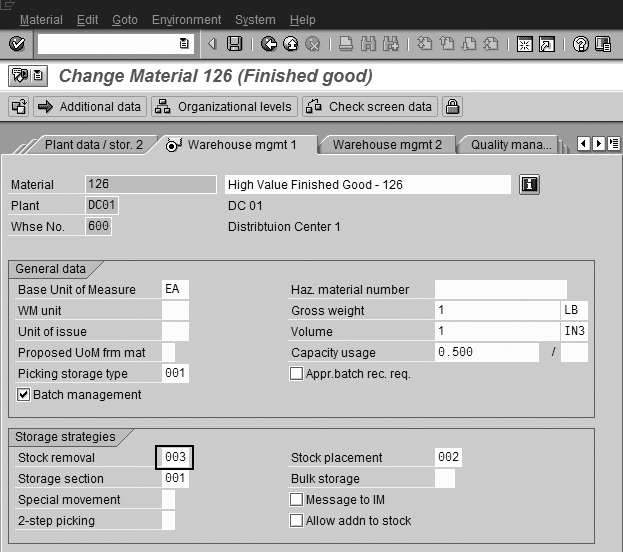
Figure 2
WM view 1 on the material master

Figure 3
Storage type search sequence
You may be wondering what the wildcard
(***) refers to or why the storage
types are different for retrieval than
for placement. (You can see in Figure
3 that the removal strategy differs
from the placement strategy. Look for
indicator 002 with
operation E).
Let’s address the purpose of
the wildcard (***). The strategy is
always executed left to right. SAP
WM initially tries to locate this material
in storage type 001.
If it cannot find any in 001,
then it looks in 003.
If it is also unsuccessful there, it
looks in the next storage type. Since
this is a wildcard (***), WM has permission
to look anywhere within the warehouse
to source that material.
Some of the warehouse’s nuances
account for why the removal storage
types differ from the placement storage
types for this material. Most likely
material is placed into a reserve location
and replenishment brings it to a forward
picking location. Therefore, having
a removal strategy that differs from
the placement strategy makes sense.
The placement and removal strategies
do not have to be similar.
The first three columns in Figure
3 are the most important. Column 1 (value 600)
is the warehouse number. Column 2 (value A)
is the operation, a pick or a placement.
Column 3 (value 003)
is what the material master references
(003 on the material
master is a pointer to this value).
For more detail on the columns in this
table, refer to my previous article.
One additional item that merits a
brief mention is the Picking
storage type on the material
master, circled in Figure 4.
This has no relation to the way WM
selects inventory. Instead it is used
in SAP’s rough workload estimating
(RWE). RWE is a method to estimate
how long work will take to execute.
As I mentioned, travel time has a significant
influence on warehouse productivity.
To estimate the time needed to complete
pending work, the system must know
what areas are involved in the picking
process. Rather than executing the
strategy and absolutely identifying
the source locations for picking, it
uses the picking storage type on the
material master to estimate where the
material will be picked — hence
the rough estimate. Remember it has
no bearing on the actual picking process.
It does not identify the actual bin
that will be selected, because that
bin could be empty.
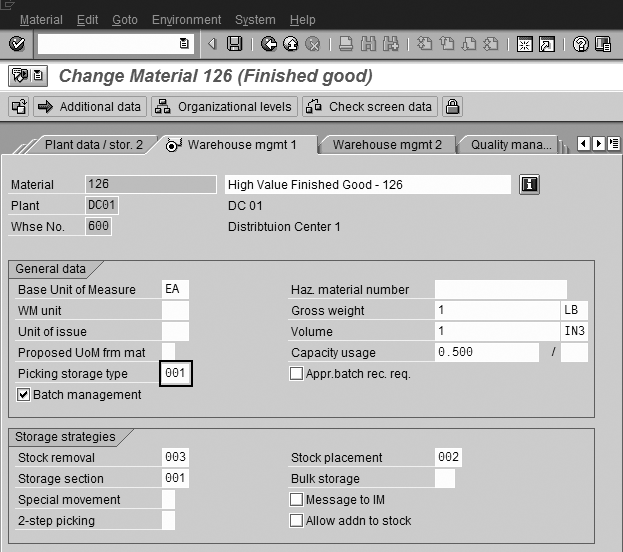
Figure 4
Picking storage type on the material master
Second: Pick Your
Material
Once you determine the storage type,
it is time to pick your material. WM
has a variety of predelivered strategies
that correspond to many common requirements. Table
2 shows SAP-delivered strategies.
However, you can also create a custom
strategy via a user exit.
| WM strategy |
What it does |
An example of why
to use it |
| FIFO |
Searches for the oldest material |
Enforcing inventory turns is
important to reduce spoilage |
| LIFO |
Searches for the newest material |
If material is placed in a stack
or arranged in a row down an aisle
and the most recently placed one
is the most accessible |
| Partial quantities |
Looks for partial pallets that
best match the requested order
amount |
To minimize the number of partial
pallets freeing up bin space |
| Large-small quantity |
Segments a single order line
into the quantities in which the
material is stored |
Assume a case is 10 units and
you have both a case and an each
pick area (an each pick area is
where you pick single units or
subcase quantities). If you have
an order for four units you would
not want to split a case; instead,
you would pick four from the each
area. Similarly, if you had an
order for 11, you would not pick
11 from each area; you would pick
one case from the case area and
one unit from the each area. This
strategy supports those types of
decisions. |
| Shelf life expiration |
Searches for material with the
shortest shelf life |
Use this when materials are date
sensitive. However, the oldest
FIFO date might not represent the
oldest product (remember FIFO is
when the warehouse received it;
it is a warehouse-centric date.
Shelf life indicates when it was
manufactured and represents how
much longer an item is saleable;
there is a different between these
two measurements). |
| Fixed bin |
Always retrieves material from
the same location |
A fixed picking line |
| Table
2 |
Overview
of SAP WM removal strategies |
A picking strategy, like a placement
strategy, is an attribute executed
within a storage type (Figure
5). To reach this in the IMG,
go to transaction OLML (a
subset specific to warehouse management)
and then Logistics Execution>Warehouse
Management>Master Data>Define
Storage Type.
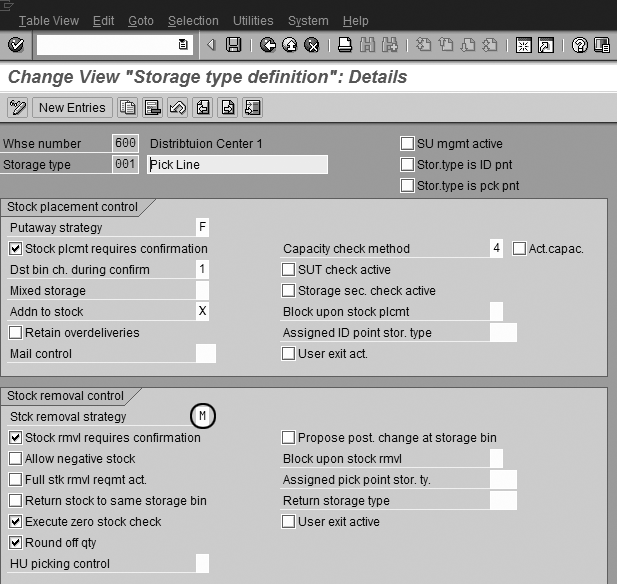
Figure 5
Storage type definition where a strategy is assigned to a storage type (zone)
Special Considerations
A few nuances to picking are worth
considering. They include the interaction
between Sales and Distribution (SD)
and WM, how batches are managed, and
stringent FIFO.
SD and WM
Most of the modules interact with
WM via transfer requirements that turn
into transfer orders. SD is different
in that transfer orders are generated
directly from the delivery note, meaning
that SD and WM are much more tightly
integrated than other modules. Additionally,
as transfer orders are confirmed, the
picked quantity on the delivery note
is automatically updated to reflect
the new total picked.
Batch Management
You can carry out batch determination
at several levels. You can dictate
on a delivery note which batch the
warehouse is to pick. However, this
can lead to inefficient picking processes
as the specified batch may not be in
the forward picking area.
If a batch is specified on an outbound
delivery, the system considers that
when running through its strategy.
If that specific batch is not in the
first storage type, it looks in the
second, then the third, and so on.
It is very possible that the system
will bypass material in your initial
storage types, which are most likely
the bins from which you prefer to pick
from a geographic perspective (i.e.,
to reduce travel time). This may happen
even if the material in those bins
is acceptable to the customer and their
attributes match exactly the batch
specified on the delivery note. Essentially,
WM says, “The customer asked
for a specific batch. This must be
important. If they asked for a specific
batch, let me find that batch.” That
means the batch can trump all removal
strategies centered on establishing
ideal material flows. This can cause
havoc in warehouse processes, undermining
the replenishment strategy and process
flows.
Therefore, when possible it is best
to delay batch determination as long
as possible. In fact, you can determine
the batch when the transfer order is
allocated. In this method, the material
positions within the warehouse are
considered, keeping the desired warehouse
material flows. This means that WM
first locates materials based upon
how you want material to flow through
the facility and then verifies the
material is acceptable based on what
the customer needs. For example, if
the customer requests a certain characteristic
and the batch in the primary picking
position lacks that characteristic,
the system will not select it. If it
is acceptable, it will. Delaying batch
determination as long as possible and
performing this “Is there a reason
not to pick this batch?” logic
preserves some warehouse efficiency
while still enforcing your batch determination
logic.
Stringent FIFO
A special FIFO picking method searches
across all storage types for the oldest
product. Normal FIFO looks within storage
types. This means the normal FIFO might
not source the oldest material if it
is in one of the later storage types
in the search strategy. Specifically,
if the first storage type has material
that was received in 2006 and the second
storage type has something received
in 2005, the system retrieves the material
received in 2006. To avoid this:
- Use stringent FIFO to
look in all storage types for the
oldest material. Keep
in mind this decreases warehouse
efficiencies because pickers may
be sent to undesirable locations
to pick older material.
- Look at your replenishment
strategies. A proper replenishment
strategy, which sources material
in FIFO order from the reserve
location to the forward location,
should closely mirror your FIFO
requirements. To put it another
way, if you replenish in FIFO order,
you’ll most likely be picking
in FIFO order. It will be unusual
for you to end up with the situation
described above (2006 material
in your picking strategy before
2005 material).
One last consideration on the stringent
FIFO strategy: Be sure to exclude certain
storage types from consideration. Stringent
FIFO looks across all storage types
including your interim locations (such
as your docks). Unless you exclude
your intermediate areas, you could
send pickers to your shipping (916)
area to pick what you just staged for
a different customer! To set the storage
type exclusion, go to OLML>Logistics
Execution>Warehouse Management>Strategies>Stock
Removal Strategies>Define Strategy
for Stringent FIFO.
Cross-Docking
Cross-docking is a method whereby
you don’t store product in its
normal location but instead you either
stage it or take it directly to a waiting
truck. SAP offers three different cross-docking
solutions. One is in WM and involves
pre-planning cross docks. The second
is available to SAP Retail customers
and is slightly more advanced. The
third, which is the most recent and
most robust, is the WM cross-docking
solution introduced in 4.7 SCM Extension
Set 2. This offering provides true
cross-docking capabilities and can
execute either planned (you know you
will cross-dock it and cause trucks
to arrive at the same time to support
the cross dock) or opportunistic (it
just happens that someone is receiving
something that is needed for an outbound
shipment) cross-docking. Complete with
cross-docking monitors and planning
documents, the solution in Extension
Set 2 can increase operational efficiencies
significantly by reducing material
handling.
User Exit in Picking
As with most of its functionality,
SAP provides the ability to customize
the base solution. Perhaps you wish
you could combine the attributes of
two different strategies depending
on a certain situation. The first consideration
when you find yourself contemplating
this is to re-examine the organizational
structure of the warehouse. Should
you simply split your storage type
into two and assign the appropriate
strategy to the two new storage types?
If the answer is not that simple, however,
you can consider a custom strategy.
This was detailed in my previous article.
So How Does It All
Work Together?
Overlooking the special case of stringent
FIFO, SAP looks within storage types
for materials that match the requirement.
This means looking at all units of
that item within the storage type (looking
at the quantities) and, if more than
one location has inventory, looking
at the quant to determine which location
to pick from (Figure 6).
For example, if five bins in a storage
type have the item, the system looks
at the goods receipt date on the quant
to determine which bin to pick from
in support of a FIFO pick. If no material
is found in that storage type, then
it looks across storage types until
it finds an appropriate one (Figure
7).
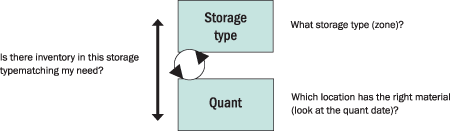
Figure 6
How SAP searches within WM organizational elements for the material to pick
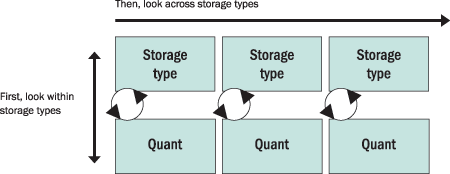
Figure 7
How the system searches within WM organizational elements for the material to pick
Ok, But It Does Not
Work…
Clearly, as with stock placements,
many factors can influence which stock
WM recommends picking. Fortunately,
you can use the troubleshooting guide
discussed in my prior article.
Creating transfer orders in the foreground
allows you to step explicitly through
the logic WM is executing and better
understand why your strategy may be
going astray. The simplest way to launch
this is from within a delivery note
by selecting Subsequent Functions>Create
transfer order. That brings
you to Create transfer order for
an item transaction (transaction code LT03)
with the delivery and warehouse defaulted.
Select Foreground for
the Foreground/background option
and proceed to the screen shown in Figure
8. Clicking on the circled
icon (create in foreground) launches
the transfer order removal process,
which is highlighted in Figure
9. Selecting Environment>Storage
bin search log then shows
the detailed logic executed to determine
the bins (Figure 10).
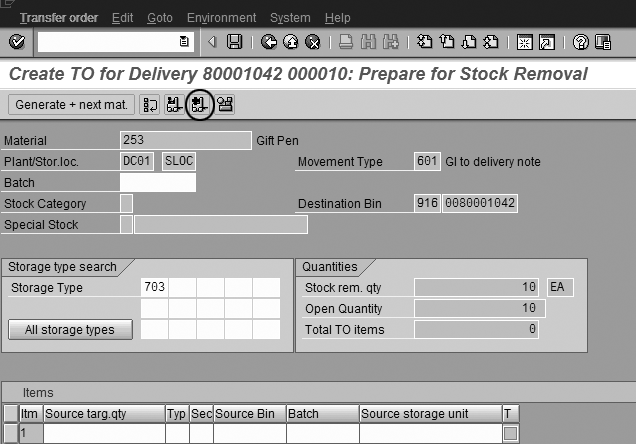
Figure 8
Launch transfer order creation in the foreground
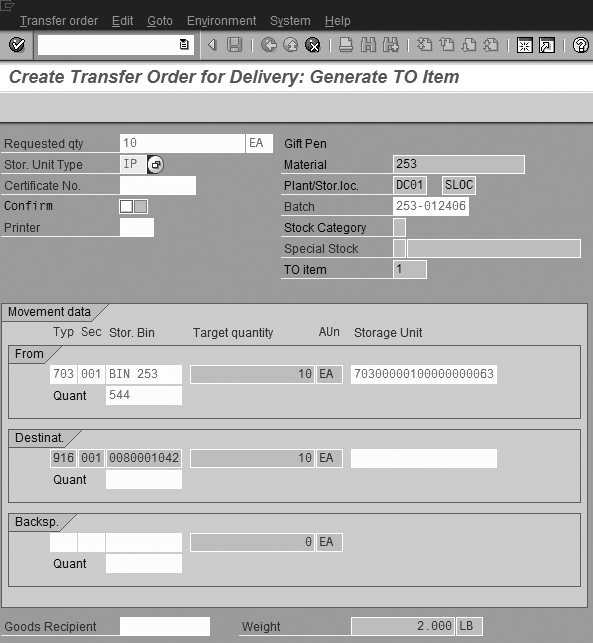
Figure 9
Create a transfer order in the foreground
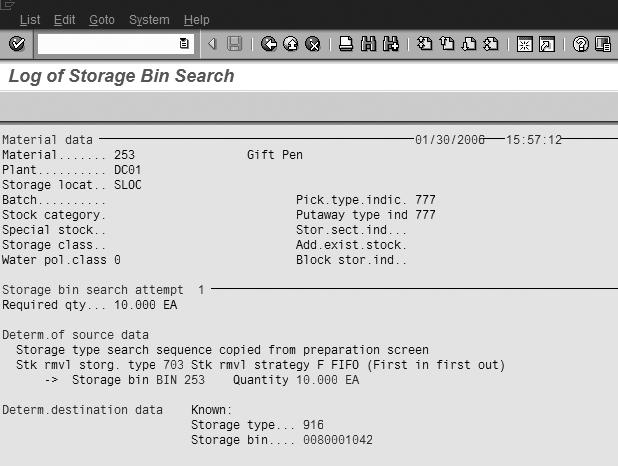
Figure 10
A log detailing the rules the system considers when determining the source bin
Keep in mind that when you begin configuring
a warehouse, you’ll find inter-relationships
among placement strategies, picking
strategies, and your warehouse organizational
structure (since the strategies are
a factor of the storage type, the primary
WM organizational element). You should
anticipate spending a decent amount
of time experimenting with the right
structure to mirror your operation
flows. I’d recommend not designing
just your placement or your removal
strategy, but both at the same time.
They are interdependent, so be sure
to take a holistic view of your facility.




 Premium