Activating virtual time hierarchies provides a flexible and convenient option for reporting on time characteristics. Not only is it simple to implement, it can immediately increase the functionality available to query designers and users. It can deliver reports with summary time groupings on existing time characteristics (based on 0DATE, 0CALMONTH, 0CALMONTH2, and 0FISCPER) with no changes required to the data targets.
Key Concept
Virtual time hierarchies allow users to report time-related characteristics in various hierarchical layouts without creating custom hierarchies or including such functionality in the design of data targets.
Have you ever been required to provide a summarized monthly report based on an InfoProvider that contains only a date field as a time characteristic? How about providing the same data by year (fiscal or calendar) or even in weekly buckets? What do you do with InfoProviders with multiple date fields? Should you include month and year data for every date field in a data model just in case there is a need to report on those dates in an aggregated manner?
For example, assume you have a requirement to determine the monthly usage for the BW system, but the BW Statistics InfoCube (0BWTC_C10) contains only a calendar day (0CALDAY) time characteristic. How can you complete this request in a timely manner and also be able to re-use it as needed?
Note
The virtual time hierarchy functionality is also available in SAP NetWeaver 2004s where the standard content version of fiscal year/period (0FISCPER) also has hierarchies available. The standard content version of 0CALMONTH no longer supports hierarchies in SAP NetWeaver 2004s. However, if the InfoObject is modified to allow hierarchies (using transaction code RSD1), you can retain the virtual time functionality. Similarly, in prior versions, you can enable hierarchies in 0FISCPER to allow virtual time hierarchies on that characteristic as well.
While several options exist, from incorporating additional characteristics in the InfoCube to executing macros on the results, the use of virtual time hierarchies allows you to quickly and easily address this requirement. Once implemented, the hierarchies are available for use on any InfoProvider containing the relevant time characteristics, thus immediately expanding time-based reporting opportunities.
Since BW 3.0, virtual time hierarchies have enabled users to display certain date fields as a fiscal- or calendar-based hierarchy, such as year, month, and quarter. For example, you could use 0DATE, or any characteristic created as a reference to this InfoObject (such as 0CALDAY) to display data in various time groupings. This option is also available for certain other time characteristics or any time characteristic created as a reference to these particular InfoObjects. Table 1 summarizes the characteristics available as virtual time hierarchies.
| Date |
0DATE |
By year, quarter, month, week, weekday, fiscal year, fiscal year/period, posting period, half year splits |
| Calendar year/month |
0CALMONTH |
By calendar year, quarter, half year split |
| Calendar month |
0CALMONTH2 |
By quarter, half year split |
| Fiscal year/period |
0FISCPER |
By fiscal year |
| * Requires certain InfoObjects (0HALFYEAR1, 0CALQUARTER) to be activated. Also, the content version of the active InfoObject may affect what you can see in the hierarchy (e.g., key vs. name). |
|
| Table 1 |
The characteristics available for virtual time hierarchies and the various hierarchy levels available for each |
If an InfoCube holds several date-related characteristics (i.e., created with 0DATE as a reference object), you can, using virtual time hierarchies, report any or all of these time-based InfoObjects on a calendar or fiscal month grouping. You can do this with no design impact and at the full discretion of the BEx Query creator or user (when changing the local definition of the query). Of course, other options may be available to facilitate such reporting, including custom time hierarchies or additional characteristics in the data target. However, these options could increase both design effort and confusion to the end user.
You cannot create additional virtual time hierarchies, but are limited to those delivered (several are automatically derived for each fiscal year variant on the BW system). The delivered hierarchies cover many scenarios and should be suitable for most time reporting requirements.
Configuring Virtual Time Hierarchies
You activate virtual time hierarchies via the configuration menu (Figure 1) or transaction code RSRHIERARCHYVIRT.
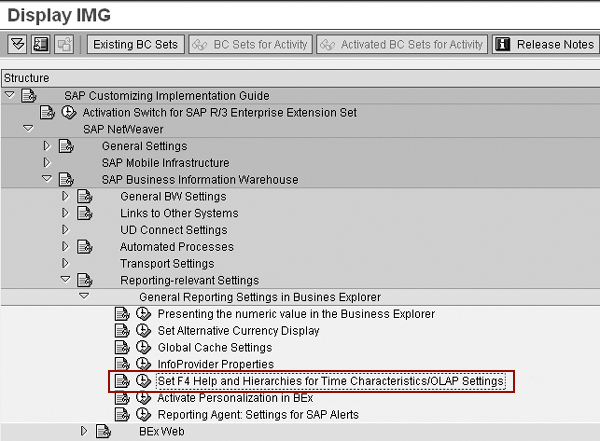
Figure 1
Configuration path for virtual time hierarchies
Use the two tabs on the screen (General Settings and Virtual Time Hierarchies) to activate hierarchies for specific time characteristics (0DATE, 0CALMONTH, 0CALMONTH2, and 0FISCPER).
The General Settings tab has three input sections (Figure 2). Of these, only Time Interval is directly related to virtual time hierarchies, but an overview of each follows:
- Time Interval: The Time Interval setting is an integral component of the virtual time hierarchy’s process and controls the entries made in the hierarchy SID table (K table) of the underlying InfoObject. Refer to Figure 3 for the contents of the K table for 0DATE as seen in the 0CALDAY InfoObject (which references 0DATE). The table entries do not hold the time interval values until initially accessed via a query. The system adds the entries to the table on a hierarchy-by-hierarchy basis. As the time interval shifts, the K table entries reflect the new range for each hierarchy. Records are not removed unless you deactivate a time hierarchy. Time Interval controls the size of the virtual time hierarchies available within the query. Try to strike a balance between having a range large enough to meet reporting requirements but not too large to be unwieldy. Ensure sufficient periods are populated for any fiscal year variant to be used as a hierarchy since this can cause errors on query execution. The fiscal periods should include one year prior to the interval.
- Factory Calendar: The factory calendar is used for certain OLAP functions, such as the exception aggregation AV2 (average weighted with the number of working days according to the factory calendar). These functions would use the factory calendar specified here.
- Master Data Texts for Time Characteristics: This option controls the display of the fiscal year/period (0FISCPER) text to use either the true fiscal year or the calendar year. This setting is relevant only if you have fiscal years that are offset from the calendar year. For example, if you have a fiscal year that is offset from the calendar year (i.e., calendar year 2005 is actually fiscal year 2006), you see different text for the fiscal periods in query results depending on the setting you make here.
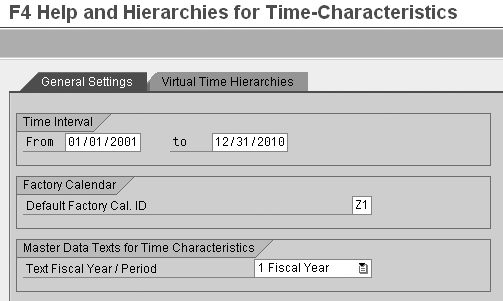
Figure 2
General Settings tab for virtual time hierarchies
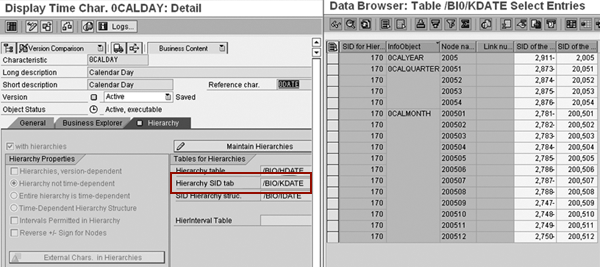
Figure 3
K table for 0DATE as seen in 0CALDAY (which uses reference characteristic 0DATE)
The Virtual Time Hierarchies tab (Figure 4) contains the available characteristics in the left panel (based on 0DATE, 0CALMONTH, 0CALMONTH2, and 0FISCPER). When you select a characteristic in the left panel, the panel on the right displays the different hierarchies for that object.
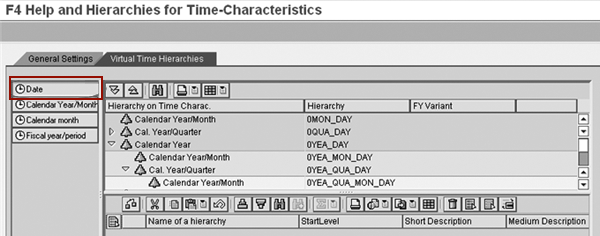
Figure 4
Virtual Time Hierarchies tab displays hierarchies for selected objects
Note
The SAP class BW330, BI Modeling and Implementation (for SAP NetWeaver 2004s) or BW330, SAP BW Modeling (for BW 3.5), provides further information about data modeling. This is an advanced BI class, so be sure to check the course prerequisites. For further details, visit
www.sap.com/useducation.
In Figure 4, Date is selected, presenting the hierarchies available to the 0DATE characteristic in the right-hand window. To activate a hierarchy for an InfoObject, either double-click on a hierarchy in the right panel or drag and drop it to the lower portion of the screen. Once you activate it, you can rename the hierarchy to better reflect its purpose by typing in the appropriate short, medium, and long descriptions (Figure 5). You can also specify the default starting level of a hierarchy in the lower portion of the screen. The starting level can also be set in the query definitions.
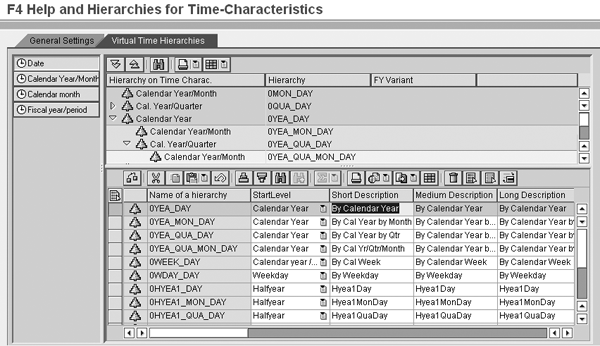
Figure 5
Activated time hierarchies for 0DATE with modified descriptions
Once activated, the hierarchies are available for use in queries. As noted earlier, these hierarchies are pre-delivered and dependent on the activation of underlying InfoObjects (e.g., 0HALFYEAR) as well as the activated version of the time characteristic InfoObjects. There is no way to create or modify the available hierarchies. Activating them makes them immediately available for reporting activities. No explicit option is available in transaction RSRHIERARCHYVIRT to transport the activated hierarchies. If activation directly in a production system is an issue, you need to investigate manual transports.
Using Virtual Time Hierarchies
Once you activate them, you can use the hierarchies on any characteristic based on the hierarchical time InfoObjects (e.g., any characteristic referencing 0DATE, 0CALMONTH, 0CALMONTH2, and 0FISCPER).
Recall the requirement at the start of this document to determine the monthly usage of the BW system from the BW statistics InfoCube (0BWTC_C10), which contains only the 0CALDAY time characteristic. Figure 6 shows the active hierarchies available to use for the calendar day (0CALDAY) InfoObject (based on 0DATE) when a designer restricts on that characteristic while creating a query.
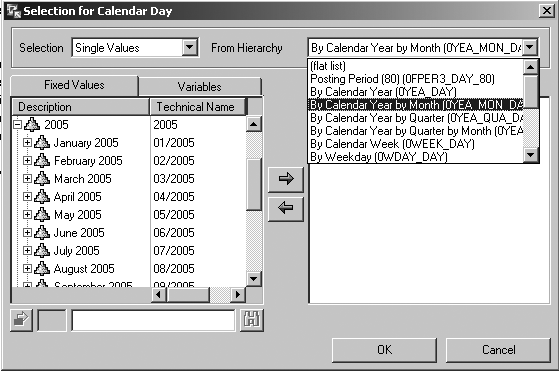
Figure 6
Activated time hierarchies for 0CALDAY (based on 0DATE) as available within a query
Note
Some of the hierarchies (especially for year values) are redundant and not all should necessarily be activated. A suggested approach is to activate a set of hierarchies and then review them in a query using a hierarchy and node variable to better determine those that are useful.
As the system initially accesses hierarchies from a query, either on execution or by displaying as values of a hierarchy variable, the associated hierarchy SID (K) table is populated to reflect the time interval set in transaction RSRHIERARCHYVIRT if entries do not already exist in that range. You can apply a virtual time hierarchy to the 0CALDAY object in the BEx Query definition (Figure 7).
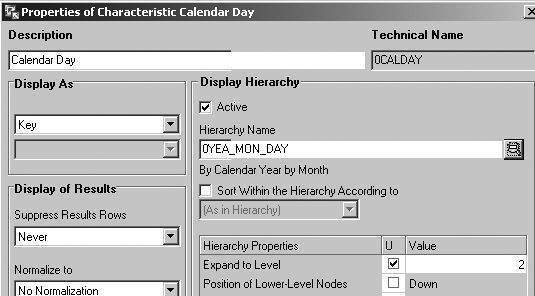
Figure 7
BEx Query definition to use year/month hierarchy and a node variable applied to 0CALDAY
When the query is executed, the user will be prompted to enter a time period (based on a hierarchy node variable). The results include a year and month grouping of system activity with the ability to drill down to days if desired (Figure 8). This addresses the requirement for monthly distribution of activity, and as with any query, you can make further layout changes to provide desired results. You could have months across the top and users in rows to present monthly distribution by user.
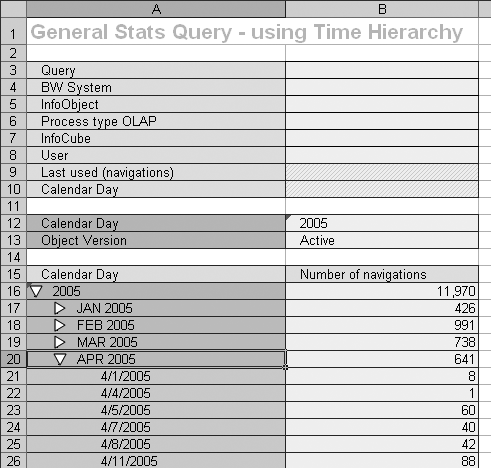
Figure 8
Query results for monthly system usage using a time hierarchy applied to 0CALDAY
As seen in Figure 9, the context menu (right-click on a characteristic cell) for these hierarchies is also unique since it provides more detail than the generic node level expansion usually available for hierarchies. As with any hierarchy, you can create variables to prompt the user to select not only a hierarchy node, but to specify the hierarchy to be used, which further enhances the flexibility of these hierarchies. Therefore, a user can have a single query that can present a calendar or fiscal view of the data depending on the hierarchy selected at execution.
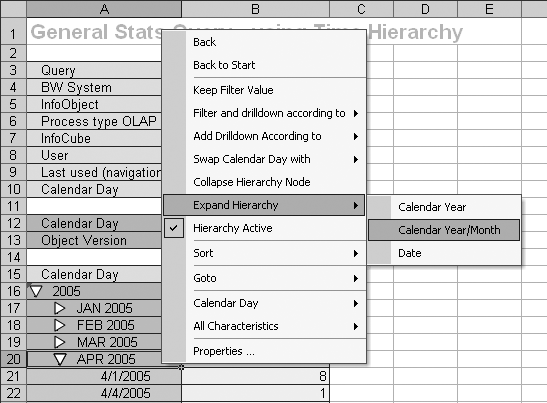
Figure 9
Context menu in query result for time hierarchy on 0CALDAY
To minimize the number of variables, create them for the reference characteristic (e.g., Date) vs. the object in the InfoCube (e.g., Calendar Day). This is an option when creating the variable in the General Information window in the SAP BW Variables Wizard (Figure 10). With this approach, you can re-use the same variables to select a time hierarchy or node for many characteristics, not just those for which they are specifically created. In the example in Figure 10, this variable is available to be used for other characteristics based on 0DATE, not just 0CALDAY.
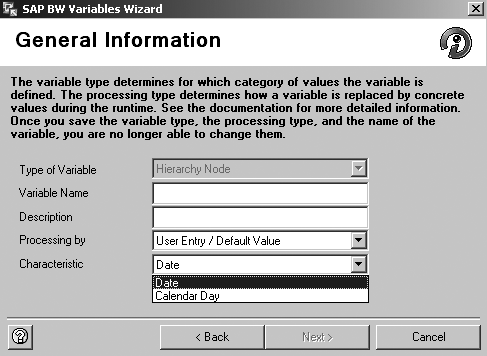
Figure 10
Create the variable on Date vs. Calendar Day
Considerations
As with most configurations, you should review SAP Notes for the most current changes. For example, SAP Note 930521 may be a relevant note resolving a problem in which the time frame available for the query restriction does not reflect what is set on the General Settings tab (Figure 2).
It is also critical to ensure that periods exist for all relevant fiscal variants, not only for the range set in the General Settings tab, but also for a year prior to the range. If the prior year does not exist for a fiscal variant, you will encounter errors in either BEx Query Designer or during query execution when using a hierarchy relevant to that fiscal variant.
If a user is not prompted for variable input of the virtual time hierarchy nodes, the hierarchy is display only and acts as a dynamic filter. The filter limits the output to the data that exists for the time interval specified on the General Settings tab. The user receives a warning message to that effect at the time the display hierarchy is included in the results. This message re-appears during any navigation unless warnings from the server have been suppressed. You can suppress such warnings in BEx Analyzer via Setting>Suppress warnings from server. However, other warnings could be useful (e.g., missing exchange rates), so you need to take care when suppressing warnings. While it does have some limitations, the virtual time hierarchy functionality can provide a useful solution to date characteristic reporting requirements with minimal, if any, development required.
Lorne Kellaway
Lorne Kellaway is a senior business systems analyst on the BW team at Alcatel-Lucent Canada, Inc., who has been working with SAP software for more than 12 years (six years on SAP BW). He has experience in various SAP R/3 modules and has worked on BW since Release 1.2B. Lorne has participated in multiple BW projects, including several upgrades.
You may contact the author at lorne.kellaway@alcatel-lucent.com.
If you have comments about this article or publication, or would like to submit an article idea, please contact the editor.