Learn how to use the Business Add-In (BAdI) AC_DOCUMENT to solve the 999-line-item limit in an FI document in a flexible manner.
Key Concept
With the Business Add-In (BAdI) AC_DOCUMENT, you can differentiate summarization not only for reference transactions (article documents, billing documents), as is the case with standard summarization, but also for different reference procedures (goods receipt, goods issue), account keys, or even individual general ledger accounts.
When you use the SAP accounting interface to post documents from sales and distribution (SD), materials management (MM), or other applications, you can use transaction OBCY to activate FI document summarization for reference transactions, such as goods receipts or billing documents. These documents from SD or MM can be so big that without FI summarization, the subsequent FI document passes the 999-line-item limit, and you receive error message F5 727: Maximum number of items in FI reached.
You can solve this problem by spitting billing documents or goods receipts. However, from a business or procedural perspective, this is undesired. Such detailed information is also not always needed or desired in FI and means the warehouse clerk has to split the delivery note into two goods receipts.
Via summarization, the SAP system can total items in the FI document if they have the same account assignments and only differ in the value fields. The summarization can be achieved by deleting certain fields in the accounting interface, such as material number in all FI items. In SAP Notes 36353 and 545137, you find a detailed description of FI summarization.
I explain how to use flexible summarization for a goods receipt (reference procedure RMWE) so that you can still clear the Goods Received/Invoice Received (GR/IR) clearing account (WRX -account key) at the purchase order item level. However, in the stock general ledger account (BSX-account key) line, the article information is deleted in the accounting interface and, therefore, summarized in the FI document.
You can also summarize accrual conditions, such as freight and customs costs, reducing the account lines even more. As a result, your purchase order can continue to have up to 900 lines without any issues. Without the Business Add-In (BAdI) option, you have to choose to split the purchase order or goods receipt when posting the goods receipt (Figure 1).
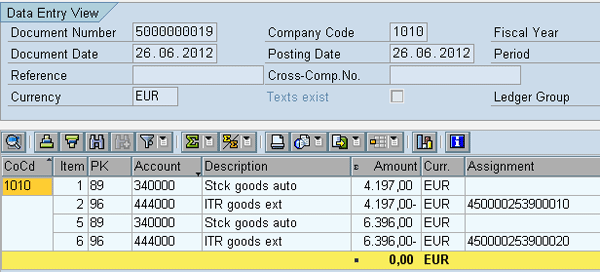
Figure 1
A journal entry without any summarization
Other Extended Options for FI Summarization
In addition to standard summarization via transaction OBCY, SAP offers other options to enable transactions otherwise blocked by the 999-line-item error message. SAP Note 73907 explains the option of differentiating FI summarization via the FI document type. One document type can be summarized, and the other document type of the same reference procedure (article document — MKPF, billing document — VBRK) cannot. This option is very useful when combined with transaction OMBA to assign the different FI document types (Figure 2) for article movements. You can summarize transaction codes in which the risk of reaching the 999 limit is greater.
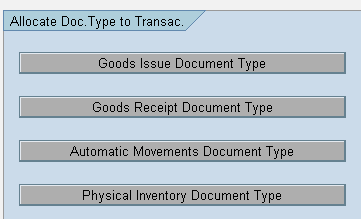
Figure 2
Allocate FI document types to logistics processes
Click the Automatic Movements Document Type button to assign the FI document type to the different transaction codes (Figure 3).
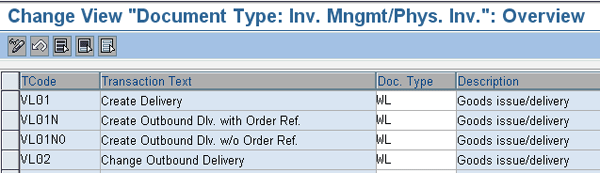
Figure 3
Automatic Movements Document Type
Next, go to transaction OBCY to make settings for document type WL and summarize the goods issue made by a delivery document (Figure 4).
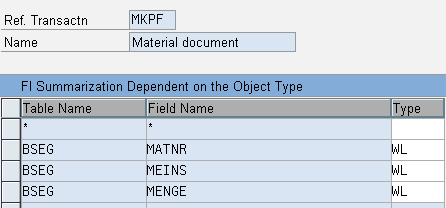
Figure 4
OBCY summarization for document type WL
Options for Splitting the FI Document
In some document splitting scenarios, summarizing the FI document is not possible as you can no longer use the profit center or cost center for the summarization.
Therefore, SAP describes solutions in the following Notes of splitting the FI document in multiple FI documents when the 999 limit is reached:
- SAP Note 1353827 — AC interface: Document split in FI for goods movements
- SAP Note 1497092 — AC interface: Posting split in FI for incoming invoices
- SAP Note 1670486 — AC interface: Posting split in FI for outgoing invoices
The drawback is that summarization has to be switched off, a fact that makes it very hard to implement these notes in high-volume installations, such as retail.
The Solution with BAdI AC_DOCUMENT
The AC_DOCUMENT BAdI allows the field contents of the general accounting document (AC document) to be enriched or changed. In this way, the AC document contains complete posting information for all accounting components, such as FI, Managerial Accounting (CO), and the Special Purpose Ledger (FI-SL).
The ACC_DOCUMENT_SUBST structure that contains the modifiable fields of the AC documents was first built from the superset of substitutable fields in the FI and CO components at the line item level (table GB01 contains the substitutable fields). In this example, I want to change field EBELP, which is not available as standard for substitution in GB01. For this reason I need to append the structure with field EBELP.
To extend this structure, use transaction code SE11. In the dictionary screen for the display structure, click the Append Structure… button (Figure 5).
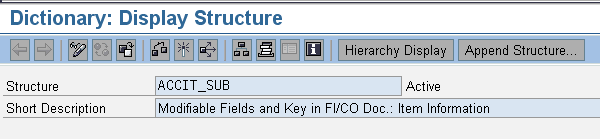
Figure 5
Extend the structure of ACCIT_SUB
In the next screen, enter a name in the Append Name field and press Enter. In my example, I used ZACCIT_SUB (Figure 6).

Figure 6
Enter the name of the structure to append
In the next screen, add field EBELP to the structure by typing this name in the field under the Component column (Figure 7).
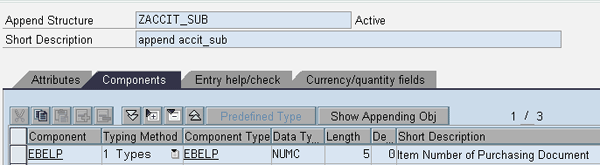
Figure 7
Add field EBELP to structure ZACCIT_SUB
To implement the BAdI, use transaction code SE19. Select Classic BadI and click the Create Impl. button to initiate the implementation (Figure 8).
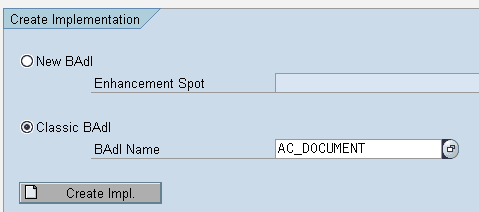
Figure 8
Initiate the BAdI implementation
Fill in an Implementation Name (Figure 9) and press Enter. In my example, I use Z_AC_DOCUMENT.
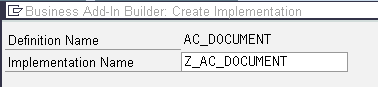
Figure 9
Add an implementation name
In the next screen, double-click the method CHANGE_AFTER_CHECK (Figure 10).
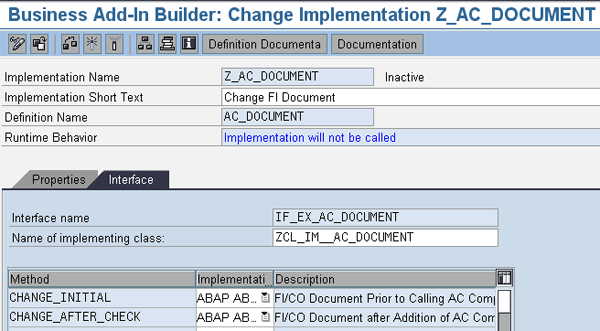
Figure 10
Details of the BAdI implementation
In the next screen, add the code shown (Figure 11).
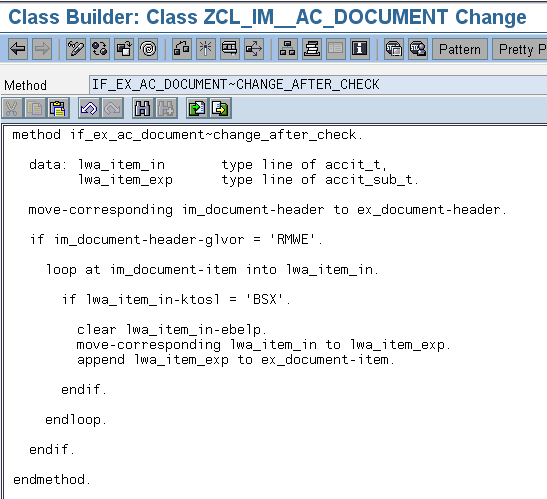
Figure 11
ABAP code for clearing line item information from a purchase order goods receipt for the stock general ledger account
Now activate the implementation by clicking the activation icon. Customize the standard summarization settings via transaction OBCY for reference procedure MKPF (article documents), according SAP Note 36353 (Figure 12). By filling in the fields, the information for these fields from the article document is not passed to the FI document, enabling SAP to summarize general ledger accounts if other information is similar.
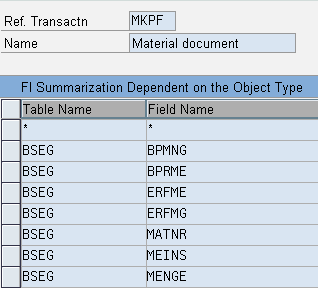
Figure 12
FI summarization settings for MKPF
As a result of the journal entry, the goods receipt posting now looks like that shown in the screen in Figure 13. For the stock account, just one line is posted and summarized while the information in the GR/IR clearing account is intact with the detail required by most companies.
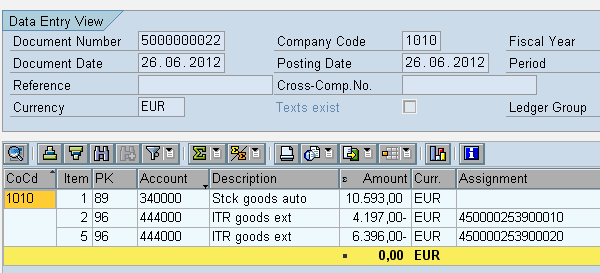
Figure 13
Journal posting with flexible summarization
Note
This method will help you in situations in which splitting the source document is difficult or from a business perspective undesirable. An added advantage in this example is that you can activate line item display in the general ledger master data of your stock account as fewer line items are posted. You should test this summarization approach in your installation to ensure no undesired side effects occur. I have made changes via flexible summarization in three different projects in SAP ERP Central Component 6.0 and even with the document splitting activated, without any issues.
Hendrik-Jan van Hoeijen
Hendrik-Jan van Hoeijen is a senior FI/CO consultant with Prospect IT. He has more than 15 years of hands-on SAP knowledge, including many full implementation cycles as well as international template rollouts. Hendrik-Jan holds a master's degree in business economics (Erasmus University Rotterdam) and has substantial experience integrating finance, controlling, and logistics.
You may contact the author at hhoeijen@prospect-it.nl.
If you have comments about this article or publication, or would like to submit an article idea, please contact the editor.