The authorization trace feature in transaction ST01 can help you trace all authorization objects being checked at different levels. See an example showing how to use it and how it affects compliance issues in your system.
Key Concept
An authorization object is the key component in the SAP security process. Each authorization object defines what organizational element (e.g., company code) is being checked. It’s important in authorization design to know which authorization objects are being checked in each SAP transaction code.
Sarbanes-Oxley compliance and segregation of duties (SoD) are becoming more and more important in today’s business process design. In SAP implementations, a prerequisite for a good Sarbanes-Oxley and SoD design is to know what authorization checks are conducted in each SAP transaction.
Usually when handling an authorization issue, knowing what authorizations are being checked is one of the biggest headaches. Mostly it’s based on the functional expert’s experience. For example, putting an authorization group in a General Ledger (G/L) account master (Figure 1) can impose restrictions to its access, or you can restrict the posting to a certain document type by putting an authorization group in the document type configuration OBA7 (Figure 2).
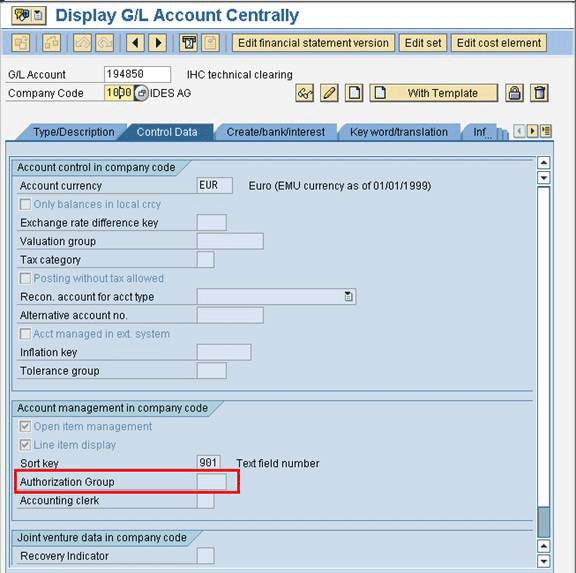
Figure 1
Authorization group in G/L account master
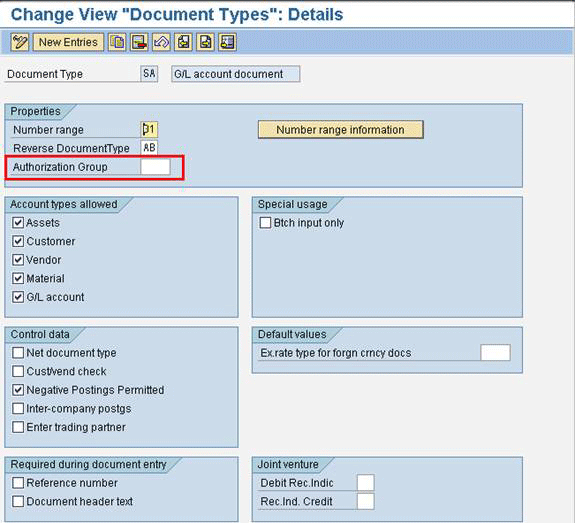
Figure 2
Authorization group in document type configuration
With SAP authorizations, there are different levels of checking. Normally the first level is transaction code checking. Authorization restriction by transaction code is the basic and most straightforward authorization checking. For example, transaction code FBL3N displays G/L account line items. If you have restricted a person from accessing transaction FBL3N, then that person can’t display G/L account line items at all.
The second level is checking by authorization object. The authorization object controls details beyond the transaction code. Using the previous example of transaction FBL3N, you can give the authorization for a person to use transaction FBL3N, but use authorization object F_BKPF_BUK to restrict that person to display G/L account line items for a certain company code only. Using an authorization object is common and can provide more flexible control for authorization access.
When you need to design authorizations using an authorization object, one important question always comes up: “How can I know what authorization objects are being checked in a transaction?” It’s fundamental information that you need to know before you can properly design an authorization. If you don’t know what’s being checked in a transaction, then you might allow people too much access without knowing it.
Authorization trace is a useful tool that can answer the above question. Authorization trace tracks down all the authorizations being checked in a transaction and provides a full list of all those authorization objects. You can use transaction code ST01 or follow menu path SAP menu > Tools > Administration > Monitor > Traces > System Trace for authorization trace (Figure 3). Select the Authorization check check box and click on the Trace on button.
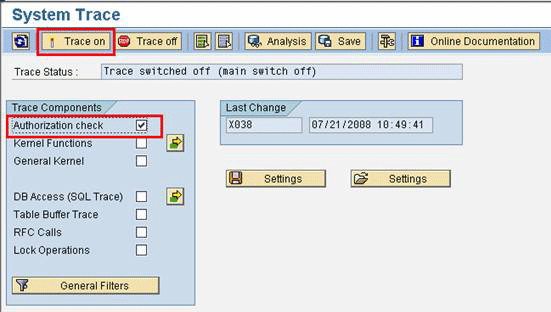
Figure 3
Enact authorization trace
Then execute the transaction that you want to trace on a separate screen. In this example, I run transaction VF44 (revenue recognition). Transaction VF44 recognizes the deferred revenue systematically and automatically by posting a credit to the revenue account and debit to the deferred revenue account. Revenue recognition is a good example because it is not a commonly used functionality, and thus, you need to use authorization trace to track down the detailed authorization check of it. After you execute the transaction, go back to the authorization trace screen and click on the Trace off button. Then click on the Analysis button to display the authorization trace result. Specify the time interval (i.e., the time when you are executing transaction code VF44) you want to display for the authorization trace, and click on the execute icon (Figure 4). In transaction ST01, sometimes the system doesn’t refresh automatically to the time interval when you execute a transaction. That’s why you need to specify the time interval.
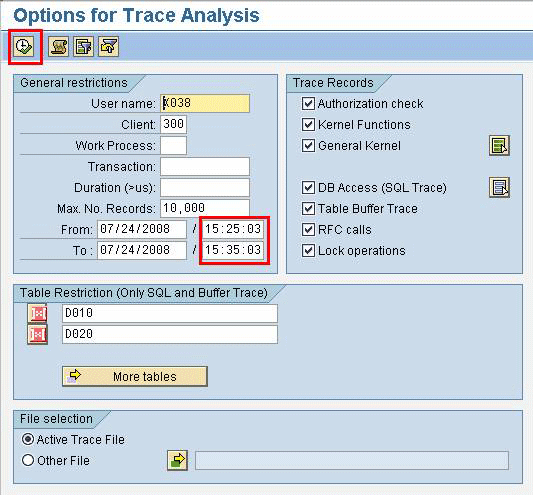
Figure 4
Specify the time interval for trace result, then click on the execute icon
Figure 5 shows the result of the authorization trace. You can see there’s only one authorization check, which is the authorization check for transaction code S_TCODE. In addition to that, there’s no check for company code.
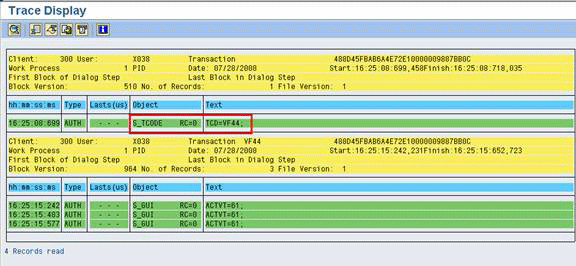
Figure 5
Result of authorization trace for transaction VF44
In this example, I can confirm from the authorization trace that transaction VF44 doesn’t have the authorization check for company code. If it’s just a single region or single entity implementation, there’s no problem. However, this would cause a big problem for a global implementation. For example, without the authorization check, a company in Germany can mistakenly execute the revenue recognition for a company in the US. It is obviously not desirable.
SAP Note 1055696 provides a solution to this problem. This SAP Note creates a new authorization object and inserts that in transaction VF44. After you implement this SAP Note, the authorization trace now shows that transaction VF44 is checking the authorization for company code in the Object column using authorization object V_VBRR_BUK revenue recognition by company code (Figure 6).
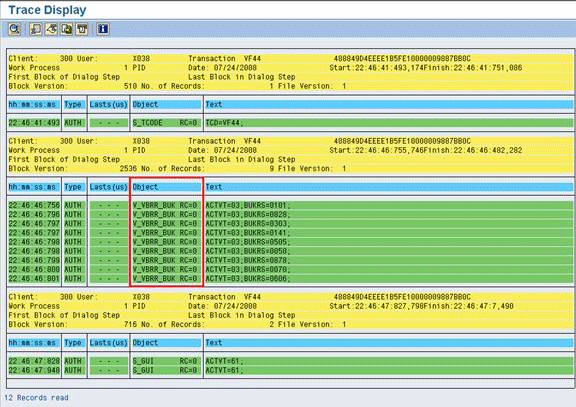
Figure 6
Transaction VF44 has authorization check by company code after implementing SAP Note 1055696
In addition to authorization trace, transaction SU24 can display a list of all the authorization objects being checked for a transaction. In addition, you can customize whether to Check or Do not check for a certain authorization object at the column Check Ind. (check indicator). Using transaction VF44 again to illustrate, run transaction SU24 for transaction VF44 (Figure 7). You can see that SAP Note 1055696 has added the authorization object to check by company code, V_VBRR_BUK. If you have your customized requirement, you can also add or delete an authorization object for a transaction using transaction SU24. Before you make changes to set it to Do not check or delete an authorization object, you need to confirm with the business user and especially with the Sarbanes-Oxley compliance team because it may trigger a compliance issue.
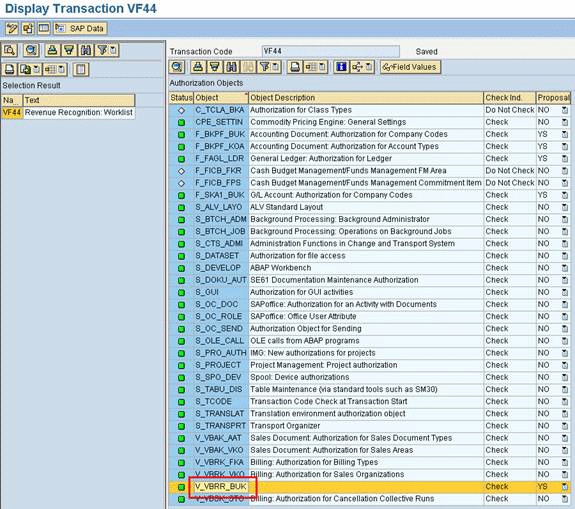
Figure 7
Transaction VF44 lists all authorization objects for a transaction code
For another example, imagine that you need to restrict the cost center display in the cost center report by company code, which is common in a global implementation, assuming you have a single controlling area for all different regions’ company codes. The authorization consultant has already maintained the authorization value for authorization object K_REPO_CCA. However, authorization object K_REPO_CCA requires you to maintain the cost centers one by one or as a range in the authorization object. My example company’s cost center naming convention has no special logic, which means the only option is to input the cost centers one by one in the authorization object’s value. This is a tedious process because each company code can have hundreds of cost centers. Also, this method means that whenever there’s a new cost center added in the future, you need to update the authorization value accordingly.
You might wonder if there is a more effective way to restrict the cost center report display by company code. To do this, you can run an authorization trace for a cost center report and find out the result (Figure 8). From the authorization trace, I can find out about another authorization object, K_CCA, being checked in the transaction. Upon more evaluation and analysis of K_CCA, I find that this authorization can fulfill the company’s requirement to restrict the cost center display by company code (or region).
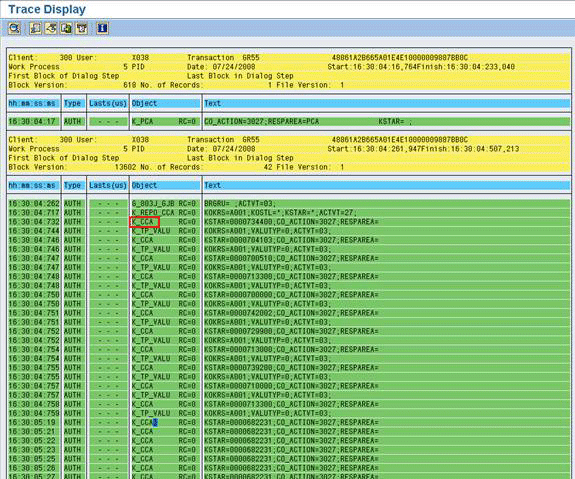
Figure 8
Besides K_REPO_CCA, K_CCA is also available for authorization check
Figure 9 shows a typical cost center standard hierarchy. The hierarchy node enclosed within a box is the top node for all the cost centers within a company code (e.g., company code 1000). Those cost centers circled with a circle are the actual cost centers in that company code (e.g., 1110). Using authorization object K_CCA, you don’t need to maintain each cost center value one by one as you did with K_REPO_CCA (Figure 10). For K_CCA, maintain the node in the authorization value field responsibility area (RESPAREA). For K_REPO_CCA, you need to maintain the cost center value one by one in the authorization value field cost center (KOSTL). This shows that K_CCA is more flexible. For example, if a new cost center is created in the future, you don’t need to update the authorization value using K_CCA because the hierarchy node remains the same.
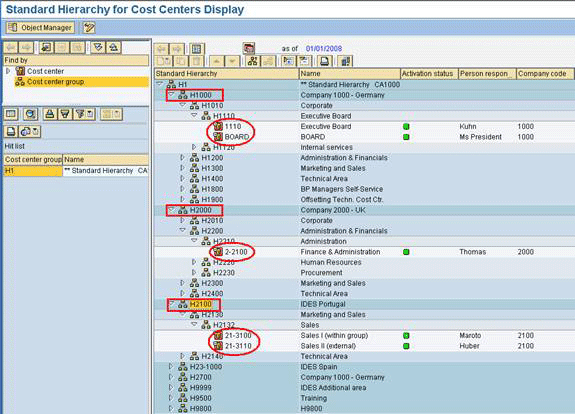
Figure 9
Cost center standard hierarchy

Figure 10
Difference between authorization object K_CCA and K_REPO_CCA
The above two examples are just two very common examples where you can make use of transaction ST01 to analyze and solve your problem. You can use transaction ST01 for all SAP transactions and reports to unveil all the authorization objects being checked. In addition, you can use transaction ST01 for your customized transaction code or report. Therefore, you can use transaction ST01 to perform a quick audit for those customized transactions or reports to see if there is any Sarbanes-Oxley or SoD exposure.
Lawrence Chung
Lawrence Chung has been working in SAP FI/CO since 1999 and was a consultant with SAP Hong Kong in 2001. He’s a CPA in Hong Kong and a fellow member of the Association of Chartered Certified Accountants. He has been acting as the lead FI/CO consultant in SAP implementations for many leading multinational corporations in various industries. He specializes in Controlling (CO-PA, CO-PC, and ML) and FI/CO integration with logistics (SD/MM, Service Management, and Project System).
You may contact the author at lawrencechung@hotmail.com.
If you have comments about this article or publication, or would like to submit an article idea, please contact the editor.





 Premium