SAP Cloud Connector
What Is the SAP Cloud Connector?
The SAP Cloud Connector is an application that can be installed on a Windows, Linux, or Mac OS environment, which provides a secure connection to the SAP cloud. This allows SAP cloud solutions to communicate securely with systems that are running on-premise, in a private cloud landscape, or an infrastructure-as-a-service environment. This is important for data security as it ensures that these systems do not have to directly be connected to the internet in order to communicate with applications running in an environment, such as the SAP Business Technology Platform (BTP).
What Is the SAP Cloud Connector?
The SAP Cloud Connector is an application that can be installed on a Windows, Linux, or Mac OS environment, which provides a secure connection to the SAP cloud. This allows SAP cloud solutions to communicate securely with systems that are running on-premise, in a private cloud landscape, or an infrastructure-as-a-service environment. This is important for data security as it ensures that these systems do not have to directly be connected to the internet in order to communicate with applications running in an environment, such as the SAP Business Technology Platform (BTP).
The SAP Cloud Connector can be installed on either a physical or virtual machine. An SAP BTP account is needed to configure the connection between the cloud environment and the Cloud Connector instance. Multiple Cloud Connectors can be deployed to connect to one or more SAP BTP regions or subaccounts depending on your landscape and needs. The SAP Cloud Connector can help achieve functionality, such as extending on-premise applications, allowing communication between cloud-based applications and on-premise systems, integrating on-premise systems with cloud applications, moving data from internal to cloud-based systems, and reporting on internal data using cloud-based applications.
Key Considerations for SAPinsiders
- Use the SAP Cloud Connector to securely connect local systems with cloud-based applications.The SAP Business Technology Platform is the foundation for creating and extending your SAP applications in the cloud. But many organizations are looking to leverage data that isn’t yet available in the cloud. The SAP Cloud Connector offers a means of doing this securely. This article by Paul Modderman explains how you can leverage the cloud connector to ensure that the work that you are doing in the cloud is securely accessing your local data, and allow that information to be accessed and used in the cloud.
- The SAP Cloud Connector is the first step that you should take when extending your SAP applications. SAP encourages customers to use the SAP Extension Suite and SAP Business Technology Platform as the basis for extending their SAP applications. Whether this is extensions for SAP S/4HANA or a new application that uses the SAP BTP, ABAP environment and data from SAP HANA, the first step that this application typically needs is to connect to existing business data and processes. Martin Grasshoff explains in this article how to build that application using SAP Extension Suite, leveraging a connection to your existing data.
1171 results
-

Leverage the Momentum of the Cloud
If you’re an IT service provider or reseller, it’s likely that the cloud has been — or soon will be — a disruptive force in your business. The cloud is changing how companies consume IT services and software and, as a result, what they expect from their service providers. Fortunately, SAP offers its partners support…
-

Balance Governance and Flexibility with SAP HANA Enterprise Cloud
This article explains how SAP HANA Enterprise Cloud enables organizations to migrate their data from their legacy on-premise applications to SAP S/4HANA or to complete a greenfield implementation of SAP S/4HANA. Learn the advantages of moving to SAP HANA Enterprise Cloud rather than relying on a classic hosting partner.
-
SAP .NET Connector for C Programmers
In the past, the SAP ActiveX Controls and the SAP DCOM Connector were the only options available for writing Windows-specific applications that communicate with ABAP-based SAP components like R/3. SAP has now released a new product for the Microsoft platform, the SAP .NET Connector, which has several advantages over the SAP ActiveX Controls and the...…
-

What’s Coming in 2004: SAP BW 3.5 to Offer Business Reporting Enhancements and More
SAP BW 3.5 will be a part of the SAP NetWeaver 2004 Ramp-Up in the end of March and unrestricted shipments begin in late 2004. The author explains the features of the updated program, such as an improved business intelligence platform, support for enterprise data warehousing, and new and easier ways to distribute enterprise-wide business...…
-
How to “Stay Clean” (for Now) with Risk Terminator
To realize all the business benefits of SAP BusinessObjects Access Control, it is important that you implement compliant user provisioning and enterprise role management (formerly Access Enforcer and Role Expert). However, if you are not ready to do that, Risk Terminator provides a very good interim solution. You can follow these step-by-step instructions for configuring...…
-
Maintain an Asset Hierarchy Using the Plant Information Catalog in SAP MII
Learn how to create, maintain, and consume a Plant Information Catalog (PIC) hierarchy in SAP Manufacturing Integration and Intelligence (SAP MII). Discover how to integrate shop floor data and enterprise data from SAP ERP in the PIC. Key Concept Plant Information Catalog (PIC) is a framework provided by SAP Manufacturing Integration and Intelligence (SAP MII)...…
-
Are You Ready for One Simple Cloud?
Most SAP customers, by now, have heard of SAP Analytics Cloud — SAP’s self-service platform for data visualization, exploration, dashboarding, planning, and predictive analytics. However, many customers wonder what exactly the new platform offers, if it’s appropriate for their environment, and what it integrates with, replaces, and/or complements. This article introduces the platform, provides a…
-
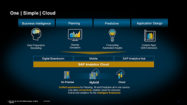
How to Simplify Access to Analytics for Everyone
Simply migrating to the cloud is no longer enough—companies must be familiar with cloud analytics in order to extract meaningful information from massive volumes of data. For companies beginning their cloud analytics journey with an existing SAP BusinessObjects BI deployment, the author of this article recommends taking a hybrid approach to integrate SAP Analytics Cloud…
-

SAP’s Integration Solution Advisory Methodology (ISA-M) for the Intelligent Enterprise
by Matthias Allgaier, SAP SE A solid integration strategy is crucial for providing the flexibility and agility organizations require to meet rapidly changing business needs. When building this strategy, enterprise architects must take into account a variety of pervasive integration requirements. For example, leveraging intelligent technologies to advance business outcomes — becoming an Intelligent Enterprise,…
-

Automating Access Governance in a Cloud-Based Landscape
According to our research, the most popular GRC solution being used by the SAPinsider Community is SAP Access Control. And yet more than half (63%) said that their current GRC solutions do not meet the need to effectively handle risk analysis and mitigation for cloud-based products without some sort of connector or bridge to a…
Related Vendors

Your request has been successfully sent