Creating planning processes is extremely complicated. Planners must accommodate an almost endless list of demands and they run the risk of being overwhelmed by minutia. SAP Advanced Planning and Optimization (APO) offers the technology to consolidate large volumes of data so that planners can have more control as they approach the task.
Key Concept
Hierarchies consolidate master data objects into groups. They form top-down and bottom-up relationships that aggregate information for various purposes such as reporting that can be used for planning.
When developing planning processes, planners focus on three central areas —time, product, and location — while simultaneously attempting to answer three key questions related to these areas: What should be procured? When? Where? (Figure 1.)
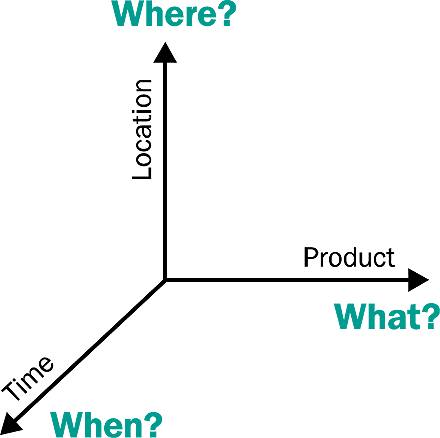
Figure 1
Planning axis
Creating a plan that satisfies all the requirements implicit in the diagram is no small feat. Plant production, product availability, delivery schedules, and scores of other issues make the planning processes increasingly complex, and the permutations planners face can quickly become infinite. Coping with planning issues in larger chunks makes the job more manageable. By using data aggregated into hierarchies, SAP Advanced Planning and Optimization (APO) provides the technology to master even the most complicated planning scenarios.
This is the first in a series of articles focusing on how APO's Supply Network Planning (SNP) module provides planners with hierarchical data models for aggregated planning. Hierarchies allow planners to streamline procedures by taking extremely granular data and aggregating it into hierarchical structures. Aggregated planning can be performed at the group level, saving time and reducing complexity during the planning process. After activities have been planned for at the consolidated level, the technology provides a disaggregation function that reverses the aggregation to execute subsequent planning phases required by lower item levels.
Hierarchies are not a new concept for data modelers and are used throughout the SAP landscape. They group master data objects into top-down relationships and are used in SAP APO to aggregate information for reporting purposes as well as for planning. I will introduce some of the basic capabilities available with SNP and show how it uses master data hierarchies to support planning tasks.
Planning Scenarios
Hierarchies establish top-down relationships linking nodes and objects at various levels to group objects like products, resources, locations, and so on. Instead of focusing on tiny slivers of a plan such as individual SKUs or specific facilities and locations, components are grouped into hierarchies. In addition to assisting in planning efforts, hierarchies also allow you to accumulate data about similar products with similar characteristics for solving problems at a higher level for developing longer-term strategies.
Hierarchies provide a framework to help solve planning issues that arise on the Product and Location axis in Figure 1. Time aggregation is also supported in SNP but it is not based on hierarchies. The aggregated planning functionality for products and locations has been an integral part of SNP since the release of SCM 4.0. Let's look at a couple of scenarios and see how the technology helps to simplify planning processes and keep them focused on the appropriate planning level.
Note
For more details on planning with hierarchies, open SAP SCM 4.0 Help and follow menu path APO>Supply Network Planning>Supply Network Planning Run>Hierarchical (Aggregated) Planning.
Product The second scenario addresses the Location axis and involves a company with satellite distribution centers outsourced and managed by an external firm. The company distributes products from its own centralized distribution facility as well as the two centers run by the subcontractor, who is responsible for replenishment. Inventory at the external centers must be taken into account as part of the planning for the main distribution center and aggregating the three distribution centers helps streamline the effort.
Establishing Hierarchies
Figure 2 depicts a simple hierarchy similar to that required for the first scenario. Relationships are linked between three products at the second level (Prod 1, Prod 2, Prod 3) and grouped into a fourth product (Prod Plan) at the first level, which is also known as the header level. Once you roll the three products into the one item in the header, it can be used for aggregated planning.
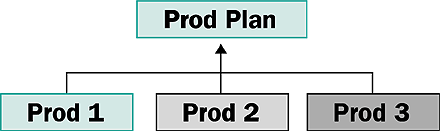
Figure 2
A simple product hierarchy
APO groups master data into two basic types of hierarchies to support aggregated planning: individual hierarchies with nodes that belong to the same master data object, and generated hierarchies, which feature nodes generated from individual hierarchies and the combined nodes from individual hierarchies.
Both types of hierarchies are featured in the example depicted in Figure 3, which provides a skeleton diagram of the first scenario I described with the products being manufactured at two plants. Individual hierarchies on the left of the diagram are formed for individual elements related to locations and products (REL_LOKATION, REL_PRODUKT). The generated hierarchy is located on the right (REL_LOKATIONPRODUKT) and is generated from individual location and product hierarchies based on location and product planning objects.
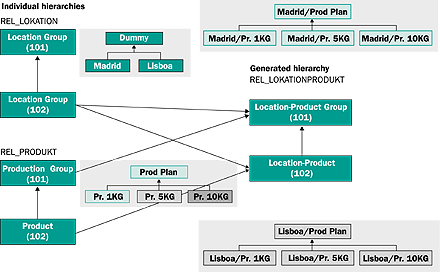
Figure 3
How the final hierarchy is generated
The lines connecting the individual hierarchies levels to levels of the generated hierarchies in Figure 3 determine how data is combined. In this example, the products (Pr. 1KG, Pr. 5KG, and Pr. 10KG) have been consolidated into one so-called "dummy" product (Prod Plan) and the locations (Madrid and Lisboa) are lumped into one dummy location (Dummy). The hierarchy levels are expressed as 101 as 102 and each corresponds to where nodes for the locations and products are added when maintaining the hierarchy. The header level is represented by 101 and 102 is the second level. The generated hierarchy header level is used for aggregate planning. Note that the dummy location is not relevant for planning in my first scenario, so there is no line from the location hierarchy header (Location Group (101)) to the generated hierarchy.
Hierarchies are maintained by following menu path APO>Master Data>Hierarchy or transaction /n/SAPAPO/ SCCRELHSHOW and attaching data objects to the correct level (Figure 4). For the example in the Figure 3, the aggregated product data Plan Prod would occupy the parent level, and objects for products at the SKU level would populate the second level in the hierarchy.

Figure 4
Build hierarchy attaching new objects (Hierarchy maintenance)
Interactive SNP
The interactive planning screen in SNP is the central point for running plans,
displaying plan information, and making manual changes. It also provides the functionality to perform aggregated planning. Follow the menu APO>SNP>Planning>Interactive SNP (All Books) or use transaction /n/SAPAPO/SDP94 to access the interactive planning screen.
The screen consists of a selector and a work area (Figure 5). The right section resembles a spreadsheet and contains rows representing key figures, while the left section offers an array of tools for data selection and manipulation. Key figures are accessed near the center of the screen and manipulated in the spreadsheet section.

Figure 5
Interactive SNP (transaction /n/SAPAPO/SDP94)
Key figures in SNP can be extracted from orders or calculated. An order in the APO environment refers to any element relevant to planning including production orders, forecasts, sales orders, planned orders, purchase requisitions, and so on. Key figures created automatically in APO Demand Planning or manually maintained can be used in SNP for aggregate planning. Calculated key figures can also be used including rows calculated via macros or exit functions or those calculated using other key figures. Total demand, for example, as a sum of forecast, sales order, dependent demand, and other demand elements is a calculated key figure available for aggregate planning based on previously aggregated key figures.
Key figures including Forecast, Sales Orders, Distribution Demand (Planned) and others are aggregated at a group level using hierarchies as the foundation for data consolidation. The Forecast key figure for the Prod Plan in the example I detailed earlier will consolidate forecast information coming from Prod 1 KG, Prod 5 KG, and Prod 10 KG. Some key figures such as Production (Confirmed) are not ready for aggregation in the original settings delivered by SAP but can be maintained for use in a hierarchy, which will support data aggregation. Check to see if your planning process requires additional steps to aggregate new key figures.
Tip!
It is often not easy to understand how a hierarchy is defined. Model new hierarchies by drawing a hierarchy skeleton such as Figure 3 in advance for an overview of how aggregation will work and what the final hierarchy will look like.
Planning books and data views, which I will cover in more detail in future articles, establish the information displayed in the interactive planning screen. The appropriate planning books are linked to the planning area during SNP configuration. The SCM 4.0 planning area provides access to key figures with the prefix Aggregated in Figure 5 such as Aggregated distribution demand, Aggregated
distribution receipt, or Aggregated
production, which are used during
aggregation and disaggregation.
Planning Solutions
The basic planning process in SNP employs two steps: First, a heuristic function runs, which is followed by a capacity-leveling function. The heuristic uses algorithms based on experience, assumptions, or hypotheses oriented to solve complex problems like product planning. The capacity- leveling function then identifies potential bottlenecks at any involved sites.
The heuristic execution is similar to the procedure used for material requirements planning (MRP) or the master production scheduling (MPS) processes. It is run at the start of any planning process and calculates all required quantities and dates. The SNP heuristic then accommodates these requirements by supplying elements like planned orders or purchase requisitions. Planning for several locations in a supply chain network is supported and all locations where a planned product exists are covered. The SNP heuristic process is repeated for each level of the network generating all the production and purchase requirements.
The SNP Optimizer is an alternative planning solution. It supports hierarchical planning and offers a cost-based planning solution to source decisions, timing considerations, and so on by seeking the minimum costs. SNP also offers a Capable-to-Match (CTM) feature that solves planning problems by setting
priorities. If you want to replenish a
distribution center from two plants, for example, it attempts to use supplies from the plant with highest priority and uses the second facility, which has a more limited capacity, only when the first is not available.
Both the heuristic approach and the SNP Optimizer support hierarchies for aggregate planning. CTM, however, does not. If you'd like to learn more about these methods, refer to "Comparison of the Planning Methods" in the Documentation for SAP Supply Chain Management (https://help.sap.com/) and related links.
Aggregates and Disaggregates
An aggregated planning scenario introduces modifications to the basic heuristic process. The heuristic run initially yields plans at the first level of the hierarchy — Prod Plan in my example. Orders are accumulated from products existing at lower levels of the planning hierarchy and that data is loaded into SNP via the interactive planning screen and aggregated automatically. When the capacity-leveling function runs, it focuses on a product family instead of an individual item, which results in new lead times or processing times based on an average of all the individual product lead times in the family.
After generating planning results for a product family at the header level, SNP allows for "disaggregation." Subsequent steps in the planning process such as executing an MRP in either APO or R/3 for components like labels or packing materials require the disaggregation procedure. It allows the remaining activities to be linked back to the second level of the hierarchy and provides access to specific data about objects in the second hierarchical. In my example, disaggregation returns the aggregated individual SKU data to its original value. Because the labels for Pr. 1KG is different from the Pr. 5KG labels, they cannot plan it at the aggregated level.
Supported by a button in the interactive planning screen, disaggregation is a basic mathematical task that inverts the aggregation step. For each product that is aggregated, an inverse contribution factor is calculated and this factor is used to return aggregated figures back to its original level. The modeled hierarchies used in the aggregation process drive the disaggregation process.
Note that during both the aggregation and disaggregation processes, the system performs unit of measure (UoM) conversions to a common. You cannot create a plan without having a shared UoM as your reference.
Problem Solving
In the product planning scenario I described earlier, you have a couple of ways to use aggregated data in SNP for planning processes. For this example, I have placed the transactional data at the individual product level in Table 1.
Stock at Madrid plant
Prod 1 KG = 3 EA
Prod 5 KG = 1 EA
Prod 10 KG = 2 EA
Total = 28 KG |
Sales orders in the past
Prod 1 KG = 8 EA (8 KG)
Manufacturing orders 21.7.2004
Prod 5 KG = 10 EA (50 KG)
|
Demand on 22.7.2004
Prod 1 KG = 9 EA
Prod 5 KG = 10 EA
Prod 10 KG = 10 EA
Total = 159 KG |
|
| Table 1 |
Transactional data at individual product level |
Initially, you should verify that the key figures are aggregating your transactional data properly. In this case, comparing the key figures Sales Order, Forecast, Production (Confirmed) in Figure 5 shows sum totals of quantities that square with the transactional data in Table 1. Note also that the Stock on Hand key figure Initial value (20 KG) in Figure 5 is in line with the transactional data. The past aggregated sales orders in Table 1 (Sales orders in the past) is subtracted from the total inventory in the table (Stock at Madrid plant) and the difference of the two (28 KG – 8 KG) is equal to the 20 KG in the Stock on Hand row in Figure 5.
Once the data has been verified, the system can be used to perform a variety of planning solutions. For example, via the heuristic, you can run net demand elements against the inventory, fixed production, and so on, and calculate the requirements for different sources, either external or from internal production.
Let's look at some of the details of how product planning can be done at the location level. First you click on the location icon in the interactive planning screen toolbar to run the heuristic for product planning at the location level. If a supply-chain network with several locations is involved, use the network planning icon to plan all locations where the product exists. As noted earlier, the heuristic runs repeatedly for each level of the network in this mode, generating all the production and purchase requirements. In our scenario, a planned order is created by the heuristic at product group level covering aggregated demands (Figure 6).
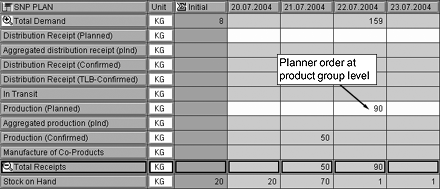
Figure 6
Planned order is created at product group level
Next, click on the Capacity leveling button in Figure 7 for the production capacity at your manufacturing sites. The data view displays capacity. If there are any production issues, you can adjust capacity levels for factories at the product group level. If capacity is stretched too thin and resources become strained, resource utilization levels can be adjusted to balance the resource load.
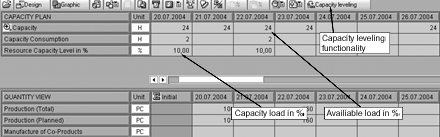
Figure 7
Data view for capacity leveling
Resource adjustments are made via production process model (PPM) structures and PPM hierarchies. PPMs consolidate production routing and bills of materials in the master data and are used to assign activities. To analyze capacity at an aggregated level, create a PPM hierarchy with the aggregated planning products (Prod Plan) at the header level and individual products at the second level.
Follow the menu path APO>Master Data>Hierarchy to create a new hierarchy with PPMs. With the PPM-based hierarchy, planners analyze capacity consumption and, if needed, execute the capacity leveling function at product group level to flatten capacity of critical resources.
Once aggregated planning is complete at the product group level and the resource capacity is evaluated, the final step is to return the top-level data (ZAMF_PRODPLAN) to the second level by clicking on the dissaggregation icon in the interactive planning screen. The Net Requirements (Disaggregation) key supports this task. As information accumulates, a macro fills this key figure with data about how much each product contributes to the total demand, taking into account the conversion of the different UoMs.
The process described in this article was executed interactively but data volumes may require that it be executed in background mode. Background running requires defining additional data like
variants, jobs, and so on. The data is maintained following menu path APO>Supply Network Planning>Planning>Supply Network Planning in Background.

Adolfo Menéndez Fernández
Adolfo Menéndez Fernández is the application architecture manager at Repsol in Madrid. Previously, he worked at SAP Consulting Spain as the logistics consulting manager. He studied at the University of Oviedo, where he earned an electronic engineering degree. He is a certified SAP consultant in supply and demand planning (SNP and DP), order fulfillment (Global Available-to-Promise), production planning and detailed scheduling (PP/DS), as well as procurement and materials management (MM). Adolfo has more than 10 years of SAP implementation experience in the consumer product goods, pharmaceutical, automotive, furniture, textile, chemical, oil & gas, and steel industries using SAP ERP logistic modules (including PP, MM, and sales and distribution [SD]) as well as SAP SCM (DP, SNP, and PP/DS). He is APICS certified in Production and Inventory Management (CPIM).
You may contact the author at asturiasadolfo@yahoo.com.
If you have comments about this article or publication, or would like to submit an article idea, please contact the editor.





 Premium