Manager
Understand the most important conceptual aspects of template management as driven by SAP Solution Manager.
Key Concept
Template management allows organizations with multi-site SAP installations to efficiently manage their business processes across geographical distances, from initial template definition to template implementation and template optimization (such as in a global rollout). Template management helps you harmonize and synchronize business processes throughout your enterprise and consequently stay compliant with internal or external standards and requirements. At the same time, it also helps you minimize implementation efforts through centralized template design, build, and testing.
Template management is a dedicated process found in application life cycle management (ALM), an Information Technology Infrastructure Library (ITIL)-driven SAP model that provides processes, tools, services, and an organizational model you can use to manage both SAP and non-SAP solutions throughout a complete application life cycle. The ALM model spans six different phases:
- Requirements: Gather requirements for new or adapted applications based on your business needs
- Design: Translate requirements into feature specifications (in other words, the Business Blueprint)
- Build and test: Prepare application and operational model for deployment
- Deploy: Incorporate an operational model in the existing IT environment and install the application on top of the operational model
- Operate: Deliver the service required by the business
- Optimize: Analyze the results of the service level performance and act on it
With template management, your company can profit in a variety of ways: SAP Solution Manager serves as a single source of template definition, implementation, and operative use. All process-related information (e.g., documentation, configuration, test material, and results) is centrally stored and accessible. It enforces business process standardization and compliance throughout the company. Using the GlobalASAP methodology, which can be enriched with your company-specific standards and guidelines, you can transfer leading business practices into all lines of your business. Moreover, the reuse of templates in implementation projects ensures the investments made in central template development and minimizes investments for redundant process development. Finally, the compare and adjust functionality assists you in adjusting your processes between different life cycle phases.
I will introduce you to template management by describing the concept and elaborating on centralized and decentralized approaches. I’ll then show you how to build and implement a template and how to handle template updates using automated compare and adjust mechanisms provided with SAP Solution Manager. Template management covers the entire life cycle of a solution and therefore needs to be thoroughly planned from the very beginning.
The Right Approach for Template Setup
Two approaches exist for arriving at a holistic template definition and working with a template along the application life cycle:
- Centralized approach: One template as a to-be and an as-is solution. This means one centralized corporate template is valid for all regions (e.g., all of Europe and the US). The template hosts both global and regional processes and settings that you may not classify separately. This setup is usually based on a single-instance approach — that is, all regions are working on one system (e.g., on one SAP ERP system). Separate template implementations are not necessary because the template that has been defined, configured, and tested already represents the implemented solution. Such a setup may be the consequence of a global roll-in where you aimed to consolidate systems.
- Decentralized approach, also called the global rollout approach (there are two directions within this option):
a) A template that covers global processes: One corporate template stores all mandatory corporate processes, which are classified as global processes and therefore must not be changed in regional implementations. Regional processes are not defined as an integral part of the template. The corporate template is rolled out to different regions (e.g., to Europe and the US) where regional implementations are executed and regional processes are defined. When finalized, these regional implementation projects are transferred to regional solutions for operative use. The setup described here (2a) is typically based on a multi-instance approach, which is what is used in a case with various SAP ERP systems located in different regions. There is one global instance and at least one regional instance that require additional region-specific implementation steps.
b) A template covering global and regional processes: This approach is similar to the setup I just described except that in this approach, the regional processes are already designed as an integral part of the corporate template. Thus, the template contains both global corporate and local regional processes. Unlike the global corporate processes, the regional processes are typically not “modeled to implement,” but instead serve as a reference recommended for regional implementations. In this sense, this approach entails a stronger governance aspect and provides transparency in business processes that are going to be implemented company wide.
The approach you choose depends on your specific situation. The template setup can vary with the IT landscape, company-specific governance aspects, and your experience in previous template update cycles. For example, you may decide to start out only defining the common set of business processes to be operated in a standardized fashion throughout the company, which includes only the definition of the global corporate processes (approach 2a). However, when you pass through the various template update cycles, you might realize it seems best to define regional processes directly in the template. Thus, the approach can be changed to approach 2b.
The decentralized approach of template creation and local/regional template implementation is supported by the GlobalASAP methodology. For background on this topic, you can refer to https://service.sap.com/roadmaps. GlobalASAP delivers a process-oriented and concise methodology called the GlobalASAP Roadmap for step by-step direction throughout your global or multi-site SAP implementation. There are two roadmaps:
- The GlobalASAP Template Roadmap for template creation and pilot rollout
- The GlobalASAP Rollout Roadmap for template implementation
These roadmaps are fully embedded in SAP Solution Manager. SAP Solution Manager also provides an authoring environment to create a customer-specific roadmap approach by either copying SAP-defined roadmaps and adapting them with your own best practices and guidelines, (e.g., for business process and document naming conventions) or by creating a roadmap from scratch.
For my example, I concentrate on the major steps of the decentralized approach. This is the more complex approach, and you can easily relate it to the centralized approach because the centralized approach involves fewer steps (because it subsumes the activities for template build and implementation).
Building Templates
A template in SAP Solution Manager is defined as a container that bundles business processes, which are standardized to an extent. It links to the underlying system landscape with process-specific developments, configuration, and test data, and you can use it for rollouts to other regions. The template definition process involves the activities shown in Figure 1.
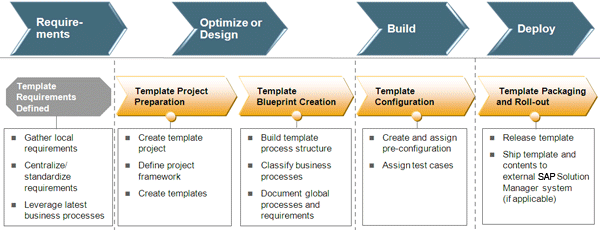
Figure 1
Activities involved in template definition
Internal and external drivers (e.g., requirements for enhanced functionality) as well as constraints (e.g., the need to harmonize business processes and underlying IT) are behind template management approaches. Once senior management or board approval has been obtained, you — as a member of the global template team — can get started with template project preparation by defining the project framework (e.g., project standards and project staffing) and the templates.
In the template blueprint phase, you define the scope of the global processes that must be implemented by the various regions. This involves not only the structure and description of the business processes, but also the classification of these processes (e.g., as global or local).
Classifying business processes with global attributes qualifies the nature of a process and the scope of changes allowed to these processes in regional implementation projects. The global attribute locks a business process against any further changes by the regions. If you assign a local attribute to a process, these processes are a copy template for regions and can be adapted by these regions during implementation projects. The easiest way to start your global Business Blueprint design is to use predefined implementation content from SAP. This includes information from the Business Process Repository (BPR), which is an SAP repository of solutions and application-related reference processes, or from other catalyst solutions.
In the template configuration phase, you assign pre-configuration, customer-specific developments, and test material to speed up configuration and test activities in the regions’ implementations. If configuration is stored in Business Configuration Sets (BC Sets), customizing copied from the central reference development landscape can be applied easily to the region’s development landscape — with or without room for modification. In regional implementations, test cases can be taken as a copy reference to prepare region-specific test activities. SAP plans to offer functionality that helps customers to manage template test plans as integral part of a template project. This reduces the regions’ test efforts to set up their own test plans because they can simply copy the template test plans and adjust them in the context of their regional implementation projects.
Having completed the template, you release and package it and roll it out to the regions. If the regional implementation projects are performed on another SAP Solution Manager system, you have to transport the template to this respective SAP Solution Manager system first.
Implementing Templates
The template is rolled out to regions and implemented by local rollout teams using implementation projects. The template implementation process involves the activities shown in Figure 2.
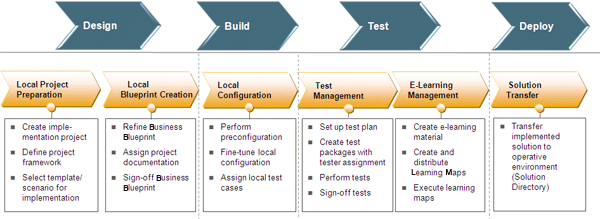
Figure 2
Activities in template implementation
As you can see in Figure 2, the template definition and the template implementation process have many functional activities in common. Therefore, I’ll briefly outline the major activities and concentrate on the activities that are specific to the implementation process.
First, the members of the local implementation team start their local implementation project. This involves defining the project framework and, most importantly, the selection of the targeted templates and business scenarios for implementation. When you generate the project based on the selected templates and scenarios, the process structure (and all its pre-configuration, documentation, and test material assignments) is automatically copied into the regional implementation project.
In the local blueprint phase, the Business Blueprint is refined based on the blueprint delivered with the template. This can include the adaptation of business processes classified as local by introducing a new region-specific process and adding region-specific configuration and documentation.
In the local configuration phase, you execute the pre-configuration delivered with the template and adapt the test material to suit your local test activities and to perform the testing. You can leverage the full capabilities of the ALM process of Test Management — from setting up test plans and sizing them into smaller test packages for testing to reporting on test results. As described earlier, the planned availability of template test plans can jump start local test activities.
Optionally, you can use SAP Solution Manager embedded e-learning management capabilities, which is an authoring environment that helps you create and distribute customer-specific e-learning maps. These e-learning maps are HTML-based learning units that address the dedicated training needs of different user roles (e.g., purchasers or sales clerks). They are quick and easy to assemble because you can include any kind of material that you created during the project phase — such as Microsoft PowerPoint presentations, business process or transaction descriptions, or e-tutorials.
Finally, the implemented local solution is deployed into an operative environment. All implemented processes, including system landscape-related information, are transferred to the operative solution directory. The data stored here serves as a prerequisite for other ALM processes, such as business process operations (including business process monitoring) and maintenance management (including maintenance activities with the maintenance optimizer).
Update Templates throughout the Solution Lifecycle
An implemented solution is not static — it is subject to subsequent changes. To understand how a template evolves in the application life cycle (from assembly to implementation to use in operations), I will walk you through the activities shown in Figure 3.
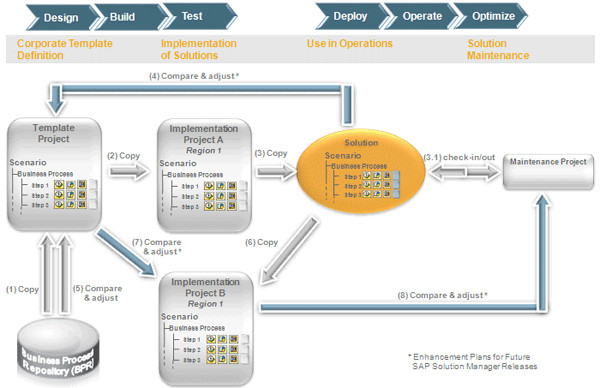
Figure 3
From templates to solutions
To start, create the template project, which I depicted as (1) in Figure 3. You can base this on BPR content or catalyst solutions, as I stated previously. The template contents, which are copied into an implementation project — for my example, implementation project A for a dedicated region (2) — are then transferred into an operative solution when the project has been completed (3). From here, you can maintain it in what is called a maintenance project using check-in and check-out mechanisms (3.1). As a rule of thumb, you should manage smaller changes (e.g., process document changes or additional transaction or configuration assignments) in this maintenance project. Larger changes (e.g., the introduction of a new business process) should be handled in the template and implementation projects.
Over the course of time, significant changes to a template are often required and may be implemented as a new template release. For example, the need for changes can originate from functional improvements or enhancements introduced with SAP enhancement packages, new business process versions available with the BPR, or new requirements for business process redesign. Changes may also arise from the various regions and are often triggered by the Solution Documentation Assistant, an SAP Solution Manager functionality that helps you analyze your regions’ productive systems. This functionality is an integral part of the ALM process Solution Documentation.
All these requirements eventually lead to the creation of an updated template. Regional changes are rolled back from the productive solution to the template project. Currently, this is a manual step but SAP plans to support it with an automated compare and adjust function (step (4) in Figure 3. (For more on SAP’s plans for this functionality, see the sidebar “More on the Compare and Adjust Functionality Planned by SAP” at the end of this article.) This is a boost to the life cycle concept because it can considerably reduce the efforts involved in business process updates. Once again, you can base the template update on the latest SAP-defined implementation content from the BPR, shown as (5) in Figure 3. Typically, you would keep the initial implementation project A as a reference for documentation and revision purposes. Once the project has been completed and set to a finished status, it is locked against further changes.
To proceed with the next implementation cycle, you must copy the solution to a new region-specific implementation project B (shown as (6) in Figure 3) from which you start the next template implementation wave. It is important to remember that within a solution’s life cycle, there is only one dedicated productive solution into which all business processes of the life cycle are synchronized. However, you must organize and transfer your processes along the life cycle as shown in Figure 3 in order for SAP’s planned enhancements to the delta compare and adjust functionality to work in your template project, implementation project, and productive solution. This ultimately reduces the manual update work between your different life cycle phases.
The updated template is rolled out once more to the region in scope whereas you would typically transfer only delta changes to the new implementation project B. However, this involves manual activities that SAP plans to support by the compare and adjust functionality in the future (7). Having completed the second implementation wave, the updated or changed business processes must be sent from the implementation project to the productive solution; this is currently a manual activity but SAP plans to support this manual activity in an automated fashion (8).
Note
For general information on ALM, refer to
https://service.sap.com/alm. SAP offers a variety of services to get you started with dedicated ALM processes and SAP Solution Manager. Refer to Related Topics > Services on the ALM page to update yourself on the latest available services. For more on template management, navigate to Related Topics > Processes > Template Management.
More on the Compare and Adjust Functionality Planned by SAP
SAP plans to enhance the compare and adjust functionality so it will compare against direct and indirect predecessors and successors. Currently, it can only compare against the direct predecessor (e.g., between an updated template and related implementation project). Even though complete life cycle support is not yet fully provided in an automated fashion by SAP, I’ll show you the underlying concept so you can prepare your customer-specific life cycle setup in a way that allows for future compare and adjust functionalities. The goal of the functionality is to retrieve and transfer business process-related differences between different life cycle phases (e.g., from an updated template into your latest implementation project). It comprises a two-step approach (
Figure A).
- SAP Solution Manager helps you compare your current implementation project with the updated template. It highlights all business processes in your implementation project that are subject to change when you implement the updated template.
- You decide which changes you transfer. In other words, you adjust changes into your implementation project on the level of individual business processes and process steps. You can do this directly in the implementation project with the compare and adjust functionality.
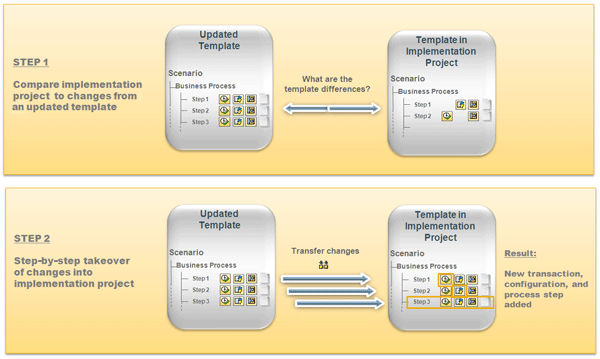
Figure A
The compare and adjust approach
The scope of the automated compare and adjust includes new or deleted business processes, process name changes, changes to the assigned template content (such as configuration and test cases), and customer-specific development. A change in the global attribute values, which classify the nature of a process and define the scope of changes in a rollout implementation project, can also be taken into account.
As a limitation, alterations in the actual objects describing the business process (e.g., changes within pre-configuration such as BC Sets and automated test cases such as extended Computer Aided Test Tool [eCATT], or changes within a document text) are not detected and highlighted by the compare and adjust functionality. Therefore, I recommend manually replacing the older version of an object (such as a BC Set) with a newer version.
When the implementation project is updated in SAP Solution Manager, global developments and configurations still need to be synchronously applied to the regions’ managed systems, documented, and tested. If you want to enforce a formalized governance process with dedicated check points, you can couple the transport logistics for your developments with Quality Gate Management and change control mechanisms (these functionalities are part of SAP Solution Manager).
Doreen Baseler
Doreen Baseler completed her remote business studies with a master of arts degree at the AKAD Hochschule Suttgart, Germany, in September 2009. She also has a diploma in English and Spanish translation from the Fachhochschule Magdeburg, Germany, and the Universidad Complutense Madrid, Spain. She joined SAP in 1999, working initially in the area of ASAP implementation tools and as a Reverse Business Engineer. Since 2000, she has been working in SAP Solution Manager product management with a focus on the implementation of SAP solutions, template management, and system landscape management.
If you have comments about this article or publication, or would like to submit an article idea, please contact the editor.