In this excerpt from Srivathsan Narayanan’s book, Optimizing Reverse Logistics in SAP ERP, learn how to process transactions by deactivating serialization requirements in SAP ERP when a serial number isn’t provided.
Key Concept
Serialization is the process of enabling serial number tracking for materials. With serial numbers, materials can be tracked across all business processes, capturing and recording important information regarding quality, warranty, and other information in the system. In SAP ERP, serial number management is enabled in the configuration, where you can define the serial number management processes and how the serial numbers will be used across the network.
Even though serialization mostly requires parts to be serialized through the whole network, there are certain occasions where a serial number isn’t provided when transactions or goods movement are performed.
For example, when the company’s stock is stored in a customer location and the data regarding transactions are provided after the fact using an interface from the customer or in the form of a file, the serial number isn’t provided at the time of performing the transaction.
Another example in which serial numbers aren’t provided for serialized parts is when a service engineer is responsible for performing a service on the equipment using the company’s stock stored at the customer site. He would remove the stock and record the removal, but not the serial number. The customer reports the serial number later in the form of an interface or in a file.
To perform this transaction without providing a serial number (even though the material number has a serial number profile attached to it), the best solution is to deactivate serialization requirements at the movement type level. You can define this in plant maintenance (PM) by following menu path Plant Maintenance and Customer Service > Technical Objects > Serial Number Management > Define Serialization Attributes for Movement Types.
In this configuration, there are two options:
- Define flow type groups
- Assign the movement type group to the movement type
For the define flow type groups, you’ll configure movement type groups for a serial number profile and define the serialization use and equipment master creation requirement with serial numbers.
Even though the same field is defined at the serial number profile configuration, the movement type group setting takes precedence over the serial number profile setting for serial number use. Figure 1 shows the definition of the flow type groups.
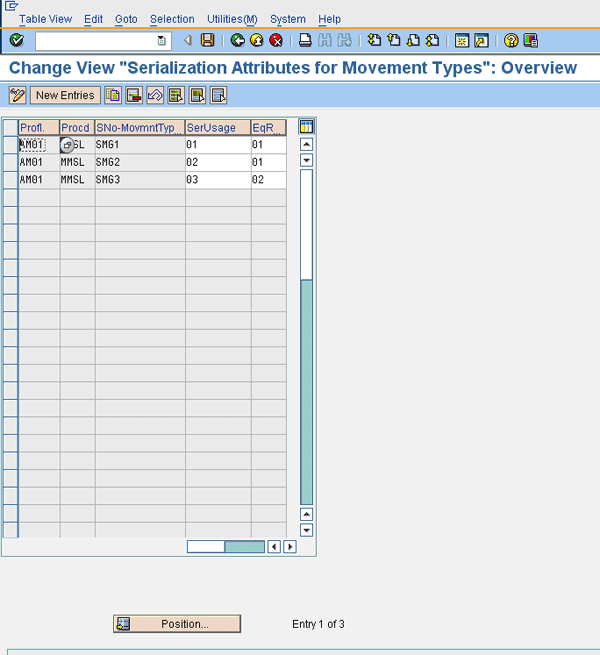
Figure 1
Define flow type groups for movement type groups in serialization
After the definition of the flow type group, you need to assign the movement type group to individual movement types in the configuration. To assign a movement type group to movement types, follow menu path Configuration > Plant Maintenance and Customer Service > Master Data in Plant Maintenance and Customer Service > Technical Settings > Serial Number Management > Define Serialization Attributes for Movement Types > Assignment of Movement Type Group to Movement Type.
Figure 2 shows the assignment of movement type 101 to the movement type group SMG1.
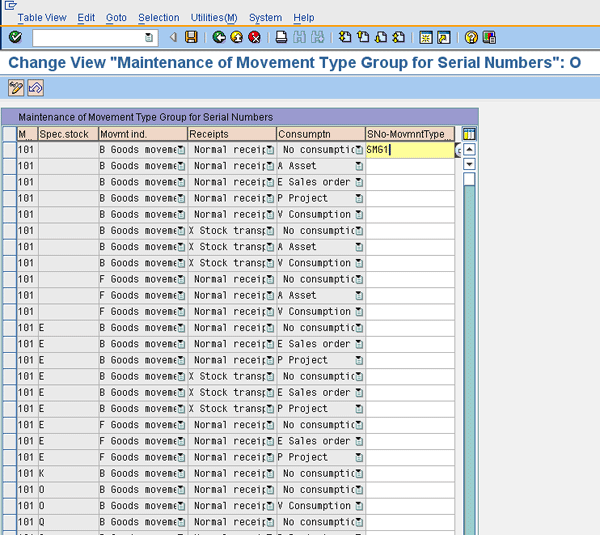
Figure 2
Assign a movement type group to a movement type
For every movement type, you assign a movement type group, which makes serialization optional, mandatory, or not applicable. It’s important to remember that this configuration overwrites the serial number profile definition requirements for serial number use. This configuration helps businesses manage complex serial number requirements.
For example, when your company ships a product to be refurbished, it typically uses a subcontract purchase order. In the subcontract purchase order, the material that is being refurbished is sent to the vendor as a component. Because the same part number comes back as a finished product, the parent item in the purchase order also contains the same material number. In SAP ERP, if you ship a component in a subcontract purchase order and provide a serial number in that transaction, you receive the Serial number recursiveness error message if you try to receive the same material number back with the same serial number after the completion of the subcontracting service.
To avoid this, you can turn off serialization for the movement type that ships the product to the vendor so that when the product is being received back, you can use the same serial number. Because SAP ERP didn’t track the part/serial number combination being sent as a component of a subcontract purchase order, this receipt is allowed.
As you can see, there are several complex serial number requirements that can be easily handled by a combination of configuration options available for serial number management in SAP ERP.
Some companies have requirements on certain locations or plants where they don’t want to have serialization. For example, there are some customer-managed locations where companies store products for the customer to use. In some cases, the serial numbers aren’t tracked in these locations, so they require that serial number tracking be turned off.
This can be easily handled by not maintaining the serial number profile for materials in these plants. This eliminates the need for serialization in this location. But this also causes issues when products are being shipped to this location from some other internal location using a stock transfer order STO. As I discussed earlier in this chapter, if the material serial number profile doesn’t match, then SAP ERP doesn’t allow the users to ship products between these two plants on an STO. To handle this requirement, maintain a serial number profile for both plants, but turn off serialization at the movement type level. To do this, you create a new movement type copied from the existing movement type and assign it to a new schedule line category, which is assigned to a new delivery item category used on the STO.
The new delivery item category is then assigned to the combination of these two plants so SAP ERP allows shipments between them without serialization requirements. Similarly, the receiving plant can also use a new movement type that doesn’t require serialization to receive products.
You can set up different delivery types for stock transfer between two plants by following menu path Materials Management > Purchasing > Purchase Order > Setup Stock Transport Order > Assign Delivery Type and Checking Rule (Figure 3). You need to assign the delivery type for every supplying plant.
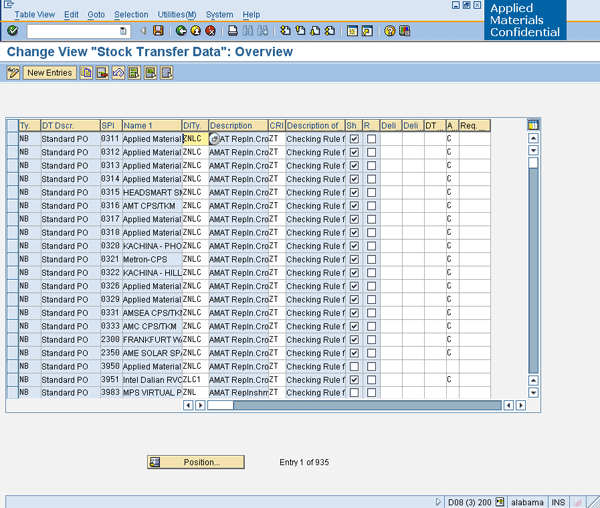
Figure 3
Assigning delivery types to a supplying plant in purchasing
Note
You need to do this configuration for the supplying plant. If a custom delivery type that doesn’t require serialization is configured for a plant, all shipments out of that plant do not require serialization.
Srivathsan Narayanan
Srivathsan Narayanan is a principal consultant with the SAP group in Dreamweavers LLC, specializing in logistics execution and RFID integration and is based in San Jose, CA. With more than 10 years of experience in information systems, he has successfully implemented and managed several projects in the SAP MM, SD, and WM modules. He holds a BS degree in engineering and is the author of the SAP PRESS book Optimizing Reverse Logistics in SAP ERP (www.sap-press.com/products/Optimizing-Reverse-Logistics-with-SAP-ERP.html).
You may contact the author at vathsan@dwllc.net.
If you have comments about this article or publication, or would like to submit an article idea, please contact the editor.