Find out about changes to BEx Suite tools in SAP NetWeaver 2004s. They include improvements to Web-based printing, document management, Information Broadcasting, BEx Analyzer, BEx Query Designer, Web Analyzer, and Web Application Designer.
Key Concept
BEx Web, a component of the BEx Suite, includes the new BEx Report Designer (discussed in part 1) as well as the updated BEx Web Analyzer and BEx Web Application Designer (Web AD). BEx Report Designer creates formatted SAP BI reports for presentations. BEx Web Analyzer allows you to analyze data via a URL or an iView in SAP NetWeaver Portal. With BEx Web AD, you can create Web sites with SAP BI content.
With SAP NetWeaver 2004s, several BEx Suite tools receive updates. On the Web side of SAP BI, the major changes include enhanced Web-based printing and a command generation tool to help you create sophisticated Web pages without writing code. For BEx Analyzer, the first major change in years offers better formatting and design capabilities. Finally, updates to document management and Information Broadcasting cross both the Excel- and Web-based areas of SAP BI.
Web-Based Printing
SAP NetWeaver 2004s integrates Adobe PDF formats as the primary way to support Web-based printing. This includes printing BEx Web templates and the Web-based reports created with BEx Report Designer (a new SAP NetWeaver 2004s report formatting tool that I discussed in part 1). Many users felt that limited printing features for the Web in previous versions of SAP BW restricted usability of the Web interface. Enhanced printing capability offered in Adobe PDF files allows users to easily print from the Web. Now users may take advantage of other aspects of the Web interface, such as a cockpit format and faster performance compared to BEx Analyzer. You only need a Web browser installed on the client side to use this feature.
Previously in SAP BW 3.x, you could manually embed the output of a BEx Web application in an Adobe PDF (using the Adobe toolset installed on your PC). Or, you could have used an unsupported, SAP-supplied printing method and class developed with ABAP object-oriented (OO) programming. This behind-the-scenes solution generated simple page formatting that you could print out via your Internet browser. With SAP NetWeaver 2004s, SAP integrates Adobe PDF and direct-to-printer output, thus enabling standard PDF formatting options including page sizes, headers, and footers (Figure 1).
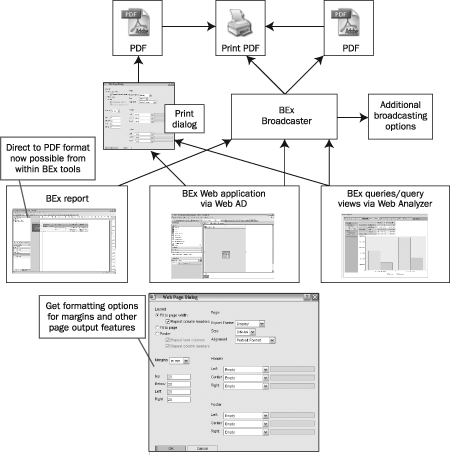
Figure 1
Create Adobe PDF output of BEx queries or query views directly from the BEx Web tool or indirectly via Information Broadcasting
Document Management
Documentation can make or break an SAP BI implementation. If you do not document the metadata with detailed records (such as how you calculate items and where you find InfoCube data), you risk alienating and confusing users over differences between online analytical processing (OLAP) and online transaction processing (OLTP) data. You also should use document management to replace email and phone conversations regarding problems and opportunities.
The major change in document management with SAP NetWeaver 2004s relates to how you can handle documents. In earlier versions, when you accessed the document interface you could view all types of documents, but you could create only text documents. In BW Release 3.5, you could not upload Word files or other complex document types. This limitation disappears with SAP NetWeaver 2004s. Now a new Web-based document browser allows you to display, edit, and create different types of documents. You can initiate the document management GUI from Web Application Designer (Web AD), Web Analyzer, or BEx Analyzer.
Other improvements with document management center on easier access of Knowledge Management (KM) services with documents. These new features include:
- Access to and customizing of KM services, even if you store documents in your SAP BI server and not on a dedicated document server (Content Management [CM] standard repository). Your landscape does not need another server to access KM services.
- Assignment of documents to hierarchy nodes. This allows analysts to document, for example, information about why they organized hierarchy branches a certain way.
- Easier migration of documents residing in SAP BI to CM standard repository. Now you can use older BW 3.x documents with KM document features such as collaboration.
Although in BW Release 3.5 you could have master data, metadata, and InfoProvider documents, you may now leverage KM services on these documents. Figure 2 shows how you can access KM features no matter where your documents physically reside. For example, say you have a sales document for a customer Computer 3000 and you store this document on the BI server. While previously you had to also store this document in a CM standard repository to access KM collaboration features, you now can access KM features from the BI server.
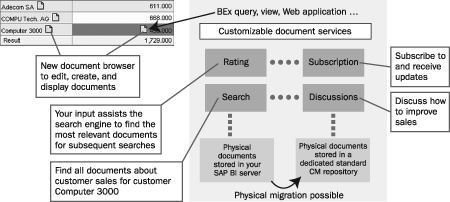
Figure 2
Access KM features from SAP BI server
Information Broadcasting: BEx Broadcaster
Information Broadcasting with BEx Broadcaster in BW Release 3.5 performed some of the same features as Reporting Agent (e.g., generating Web pages at a predetermined time). Now BEx Broadcaster handles all the Reporting Agent tasks as well as some new ones (Figure 3). SAP does not plan to develop Reporting Agent further, although as is the case with all BW 3.x tools, it can run on SAP NetWeaver 2004s. New BEx Broadcaster functions include printing directly to Adobe PDF and multi-channel broadcast to combine other distribution types and formats in one BEx Broadcaster setting. For example, this feature lets you broadcast print and email at the same time from one setting. Previously, one setting could only do one thing at a time.
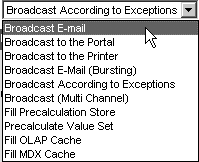
Figure 3
BEx Broadcaster functions
Note
SAP includes the old BW 3.5 tools as part of SAP NetWeaver 2004s. The old tools are completely separate, allowing business areas to upgrade to new features in a step-by-step manner.
Another new feature is bursting, which gets its name from the old process involving huge paper-based reports that you manually had to separate (burst — e.g., by country), then mail to the physical address of the sales manager for the country. With bursting in BEx, you filter once for each sales manager and email a Web link or completed output (Web or Excel workbook) to him or her (Figure 4). Each manager receives the appropriate material, but you do not need a formal authorization scheme as you did for BW 3.5.
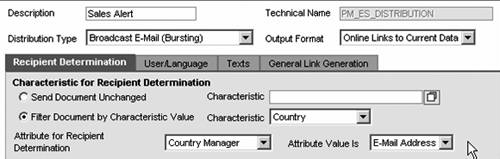
Figure 4
Bursting with Information Broadcasting allows you to filter for sales manager by country, then send your report via email
Note
When you broadcast via the portal, you have KM features available even if you do not store the document in a dedicated KM content repository on a different machine. This means that you do not need a separate KM system.
BEx Analyzer
The improvements to this Excel-based interface focus on how you design workbooks, making the design similar to that of a BEx Web application. The features are best divided between design mode and analysis mode.
In design mode (Figure 5), you create a workbook with visual and navigation elements. Drag design elements including tables, buttons, exceptions, conditions, and drop-down boxes to the layout area, just as you do with Web AD. Then, assign data providers to feed query data to these design elements.
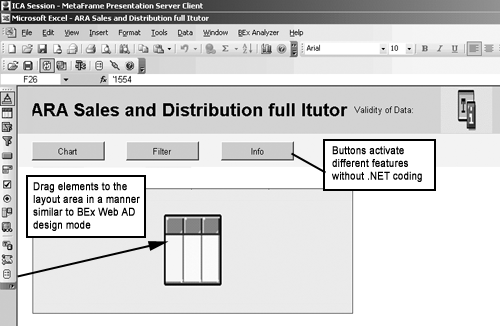
Figure 5
Excel-based design mode. Drag elements from the toolbar on the left to the Excel grid on the right.
Besides the general layout options afforded by the new design methods, you can automatically and uniquely assign Excel formulas to every data cell. You have dedicated formatting options for each cell that are similar to the options included in the new BEx Report Designer. Figure 6 shows some formatting possibilities. With these capabilities you may not need to use third-party formatting tools.
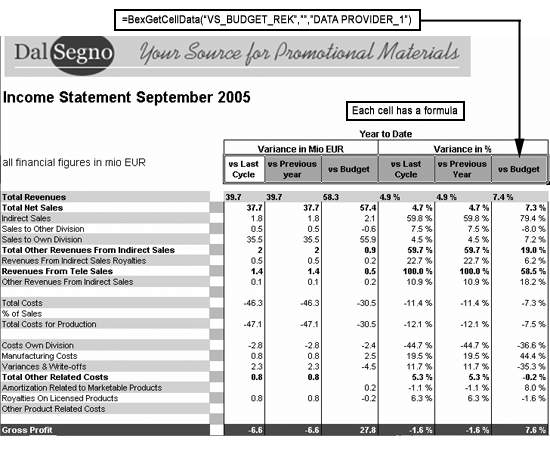
Figure 6
Formatting possibilities in Excel with the new BEx Analyzer design methods
In analysis mode, you can change navigation with the new drag-and-drop method (e.g., swap columns or replace one characteristic with another). This combined with navigation buttons you can add in design mode means that you should not need Visual Basic/.NET code to analyze data.
Note
Refer to help.sap.com documentation for layout limitations involving two structures. Go to BI Suite: Business Explorer>Query Design: BEx Query Designer>Analysis & Reporting: BEx Analyzer>Design Mode>Working in Formula Mode.
BEx Query Designer
BEx Query Designer looks very different in SAP NetWeaver 2004s, offering easier-to-access settings (Figure 7). You can reorganize sections, giving you a custom look and feel. The new Default Values section limits the initial data included in the report. Unlike a filter, you can navigate to other values if you need to after you execute the query.
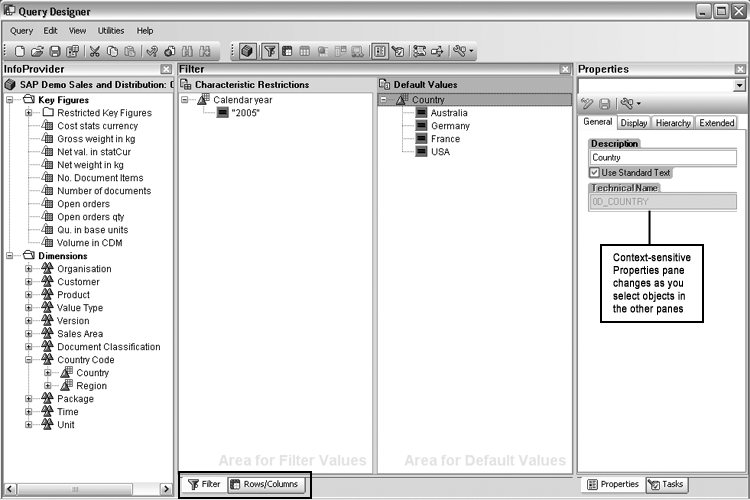
Figure 7
The updated BEx Query Designer. Notice the new Default Values and Properties areas.
However, if you set restrictions in the Default Values section, the system only provides an initial (yet changeable) set of data. You could ask for more data via subsequent navigations, because the characteristics in the default section appear as free characteristics in the output to the user. For example, a default for country US allows an end user to ask for Germany (DE) during navigation, whereas a filter for US prevents the end user from selecting any other country except US. In prior releases this functionality was only possible through a variable setting that allowed subsequent navigation. BEx Query Designer has other features that improve usability, including wizards to create conditions and exceptions.
The Properties window is also new. When you click on objects in the other panes, the Properties frame changes and displays the options available to you for those objects. The center pane toggles between the Filter or Rows/Columns by clicking on the buttons at the bottom of the pane, highlighted in Figure 7. Characteristic Restrictions in the Filter section work the same as they do in BW 3.x — they completely restrict the data available to the user.
Tip!
Although the latest release of BEx Query Designer is easier to use, I still do not recommend that end users develop queries. Instead, power users should handle the primary query design in the functional areas of the business. Web Analyzer and views should cover any ad hoc user needs not covered by queries created by power users.
Web Analyzer
Web Analyzer, a Web-based tool for analysts, was introduced in SAP BW 3.5. In SAP NetWeaver 2004s, Web Analyzer works with KM features to create and save complex analyses more easily using only a Web browser. Although the average user may use this tool as the primary way to obtain Ad Hoc Query analysis, analysts who work primarily in the Web environment can find and execute queries not assigned to their roles. In addition, analysts without formal query design authority can create quick custom queries without needing to consult a power user.
Improvements involve drag-and-drop query design on the Web (though not as sophisticated as with BEx Query Designer), wizards for exceptions and conditions, and easier saving of query views for later use. Integration between SAP BI and SAP NetWeaver Portal allows you to save the results of Ad Hoc Query analysis in your personal portfolio.
Web AD
Although Web AD experienced no major changes to the look and feel, it is now easier to drill down on an area, then filter by a specific criterion. Your Web cockpits become more intuitive by integrating command buttons and tabs that allow you to navigate with a wizard, avoiding the need to add command syntax to get the report results you desire. For example, you could drill down on country and then filter on customer 1000 by using just the command buttons and tabs in the wizard.
In SAP NetWeaver 2004s, these commands are available to build from menus integrated in the design mode of Web AD. A wizard walks you through the functions you want the button to perform and then writes the code. Additions to Web AD include new Web items, more chart types, and drag-and-drop table item navigation (now called an analysis Web item).
Note
For more information about these new features, as well as hands-on experience, refer to the upcoming SAP NetWeaver 2004s delta classes offered by SAP. In the US and Canada, these courses include DBW70E “Extraction and Back End Delta,” DBW70P “SAP BI Planning Delta,” and DBW70R “Reporting and Front End Tools Delta.” Outside of the US and Canada, these courses include TZBI7E “SAP BI — Enterprise Data Warehousing (Delta SAP NetWeaver 2004),” TZBI7R “SAP BI — Enterprise Reporting, Query, and Analysis (Delta SAP NetWeaver 2004s),” and TZBI7P “SAP BI — Enterprise Planning.”
Ned Falk
Ned Falk is a senior education consultant at SAP. In prior positions, he implemented many ERP solutions, including SAP R/3. While at SAP, he initially focused on logistics. Now he focuses on SAP HANA, SAP BW (formerly SAP NetWeaver BW), SAP CRM, and the integration of SAP BW and SAP BusinessObjects tools. You can meet him in person when he teaches SAP HANA, SAP BW, or SAP CRM classes from the Atlanta SAP office, or in a virtual training class over the web. If you need an SAP education plan for SAP HANA, SAP BW, BusinessObjects, or SAP CRM, you may contact Ned via email.
You may contact the author at ned.falk@sap.com.
If you have comments about this article or publication, or would like to submit an article idea, please contact the editor.



 Premium