The starter kit for capital planning for SAP BusinessObjects Planning and Consolidation, version for the Microsoft platform, allows for specific business process flows to be common across budget planning for multi-year capital expenditure investments. See how to use the starter kit as well as the various views available to evaluate different strategic objectives.
Key Concept
The starter kit for capital planning available for SAP BusinessObjects Planning and Consolidation, version for the Microsoft platform, allows for a consistent and accurate approach for multi-year capital expenditure investments aligned with strategic objectives.
Linking strategic planning at the executive level to departmental-level management can occur based on several approaches. The most common resembles what is often referred to as a planning round. A planning round may consider the upcoming fiscal-year budget aligned to specific strategic objectives that are intended to be achieved inside that fiscal year. A planning round may also look downstream to subsequent years to provide insight into fiscal mapping of resources and capital required to achieve particular strategic objectives. This gives the organization advanced warning and allows preparation for it to move in a particular direction and to acquire the talent, capital, and resources needed for execution.
The end product of such a planning round is an operating budget that functional and operational management may use to execute in the upcoming fiscal year, with downstream annual forecasts (summarized in Figure 1). Many organizations treat this operating budget as a compact between executive management and the operational and functional teams. Based on human capital performance management and reward and recognition programs, performance against budget and plan yield significant compensation effects for management and staff alike.
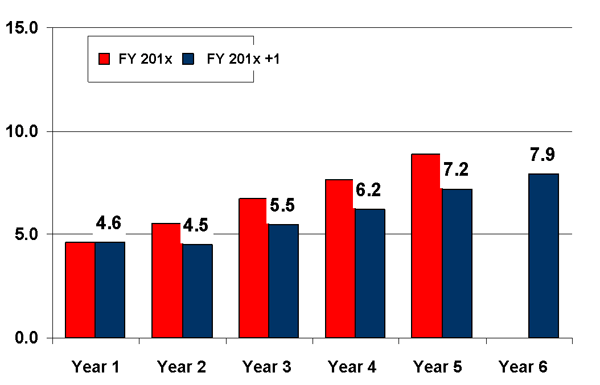
Figure 1
Example of summarized planning round budget levels
Note
The starter kit for capital planning is available for SAP BusinessObjects Planning and Consolidation 7.0, version for the Microsoft platform. The starter kit for capital planning for SAP BusinessObjects Planning and Consolidation 7.5, version for the Microsoft platform, is currently in ramp-up. At the time of this writing there are no plans to release the starter kit for capital planning for SAP BusinessObjects Planning and Consolidation, version for the SAP NetWeaver platform.
By using the starter kit for capital planning, available for SAP BusinessObjects Planning and Consolidation, version for the Microsoft platform, organizations can leverage a consistent, accurate approach to multi-year investments. I’ll show you the highlights of the starter kit for capital planning and some of the key points when using it.
Note
William’s forthcoming book
Understanding SAP BusinessObjects Enterprise Performance Management covers this and other topics. For more information, visit
SAPinsider.com/Store.
Building a Capital Expenditures Planning Environment
One of the areas of interest in planning and forecasting activities is the acquisition of capital expenditures and the investment in liquidity needed to secure them. This is of particular interest for industry segments (e.g., manufacturing) that leverage plant and equipment assets and the financial segments that support those industries.
The starter kit for capital planning, similar to other starter kits from SAP, is available at no additional cost to current licensed customers of SAP BusinessObjects Planning and Consolidation, version for the Microsoft platform. Some of the features of the starter kit for capital planning include:
- Align capital expenditure investments with specific strategic objectives and initiatives
- Create budget projections for the spend, return on investment (ROI), and anticipated revenues realized from the capital expenditure investment
- Manage capital requests and project funding for capital expenditure investments
- Monitor capital expenditure projects through the use of pre-developed SAP BusinessObjects Xcelsius Enterprise dashboards and pre-defined tracking metrics
Strategic goals and objectives defined by the organization require funding and financial enablement to become realized in the organization. You can define these objectives and corresponding projects in SAP BusinessObjects Strategy Management or in spreadsheet-based environments.
Figure 2 depicts the starter kit’s landing page. It offers a unified user experience with context-sensitive action panes and a variety of ways to interface with the application. The landing page gives you a central spot to deliver information about current and planned capital expenditure spending, as well as information about the planning process itself. SAP Business Objects Xcelsius Enterprise dashboards can also display data along with graphics.
Note
The Xcelsius dashboard application is licensed separately and is required to demonstrate the views shown in the starter kit for capital planning.
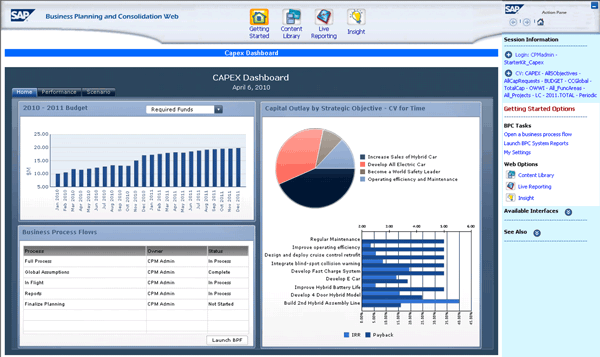
Figure 2
The starter kit’s landing page
The starter kit for capital planning takes advantage of the business process flows (BPFs) that exist in SAP BusinessObjects Planning and Consolidation. BPFs provide the ability to streamline repeatable business processes such as consolidations, forecasting, and budgeting. Managers and administrators can embed existing business processes, such as the annual budget, but can ensure control and consistency in the process. BPFs guide users step by step through a given process. Even users who may only participate once or twice a year no longer have to worry about searching for information to complete a process. Many users may be involved in a given process. These users may be working at different paces, but they all complete the same steps in the same order, as defined by the process. Even though different users may be managing planning for the same region, managers, planners, and administrators will have visibility into how each region is doing based on the typical controls used in this global organization example. For the capital expenditure example, the process and specific region of the capital expenditure planning is selected as shown in Figure 3.
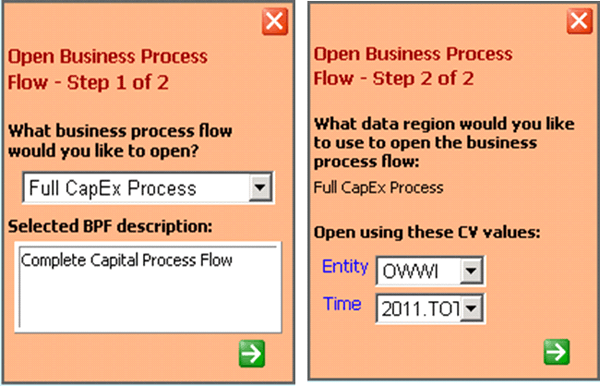
Figure 3
BPFs enable step-by-step process controls for capital expenditure programs
Once the user invokes the BPF for capital expenditures and a given region, the To Do List is shown (Figure 4). You can then navigate the work steps and analysis surrounding capital expenditure planning. In this example, the user would like to enter a new strategic initiative that is associated with a particular strategic objective during formulation and alignment activities.
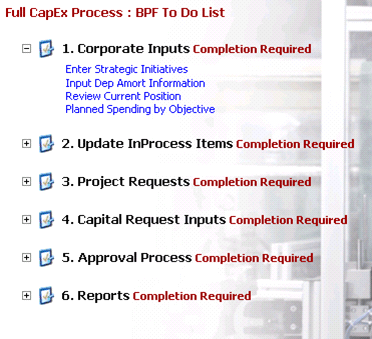
Figure 4
BPF To Do List for corporate inputs
The SAP BusinessObjects Planning and Consolidation budget and planning window allows the user to enter the strategic objectives of the organization. (If you’re using SAP BusinessObjects Strategy Management, you can pre-populate these with integration.) Later in the process, you need to align each request with one of these strategic objectives. This feature gives executives visibility into their capital budget by strategic objective ensuring that spending is aligned with strategy (Figure 5).
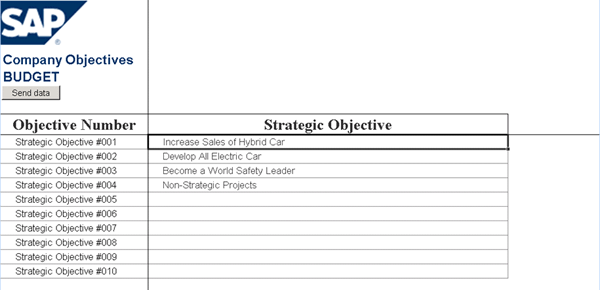
Figure 5
Strategic objectives aligned to a specific budget objective number
From the BPF To Do List, the user can also add specific information on each capital expenditure investment associated with the strategic objectives. This can include depreciation, amortization, and other financial assumptions based on Generally Accepted Accounting Principles (GAAP) for each country or based on the International Financial Reporting Standards (IFRS) approach.
To view the current versus projected flow of capital based on a given capital expenditure investment, the user may select the current position item from the BPF To Do List. Figure 6 illustrates the current and projected capital outlay flows based on the specific strategic objective. You can map source data for each expenditure flow using a variety of source data applications, including flat files, SAP ERP, and third-party applications. I’ll show you this using the Map Project Ids step later.
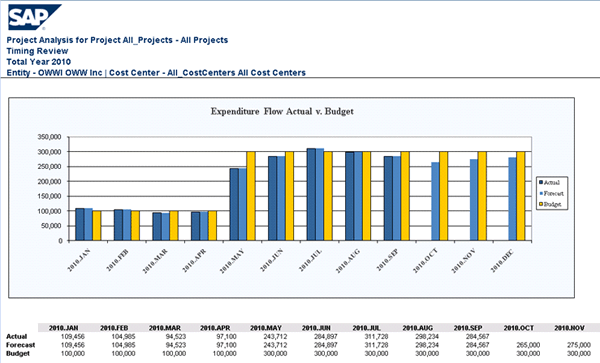
Figure 6
Expenditure capital flow based on capital expenditure initiatives
Another useful monitoring and planning view available in the starter kit is the logical grouping of investments by the strategic objectives provided in the approach (Figure 7). This shows specific spend patterns associated with a given strategic objective, which could include multiple initiatives and capital expenditures. You can see total capital outlay to date based on each of the defined strategic objectives and their corresponding initiatives.

Figure 7
Summary of capital expenditure investments by strategic objective
As mentioned earlier, the starter kit for capital planning provides an active monitoring environment to approved, in-flight projects and shows how those projects are performing against initiatives and strategic objectives. Capital projects lasting several years can span more than one budgeting cycle. As such, the organization needs to review projects that were approved in prior years, but still have planned spending in the current year or future years.
Figure 8 shows the options available from the BPF To Do List in the area of in-process items. One of the unique features of SAP BusinessObjects Planning and Consolidation is the ability to map project information from classic SAP environments (such as SAP ERP) as well as other non-SAP environments. You can accomplish this through the Map Project Ids step.
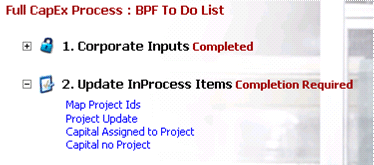
Figure 8
BPF To Do List for in-process items
The Project Update item found in the BPF To Do List provides the user with a review of current in-flight programs associated with strategic objectives. In the example shown in Figure 9, the project status box at the top of the report indicates the project started in June 2009 and is scheduled to complete in 2010. As part of the planning process, the project manager needs to update the forecast and budget periods for this project. This allows for management to view the complete life cycle of the project, relating back to the capital expenditure investment summary against each strategic objective.
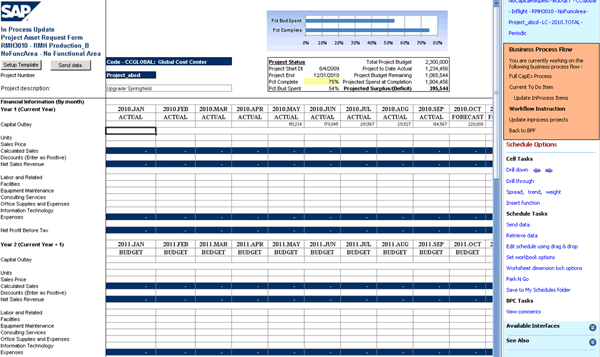
Figure 9
In-process update of project and initiatives
The starter kit for capital planning also provides a mechanism for establishing new projects and their business cases. You can enter them directly into SAP BusinessObjects Planning and Consolidation or have them taken directly from SAP BusinessObjects Strategy Management if you are integrated with it. Once the projects are defined to each strategic objective, management can monitor the results and performance against targets. The BPF To Do List shown in Figure 10 provides several elements available for this purpose.
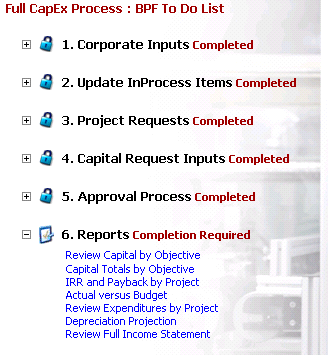
Figure 10
BPF To Do List for reporting and monitoring
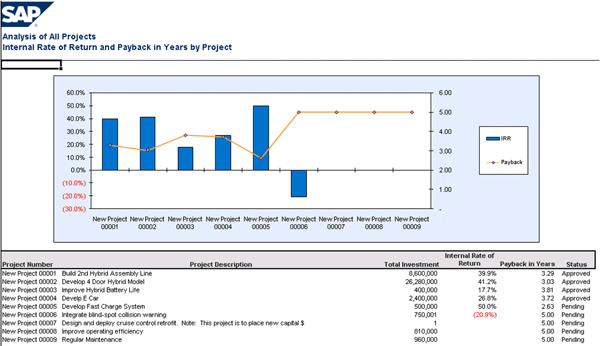
A review of capital expenditures by objective is shown in Figure 11. An executive can see the initiative composition of each strategic objective by funded or pending project, the capital outlay schedule for the funding, as well as the specific cost or profit center providing the funding for each project. An additional view of the internal rate of return (IRR) and project payback (also known as break-even) schedule is shown in Figure 12. Stakeholders can validate initiative sets, which may be integrated with other applications, including SAP BusinessObjects Strategy Management.
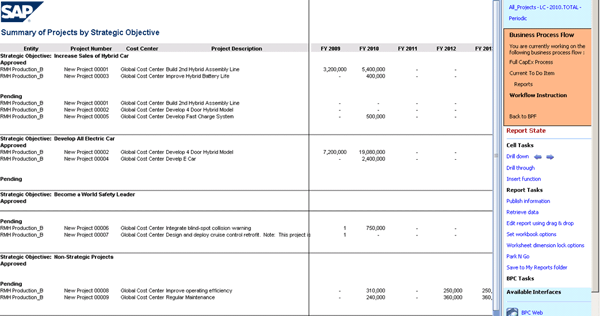
Figure 11
Capital expenditure summary of projects funded and pending by objective

William Newman
William Newman, MBA, CMC is managing principal of Newport Consulting Group, LLC, an SAP partner focused on EPM and GRC solutions. He has over 25 years of experience in the development and management of strategy, process, and technology solutions spanning Fortune 1000, public-sector, midsized and not-for-profit organizations. He is a Certified Management Consultant (CMC) since 1995, qualified trainer by the American Society of Quality (ASQ) since 2000, and a trained Social Fingerprint consultant in social accountability since 2012. William is a recognized ASUG BusinessObjects influencer and a member of SAP’s Influencer Relations program. He holds a BS degree in aerospace engineering from the Henry Samueli School of Engineering and Applied Science at UCLA and an MBA in management and international business from the Conrad L. Hilton School of Management at Loyola Marymount University. He is a member of the adjunct faculty at both Northwood University and the University of Oregon with a focus on management studies and sustainability, respectively.
If you have comments about this article or BI Expert, or would like to submit an article idea, please contact the editor.
You may contact the author at wnewman@newportconsgroup.com.
If you have comments about this article or publication, or would like to submit an article idea, please contact the editor.