Among the benefits of SAP NetWeaver ’04 is better integration between SAP BI and SAP Enterprise Portal (SAP EP). This overview explains what the integration of SAP BW 3.5 with SAP EP 6.0 Support Stack ’04 (and above) provides.
Key Concept
SAP Knowledge Management (SAP KM) is a part of SAP BI that coordinates information within a company. It focuses on rationalizing, organizing, and making accessible unstructured corporate information and consists of two parts, collaboration and content management.
SAP NetWeaver ’04 provides greater compatibility between the SAP BW 3.5 and SAP Enterprise Portal 6.0 than earlier releases of those components. SAP EP 6.0 is better able to accommodate SAP BI content thanks to changes in the iView architecture and enhancements to SAP Knowledge Management (SAP KM), a component of SAP EP.
End users will find the process of publishing SAP BI content into the portal simpler using SAP BW 3.5 and SAP EP 6.0. They can publish SAP EP iViews from SAP BW 3.5 directly in the Business Explorer Web Application Designer (BEx Web AD), BEx Query Designer, or the BEx Broadcaster — this includes publishing of BEx Analyzer workbooks into SAP EP.
I’ll give you an overview of how SAP EP 6.0 integrates with SAP BW 3.5 along with new technical integration points. You will also have a good idea of how the new technology is similar as well as different from its predecessors. I’ll detail the variety of KM document and iView publishing targets that are available and provide you with a number of resources for more detailed information. I will also show you how to publish BEx Analyzer workbooks in the SAP EP 6.0 and demonstrate the portal-based BEx Showcase role.
Technical Integration
In terms of technical integration, SAP BW 3.5 is significantly different from previous SAP BI releases and it provides enhanced interaction with the portal. In SAP EP 5.0, the portal was aware of SAP BI, but SAP BI was not entirely aware of the portal. This is not the case with the new releases. When SAP EP 6.0 is connected to SAP BW 3.5, you maintain entries for SAP EP in the SAP BW 3.5 system. You also can maintain multiple entries when there are multiple target portals.
SAP BW 3.5 connected to SAP EP 5.0 behaves in many ways like an SAP BW 3.0B system, which I described in my article, “Four Ways to Publish SAP BW Content to SAP Enterprise Portal.” SAP BW 3.5 system provides an option for this interaction (Figure 1).
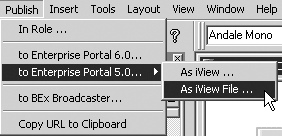
Figure 1
SAP BW 3.5 options for SAP EP 5.0 publishing
SAP EP 6.0 differs from its predecessor in that the newer portal technology provides dynamic menu navigation via BEx Web item roles rather than iPanels. You can also publish directly from BEx Web Application Designer (Web AD) to SAP EP 6.0 instead of using an iView file upload. Full-screen iViews replace external services in SAP EP 6.0 and the Portal Content Studio manages portal content rather than requiring separate storage for roles, pages, and iViews as called for in SAP EP 5.0. Moreover, SAP EP 5.0 did not support Information Broadcasting-based portal publishing.
Java components allow the SAP BW 3.5 system to access and display contents of the portal as publishing targets for SAP BI content. In the BEx environment, open and save dialog boxes display various tools and available SAP EP roles as well as Portal Content Catalog (PCC) folders, documents, and folders from SAP KM. When saving, you can create iViews or documents directly from the BEx Web AD or BEx Query Designer without extra administrative steps in SAP EP. SAP BI Information Broadcasting allows you to generate documents and links in SAP KM folders. You also can visualize these documents and links using the delivered BEx Portfolio content in SAP EP.
SAP EP provides BI repository managers to connect the SAP KM repository framework to external content. As a result, the SAP BI server becomes another content source for the SAP KM repository.
This exposes metadata regardless if it is generated from SAP BI or if it is a Multipurpose Internet Mail Extension (MIME) document attached to SAP BI content. MIME is a standard that identifies the type of data contained in a file based on its extension, and MIME documents can be attached to meta-, master, or transaction data in SAP BI (Figure 2).
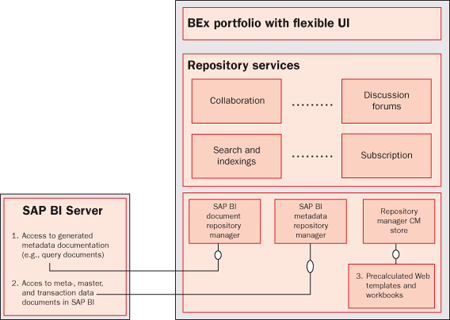
Figure 2
KM repository managers for SAP BW
Publishing Targets
There are five publishing targets for SAP BI content: SAP KM documents, SAP KM document links, SAP EP collaboration rooms, and PCC as a BW Web application iView or as an SAP transaction. I’ll describe each target in more detail.
SAP KM Documents
SAP NetWeaver ’04 supports two classes of portal content: KM documents (contained in My Portfolio, Content Manager Repository View, and Collaboration Rooms) and iViews (Portal Content, Portal Roles).
The BEx publishing targets shown in Figure 3 include:
- My Portfolio — publish as a document to a user’s private SAP KM folder
- CM Repository-View — publish as a document to the public SAP KM folders accessible to people assigned to roles.
- Collaboration Room — a special kind of SAP KM storage that has additional collaboration features available. I’ll explain this storage option in some detail below in the “Collaboration Rooms” section.
- Portal Content — publish as an iView into the main PCC where it can be used by portal administrators and users as they design portal pages, worksets, and roles for content deployment (see the “PCC” subhead for details)
- Portal Roles — publish directly to a specified pole in the portal
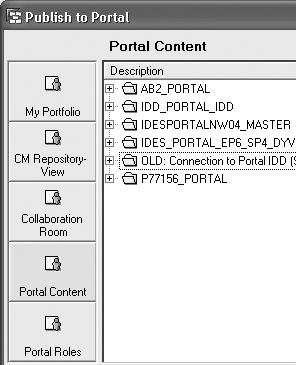
Figure 3
SAP BW 3.5 options for publishing to SAP EP 6.0
Note that the first three options publish content into SAP KM as documents. You cannot publish standard iViews within those options — the final two options allow for the creation of iViews.
SAP KM provides content management services to bring unstructured content to users. It also offers users document services such as unified search, subscriptions, ratings, adding of attributes, commentary, and classification capabilities. You can access remote documents via the repository managers or store documents in the Content Management (CM) data store within SAP KM itself.
SAP KM Document Links
Information Broadcasting provides content precalculation capabilities for posting documents as well as online links. Precalculation means that the SAP BI server executes and populates SAP BI content. This content is then pushed via the broadcasting mechanism. The result is that within SAP KM, precalculated broadcast content becomes an SAP KM document in public and private KM folders with full document services. Online links become SAP KM document links which link back to the source system and launch SAP BW 3.5 content (in this case).
With documents, the document content is accessible to SAP KM services, whereas with online links, only the metadata of the link is available. In addition to SAP KM services for documents, you can fully index and classify SAP KM documents in SAP’s Text Retrieval and Information Extraction engine (SAP TREX), allowing the contents to participate in enterprise searches. Beyond this, TREX can help you identify content for and assist in the structuring of the enterprise taxonomy. In this case, SAP BI content in the SAP KM repository would participate in this process.
CM Repository
Broadcasting content into SAP KM folders within SAP EP is a BEx Information Broadcasting option within SAP BI (Figure 4). I wrote an article (“BEx Information Broadcasting in SAP BW 3.5 Puts Users Front and Center”) that offers more details.
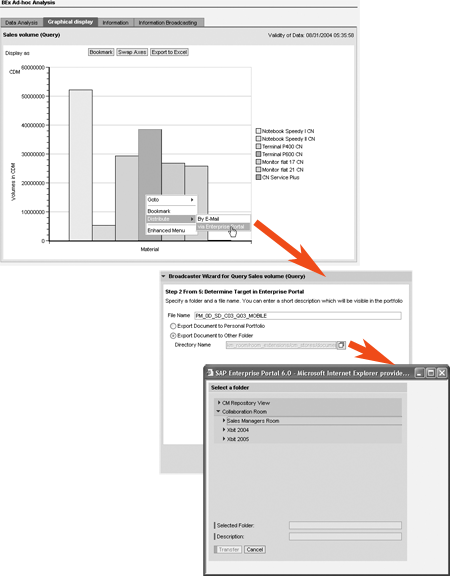
Figure 4
BEx publishing options
The CM Repository View is the CM repository (which is a sub-directory of the SAP KM repository taxonomy used as a target for broadcasting). Using the CM Repository View, you can publish to public or private KM folders.
Collaboration Rooms
As I noted earlier, collaboration rooms are a special type of KM storage that further extend KM services by providing:
- Asynchronous collaboration capabilities such as task management, discussions and threading, document feedback, and instant polling
- Groupware integration of existing calendaring and scheduling applications
- Synchronous collaboration features such as instant messaging and application sharing (WebEx, NetMeeting, etc.)
- Incorporation of room parts for consistency of common functionality across rooms
- Template-based room deployment for a consistent look and feel
Collaboration rooms allow companies to use SAP EP as a single point of entry for process-driven, unstructured, or ad hoc collaboration among employees and knowledge workers. You can find more information about SAP EP collaboration at https://service.sap.com/nw-collaboration.
PCC
A number of changes in the SAP EP 6.0 architecture affect SAP BI report authors and SAP EP administrators. The separate storage of iViews (Web applications as part of a portal page) and external services (Web applications as a whole portal page) have been unified in the SAP EP 6.0 PCC. It enables simple, common maintenance of all portal content objects and allows for a folder-based (taxonomy) structure within the PCC.
In SAP EP 6.0, iViews replace external services. iViews can contain a whole page and no longer have to be part of a portal page, meaning that iViews can exist without portal pages. This makes the configuration options for administrators and authors more flexible and simplifies the storage of content in the PCC, making it more accessible and less dispersed across numerous classifications (iViews, external services, pages, etc.).
Note
Because of the close integration of the BEx suite of tools and SAP EP, the use of iView files (.ivu) is no longer necessary and not supported for SAP EP 6.0. This feature continues to be supported when SAP BW 3.5 is connected to SAP EP 5.0. You can use URLs to integrate older versions of BW to SAP EP 6.0.
Portal Roles
SAP Role Migration has been replaced with Role Upload in SAP EP 6.0. Role Upload is an option within portal administration that uploads objects (e.g., roles and transactions) from ABAP-based SAP systems. For details on this functionality, see https://service.sap.com/nw-howtoguides > Portal, KM and Collaboration > Portal > Uploading and Adapting ERP Roles to SAP Enterprise Portal. This document applies to all ABAP-based SAP systems such as SAP BI.
Web Query/Template URLs and Bookmarks in SAP EP
Since SAP EP 5.0, URL-based integration (e.g., iViews defined from a URL) has been possible with SAP BI content. As mentioned in my 2003 BW Expert article on SAP EP 5.0 integration, it is best to set up BEx queries using the application type SAP BW Web application in SAP EP. This means that you configure SAP BI and SAP EP so the source SAP BI system has an alias on the SAP EP.
This configuration is preferred because portal sessions and system and cache management are available to known source systems. With SAP BW 3.5, the direct integration of the BEx suite of tools should reduce manual, URL-based iView creation. However, this functionality is still supported in SAP EP 6.0 should end users or administrators deem it necessary (if you were to connect an older version of SAP BI to SAP EP 6.0, for example).
The process to integrate SAP BI content via a URL is simpler than with SAP EP 5.0. You still use the iView Wizard method I described in the earlier article and select the SAP BW Web application template for the iView. Figure 5 shows how the administrative navigation to the iView Wizard has changed in SAP EP 6.0. Populate the BEx Web Application Query String property with values displayed in the SAP BI query/template URL. The new, simpler format for this entry is as follows (where uppercase values should be replaced with the technical name for your template, InfoCube, query, or bookmark, respectively):
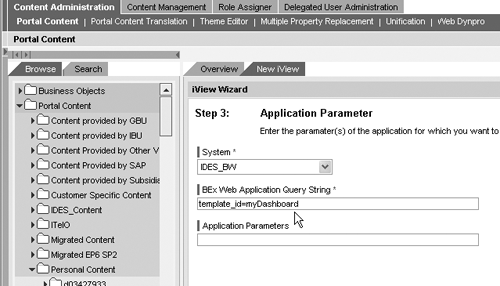
Figure 5
View Wizard in SAP EP 6.0
- For BEx Web applications: template_id=
- For BEx Web Analzyer (e.g., default Web template) queries: infocube=INFOCUBE>&query=
- For SAP BI bookmarks: bookmark_id=
You can obtain these values by launching a BEx Web query or template and inspecting the URL SAP BI inserts into the Web browser’s Web address toolbar.
The Flexible User Interface (Flex UI) in SAP EP 6.0 is an important part of how the viewing audience perceives portal content. You can configure the layout of content published into the portal in two ways. The administrator can standardize the layout for a corporate look and feel or you can allow individual users to customize it. Figure 6 shows one possible layout for the content published to SAP EP. Figure 7 shows some of the options available by default in SAP EP for alternate views of the same content, in addition to custom layout sets defined by administrators.
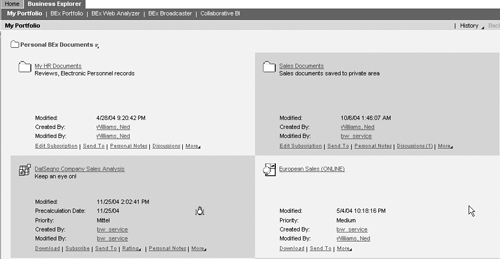
Figure 6
Business Explorer showcase role in SAP EP 6.0

Figure 7
SAP EP Flex UI presentation options
Publish BEx Analyzer Workbooks to SAP EP
SAP BW 3.5 continues to support Microsoft Excel workbooks as an interface for analysis of data. BEx Analyzer workbooks can be used in Information Broadcasting scenarios. You can broadcast them as SAP KM documents when pre-calculated or as SAP KM document links when broadcasting as an online link. Publishing a BEx Analyzer workbook as an iView is different, however. iViews for BEx Analyzer workbooks are set up as SAP transaction iViews in the iView Wizard. In the iView definition, you must populate three properties to successfully execute the workbook from SAP EP:
- Make sure that the System property contains the alias of the SAP BI server (e.g., define the system in the portal).
- Set the transaction code property in the iView to RRMXP.
- Populate the ApplicationParameter property with the value WBID=. To determine the workbook ID from the BEx Analyzer toolbar, choose OLAP Functions for Active Cells>Properties. The Information tab contains the Workbook ID of the BEx Analyzer workbook. Enter the value WinGui (default) in the GuiType property.
Now I’ll show you what the SAP BI content looks like in the new SAP EP Business Explorer Showcase role.
The Business Explorer Showcase Role
The SAP-delivered EP 6.0 role Business Explorer showcase (technical name com.sap.ip.bi.business_explorer_showcase) provides insight into the SAP KM document options described above and demonstrates new features of SAP BW 3.5 in SAP EP. In terms of overall functionality highlighted, the “My Portfolio” view shown in Figure 6 is a private (user-specific) sub-directory of the SAP KM folder taxonomy. The top two links are further sub-folders in the taxonomy and the bottom two links are SAP BW 3.5 broadcast content — a precalculated document on the left and an online link on the right. Figure 8 shows the entire public taxonomy structure — the BEx Portfolio tab would be pointed to a node in this taxonomy, allowing broadcast content to fall into a consistent place within the overall taxonomy.
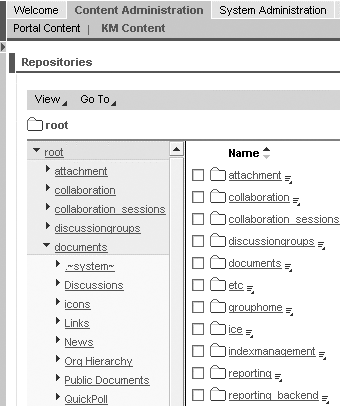
Figure 8
Administrator’s view of the SAP KM folder structure
Figure 6 shows the showcase role. This role demonstrates SAP BI content displayed via the new Flex UI in SAP EP 6.0. The first two tabs provide an example of the delivered Flex UI page layout called broadcasting. The role comes with the following content tabs:
- My Portfolio — displays the contents of the private SAP KM folder, Personal BEx Documents (located in the SAP KM repository at /~Portal alias~/userhome//Personal BEx Documents).
- BEx Portfolio — displays the contents of the public document folder, Public Documents (located in the SAP KM repository at /documents/Public Documents). Figure 8 shows this folder structure as seen from SAP KM administration within SAP EP.
- BEx Web Analyzer — provides direct access to the SAP BW 3.5 default Web template.
- BEx Broadcaster — provides Information Broadcast settings administration for the end user (described in detail in my September 2004 BW Expert article on Information Broadcasting).
- Collaborative BI — contains iViews from SAP KM to display discussions, notifications, and public and private collaboration rooms. As mentioned above, collaboration rooms are a special type of SAP KM storage with specialized services. As shown in Figure 9, this showcase role provides easy access into collaboration tools within the SAP EP. Discussion threads and notifications are also shown here. Note that notifications in Figure 9 appear in a sub-window simply to demonstrate what can be seen when you expand the Recent Notifications iView.

Figure 9
Collaborative SAP BI overview display
Delegated Administration in SAP EP 6.0
Delegating administration, distributing the administration of tasks and content in the portal to different administrators, allows for selective assignment of the tools, tasks, and content in the portal. This can help to solve the problem of exposing restricted company data while allowing for flexible administrative authority where appropriate. For SAP BI content, it means that administrators can delegate BI publishing tasks to the appropriate users without consistent, direct intervention on the part of the super administrator.
The flexibility of content administration is available because portal administration tools in SAP EP 6.0 are effectively iViews. These iViews are grouped into worksets, which are groups of logically related iViews that accomplish specific aspects of portal administration. Customer-defined worksets are not subject to any constraints other than those specified by corporate or project guidelines. SAP-delivered worksets in turn are provided in predefined sub-roles such as user administration, content administration, or system administration. A specific workset, Delegated User Administration, allows an administrator the right to create new users and assign roles without changing content and system settings. This workset can be configured during implementation, so you can change the authorizations of this workset if desired.
Delegated administration is particularly useful when considering the various responsibilities suggested in Table 1. Further information on this topic is available at https://help.sap.com/saphelp_nw04/helpdata/en/a4/76bd3b57743b09e10000000a11402f/frameset.htm.
| BEx Query Designer |
1, 2, 3, 5** |
Power user, query author |
Provides the means of directly publishing content to the portal in the SAP BEx Web Analyzer template (e.g., the default Web template for the SAP BI server). |
| BEx Web AD |
1, 2, 3 |
Power user, Web content or dashboard author |
Provides the means of directly publishing custom BEx Web AD template content to the portal. |
| BEx Ad-hoc Query Designer (This method requires manual creation of the iView using the SAP BI URL and the SAP EP iView Wizard) |
1*, 2*, 3 |
Casual users wishing to create simple Web queries |
An instance of the Web AD Ad-hoc Query Designer Web item. The end user would have to launch the Web query and send the URL to a portal administrator to run the iView Wizard and create the iView based on this URL or run the Information Broadcasting Wizard after launching the query. |
| BEx Broadcaster (Wizard or BEx Broadcaster itself) |
1, 2, 5 |
Casual users (Information Broadcasting is intended for use by the SAP BI mass audience, subject to your company’s deployment strategy.) Allows direct publishing into the SAP KM repository. |
Note that the BEx Broadcaster allows you to choose whether content will be pushed to the portal as an SAP KM document or as an SAP KM document link (referred to as an online link in the Broadcaster). |
| BEx Analyzer (Excel) |
1*, 2*, 4 |
Any end user who is able to determine the workbook ID of BEx Analyzer workbook. A portal administrator would be required to set up the display of the BEx Analyzer as an SAP transaction iView in the portal. |
BEx Analyzer (MS Excel) workbooks are added as an SAP transaction into SAP EP. |
| SAP BI Web query/template URLs and bookmarks |
1, 2, 3, 5** |
Any end user or administrator who is aware of the SAP BI URL string in the browser. A portal administrator would be required to run the iView Wizard and create the iView based on this URL or bookmark. |
This option could be used when, for example, the content creator wishes to add additional URL commands to filter, drill down, or add variables and security. |
1. SAP KM documents in public and private SAP KM folders
2. SAP EP collaboration rooms
3. PCC as an SAP BW Web application iView
4. PCC as an SAP transaction
5. SAP KM document links in public and private SAP KM folders
* By running the Broadcasting Wizard
** SAP EP must generate SAP KM document links for these options |
Glen Leslie
Glen Leslie is a product manager for SAP’s Business Intelligence solution. Originally a data warehousing consultant, Glen has been working with SAP BW since the 1.2B release in a variety of environments.
If you have comments about this article or publication, or would like to submit an article idea, please contact the editor.