Profit Center Accounting: Track internal revenue and costs using transfer pricing.
I’ve been hearing a lot about this question: “What are the possible ways to record the internal sales for an organization?”
Let’s say you are required to track the profitability of a certain product. However, the product is sold as a consumption material to outside customers as well as to other product lines within the organization. Sometimes you may be required to charge other divisions or related companies not just the cost, but also an extra amount to cover the overhead or to share profits.
I’m going to address this situation and show you how you can make an informed decision, using three examples drawn from my personal experience. My focus is on the use of the Profit Center Accounting module.
Case 1: Internal Sales Revenue Tracking
Situation: There are two products within an organization, Product A and Product B. Product A is a finished product while Product B is a semi-finished product. Both products are sold to the outside world. However, B is a sub-assembly in the bill of material of A. That means every time A is produced, B is consumed. Or the situation could be that there are two plants in a company, with one plant transferring materials to the other plant.
Requirements: Products A and B have separate product managers and they each have certain revenue budget requirements. They need a report that shows how much sales revenue they have generated by selling their products internally and externally. The reporting requirement is straightforward in that the product managers are interested only in the revenue and cost numbers by each product number.
Facts: The overhead structure of the company is such that the overheads are applied to both products uniformly. Therefore, there is no need for B to charge extra if the product is sold to A.
Solution: In this option, with some additional configuration, the Profit Center Accounting module can easily meet the needs of the managers of A and B
How it works: So how do you do this? First, you need to activate Profit Center Accounting, if it is not already activated. (Caution: Keep in mind Profit Center Accounting is for the controlling area, so all the company codes assigned to the same controlling area will be affected.)
Now, create two profit centers, 1005 and 1500. Of course, you will need a Dummy/9999 profit center also, as it is used as a catchall type of profit center to keep FI and Profit Center Accounting in balance (Figure 1). So far, so good. I have not told you anything new. Here is how you configure the tracking process:
Step 1. As a first step, you have to assign the internal revenue and cost accounts in configuration. You can do this by material type also, if you wish. Follow the IMG for R/3 Customizing menu path
IMG>Controlling>Profit Center Accounting>Transfer Prices>Settings for Internal Goods Movements>Define Account Determination for Internal Goods Movements.
Step 2 From now on, every time B is consumed by A, it is recorded as an internal sale of B to A with the internal revenue recorded in profit center 1005, the internal cost recorded in 1005, and the cost of consumption recorded in 1500, using the account assignment in Figure 2. See Figure 3 for the line items posted in a similar posting.

Figure 1
Profit Center Accounting general settings

Figure 2
Assign internal revenue and cost accounts in Profit Center Accounting
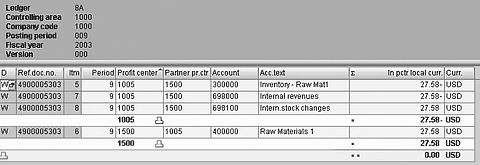
Figure 3
Profit center document displaying the internal postings
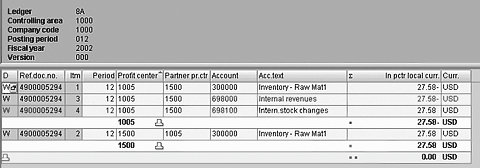
Figure 4
Profit center document for inventory transfer from one plant to another plant
Step 3. Simply write a report to capture the external sales together with the internal sales (Account 698000) and external cost of goods sold (COGS) with the internal COGS (698100).
When a material is transferred from one plant to another, you see the entries in Figure 4.
As you can see in this transaction, the 1500 profit center shows the Inventory movement posting only.
Tip!
In this configuration, you have an option of tracking internal stock movement between profit centers as well. I prefer to track that only in a multiplant situation in which valuation matters.
Case 2: (Within the Same Plant/Cross Plant)
Situation: Now that the organization has matured, it would like to enhance the original method implemented for it to track the sales revenues. It would like to start charging Product A with Product B’s overhead and some profits. In other words, it wants to treat the A division like an outside customer for B.
Requirements: The company wants to charge an extra amount to division A to cover division B’s overhead structure and make some profit by B, because B is now treated as an external vendor. Also, the company wants to pass this information on to the Profitability Analysis (CO-PA) module for reporting purposes.
Facts: A and B belong to the same company code. They could belong to the same plant or not.
Solution: Use the Profit Center Accounting module and the CO-PA module with transfer pricing.
How it works: Now it’s gettinginteresting. You are going to use the transfer pricing solution from SAP to help achieve the company’s goals. (Caution: Once the transfer price functionality is activated, you cannot reverse it easily.)

Figure 5
Material master Accounting 1 view once the material ledger is switched on
Here’s how you set it up:
Step 1. Set up and assign the currency and valuation profile — 8KEM and 8KEQ.
Step 2. Maintain the version — 0KO and 0PC.
Step 3. Activate the valuation area for material ledger — OMX1.
Step 4. Set up transfer prices in Profit Center Accounting. Change the Profit Center Accounting valuation to Profit Center valuation — 0KE5. Set up the account determination for goods movement (same as in Case 1) — 0KEK.
Step 5. Activate transfer prices — 8KEP.
Step 6. Create transfer price conditions to maintain the sales price of materials between plants — AKE7.
Step 7. Activate the valuation area for the material ledger — CKMSTART.
Step 8. Set up transfer prices in CO-PA. Activate the profit centervaluation in operating concern — KEA0. Assign value fields to internal goods movement — KEAD01. Activate the profit center valuation — KEKG.
Step 9. Set up transfer prices in Product Costing (optional).
Once the transfer price is activated, you can set up managerial prices for the materials exchanged between profit centers. These prices can beset up manually or can actually be calculated using the Product Costing module, which requires additional configuration steps on the product costing side.
As shown in Figure 5, Profit Center Accounting uses the values under Profit Center Valuation, and legal accounting uses the values under Legal Valuation. These values could be the same if the transfer price equals cost, or different if the transfer price equals cost plus or minus the profit/overhead.

Figure 6
Activate profit center valuation in CO-PA via transaction KEKG

Figure 7
CO-PA document — Profit center view
The beauty of this is that with the transfer price active, you can send the goods issue transactions to CO-PA as well. To transfer the values to CO-PA, you need to activate the profit center valuation in CO-PA. (See Figure 6.) Now the goods exchanged between two profit centers within the same plant can use the functionality of transfer pricing without using a stock transport purchase order or any other custom development. For the profit centers belonging to separate plants, the transfer price transactions take a piggyback ride on the logistics transaction, and create a document in CO-PA, as shown in Figure 7.
| Figure 6 |
Activate profit center valuation in CO-PA via transaction KEKG |
|
| Figure 7 |
CO-PA document — Profit center view |
|
Case 3: Cross-Company Code
Situation: The transfer of goods is happening between two legal entities.
Requirements: The corporation is interested in charging the transfer prices between company codes.
Facts: A and B belong to separate company codes. The R/3 Sales and Distribution (SD) module uses the STPO functionality to move goods between company codes.
Caution: Make sure the legal department agrees with this idea of having transfer prices in the Profit Center Accounting module and double-check if the transfer of goods involves cross-country transactions. In the case of cross-country transactions, you may want to consider using the more traditional SD pricing to charge the transfer price between company codes.
Solution: Use the Profit Center Accounting module with transfer pricing.
How it works: The solution here would be same as in Case 2, except a few more settings are required. You need to take these additional steps:
Step 10. Clear accounts for cross-company postings — 8KEN.
Step 11. Maintain the pricing procedure for transfer pricing.
| Tip! If you have a situation that involves more than one company code, I recommend you think about using the SD module instead of Profit Center Accounting for reporting purposes. As you are going to have STPO creating billing documents, you can use the condition technique in SD to come up with transfer prices. |
Comparison of the Options
Case 1 has a very simple solution you can use without worrying about material ledger or CO-PA. You should think about using that method before starting to implement the others.
Cases 2 and 3 become progressively difficult in implementation. However, in my experience, it’s more difficult to get the concept adapted in the business than it is to actually implement it in R/3. I have had a chance to implement all three cases for different clients, and have had great success. The level of difficulty was in synch with the level of involvement from the business organization in getting it implemented.
Cases 2 and 3 add some additional configuration on the Product Costing side. As you need to maintain the legal and profit center values in the costed part, the best option would be to set up a costing variant for Profit Center Accounting using legal calculated values as a reference. This then populates the Profit Center Accounting valuation with the same values as legal values once you run product costing for the Profit Center Accounting valuation. If your company has split valuation active for costed parts, you will have a hard time configuring the automatic Profit Center Accounting cost calculation that is not equal to the legal valuation.
One more area to take care of is planning in Profit Center Accounting. You will have actual postings in Profit Center Accounting in the internal sales and cost accounts, so you have to load the planning data in those accounts also to come up with plan vs. actual reports.
If you do not want to use the transfer price solution in Profit Center Accounting, one of the alternatives I have come across is using ABAP custom reports identifying each movement in material that crosses the plant/company codes to separately report the external versus internal revenue.
Darshan Shah
Darshan Shah is a platinum solutions consultant with itelligence Consulting. itelligence is a leading global mid-market SAP provider that offers a full scope of SAP services, including SAP consulting, licensing, managed hosting, customer support, and education. It is one of only 12 consulting firms to earn SAP Global Partner status and one of only six to earn SAP Global Hosting Partner status. With an MBA degree in finance, Darshan has managed and implemented several SAP projects over the last nine years in North America and Asia. He has extensive experience in designing and implementing solutions in conjunction with SAP. He is skilled in helping clients to make strategic decisions for overall ERP implementations.
You may contact the author at Darshan.shah@itelligencegroup.com.
If you have comments about this article or publication, or would like to submit an article idea, please contact the editor.





 Premium