Evaluate the differences between the old G/L posting program and the new program available in SAP ERP 6.0. See how third-party posting processes affect your decision to switch processes and prepare your organization for various business scenarios.
Key Concept
Program RPCIPE00 is a new Financial Accounting (FI) posting method in SAP ERP 6.0. The old posting program (RPCIPE00_OLD) requires custom rules and wage types to meet business needs. For example, the old program can only categorize wage types by tax authority. The flexible, new posting program eliminates excessive customization and enables organizations to use different general ledger (G/L) accounts for each tax company. If your company is upgrading to SAP ERP 6.0, you need to consider how third-party processes fit into the new posting process.
SAP ERP 6.0 contains a completely rewritten posting program to transfer payroll data to the general ledger (G/L). New configuration tables are available and the setup for posting tax wage types is greatly simplified. However, a new link between the Financial Accounting (FI) posting process and the third-party posting process complicates the setup process.
Organizations can no longer dive in and set up the new FI posting configuration without deciding if they intend to implement third-party postings as well. Whether or not your company uses the third-party posting process likely determines whether your organization should switch from the old method of posting taxes to the new method in SAP ERP 6.0.
Most SAP system users prefer to post tax amounts in different G/L accounts based on tax authority. For example, there may be one account to track federal taxes withheld and another account to track specific state taxes withheld. Prior to SAP ERP 6.0, this scenario could only be achieved by using custom rules in the payroll schema to generate a group of custom wage types that hold tax amounts split by tax authority.
The new configuration, which consists of populating the tables and using the new posting program, allows you to post the standard tax wage types directly to different G/L accounts depending on tax company and tax authority (Figure 1). This setup eliminates the custom rules and custom wage types that are required in the old posting method.
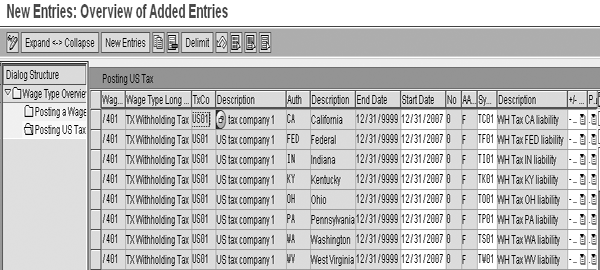
Figure 1
Configure posting of US tax wage types
Evolution of the Posting Processes
A significant number of functional improvements from mySAP ERP 2004 to SAP ERP 6.0 are located in the FI module. Among other additions, the G/L is completely redesigned. To accommodate these changes, it is also necessary to rewrite the Human Capital Management (HCM) to FI posting interface. This is why program RPCIPE00 is new in SAP ERP 6.0.
During the age of dinosaurs, the original posting program (RPCIPE00_OLD) was designed to map each wage type to a single symbolic account per employee grouping. This solution did not work well for tax wage types because a single tax wage type may contain amounts for many different tax authorities and most users wish to account for the liability of each tax authority separately. The standard rule UTAU and custom tax wage types (such as 9F01) were developed as a workaround. Tax amounts were split into different wage types on the basis of tax authority. This way, the posting program that existed at the time could be used to assign different symbolic accounts for the amounts related to each tax authority.
Many of you may be planning an upgrade or have recently upgraded to SAP ERP 6.0, which contains the newly designed posting program. Tables T52EZ and T7US3PR_TXSYMKO are available to map taxes directly from the tax wage types to separate symbolic accounts, based on tax company and tax authority.
Table T52EL still maps non-tax wage types to their symbolic accounts. The new posting program needs a way to decide which wage types should be mapped via T52EL and which wage types should be mapped via the new tables (T52EZ and T7US3PR_TXSYMKO). Processing class 78 is the designated trigger that determines which table should be used. All the standard tax wage types (those starting with /4) have a value of 2 in the processing class, which you configure in table T512W. Processing class 78 identifies wage types to include in the third-party posting process. The value 2 indicates a tax wage type to be remitted. For tips on retaining the old process and accessing the third-party posting program, see the sidebar, “Additional Information.”
Traditional Tax Posting Process
Figure 2 illustrates the traditional method of posting taxes by tax authority. My example shows how withholding tax is transferred from pay results to the G/L. In the RT table of the pay result, the withholding tax for both federal (FED) and Michigan (MI) are contained in wage type /401. A split indicator in the RT table links each /401 entry to different entries on the TAX table. The TAX table contains a list of relevant tax authorities.
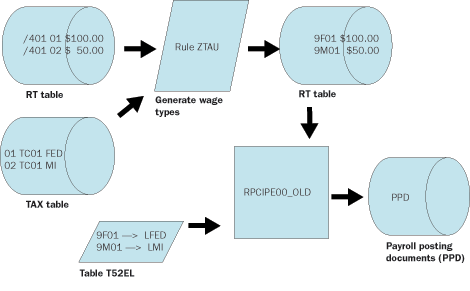
Figure 2
The traditional method of posting taxes by tax authority
The payroll schema contains a custom rule (typically named ZTAU or $TAU) that was copied from the standard rule UTAU. This custom rule reads the /401 wage type and the corresponding tax authority information to split the amounts into separate, custom wage types. In my example, wage type 9F01 holds federal withholding tax and 9M01 holds the Michigan withholding tax.
Traditional posting program RPCIPE00_OLD reads table T52EL and assigns a symbolic account to each wage type. The federal withholding tax is assigned to symbolic account LFED and the Michigan withholding tax is assigned to symbolic account LMI. Without the two custom wage types, this process assigns all withholding tax to the same G/L account. The limitations of table T52EL reinforced demand for the ZTAU rule and the collection of special wage types.
New Tax Posting Process
Figure 3 illustrates the new and improved method of posting taxes to the G/L. The RT and TAX tables in the pay result are the same as the old method. However, the new process does not require the ZTAU rule or the 9F01 and 9M01 wage types. The new posting program RPCIPE00 reads tables T52EZ and T7US3PR_TXSYMKO to determine which G/L account should receive each of the split tax amounts. These tables direct the taxes to different accounts based on tax authority and tax company. In the old process, you could classify taxes by tax authority only. This added flexibility is beneficial to organizations that want to use different G/L accounts for each tax company.
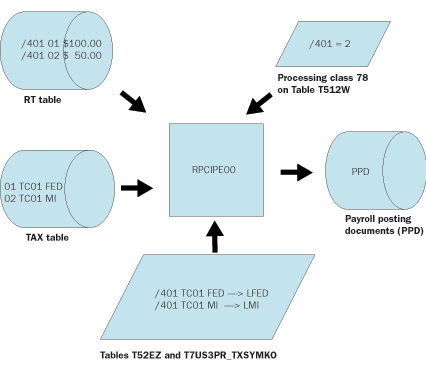
Figure 3
New tax postings with active third-party remittance
Possible Scenarios
One important change in this process is that value 2 in processing class 78 serves as the trigger that instructs the posting program to use the new wage types to map symbolic accounts. Table T52EL is the old table used to map wage types to symbolic accounts. Table T7US3PR_TXSYMKO is the new table for mapping wage types to symbolic accounts. Table T52EZ tells the system on which date the posting program should start using the new table.
Third-party remittance is an optional component. Some companies don’t use it at all, while other companies use it for either taxes or garnishments, but not for both. If and to what extent your organization uses third-party remittance depends on your specific business requirements. The payroll to FI posting process is also optional, but most companies with FI use this process.
By selecting processing class 78 as the trigger that activates the new FI posting rules, a link is created between the third-party remittance process and the FI posting process. The new posting program only considers the new mapping rules if the wage type is flagged as a tax remitted through third-party postings. The third-party posting program attempts to collect and remit wage types that are flagged in this manner. Several different scenarios are possible, so I’ll discuss three common scenarios and solutions:
Scenario 1: In this scenario, your company already uses third-party remittance for taxes. You configured your custom wage types, such as 9F01 and 9M01, for both third-party posting and FI posting. Processing class 78 is set to 2 for your custom wage types and to blank for the standard wage types. You could leave your third-party configuration alone and adjust the FI posting so that it maps your custom wage types using the new tables. You must update the FI posting rules because the new posting program looks at the new tables for all wage types with 2 in processing class 78.
It is redundant to map wage types that are split by tax authority via a table that allows differentiation by tax authority. Although it would take a little more work up front, if you adopt the new paradigm and discontinue using your custom tax wage types, ongoing maintenance becomes much easier. On custom wage types, turn processing class 78 off and activate it on the standard tax wage types. Adjust the third-party configuration to use the standard wage types and configure the new FI posting rules with the standard wage types. Begin to phase out the UTAU rule in your payroll schema to create smaller payroll results and an easier-to-follow configuration.
Scenario 2: In this scenario, your company does not use third-party posting. This is probably the easiest situation to deal with because the link between the FI posting and the third-party posting is not important to you. If you choose to leave your tax wage types configured in table T52EL (the old way), you must make sure that processing class 78 is blank on those wage types. Conversely, if you want to implement the new posting rules you could simply configure the standard wage types in the new mapping tables and delimit the mapping of your custom wage types. Eliminating the custom tax wage types allows you to phase out the UTAU rule in your schema and reduce the size of your payroll results.
Scenario 3: In this scenario, your company uses third-party posting for some processes, but not for taxes. This is an especially challenging scenario. You might want to implement the new posting rules and eliminate your custom wage types, but you can’t. Remember, you can only access the new mapping tables with the FI posting program when processing class 78 contains the value 2. If you set processing class 78 to a value of 2 for any tax wage types, then the third-party posting program attempts to post those amounts.
Because the configuration for third-party posting of taxes has not been completed, you receive errors and won’t be able to post any third-party remittances. In this case, you need to retain the UTAU rule and all of your custom wage types. You must set processing class 78 to blank in both your wage types and standard tax wage types. The FI posting rules for your wage types must remain in the old table T52EL (Figure 4).
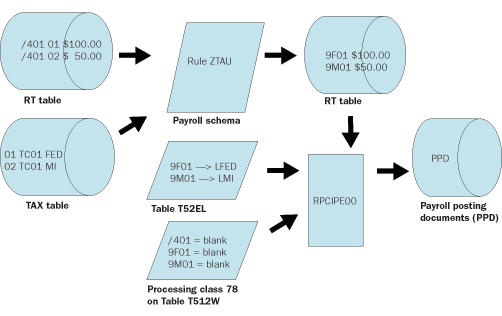
Figure 4
Table T52EL contains FI posting rules for your wage types
In the future, if you choose to implement third-party posting for taxes you need to set processing class 78 to a value of 2 and configure the FI posting rules on the new tables. You should phase out the UTAU rule and your custom wage types. Start using the standard tax wage types for both the FI posting and the third-party posting.
Note
Refer to
SAP Notes 901215, 919139, and 896983 for helpful information about the new FI posting process. There is a new screen in the view reached via IMG menu path Payroll> Payroll USA>Posting to Financial Accounting>Activities in the HR System>Wage Type Maintenance>Define Wage Type Posting Attributes. The help screen for this step describes how to configure the tables. You can find the SAP ERP 6.0 release notes
HERE (logon credentials required). Then follow menu path SAP Solutions>SAP ERP>SAP ERP 2005>SAP ERP 6.0>ECC 6.0>Chapter 25: PY Payroll to view the Payroll-specific notes.
Implications for Your Upgrade Project
Carefully consider the new method of posting tax wage types to FI and the link between the FI posting process and the third-party posting process in your upgrade project. The upgrade team must decide which path to take and address questions such as:
- Will you retain your existing mapping rules to minimize the effort required
to upgrade?
- Will you use program RPCIPE00_OLD for a period after go-live to buy some time before you redesign your posting rules?
- Will you happily abandon your custom tax wage types and the UTAU rule in favor of the new, standard solution?
- Does your current or planned use of third-party posting impact this important decision?
Sidebar: Additional Information
Retaining the traditional posting program:
In SAP ERP 6.0, the traditional posting program is available under the name RPCIPE00_OLD. Your company may want to use this program rather than the new one. One reason for this is if you wish to go live on the new version quickly and forego an immediate redesign of your posting rules.
The old program is not associated with a standard transaction code so you need to ask an ABAP programmer to create a custom transaction to run this program. Be sure that the new transaction code is authorized in the security profile of every user who typically performs the FI posting process. If the standard tables do not provide sufficient differentiation for account determination, consider implementing user exit EXIT_RPCIPE00_001 in enhancement PCPO0001.
Using the new third-party posting program:
A new transaction is also available for the third-party remittance process. Transaction PC00_M99_URME evaluates a payroll result and updates the third-party remittance tables. By executing this transaction, your system stores the evaluation run automatically, replacing the need to run program RPCALCU0 with schema U500, followed by transaction PC00_M99_URMU.
Clay Molinari
Clay Molinari has 20 years of experience in the IT industry and has been working as an SAP HR consultant since 1997. He is currently president of C&C Savant, Inc., an SAP consulting firm that specializes in combining standard SAP configuration and custom ABAP programming to help its clients solve unique or complicated requirements.
You may contact the author at claymolinari@comcast.ne.
If you have comments about this article or publication, or would like to submit an article idea, please contact the editor.




 Premium