SCM
Authentic and accurate delivery times during which vendors deliver the requisite materials is the key to effective and efficient procurement planning.
Key Concept
Planned delivery times improve your procurement process by suggesting the most practical and optimal delivery times for your materials. Using this functionality helps you reduce inventory carrying costs while also bringing greater visibility to material procurement planning information maintained in the system.
Whether they are involved in a new SAP ERP system implementation or an ongoing optimization of business processes, companies can use a plethora of standard reports and standard analysis tools available to optimize their business processes.
For example, at first you may have entered a planned delivery time of a procured material as three days. This information may have been based on the historical data available or from your own experience. In all procurement planning, including using the Material Requirements Planning (MRP) tool, the system plans the material with three days lead time (planned delivery time). The purchaser then creates a purchase order and the system automatically incorporates three days as lead time for delivery. The vendor delivers the material after five days, thus jeopardizing the entire planning activities. In due course, the system continues to maintain a database of all the deviation between planned delivery dates with actual delivery dates.
When a significant database is built up, and when the company has frequently procured the material over the period of time, it can make use of Calculate Planned Delivery Time functionality, not only to evaluate the deviations in planning but also to update its record for effective procurement planning in the future.
There are three distinct areas in which the process owner can maintain planned delivery times:
- Material master record: The planned delivery time entered in the material master record applies to material procured from any vendor. Normally, this is the average delivery time and is used for planning estimation purposes.
- Vendor master record: The planned delivery time entered in the vendor master record applies to all the materials that the specific vendor delivers. This option has its limitations, as some materials may take longer for the vendor to deliver than others.
- Purchase Info Record: A Purchase Info Record (short for Purchase Information Record) is a one-to-one procurement relationship of a material that is obtained from a specific vendor. It contains the option to enter the planned delivery time it takes for a vendor to deliver the material. When the process owner creates the purchase order for the vendor and material combination, the system looks for the purchase info record for relevant information. If no purchase info record exists, then the system automatically creates one, and also keeps on updating it with procurement-related activities and information. After you create a new purchase order, the system only considers planned delivery time from the material master or from the vendor master.
To evaluate planned delivery time calculation, follow menu path Logistics > Materials Management > Purchasing > Master Data > Planned Delivery Time Calculation or use transaction code WPDTC (Figure 1).
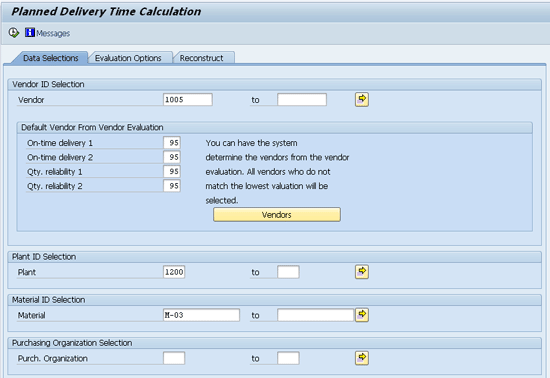
Figure 1
The initial screen of planned delivery time calculation
Figure 1 is the upper half of the screen for data selection of planned delivery time. In this screen, the system provides the option to enter parameters so that it displays only the refined and relevant search results. It provides the option to make use of vendor evaluation functionality in the Materials Management (MM) component, which places great importance on timely deliveries of material, as well as quantity reliability from the vendors.
Scroll down the screen or press the Page Down key on your keyboard so that the remaining screen becomes visible. This is shown in Figure 2.
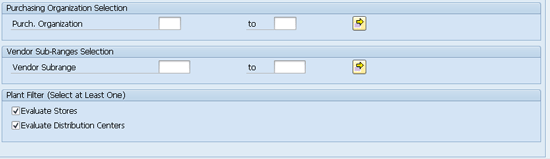
Figure 2
Lower half of the initial screen of planned delivery time calculation
The Plant Filter section of Figure 2 provides you with the option to select either stores (storage locations) or distribution centers if you have Warehouse Management (WM) functionality implemented. You have to make at least one selection. I select both the check boxes. Next, I click the Evaluation Options tab (Figure 3).
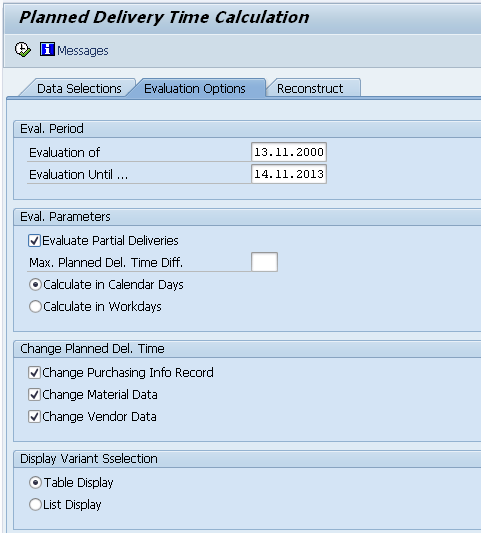
Figure 3
The Evaluation Options tab of the Planned Delivery Time Calculation
In Figure 3, you can define the date ranges for which you want to evaluate the planned delivery times. For example, if you only want to limit your evaluation of procurement activities for the last one year, then you can define them in the dates range. Another important parameter for evaluation on this screen is to select the planned delivery time calculation either in calendar days or in work days. The calendar days option takes all days of the year into account, including holidays, whereas work days only takes the number of working days (as defined in the factory calendar) into account.
In Figure 3, you can also select the relevant check boxes for the planned delivery time that you intend to eventually change or update. The available options are Change Purchasing Info Record, Change Material Data, and Change Vendor Data. I select all three check boxes. I also select the Table Display radio button to enable the system to display results in a tabular form. Press F8 or click the execute icon  to move to the screen shown in Figure 4.
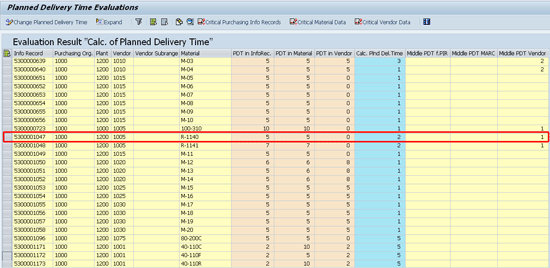
The calculated planned delivery time in the blue column
The numbers in the blue column in Figure 4 denote the number of days that the system calculates and proposes. These numbers are based on the average delivery time of multiple deliveries. The system calculates the vendor delivery time in the last column based on the average delivery time of an individual vendor, which in this case is vendor 1005.
Figure 4 displays the purchase info records of various material, vendor, and plant combinations. It provides a comprehensive view of different planned delivery times entered in the material master, vendor master, and purchase information record, and how these differ from what the system calculates (in the blue column).
Let’s evaluate purchase info record 5300001047, which is a purchasing relationship of vendor 1005 and material R-1140. Here, the planned delivery time originally entered in the purchase info record and also in the material master is five days. However, no delivery time is maintained in the vendor master of vendor 1005. Based on the dates’ information from purchase orders and from goods receipts, the system calculates that on average it takes two calendar days for vendor 1005 to deliver the material R-1140. Further, based on all the deliveries from this vendor, the system calculates the midpoint (middle) planned delivery time for the vendor as one day (last column of the same row). This midpoint is the arithmetic average (moving average) of all the deliveries against the material, vendor, or information from the purchase info records.
Click the Critical Purchasing Info Records button in Figure 4. The next screen (Figure 5) reflects the fact that planned delivery times in the purchase info records of all materials are maintained on the higher side, compared with system-calculated ones. It provides business process owners the option to evaluate and update the records where necessary.
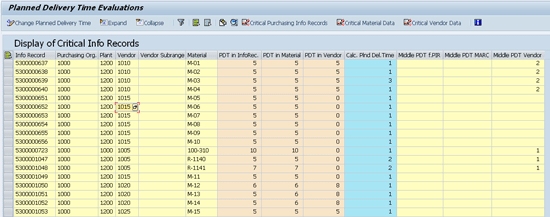
Figure 5
Critical purchasing info records
Click the Critical Material Data button in Figure 5. In the next screen (Figure 6), the system switches the information of critical master data records to show how each of the materials (in the first column) compares with the various planned delivery times that are either maintained or that the system calculates.
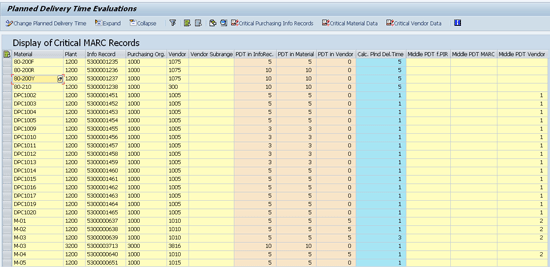
Figure 6
Critical master data records
Click the Expand button in Figure 6. The system navigates to the screen shown in Figure 7.
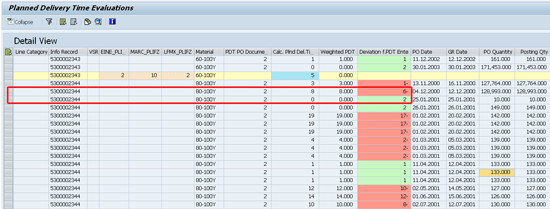
Figure 7
Detailed view of critical master data records
Figure 7 is the detailed view of purchase info record and shows the deviation of individual records. When the vendor delivers goods earlier than the purchase order data, the system reflects this with a green row. For another delivery status (for example a vendor delays the goods delivery), the system denotes this status with a red row. Click the Collapse button.
In the next screen (Figure 8), select the purchase info record 5300001047 and click the Change Planned Delivery Time button.
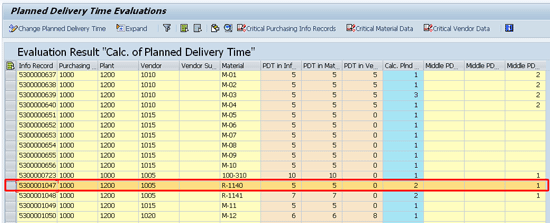
Figure 8
The Planned Delivery Time Evaluations screen
A pop-up screen appears (Figure 9) to confirm the selection and to inform that the system updates the planned delivery time (technical name: PLIFZ_CALC) to two days. After you click the continue icon located at the bottom of the screen, the system performs the necessary update in the background.
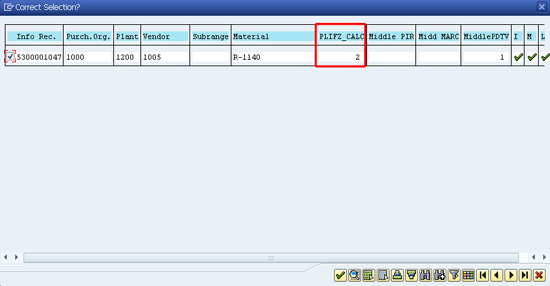
Figure 9
The pop-up screen to confirm purchase info selection for an update
To display the purchase info record, follow menu path Logistics > Materials Management > Purchasing > Master Data > Info Record > Display or use transaction code ME13. On the initial screen of display purchase info record, enter the Info Record number 5300001047, vendor 1005, material R-11040, and purchase organization as 1200. Press Enter.
Figure 10 shows that the system has updated the purchase info record to two days.
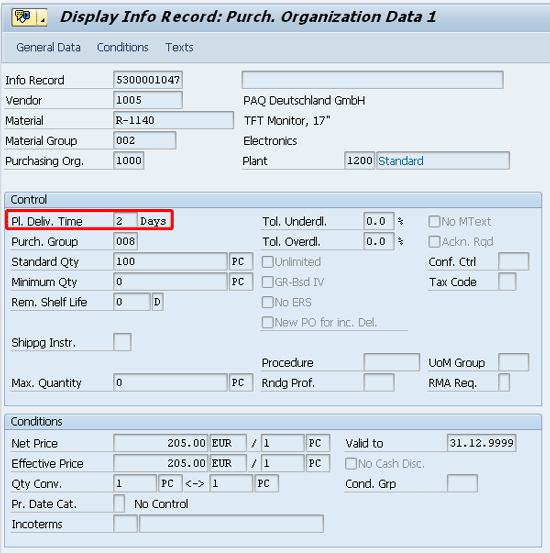
Figure 10
The purchase info record with an updated planned delivery time

Jawad Akhtar
Jawad Akhtar earned his chemical engineering degree from Missouri University of Science and Technology. He has 17 years of professional experience, of which nine years are in SAP. He has completed eight end-to-end SAP project implementation lifecycles in the areas of PP, QM, MM, PM, and DMS in the steel, automobile, chemical, fertilizer, FMCG, and building products industries. He also has worked as an SAP integration manager and an SAP project manager. He has been proactively involved in a business development and solution architect role for seven years. He is the author of Production Planning and Control with SAP ERP, it's filled with in-depth infomation on discrete, process, and repetitive manufacturing types. His profile on LinkedIn is at https://pk.linkedin.com/in/jawadakhtar. You may follow Jawad on Twitter @jawadahl. Currently, he is associated with AbacusConsulting as Head of SAP Delivery.
You may contact the author at jawad.akhtar@live.com.
If you have comments about this article or publication, or would like to submit an article idea, please contact the editor.


 Premium

