Properly managing your system memory can lead to improved performance and lower operating costs. Find out how SAP Extended Memory helps you achieve these goals and discover the main parameter settings to help solve common memory challenges.
Key Concept
Disclaiming means releasing the memory that is allocated to the SAP application or user back to the operating system. Parameters such as ES/SHM_DISC* control the disclaiming of the memory segments.
Most performance problems come from memory issues. It is a common misconception that whenever any transaction runs in an SAP system, memory is mainly controlled by only two parameters — ZTTA/ROLL_EXTENSION and EM/TOTAL_SIZE_MB. This is not quite true because although these parameters are important, you also need to be aware of additional parameters to ensure optimal memory use.
You can avoid these memory issues if you know how best to use extended shared segments parameters. Table 1 shows all the important parameters that control the memory in ABAP systems. The Value column contains sample values assigned to the parameters as examples.

Table 1
Important SAP memory parameters
Note
SAP Note 856848 provides more details on where and when to change these parameters.
One of the advantages of using the extended shared segments parameters is that they provide control over how the system uses memory, speeds up the performance, and allocates memory to users. Extended shared segments only disclaim memory when it is necessary to free up the physical memory.
Tip!
To see if extended shared segments are active in your system, check the value for parameter ES/TABLE. If this parameter is equal to SHM_SEGS, then you have extended shared segments implemented in your system.
Using the data from Table 1, you might think that if a session quota is 1GB and the total extended memory of the system is only 4GB, that it means only four users can be in the system, because 4GB worth of quota is already allocated. However, that is not the case with extended memory because it is shared memory. It is given in blocks. Each block is em/blocksize_kb (by default set to 4096KB or 4MB.) Therefore, the maximum number of blocks for the system is (EM/TOTAL_SIZE_MB)/(em/blocksize_kb).
Figure 1 shows how the memory is allocated. After every 4MB is allocated, the system goes to the SAP system to get another chunk of 4MB. That can consume more time. To save time, you can use segments. At the initial stage, when a user starts consuming extended memory, segments are allocated to the user as required. Then more segments are given to the user context. Each segment has a size of SAP parameter ES/SHM_SEG_SIZE with (ES/SHM_SEG_SIZE)/(em/blocksize_kb) blocks.

Figure 1
Allocation of blocks
Blocks are grouped together in segments. Each user context can get the maximum of ES/SHM_MAX_PRIV_SEGS segments. In other words, the maximum allocation of quota cannot be more than => (ES/SHM_MAX_PRIV_SEGS)*(em/blocksize_kb). Figure 2 shows how the segments relate to the 4MB blocks.

Figure 2
Allocation of segments
Note
You can see details such as which user is consuming how many segments or how many segments in the system are free through utility program ESMON. You can activate ESMON through <SID>adm user with command esmon pf=<Instance profile> <parameters>.
You can limit the user quota by using the ztta/roll_extension parameter. This ensures that one user cannot gobble up the entire SAP system’s extended memory, which results in numerous memory dumps for all other users — the equivalent to an SAP system crash. Figure 3 shows how the ztta/roll_extension parameter limits user quotas.

Figure 3
Concept of quota
ES/SHM_PROC_SEG_COUNT identifies the number of segments that a single quota can use. One segment is always given to the maximum shared segments. This helps when you switch from one quota to a new quota by allowing the system to give the maximum private segments (private to that particular quota) to the ongoing quota. A private segment is not shared by any other user. One user quota can trigger another new user context when the shared segment comes from the parameter ES/SHM_MAX_SHARED_SEGS. Because of this, user context is limited to parameter ES/SHM_MAX_PRIV_SEGS.
You can limit the maximum number of segments available by using parameter ES/SHM_SEG_COUNT. In addition, SAP parameter EM/TOTAL_SIZE_MB limits the total amount of extended memory that a given SAP application can use (Figure 4). Usually segments are allocated only once — after they are used, the segments are pooled internally. They are never released to the operating system again. If you have a short period of time in which many segments are allocated that will not be used again, then memory would be lost. Thus the segments can be disclaimed back to the operating system.

Figure 4
Parts of extended memory
The memory is initialized when a new user tries to access memory from the system. The ES/SHM_DISC* profile parameters control when and how much disclaiming is done.
The parameter ES/SHM_FLAGS is a bit mask, which adds an extra bit to the address space for security reasons. This parameter controls the kernel’s behavior in several directions and it can also influence disclaiming. This parameter should not be changed, so leave it at the default value.
Some of the system segments are attached to work processes when they are not in use. They reserve the address space to prevent the operating system from using it for other things. They do not use real memory.
ES/SHM_SYS* parameters control how many segments should be allocated to the SAP application at system startup. They also control how many parameters should be in the SAP application before returning any segments back to the operating system using the disclaiming function. Below are a few case studies that give a clearer view on how to troubleshoot and analyze the problems pertaining to SAP Extended Memory.
Case Study 1
Problem: Users are complaining that their transactions are being terminated with ABAP Dump TSV_TNEW_PAGE_ALLOC.
Parameters settings in system:
- ztta/roll_extension: 2147483648
- EM/TOTAL_SIZE_MB: 24GB
Memory details in dumps: You can get these details by checking How to correct Error in the dump. Below are sample details from one of the dumps.
Roll area...................... 2718352
Extended memory (EM)........... 184773633
Assigned memory (HEAP)......... 10004800
Short area..................... " "
Paging area.................... 0
Analysis: As you can see, the quota is set to 2GB (2147483648 bytes) and sessions. The above dump was terminated after it consumed only 180MB (approx). You can clearly say that problem is not with the quota. Now you should check the entire SAP Extended Memory.
In Figure 5 you can see that the current extended memory is consumed up to 87% (86.57) and there is at least one time when extended memory was completely exhausted, as shown in the MaxUse [KB] column. The transactions were terminated because of EM/TOTAL_SIZE_MB exhaustion.

Figure 5
SAP memory use as viewed in transaction ST02
Solution: Increase the parameter EM/TOTAL_SIZE_MB based on the amount of free physical memory.
Note
When using an AIX system, you may not see the correct value for free physical memory in transaction ST06. You might see less free physical memory than is available. AIX draws on unused memory to cache to disk blocks from the file system and shows less free memory available. See SAP Note 973227 for more details.
To gain an approximate figure for free physical memory, you need to calculate and add up several memory parameters for SAP ABAP, Oracle, and SAP Java depending on what applications are running in the server or logical partition (LPAR).
Case Study 2
Problem: An SAP system user complains that a transaction is terminated with ABAP Dump TSV_TNEW_PAGE ALLOC_FAILED.
Memory parameters settings in the system:
EM/TOTAL_SIZE_MB: 4096
abap/heap_area_dia: 10000000
abap/heap_area_nondia: 10000000
abap/heap_area_total: 2000000000
ztta/roll_extension: 1000000000
Memory details in dump:
Roll area...................... 2718352
Extended memory (EM)........... 1001378128
Assigned memory (HEAP)......... 10004800
Short area..................... " "
Paging area.................... 0
Analysis: You can see from the dumps that the session quota is becoming exhausted. Note that extended memory is not extended memory for the entire system. Instead, it is the extended memory assigned for a single user context or quota. Assigned memory in the dump is a little more than the value in the parameter for ztta/roll_extension. This happens because once the quota is exhausted, it tries one more time to obtain memory from extended memory. It received approximately 1.3MB, but should have received 4MB (size of a single block) because memory is assigned to the user context in terms of blocks. The quota terminated before the system could assign one more block to the context because it was capped by parameter ztta/roll_extension. You can go ahead with any one of the following solutions:
Solutions:
- Increase the values for abap/heap_area_dia and abap/heap_area_nondia from 10000000 (10MB) to 100000000 (1GB) instead of increasing the quota value. The heap memory is only allocated on demand, although the work process enters private mode if any session runs out of its quota.
- Increase the quota temporarily using SAP program RSMEMORY. To do so execute the program RSMEMORY through transaction SE38.
As shown in Figure 6, change the value for quota or heap memory temporarily for either the dialog or non-dialog process depending on how the user is running the report.
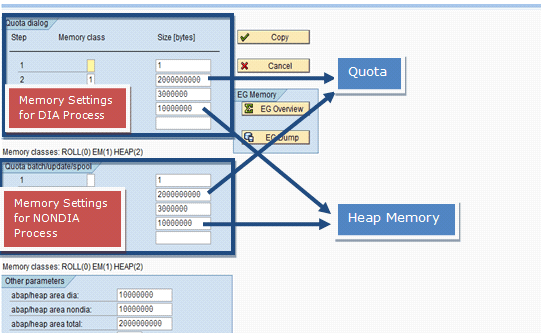
Figure 6
Change the values temporarily for dialog (DIA) and non-dialog (NONDIA) work processes
Note
Temporarily means that because ztta/roll_extension and heap memory parameters are dynamically switchable, you do need to stop or start the SAP application to change them. Once a job is completed you should revert back to the original values using transaction RSMEMORY. If you change values through transaction RSMEMORY after stop or start, they revert to the previous values as you have not changed the values in the instance profile. At the start, the system reads the parameter values from the instance profile. If you want to make permanent changes, use transaction RSMEMORY for an immediate effect and also change the parameters in the instance profile using transaction RZ10.
Case Study 3
Problem: All the sessions are terminated exactly at 1.7GB consumption of memory with tab-separated values (TSV) memory dumps.
Memory parameter settings:
EM/TOTAL_SIZE_MB: 8192
ztta/roll_extension: 2000000000
ES/SHM_PROC_SEG_COUNT: 8
ES/SHM_MAX_PRIV_SEGS: 7
ES/SHM_SEG_SIZE: 256
Memory details in dumps:
Roll area...................... 2718352
Extended memory (EM)........... 1847736336
Assigned memory (HEAP)......... 10004800
Short area..................... " "
Paging area.................... 0
Analysis: The above information was taken from a dump that occurred on March 6 at 10:11:43 for user PHPTR1. It was running on work process 3.
Currently the quota is set to 2000000000 bytes (1.9GB). The issue here is not with the quota. If you check the consumption of total extended memory you see that it has never crossed 3.4GB. Currently EM/TOTAL_SIZE_MB is set at 8192MB (Figure 7). You can view this information in transaction ST02. Double-click Extended Memory and select History.
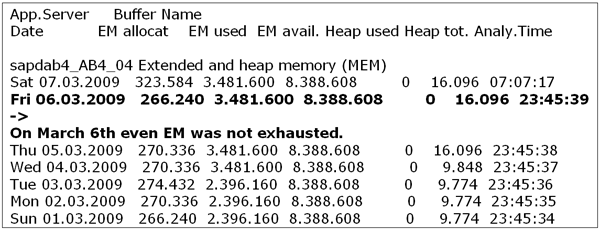
Figure 7
History of extended memory consumption
Therefore, neither the entire extended memory nor the quota was exhausted. Looking deeper into the problem you see the following error message in the work process 3 trace file, which occurred exactly one second before the dump was generated (Figure 8). To view this information, use transaction SM50 and follow menu path Select Work Process > Process > Trace > Display File.
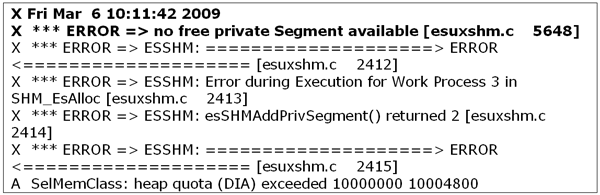
Work process trace file
Currently parameter ES/SHM_PROC_SEG_COUNT is set to 8 and parameter ES/SHM_MAX_PRIV_SEGS is set to 7 (which should always be 1 less than parameter ES/SHM_PROC_SEG_COUNT as per SAP Note 445533). Currently the size for each segment is set to 256MB (ES/SHM_SEG_SIZE=256). That means the maximum allocation for a user context can be up to 256 MB*7(segment size*number of private segments), which is equal to 1792MB. Now if you look at the dump, it equals the exact amount of quota allocated at the termination point.
Generally ztta/roll_extension should be equal to ES/SHM_MAX_PRIV_SEGS *ES/SHM_SEG_SIZE*1024*1024 (which in current scenario is approximately 200MB more than that).
As in this scenario, the quota is not set correctly according to the segments, so the result is a TSV* dump, as shown in Figure 9. On March 6 at 10:11:43, the session running on work process 3 was terminated. At the time of termination, the session used up only 1847736336 bytes (1.72 GB) of extended memory although the quota was set to 2000000000 bytes (1.9 GB). However, on March 6 the maximum use of extended memory was 3481600 KB out of 8388608 (Figure 10).

Figure 9
View of the ABAP dump

Figure 10
Extended memory view
The highlighted part of Figure 10 shows that the system did not run out of quota or extended memory. Just one second before the dump occurred there was an error message triggered in the WP3 trace file for no free private Segment available (Figure 11).

Figure 11
Error message generated
Solutions:
1. Increase the parameter:
ES/SHM_PROC_SEG_COUNT to 9
ES/SHM_MAX_PRIV_SEGS to 8
2. If you do not want to go ahead with the above recommendation, then increase the size of the segment by increasing the parameter ES/SHM_SEG_SIZE based on the equation below:
(ES/SHM_SEG_SIZE* ES/SHM_MAX_PRIV_SEGS)>=ztta/roll_extension
Following these steps not only improves your use of SAP Extended Memory, it also helps you use the physical memory more efficiently and cost effectively. If you tune your parameters as described, you can improve SAP Extended Memory performance and save money on physical memory.
Vipul Shah
Vipul Shah has a master’s degree in software engineering from BITS Pilani, India, and was an SAP Basis consultant and team lead for incident, change, and problem management. He started his career at Wipro Technologies as an SAP Basis consultant and was part of two implementation projects and a performance analyst for five different support projects. He also implemented Sarbanes-Oxley compliance for a Basis project with the ITIL process and ISO 20K standards. He has also achieved his certification in end-to-end root cause analysis from SAP.
You may contact the author at vipul.dineshshah@gmail.com.
If you have comments about this article or publication, or would like to submit an article idea, please contact the editor.