More businesses are evaluating their procurement options to focus on core business processes. As a result, subcontracting is becoming one of the popular procurement alternatives. The costing process for subcontracted materials is transparent to the end users and therefore requires only a little change management and no process disruptions. By setting up the correct configuration and master data for a material, you can easily switch product costing to a subcontracting process from in-house manufacturing.
Key Concept
Subcontracting is a business strategy that both the prime contractor and subcontractor can use to overcome capacity and skill constraints experienced when meeting customer requirements. It involves outsourcing certain parts of a given process while keeping most of a project in house.
Most manufacturers prefer to manufacture an entire product in house, including the components and subassemblies. Some of the reasons for manufacturing in house are greater control over the manufacturing process and the fact that there is no need to share proprietary information with the outside world. However, in spite of these benefits, managers always evaluate a make-or-buy decision for components and subassemblies — and sometimes even for the end products. The major drivers for companies to consider buying from an outside business are lower cost and a lack of competency and capacity to manufacture these materials in house.
Subcontracting is one of the options for companies making the make-or-buy decision. It is a hybrid of the pure make or pure buy process. Unlike the pure buy process, where the responsibility of manufacturing a material is entirely with the vendor, with subcontracting the buyer has a responsibility to supply the vendor with some or all raw materials that go into the manufacturing of the subcontracted material. For example, say that a vendor provides a service of coating metal parts by a process of anodizing. In this case, this vendor receives metal parts of different shapes and sizes from customers and then coats them based on the buyer requirements using a process of electrolysis.
The SAP system helps you implement the subcontracting process with integration across various business functions, including purchasing, engineering, costing, and finance. To enable the subcontracting process, you need to specify parameters in certain master data and in relevant configuration tables in the system. This enables a company to run the various steps of the subcontracting process, including the creation of a purchase order for the subcontracted material, the issuing of necessary input materials to the vendor, and receipt of the subcontracted material. Along with the process execution, the system posts material and accounting documents to record the quantities and related values.
The master data and configuration data required to enable running subcontracting process in the SAP system is part of various SAP modules, including materials management (MM), purchasing, product costing (PC), and production planning (PP). It is really an interplay of components of these modules that produces an integrated subcontracting process.
I’ll talk more generally about the subcontracting process as it relates to costing next, before moving on to how to calculate the standard cost in your SAP ERP system.
Costing Subcontracted Materials in SAP ERP
The hybrid nature of the subcontracting process has a bearing on the decision whether to use a method of the moving average price (MAP) or a standard price for valuation of inventory and product costing. MAP is more suitable for bought-out materials (e.g., commodities) — materials for which the purchase price remains relatively stable over time and does not vary substantially among the vendors, thereby resulting in relatively smaller purchasing variances. Therefore, a detailed causal analysis on variances is not necessary.
On the other hand, subcontracted material is specially manufactured for the buyer. Therefore, there could be variances in the cost of manufacture between vendors due to the different processes used or variation in the prices of input materials supplied to the vendor over time. Because the price of the subcontracted material can vary considerably and because the variances could be due to specific factors, buyers are interested in analyzing variances.
To capture these variances, you need to set up a benchmark cost against which the actual procurement cost is compared. This benchmark cost or standard cost is stored as the standard price in the SAP system. You compare the standard cost price with actual costs to determine variance. It is also used to valuate material relevant transactions.
In addition to this, the standard cost price plays another role in the SAP system. Generally, a subcontracted material is used as an input to manufacture a higher-level material. When costing the higher-level material, depending on the valuation strategy, the system uses the standard cost of the lower-level material. Therefore, calculation of the standard cost price for the subcontracted material is important for calculation of the standard price of higher-level material.
Next I’ll show you the composition of the standard cost of the subcontracted material and then discuss system settings required to enable its calculation.
Standard Cost of the Subcontracted Material
The cost of a subcontracted material consists of value additions both by the subcontractor and the buyer. The nature and proportion of these value additions may differ from material to material. In addition, determination of certain value additions (e.g., freight and overhead) may depend on attributes such as vendor location and procurement location. These factors result in complexities in the calculation of the standard cost for a subcontracted material.
SAP product cost planning functionality can capture these complexities and compute a standard cost of the subcontracted material. However, before the standard cost of the subcontracted material is calculated, you need to make extensive system preparations — including setting up various configuration tables and cost-relevant master data.
To provide a framework to discuss system preparations for costing subcontracted materials, refer to the following list of cost categories under which the subcontracted material’s standard cost can be divided:
- Cost of raw materials supplied to the vendor that are used to manufacture the subcontracted material
- Vendor charges for processing these raw materials
- Cost of the freight, duties and other purchase expenses
- Overhead involved in procurement
I’ll now go into detail on the system settings necessary for each of these. In this way, costs pertaining to each cost category are included in the standard cost of the subcontracted material.
Include the Cost of Raw Materials
In subcontracting, input materials or components are supplied to the vendor to manufacture the end material. You need to include the cost of these input materials in the standard cost of the subcontracted material.
Master Data
You need to set up a bill of material (BOM) for the subcontracted material that consists of the input materials and components. Use transaction CS01 or follow menu path Logistics > Production > Master Data > Bills of Material > Bill of Material > Material BOM > Create and set up the BOM for subcontracted material with BOM usage type 3 Universal (Figure 1).
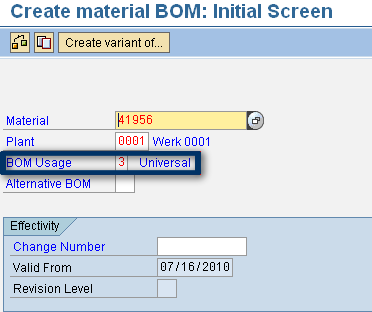
Figure 1
Create the BOM
Configuration
One of the important controlling parameters in the process of standard cost calculation is the costing variant. In the definition of a costing variant, a quantity structure control key is included. The quantity structure control key determines the BOM used for cost calculation based on the BOM usage type.
To valuate the example subcontracting BOM during the costing run, you need to specify an entry for BOM with usage type 3 in the quantity structure control (Figure 2). Use transaction OPJM to get the Selection ID under which you need to add the priority. In the standard system, the Selection ID is 05 for the costing application.

Figure 2
Specify the Selection ID
Next, use transaction OPJI. Under the Selection ID 05, add an entry with usage type 3 with the priority order as shown in Figure 3. The system uses this priority order for selecting a BOM during a costing run. For a subcontracted material, a BOM with usage type 3 is chosen because for this material, a BOM with usage type 6 (costing) or 1 (production) would not exist.
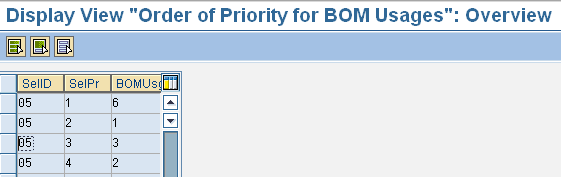
Figure 3
Add an entry with usage type 3
Include the Vendor Charges for Processing
To include vendor charges for processing subcontracted material, you need to complete the following configuration and master data steps.
Configuration
Use transaction OKK4 to modify the valuation variant that is used for standard costing. Under the Subcontracting tab, specify a valuation strategy for the system to find the price of vendor charges (Figure 4). You can specify the vendor charges by using either the purchase info records (PIR), a quotation, or a purchase order.
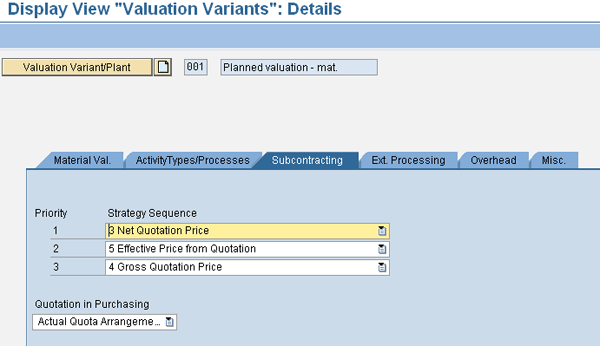
Figure 4
Specify the vendor charges
Master Data
Depending on the valuation strategy specified in the valuation variant, you need to maintain a PIR or a quotation record to specify the price that the vendor charges for the subcontracted material. To maintain a PIR, use transaction ME11 or follow menu path Logistics > Materials Management > Purchasing > Master Data > Info Record > Create (Figure 5). Create the PIR with the Info category radio button Subcontracting selected.

Figure 5
Select the Subcontracting radio button
Include the Cost of Freight, Duties, and Other Purchase Expenses
You can use an overhead costing sheet for adding freight, duties, and other purchasing expenses. Use transaction KZS2 to maintain the costing sheet to specify rules for calculation of freight, duty, and other purchasing costs. These rules need to be in sync with what has been specified in the purchase conditions so that no purchase variances are created.
The overhead costing sheet is specified under the Overhead tab of the valuation variant. Check the Overhead on Subcontracted Materials check box to include the costing sheet in the standard costing process (Figure 6).
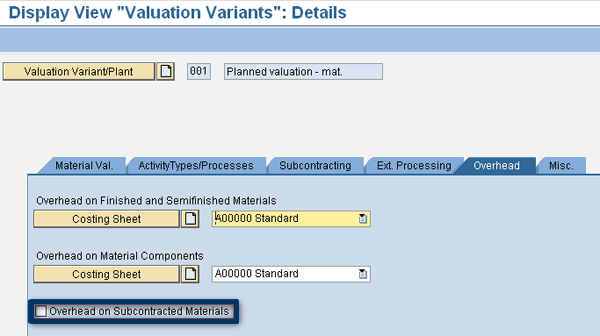
Figure 6
Select the Overhead on Subcontracted Materials check box
Finally, to ensure that the above settings are used in the costing process, you need to maintain the material master record for the subcontracted material. Use transaction MM01 to create the material master record for the subcontracting material, or use transaction MM02 if it already exists. Alternatively, you can follow menu path Logistics > Materials Management > Material Master. Specify the procurement type F and the Special procurement key 30 (subcontracting) in MRP view (Figure 7). You can also specify the Special procurement key in costing view (Figure 8). During the costing process, the system first checks the special procurement key in costing view. If it is not entered in the costing view of the material master record, then the system uses the special procurement key in MRP view.
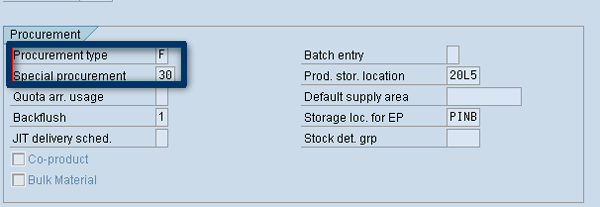
Figure 7
The special procurement type in MRP view

With all the above settings completed, you are ready to run the costing process.
Costing Process
The calculation of the standard cost of a subcontracted material is a specific case of the generic standard cost calculation process. Therefore, once the subcontracting system settings are made, the costing process is the same for the end user. In fact, you could include both the subcontracted materials and the in-house manufactured materials in the same costing run, thereby avoiding any additional efforts from the users.
To run the costing process, use the product costing cockpit transaction CK40N. Since you have specified procurement type F and special procurement type 30 in the material master record for the subcontracted materials, the costing run will access valuation strategies under the subcontracting tab in the valuation variant. The system uses these valuation strategies to access the relevant purchasing data such as PIRs to determine the amount the vendor will charge for providing the subcontracting service.
Further, based on the priority settings for BOM selection under the quantity structure control, the system selects and valuates the subcontracting BOM. The subcontracting BOM consists of the materials supplied to the subcontractor for processing. Therefore, the system adds the cost of these materials to the standard cost of the finished material.
If you have assigned an overhead costing sheet to the valuation variant, the system calculates values for freight, duties, or overheads based on the rules configured in the costing sheet. Otherwise, the condition types calculate charges such as freight, duty, or other purchasing expenses.
Note
I discussed the standard cost calculation for a subcontracted material, but you can use the same concepts and settings to calculate the standard cost of subcontracted services as well.
Sanjay Wagh
Sanjay Wagh has 28 years of professional experience in manufacturing, banking, and consulting in global companies. Sanjay started as a product engineer and corporate finance specialist and seamlessly transitioned to a consultant, assisting other companies in implementing software systems. Sanjay combines his experience in manufacturing and finance with consulting experience to help clients design and implement business processes using best practices in a cost-efficient, risk-free manner with a long-term perspective. Sanjay has 16 years of SAP software implementation experience in the areas of FI and CO along with several end-to-end SAP project life cycles. He has participated in conducting requirements gathering and business blueprinting workshops, realization, testing, end-user training preparation and delivery, and post-implementation support. He is a certified SAP solution consultant.
You may contact the author at wagh65@yahoo.com.
If you have comments about this article or publication, or would like to submit an article idea, please contact the editor.