Learn about FAGL_FCV, the new currency valuation transaction for SAP General Ledger in SAP ERP Central Component (SAP ECC) 6.0 enhancement package 5. Find out why SAP has provided a new option, when it is necessary to use this transaction, and the benefits of using it.
Key Concept
Currency revaluation is the process of adjusting the income statement and balance sheet for fluctuations in exchange rates, which affect assets and liabilities recorded in foreign currencies. It is a key step in the month-end close for most enterprise organizations.
Transaction FAGL_FCV is a replacement for the previous SAP General Ledger valuation transaction, FAGL_FC_VAL. The old transaction, FAGL_FC_VAL, automatically takes the user to the new transaction, FAGL_FCV, if FAGL_FC_VAL has never been run or FAGL_FCV has been run at least once. This can cause confusion to users who are setting up a new SAP instance and are familiar with the older program and suddenly get a different selection screen.
I explain the differences between the old and new transactions, why SAP created a new transaction, what the benefits of the new transaction are, and why you should consider switching to the new transaction.
One of my clients was setting up a new system and was proceeding with testing month-end processes, one of which was valuation. The user ran transaction FAGL_FC_VAL and a new pop-up was displayed (
Figure 1). This caused some confusion to the user as a familiar process had now been disrupted. This user wanted to know what the pop-up meant, what the SAP system had done, and if his process was broken. These are concerns that I answer in this article.

Figure 1
FGAL_FC_VAL warning message when program FAGL_FCV is active
The message notifies users that the SAP system is automatically switching them over to FAGL_FCV when they call FAGL_FC_VAL. SAP has done this to encourage adoption of the new, improved transaction, which clearly identifies the change to the users, rather than the stealth approach of introducing a new transaction that is briefly mentioned in upgrade notes and as a result is not widely adopted by the SAP community.
Transaction Cutover
For implementations of SAP General Ledger in which valuation has not been used before, the cutover pop-up (
Figure 1) appears by default. If valuation has been run previously, with old transaction FAGL_FC_VAL, after the first live run of FAGL_FCV the pop-up appears. Note that both the old and new valuation programs cannot be run at the same time. Once you use new FAGL_FCV you cannot go back to old FAGL_FC_VAL.
If end users are annoyed or confused by the constant warning message they receive with old transaction FAGL_FC_VAL, it can be turned off using transaction code OBA5 (see SAP Note 1892199). If you choose to use transaction code OBA5, you will be cut over to the new transaction (FAGL_FCV) without any notification.
The introduction of transaction FAGL_FCV only applies for valuation. For the translation process continue using transaction FAGL_FC_TRANS (see the “Currency Revaluation Processes” sidebar for an explanation of translation versus valuation).
Users will be familiar with calling FAGL_FC_VAL using SAP Easy Access menu path Accounting > Financial Accounting > General Ledger > Periodic Processing > Closing > Valuate > Foreign Currency Valuation. There is no new menu entry for FAGL_FCV, just the old menu entry that automatically cuts over to FAGL_FCV (
Figure 2).
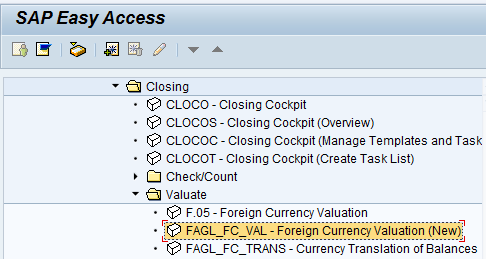
Figure 2
The SAP Easy Access menu for FAGL_FC_VAL
For any analyst implementing new SAP functionality you need to ensure that the new SAP functionality does not negatively affect the end user. You also need to check that the change does not result in a spike in trouble tickets at cutover. Consider the changes that the new transaction FAGL_FCV brings about and educate end users in advance. The changes are not major, and they can be clearly communicated to end users ahead of time.
End-User Impact
Report output is very similar between the old and new transactions. The report output is very similar. The key change is that the duplicate valuation difference columns are named Old Difference and New Difference. Compare the output provided by FAGL_FCV (
Figure 3) and FAGL_FC_VAL (
Figure 4).
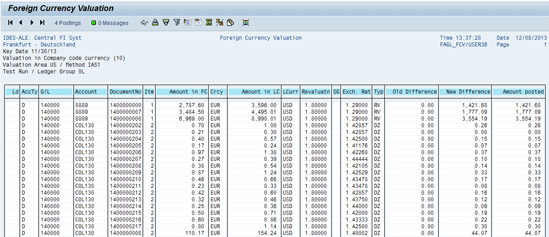
Figure 3
FAGL_FCV report output
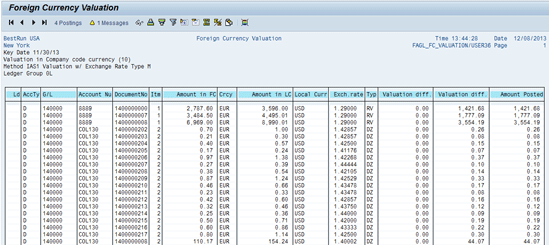
Figure 4
FAGL_FC_VAL report output
Why Should You Use FAGL_FCV?
Most users and analysts come across FAGL_FCV within the environment of an existing SAP system that allows them to continue using FAGL_FC_VAL, provided that they do not perform a live run of FAGL_FCV. So why should they change to the new transaction?
Performance
The strongest argument for switching to FAGL_FCV is its support for parallel processing. Valuation is typically run as the final steps of the month-end close process. At closing time these processes are always at a premium, and anything that can help speed up a close is welcome. For example, parallel processing can reduce the time it takes to complete a valuation job from four hours to one. Usually, no other transactions take place in the period being closed during valuation, so the time saved directly reduces the duration of the close.
Note that the parallel processing makes use of dialog processes, the same processes end users use, even if FAGL_FCV is run as a batch job. One drawback of this is that the online time-out applies to the sessions. You need to determine the optimal number of parallel jobs to run to maximize runtime, but not use up so many dialog processes that other users are slowed down. The default number of parallel processes is four.
Document Splitting
FAGL_FCV takes better consideration of document splitting fields than FAGL_FC_VAL. When you used the older program, you had to add the document splitting fields to special structures using the Data Dictionary (transaction code SE11), which required technical team assistance. With FAGL_FCV the open item document splitting fields defined in view V_FAGL_SPLIT_FIELD (transaction code FAGL_SPLIT_FL2) are taken into consideration for open items being processed (
Figure 5).
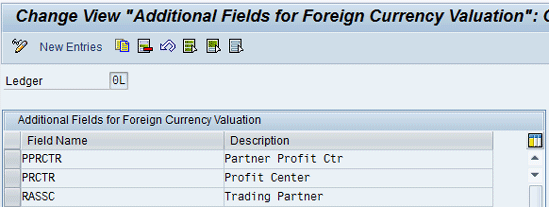
Figure 5
Document splitting configuration for FAGL_FCV
However, these open item document splitting fields are not considered for the G/L posting being created. Additionally, you need to define the document splitting fields in view V_FAGL_FCBAL (transaction code FAGL_FCBAL). The configuration setup for document splitting is much simpler than it was for transaction code FAGL_FC_VAL, and it is clearly documented in the online help for FAGL_FCV at the selection screen.
Bug Fixes
FAGL_FC_VAL has more SAP Notes than the new transaction. Anyone who has worked with it knows the initial setup can be very time-consuming. SAP has sought to address these issues in a comprehensive manner with a redesign of the detailed logic in FAGL_FCV. Note that there are more than 80 SAP Notes for FAGL_FCV, which I recommend you review and implement as necessary. However, this is not a reason to avoid FAGL_FCV. Even with SAP Note application, FAGL_FCV has better functionality than FAGL_FC_VAL.
Currency Revaluation Processes
SAP has two currency revaluation processes that are run at month end: valuation and translation. Users often become confused by the terms valuation and translation. Valuation is the recalculation of a cash equivalent item’s local currency value based on document currency (DC > LC). For valuation you can use transaction code FAGL_FC_VAL or FAGL_FCV.
Translation is the recalculation of group currency balances based on local currency (LC > GC). For translation you use transaction code FAGL_FC_TRANS.
Table A compares valuation and translation. These are used to revalue account balances that are in a foreign currency. Because currencies move in value against each other, the value of certain assets and liabilities varies.
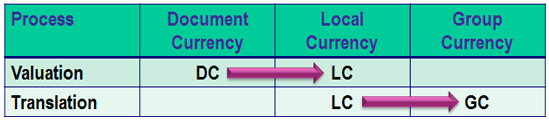
Table A
A comparison of valuation and translation
Table B lists sample transactions subject to valuation and translation. To meet local accounting standards, these foreign currency balances need to be revalued at month end. The method of revaluation is controlled by accounting standards. The most common standards are FAS 52 and IAS 21.
| Transaction type |
Example |
| Unpaid foreign currency vendor invoices |
A German company operating with currency EUR owes a UK vendor a sum in GBP |
| Unpaid foreign currency customer invoices |
A Japanese company operating with currency JPY has invoiced a Chinese company in CNY |
| Foreign currency bank balances |
A US company operating with currency USD has operations in Mexico and has a bank balance in MXP |
Table B Sample transactions subject to valuation or translation
Features of FAGL_FCV
As mentioned above existing valuation transaction code FAGL_FC_VAL has many SAP Notes. SAP has taken the opportunity to address these issues in a more comprehensive manner with transaction code FAGL_FCV. If you have worked on an initial implementation of FAGL_FC_VAL, you know that multiple SAP Notes need to be applied, and certain functionalities, such as delta postings, need a lot of setup.
The selection screen: The first difference you notice with FAGL_FCV is that the selection screen now has five tabs (
Figure 6) as opposed to FAGL_FC_VAL, which has four tabs (
Figure 7). Additionally, the selection criteria within the tabs of FAGL_FCV allow more precise selection of the documents to be valuated. The key differences are detailed in
Table 1.
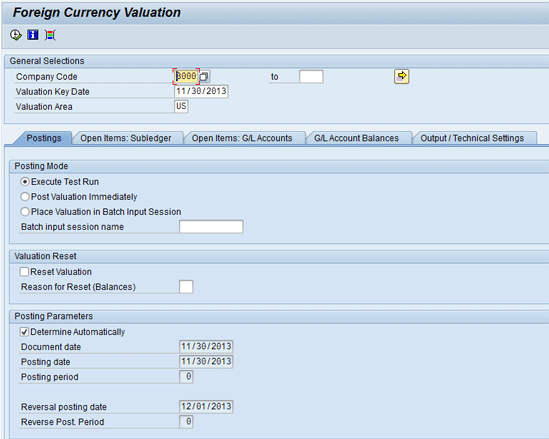
Figure 6
FAGL_FCV selection screen with five tabs
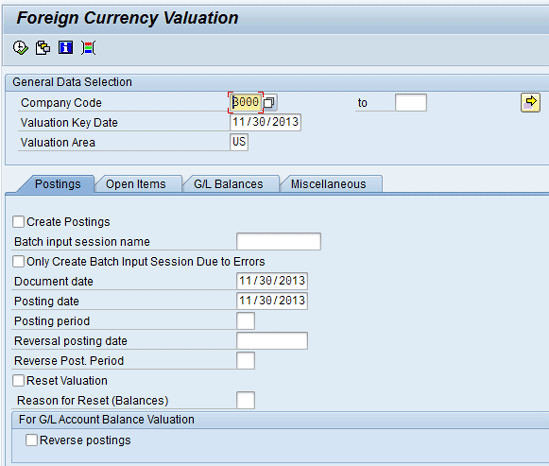
Figure 7
FAGL_FC_VAL selection screen with four tabs
| Tab |
Frame |
Comment |
| Postings |
Posting mode |
New post valuation immediately option; previously had to post via batch sessions |
|
Posting parameters |
New determine automatically option; previously had to set date variables in variant |
| Open Items: Subledger |
Open Items: Subledger |
Breakout of old Open Items tab |
|
Vendor and customer |
Accruals/Deferrals button to allow for dynamic selection of vendor or customer line items |
|
Central selections |
New Fiscal Year option |
| Open Items: G/L Accounts |
Open Items: G/L accounts |
Breakout of old Open Items tab |
|
G/L account selection |
Accruals/Deferrals button to allow for dynamic selection of G/L line items |
|
Central selections |
New Fiscal Year option |
| G/L Account Balances |
G/L account selection |
Accruals/Deferrals button to allow for dynamic selection of G/L line items |
|
Postings |
Reverse Postings checkbox moved from the initial Postings tab to this tab |
| Output /Technical Settings |
Log storage |
New Log Name field allows a custom name for a log file
New Restrict Log List checkbox to narrow down list of logs displayed, for completed runs |
|
Parallel processing |
New fields to allow parallel processing; see Figure 8 |
Table 1 New selection criteria of FAGL_FCV
Automated date selection: The appropriate dates for document date, posting date, and reversal date are determined based on the selected valuation key date. This helps simplify variant setup for batch jobs. By default, automated selection is on, and the document date, posting date, and reversal date fields are grayed out.
Parallel processing: To help speed up the valuation jobs, FAGL_FCV supports parallel processing. Settings to support parallel processing are in the selection screen under the tab named Output / Technical Settings (
Figure 8).
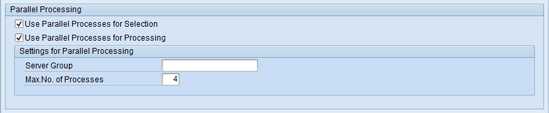
Figure 8
The FAGL_FCV parallel processing option settings
Configuration
Transaction code FAGL_FCV uses the same IMG configuration as FAGL_FC_TRANS, most of which can be found at Financial Accounting (New) > General Ledger Accounting (New) > Periodic Processing > Valuate > Foreign Currency Valuation.
One new configuration item is Define Number Range Intervals for Valuation Run ID. For this setting, you need to configure number range 01. Follow IMG path Financial Accounting (New) > General Ledger Accounting (new) > Periodic Processing > Valuate > Foreign Currency Valuation > Define Number Range Intervals for Valuation Run ID. The number range should be set up as 010000000 to 0199999999 by default as part of the enhancement pack 5 upgrade process (
Figure 9). If this range is not set up by default, manually create the number range as shown in. This new configuration provides a sequential number for a valuation run ID to identify every time a live run is posted. This number is a key ID for finding job logs.

Figure 9
New number range configuration for FAGL_FCV
What Are Your Options?
For any new system or client initiated after installation of SAP ECC 6.0 enhancement pack 5 or higher, SAP forces the use of FAGL_FCV. Old transaction FAGL_FC_VAL displays a pop-up message and then takes the user to FAGL_FCV. SAP Note 1881355 has details of this behavior.
If you are implementing a new system and your finance team is familiar with the behavior of FAGL_FC_VAL and you have never made a live run of FAGL_FCV, then it is possible to trick the system into switching back to using FAGL_FC_VAL. Make a dummy entry in table FAGL_BSBW_HISTR, details of how to do this are outside the scope of this article and requires specialist SAP resources.
I would strongly recommend you look at using transaction FAGL_FCV first and only if there is a major issue try and switch back to using FAGL_FC_VAL (e.g., there are unexpected valuation differences between two separate SAP instances). I would expect this type of difference to only occur rarely, but FAGL_FCV and FAGL_FC_VAL do call two different programs with slightly different logic and may have different levels of SAP Notes applied, which can result in minor differences. Given FAGL_FCV is a newer program expect it will fix errors that FAGL_FC_VAL may have produced.
SAP has made a major improvement to currency valuation functionality with the new transaction FAGL_FCV. I would encourage you to investigate using this transaction for your current system as well as new systems. Document splitting configuration has been simplified considerably compared with older FAGL_FC_VAL. The introduction of parallel processing options is the most powerful argument for using FAGL_FCV over older FAGL_FC_VAL.

Rohana Gunawardena
Rohana Gunawardena heads the SAP practice division at Exium Inc. Exium is a leading business and technology consulting firm that enables companies to achieve their strategic business goals. Exium specializes in delivering superior IT solutions using ERP systems, with a special focus on SAP products. Rohana has been working with SAP since 1992. During his career he has assisted multiple clients on detailed system correction projects, such as correcting inventory balances, controlling area reorganizations, retrospectively activating group currency, and optimizing inter-company accounting transactions. He has spoken at many SAP conferences and has published more than 20 articles in
Financials Expert,
SCM Expert, and SAPtips on various aspects of SAP. His presentations have focused on Financials module selection, the order-to-cash process, global rollouts, business segment reporting, cross-module integration, and the financial impact of SCM transactions. Rohana is widely acknowledged as a leading SAP expert. Rohana is a Fellow of the Institute of Chartered Accountants in England & Wales. Previously Rohana has worked with the consulting practices of Accenture, Deloitte, and PwC.
Rohana will be presenting at the upcoming SAPinsider Financials 2018 conference October 16-18 in Prague. For information on the event, click
here.
You may contact the author at
Rohana@Exium.com .
If you have comments about this article or publication, or would like to submit an article idea, please contact the
editor.



 Premium