SCM
See how you can achieve end-to-end supply chain visibility with the SAP Event Management tool. It provides a framework for track and trace, which can be easily adapted to a wide range of visibility requirements.
Key Concept
SAP Event Management is a means to achieve end-to-end supply chain visibility for an organization. It also makes accurate, timely, and complete information about supply chain events available within and across organizations.
SAP Event Management is the central application in the SAP SCM suite that provides track-and-trace capability for a wide range of business processes. Since launching SAP Event Management 4.0 in 2004, SAP has added multiple tracking capabilities across a range of processes, including procurement, delivery fulfillment, transportation, and production. SAP Event Management is currently on version 9.0, with added functionalities such as enhanced transportation visibility. It provides integration with Geographic Information Systems (GIS) as well as visual business maps.
As part of the framework of track and trace, SAP Event Management now provides a wide range of functions to monitor process milestones (known as expected events), log unexpected events, and trigger alerts, notifications, and any kind of automated follow-up activities. It is also designed to monitor a given business process across applications, systems, and business organizations, both internal and external.
Key Business Processes
SAP Event Management provides end-to-end supply chain visibility using a set of integrated software functionality that supports four key business processes:
- Monitoring
- Notifying
- Controlling
- Measuring
Monitoring
SAP Event Management monitors business process flow using interfaces such as mobile devices, the Internet, or integration with a legacy system.
SAP Event Management also provides Web user interface (UI) capabilities controlled by the authorization or filter concept, which is based on event handler (the equivalent of a business document in an application system) information. For example, third-party logistics partners can be allowed to access data for shipments relevant to their business activities. SAP Event Management acts as a central collaboration platform for visibility and allows event reporting across the extended supply chain. It also enables you to define or plan process milestones.
Other monitoring capabilities of SAP Event Management include the following:
- Monitoring of partners: See how partners are performing so that you can react to performance deviations.
- Monitoring of locations: If an event is expected to happen at location A, but is reported at location B, an exception can be raised.
- Measurements: If you are transporting certain quantities of goods and receive only partial quantities, this deviation can be reported as an exception.
- Track status changes across processes.
Notifying
The notification ability of SAP Event Management is based on the planned or actual status of the business process involved. Notification of events can be done by Short Message Service (SMS), email, fax, or a universal work list. SAP Event Management can generate notifications based on either the actual reporting of events or the event not being reported on time. For example, when a delay is reported by a trucking company, the shipper can notify the customer about a possible delay in delivery.
Controlling
SAP Event Management matches the planned process with the actual process to uncover supply chain exceptions. It allows the sequencing of events and monitoring of expected and unexpected events. It also detects overdue events, allowing the rule set to trigger follow-up activities and alerts.
Measuring
SAP Event Management’s ability to measure supply chain activities provides users with both operational and analytical reporting. Operational reporting capabilities are based on the SAP Event Management Web user interface (UI), as different views (called tracking scenarios) can be built on the same set of data, depending on the audience. For example, an organization monitoring transportation processes can provide different tracking scenarios for internal logistic teams, customers, and third-party logistics providers.
The SAP Event Management Web UI also offers hierarchy or document flow (similar to SAP ERP Central Component [ECC] document flow). This functionality enables supply chain planners to identify all linked entities in the supply chain. It also provides analytical SAP NetWeaver Business Intelligence (BI) integration, which allows organizations to use large amounts of event data to identify trends. For example, a postal company using SAP Event Management might use SAP Event Management and BI to understand optimal routing for registered or unregistered package deliveries.
Figure 1 shows SAP Event Management architecture.
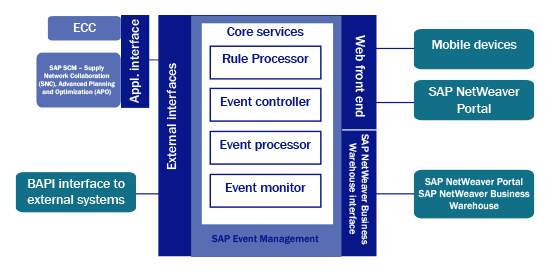
Figure 1
Architecture of SAP Event Management
SAP Event Management architecture includes the following core services of the SAP Event Management module:
How SAP Event Management Works
All transactional processing is conducted in an application system, as usual. It does not have to be an SAP application system in the back end. SAP Event Management can integrate with any application system that needs to track its business documents.
Users create an application document, such as a purchase order in ECC, which is transferred to SAP Event Management using a valid tracking object (such as a purchase order item), generally called an event handler. The business process is represented by an event handler in SAP Event Management, including relevant attributes (IDs, parameters) and status information extracted from the application system.
SAP Event Management can extract milestones and expected measurements from the application system. These milestones and measurements contain information about what is anticipated to execute in the process. SAP Event Management also can build process milestones based on business rules.
The user can perform an action in the application system (for example, create an inbound delivery in ECC), and an event message is sent to SAP Event Management to capture the status of the business document (such as an advanced shipping notification [ASN] Sent/Inbound delivery created for a purchase order item). When the events are registered in SAP Event Management, they are evaluated based on the business rules and produce a status for the object flowing through the process, such as a purchase order line-item status as ASN Sent.
Events also can be reported by internal or external parties (B2B exchange, Web, and mobile) via integration with legacy or carriers. Supply chain partners can also log in to the SAP Event Management Web UI to report events. Attachments (such as a digital signature) can be posted with an event.
If SAP Event Management detects that the event is an exception event (for example, an ASN reported late), it can send an alert or workflow to the responsible people or customers to notify them of the exception. SAP Event Management also can be used to go back into the application system and perform a function there. For example, when a goods receipt document is triggered, an invoicing document can be generated in ECC.
Now I discuss various SAP Event Management Web UI capabilities and various event handler (business tracking document) details.
To launch the SAP Event Management Web UI, follow menu path SAP Menu > SAP Event Management > Web Interface > Search (transaction code /N/SAPTRX/EM_START). In the screen that appears (Figure 2) you can select a tracking scenario from the drop-down menu. The option that you select shows all selection parameters relevant to it. Select the parameters that you want and click the Search button.
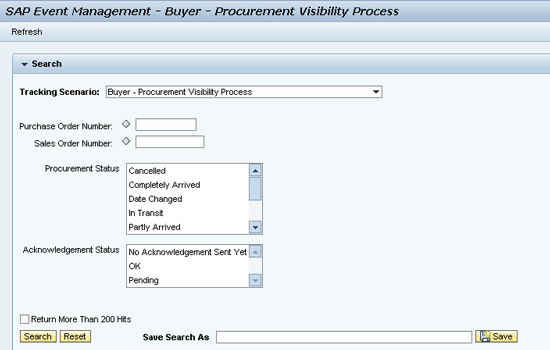
Figure 2
Selection criteria for a tracking scenario in the SAP Event Management Web UI
The next screen (Figure 3) displays search results based on the selected criteria. Search results list all event handlers (e.g., the purchase order line item) satisfying selection criteria.
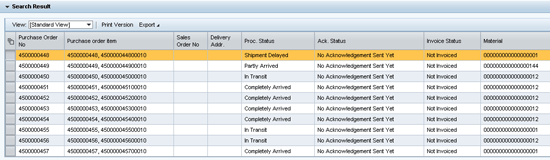
Figure 3
Search results showing event handlers based on selection
After you select a specific line item representing a particular event handler from the search results, the system populates two additional tabs: Details and Event Messages. The Details tab (Figure 4) includes event handler details such as tracking ID (the purchase order item), status (Procurement Status, Acknowledgement Status, and Invoice Status), and parameters (PO Item Qty, Material, Material Text).
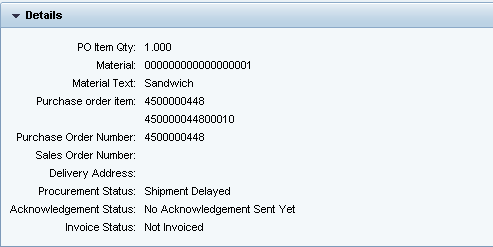
Figure 4
Event handler details
The Event Messages tab (Figure 5) shows event message details such as unexpected and expected events with a traffic-light system indicating event statuses. A red status indicates that an event is overdue and has not been reported yet. A green status indicates an event reported in line with planned dates. An amber status indicates events within planned dates that have not been reported yet.
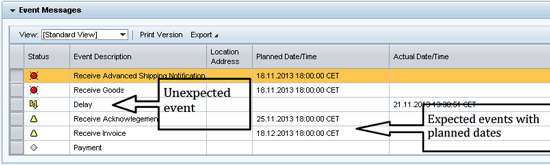
Figure 5
Event message details in the SAP Event Management Web UI
A typical event handler represents a business process and is generally tied to the application object type from the application system. The application object type represents the source application document, for example, a purchase order in ECC or a transportation order in SAP Transportation Management (TM).
Event handlers also consist of additional data critical for operating in SAP Event Management, such as:
- Rules data: Business rules containing follow-up actions to be carried out when an event is reported. For example, email notification is to be sent when an event delay is reported.
- Status profile: Customers can define their own status for business processes, such as transportation status linked to events.
- Expected events: Events or milestones that are planned, with expected dates.
- Tracking IDs: Tracking numbers through which an event handler is identified, such as a house bill of lading for an ocean shipment. They also can represent event handlers against which an event is reported, so an event handler is expected to have multiple tracking IDs.
- Parameters: Additional data typically sourced from the application system — for example, volume/weight/quantity details of a purchase order item. Parameters are classified into three groups: Control parameters, Info parameters, and System parameters. Control parameters specify key characteristics of an event handler. Info parameters specify additional information, typically used for display (information and query) purposes. Info parameters can also be used for rules processing. A system parameters is a type of control parameter from the application system that uses database indexing to enable faster search queries.
Event Types
In SAP Event Management, events are broken down into the following types:
- Regular events, which occur within the planned period
- Early/late events, which occur outside the planned period
- Unexpected events, which are not part of the plan
- Unreported events, which are planned but never occur
Figure 6 illustrates a variety of events tracked in SAP Event Management.
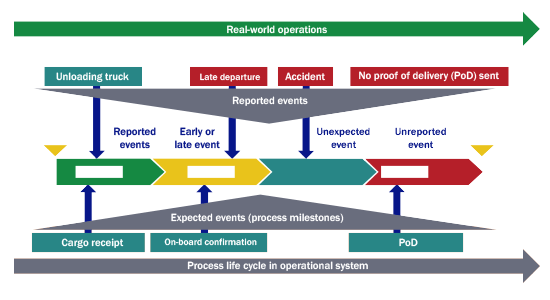
Figure 6
Event tracking within SAP Event Management
Rule Sets
An SAP Event Management rule set consists of several business rules that define how the event messages for a particular event handler are processed and evaluated. A rule set is assigned to an event handler type, and thus to a specific event handler (for example, a business document coming from the application system).
To access SAP Event Management Rule Sets follow menu path SAP Menu >SAP Event Management > Monitoring and Lists > Display Rule Sets (transaction code /N/SAPTRX/TSC0TRD). You can select a rule set to display from a drop-down list. Individual rules within a rule set consist of Condition ID (when the rule is triggered) and Activity ID (the specific action to be carried out when the rule is triggered). For example, if you check activity ID ODT20_FU_SCHEDULED within rule set ODT20_FU (Freight Unit for Transportation Execution Visib. Process) and rule ID SCHEDULED (Figure 7), the first task (IS_EVENT_SCHEDULED) checks whether the event code is SCHEDULED. If this task is successful, the second task (STATUS_SET) sets the status of the event handler to ‘Scheduled’ (Figure 8).
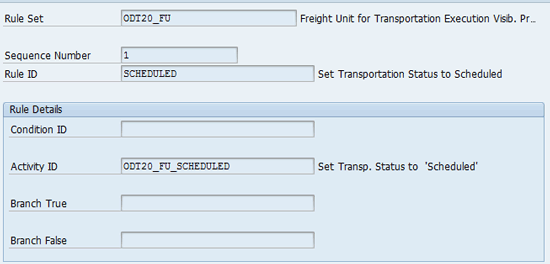
Figure 7
SAP Event Management Rule sets
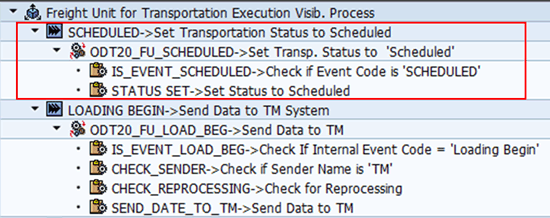
Figure 8
SAP Event Management rule set activities
For companies implementing track-and-trace functionalities, visibility processes are pre-defined scenarios that typically cover part of the SAP standard process — procurement visibility — and deliver all the necessary configuration/development content required to track it.
Using these preconfigured business process templates allows companies to add business content to SAP Event Management without starting from scratch, and to take advantage of the functionalities SAP Event Management offers.
SAP Event Management visibility process content includes interfaces to SAP application systems such as ECC, TM, and Supply Network Collaboration (SNC). It includes standard customizing for rules, status descriptions, and expected events; standard user interfaces for sending event messages and for information queries; and extractors for data transfer from SAP Event Management to SAP BI.
Processes covered by integration with SAP Event Management include the following:
Table 1 shows the processes covered by integration with SAP Event Management.
| Table 1 Processes covered by SAP Event Management integration |
| ECC integration |
Auto-ID integration |
Supply Network Collaboration (SNC) |
Advanced Planning and Optimization (APO) |
Transportation Management (TM) |
| Procurement |
Outbound or inbound delivery |
Responsive replenishment |
Planned shipments |
Freight or booking order processing |
| Fulfillment |
Returnable transport item |
Purchase order processing |
|
Freight unit processing |
| Production malfunction |
Product tracking and authentication (Object Event Repository [OER]) |
|
|
Instructions (Standard Operating Procedure [SOP] processing |
| Outbound or inbound delivery |
|
|
|
|
| Seasonal procurement (retail) |
|
|
|
|
Thus, SAP offers preconfigured integration with SAP Event Management for business objects covered under respective visibility processes (Table 2).
| Table 2 Business objects preconfigured for integration with SAP Event Management under respective visibility processes |
| SAP ERP |
APO |
SAP TM |
SAP SNC |
| Sales order (Sales and Distribution [SD]) |
Planned shipment |
Freight unit |
Purchase order |
| Purchase requisition (Materials Management [MM]) |
|
Freight order |
|
| Purchase order (MM) |
|
Instructions |
|
| Invoice (SD, MM) |
|
|
|
| Clearing Document (FI) |
|
|
|
| Delivery (Logistics Execution) |
|
|
|
| Material document (MM) |
|
|
|
| Shipment including handling unit (LE) |
|
|
|
| Work orders (production, process, service, maintenance) |
|
|
|
| Notification (Plant Maintenance [PM], Quality Management [QM]) |
|
|
|
| Inspection Lot (QM) |
|
|
|
| Equipment (PM) |
|
|
|
Procurement Visibility Process
When a purchase order is saved in ECC, the system checks whether this purchase order has items relevant to SAP Event Management. If it does, then the system creates an event handler.
The due dates and times of expected events are determined by SAP Event Management. For example, the order acknowledgement is expected five working days after the purchase order creation date.
Additional supporting data is also determined and transferred to SAP Event Management from the application system. This data is stored in the event handler as freely defined parameters.
The acknowledgement status is set as the value No Acknowledgement Sent Yet. The procurement status has the value Sent when the event handler is created because it is assumed that the purchase order is sent to the supplier automatically following creation.
Business partners involved in the supply chain now confirm actual events that are based on the expected events according to the purchase order event handler.
When actual events are reported, SAP Event Management uses the tracking ID and the event code to find the corresponding expected event in the event handler (EH). The information about the actual events contained in the message is saved in the event handler. The rule set is triggered at the same time. This, in turn, triggers follow-up activities, as detailed in Table 3.
| Table 3 Reported events in the procurement visibility process |
| Event |
Status |
Activity |
| Reported event |
Status changes in event handler |
Notification |
| Purchase order created |
Procurement status = sent |
|
| Order acknowledgement received without changes |
Acknowledgement status = OK |
|
| Order acknowledgement received with changes |
Acknowledgement status = pending |
Email to buyer |
| Advanced shipping notification (ASN) received |
Procurement status = in transit |
|
Case Study
A solar panel manufacturer worked with various suppliers across the world to source items required to make solar panels. Because solar panels are always assembled and installed at the customer location, it is critical to have all sourced materials available at the customer location before solar assembly begins.
Efforts to share information and ensure the smooth flow of goods through inbound supply chains had fallen short, causing delays to solar project schedules. The inability to provide visibility on supplier commits and shipment status resulted in increased supply chain-related expenses, including rush orders, to meet project schedules.
The manufacturer decided to implement SAP Event Management to provide visibility into key supplier information, such as timely supply of components, commit dates, and lead times. SAP Event Management provided full integration capability with SNC to monitor the procurement process, providing a comprehensive view to all stakeholders in the process. Using SAP Event Management, the manufacturer was able to compare suppliers’ commits against actual on-time deliveries. SAP Event Management Web UI also allowed the manufacturer to collaborate with third parties when suppliers reported that goods were ready for pickup.
The manufacturer’s logistics team now uses SAP Event Management Web UI to plan pickups from suppliers. Suppliers, using the same UI, confirm these dates and give consent on the date of delivery. Third-party shippers, using SAP Event Management Web UI, also look up shipments ready for pickup along with upcoming delivery schedules and addresses of pickup and delivery.
After shipments are picked up, third-party movers post the status of shipments until they reach the customer’s doorstep. All process milestones across the entire shipment leg — domestic as well as international — are monitored using SAP Event Management. Once delivered, SAP Event Management triggers follow-up actions in SAP ECC, such as invoicing/billing and related logistical transactions.
Project managers, finance, or logistic planners monitor these shipments using their own tracking scenarios (views) and also are immediately informed by email alerts of any supply chain exceptions, such as accidents or delays.
Thus, the manufacturer was able to create a more flexible and responsive environment with its supply chain partners. By sharing and proactively acting on information, the manufacturer was able to control project schedules and related costs, thus improving customer satisfaction.
Case Study
A freight forwarder worked with carriers (air, ocean, and truck) around the world to move shipments from the shipper to the consignee’s doorstep. Although the company had an existing legacy visibility system to connect with supply chain partners, it lacked a fully integrated, scalable, and flexible visibility system. Because the underlying technology was managed on an ad-hoc basis it impeded the company’s ability to meet the ever-increasing demands of the rapidly changing freight forwarding industry landscape. The inability to give accurate commits or lead time for delivery at the consignee’s doorstep had affected customer relationships. The company was also unable to manage customer needs, such as requests for individualization, or to optimize its shipments across the carrier base to take advantage of volatile carrier rates.
The company wanted to achieve centralized data management including a 360-degree view on customer and shipment data, integrated information flow with interfaces with carriers around the world, easy integration with third parties, and global visibility of shipment information to improve its ability to address supply chain exceptions.
The company implemented SAP Event Management (linked to SAP Transportation Management [TM]), which tracks customer orders from the shipper’s warehouse to the consignee’s doorstep. Information is provided to customers by SAP Event Management Web UI or alerts in a timely manner. Internal end-to-end visibility is achieved from order acceptance to payment, as milestones across the process are reported either by interfaces with ocean or air carriers or manually in SAP Event Management Web UI. Supply chain exceptions are monitored closely with email notifications to the operations team, and incidents are created in SAP Customer Relationship Management (CRM) for action with customer service. Integration with SAP BI with advanced analytics capability allows the company to monitor third-party delivery performance and to identify potential supply chain bottlenecks.
With SAP Event Management, the company also plans to monitor standard operating procedures within its operations and warehousing process, such as packaging and deconsolidation procedures. The company integrated SAP Event Management with SAP TM/CRM/GTS/ECC and BI systems to capture milestones in the shipment process from transportation activities, supply chain exceptions, customs-related activities, and finance-related events.
Implementation Considerations While Configuring SAP Event Management
Implementation of an SAP Event Management-based visibility solution starts with outlining business process scenarios. Make sure to capture all possible process variations from a tracking perspective and then outline events that can occur during these process milestones.
Next, identify source documents from the application system, which is equivalent to the event handler for SAP Event Management. You also can evaluate relevance conditions for sending these documents to SAP Event Management (that is, you might want to activate tracking for purchase orders belonging to specific purchasing organizations). Then list all tracking IDs for these documents (purchase order numbers).
Then list all the parameters (additional information sourced from an application system) for event handlers. You might want to classify them as Control/Info/System parameters along with the source field from the application system.
After you have lists of all possible events from business scenarios (expected as well as unexpected), make logical groupings of these events. For example, all events related to customer documentation can be assigned to the documentation group. This event grouping can be used while defining status attributes and expected event profiles. It is also important to define event categories such as expected, unexpected, and actual events.
For each of these events, be sure to capture details, such as:
- What are possible ways to report these events? Options include automatically via the application system, via SAP Event Management Web UI, or via external interfaces. Also, list mandatory information to be captured while reporting events.
- In case of external interfaces with SAP Event Management, please make sure to capture source and target data definitions as well.
- How do you arrive at planned dates and location for these events? Are there any business rules involved in the determination of planned dates, such as cut-off dates?
- What’s the follow-up action once these events are reported or not reported on time (thus being overdue)?
Finally, also outline SAP Event Management Web UI requirements with business users. You should include details such as:
- List of tracking scenarios (views of event handler data)
- Selection/Display/Event message screen layout
- Events that can be reported specifically via the Web UI
- Authorization or filter requirements
Then, you can focus on additional details such as:
- Reason codes: Most useful for tracking against unexpected events
- Alert or workflow requirements
- KPI requirements: To be handled via SAP Event Management BI integration
- Archiving/sizing strategy
- SAP Event Management deployment options
Once you are done, these details can be easily released for further development and configuration. Supply chain visibility-related projects also involve efforts from organizations and their partners to adopt new ways of reporting events and new expectations regarding the monitoring of the process. So, make sure to plan for training to ease the adoption of an enhanced visibility process with supply chain partners as well.
Sanket Kulkarni
Sanket Kulkarni is a solution architect at Accenture Services Private Limited. He has about 15 years of SCM consulting experience in SAP implementation, rollout, and support projects. He has been associated with SAP Event Management for the last five years. He also has worked across a diverse range of SAP modules in the SCM suite, such as SAP Transportation Management (SAP TM), materials management (MM), SAP Advanced Planning and Optimization (APO), SAP Supply Network Planning (SNP), SAP Production Planning and Detailed Scheduling (PP/DS), Global Available-to-Promise (GATP), and Supply Network Collaboration (SNC) during his earlier assignments.
He has worked with clients in the discrete, consumer packaged goods (CPG), automotive, oil and gas, and semiconductor industries, as well as with transportation and carrier companies.
If you have comments about this article or publication, or would like to submit an article idea, please contact the editor.